
Professional Meeting Room Camera Solutions in Dubai
Camera for Video Conference Room Dubai
Fourteck supplies and installs professional cameras for video conference rooms in Dubai for companies that need sharp video, clear audio, fast meeting start-up, and dependable support. From compact huddle rooms to large executive boardrooms, we help your team choose the right 4K camera, PTZ camera, all-in-one video bar, touch controller, microphone system, display, and collaboration platform setup.
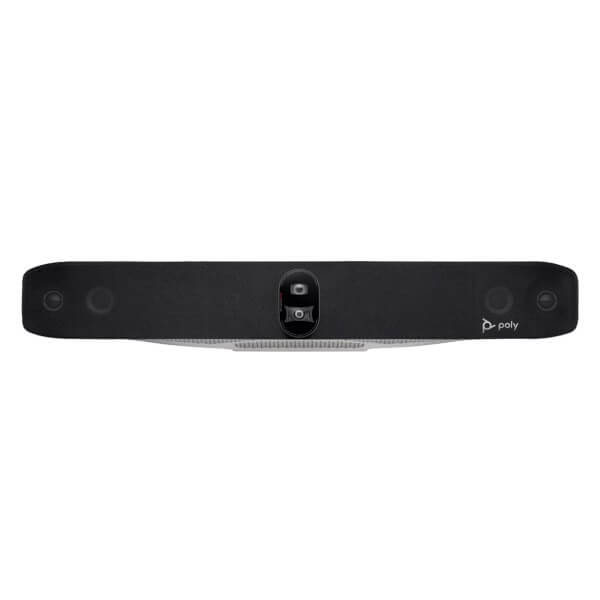
Ideal for Microsoft Teams Rooms, Zoom Rooms, Google Meet spaces, boardrooms, training rooms, hybrid offices, and client meeting areas.
4K Room Video
Choose professional video quality that keeps participants visible during reviews, sales calls, management meetings, and online training sessions.
AI Framing
Modern room cameras frame participants automatically, follow speakers, and reduce manual camera adjustment during active discussions.
Clear Audio
Pair the right camera with microphones, speakers, noise reduction, and room layout planning so every participant can hear and speak clearly.
Dubai Support
Fourteck supports consultation, supply, installation, testing, and after-sales assistance across Dubai and the UAE.
Professional Camera for Video Conference Room Dubai
A modern video conference room needs more than a basic webcam. Dubai businesses now expect meeting rooms that help people speak naturally, share content quickly, and connect with remote teams without technical delays. A professional camera for video conference room Dubai improves visual presence, reduces meeting fatigue, and gives every attendee a clear view of the discussion. Fourteck helps companies select the correct room camera based on room size, seating layout, display placement, acoustic conditions, table shape, platform choice, and IT management requirements.
Many offices search for a conference room camera, video conferencing camera, 4K meeting room camera, AI camera for boardroom, PTZ camera for video meeting, all-in-one video bar, Zoom room camera, Microsoft Teams room camera, and USB conference camera. These phrases describe the same buying need: a reliable room camera that captures people clearly and works smoothly with business communication platforms. Fourteck uses this requirement to recommend solutions that fit practical business use, not just product names.
Companies in Deira, Bur Dubai, Business Bay, Downtown Dubai, Jumeirah, Dubai Marina, JLT, Al Barsha, Dubai Internet City, Dubai Media City, Dubai Silicon Oasis, Dubai Investment Park, JAFZA, Al Quoz, Sheikh Zayed Road, Mirdif, Garhoud, Festival City, and nearby UAE areas can request supply and installation support. Whether your team needs Camera for Video Conference Room Best price, Camera for Video Conference Room Buy now, Camera for Video Conference Room Authorized partner, Ready Stock UAE, Ready Stock Dubai, Ready Stock Deira, Ready Stock Business Bay, or Ready Stock JLT, Fourteck can support a quote-based purchase with professional guidance.
Recommended Room Camera Choices for Dubai Offices
The best camera depends on the meeting room size. A small huddle room usually needs a wide-angle video bar with built-in audio. A medium room often benefits from stronger speaker tracking, microphone expansion, and a larger field of view. A large boardroom may need dual 4K lenses, PTZ movement, zoom capability, external microphones, touch controller integration, and display or codec planning. Fourteck can recommend Poly Studio X70, Poly Studio X72, Poly Studio G62, Logitech Rally Bar, Yealink MeetingBar, AVer CAM550, and other suitable systems based on availability and project scope.
Small Meeting Rooms
Use a compact USB or all-in-one video bar with wide-angle coverage, built-in microphones, and simple plug-and-play connectivity for quick daily meetings.
Medium Conference Rooms
Choose 4K video, auto framing, speaker tracking, strong audio pickup, touch controller options, and platform-friendly deployment.
Large Boardrooms
Select dual-camera systems, PTZ zoom, expanded microphones, professional installation, cable planning, and device management support.
Specification Highlights
| Requirement | Recommended Detail | Business Advantage |
|---|---|---|
| Video Quality | 4K camera or 1080p business video output depending on platform | Clearer faces, better presentation confidence, improved hybrid meeting experience |
| Camera Coverage | Wide-angle lens, PTZ movement, dual-lens framing, or speaker tracking | Captures room participants without constant manual adjustment |
| Audio Pickup | Integrated microphones or expandable microphone pods | Better voice clarity for remote attendees and fewer repeated conversations |
| Connectivity | USB, HDMI, Ethernet, Wi-Fi, controller, and display support as required | Flexible installation for laptops, appliance mode, or dedicated room systems |
| Platform Use | Microsoft Teams, Zoom, Google Meet, Webex, and SIP-based environments | Supports practical business workflows and reduces meeting setup confusion |
Compassion of Product: Video Conference Room Camera Options
The comparison below helps owners, office managers, procurement teams, and IT teams shortlist practical models. Final selection should consider room dimensions, table layout, cable route, display position, platform license, microphone coverage, and support expectations.
| Model | Best Fit | Camera Strength | Audio / Control | Why Dubai Teams Choose It |
|---|---|---|---|---|
| Poly Studio X70 with TC10 | Large conference rooms and executive boardrooms | Dual 4K camera design, intelligent participant framing, strong room coverage | Integrated audio with TC10 touch controller | Professional all-in-one deployment for high-value meeting spaces |
| Poly Studio Range | Small to large room requirements | Smart framing and Poly room collaboration features | Built-in audio and room-friendly operation | Good for companies standardizing on Poly meeting solutions |
| Poly Studio G62 | Modular room system projects | Works with compatible room cameras and AV components | Designed for integrated meeting environments | Suitable when a room needs a more customized AV design |
| Logitech Rally Bar | Medium and large rooms | AI video bar, strong optics, auto framing, popular Teams and Zoom room use | Integrated audio with expansion options | Widely used in corporate collaboration rooms |
| Yealink MeetingBar A30 | Medium meeting rooms | Dual-eye camera system with wide view and hybrid zoom | Built-in collaboration bar audio and control options | Good choice for smart meeting rooms that need simple operation |
| AVer CAM550 | Medium to large rooms needing PTZ camera control | Dual 4K lenses, 12x optical zoom, panoramic AI lens | Works with compatible room audio and conferencing systems | Strong option for rooms requiring optical zoom and tracking |
Buying Guidance for Owners and IT Teams
Business owners want a meeting room that looks professional, starts quickly, and helps clients feel confident during remote discussions. IT teams want a reliable device that matches the network, platform, display, cable route, security policy, and support plan. A camera for video conference room Dubai should satisfy both priorities. Fourteck reviews room size, seating distance, microphone pickup area, network availability, platform preference, display type, mounting surface, cable concealment, and daily meeting usage before recommending a solution.
For procurement teams, the right camera reduces support calls and avoids repeat purchases. A low-cost webcam may work for one person, but it often fails in a room with eight, twelve, or twenty participants. Professional systems use better optics, wider room coverage, automatic framing, improved audio processing, and stable connectivity. This matters for board meetings, online interviews, vendor calls, government discussions, legal reviews, remote training, finance approvals, medical consultations, and international sales presentations.
For IT teams, deployment should remain manageable. Many modern video bars support device management tools, firmware updates, meeting platform integration, and simplified room control. A properly planned system lets employees start meetings without calling IT each time. That saves time and increases adoption across departments.
Installation and Compatibility
A successful room camera installation needs correct placement. The camera should sit near the display at a natural eye line, not too high and not too low. The microphone should cover the real speaking area, not only the closest seats. The display should allow remote attendees and shared content to remain visible. Power, network, HDMI, USB, and controller cables should follow a clean route that keeps the room safe and professional.
Fourteck can support camera wall mounting, display-side placement, tabletop setup, controller placement, cable dressing, platform sign-in coordination, test calls, and user guidance. Compatibility planning may include Microsoft Teams Rooms, Zoom Rooms, Google Meet, Cisco Webex, laptop-based USB calls, appliance-mode video bars, HDMI content sharing, dual display layouts, and network access. When the room requires more than one component, Fourteck can combine the camera with microphones, speakers, controllers, displays, mini PCs, codecs, network points, UPS backup, and AV accessories.
Dubai, GCC, and Africa Availability Focus
Companies in the GCC often need meeting room cameras for Dubai, Abu Dhabi, Sharjah, Ajman, Ras Al Khaimah, Fujairah, Umm Al Quwain, Saudi Arabia, Qatar, Kuwait, Bahrain, Oman, and wider regional offices. Many buyers compare stock availability, warranty terms, installation support, platform compatibility, and fast quotation before selecting a video conferencing camera. Fourteck supports UAE buying requirements and can guide customers who need Camera for Video Conference Room Best price, Camera for Video Conference Room Buy now, Camera for Video Conference Room Authorized partner, Ready Stock UAE, Ready Stock Dubai, Ready Stock Abu Dhabi, Ready Stock Sharjah, Ready Stock Kuwait, and GCC-ready meeting room solutions.
Africa-focused organizations often need dependable video meeting systems for Kenya, Uganda, Tanzania, Rwanda, Ethiopia, Nigeria, Ghana, South Africa, and regional branches that connect with Dubai headquarters. A stable camera and audio setup helps regional teams attend leadership meetings, remote training, HR interviews, compliance reviews, sales calls, and project discussions. Fourteck’s regional presence helps customers evaluate the right solution for local office layouts, hybrid work plans, and practical support needs.
Useful Fourteck Locations
Practical Use of a Video Conference Room Camera
A camera for video conference room Dubai supports daily management meetings, customer demos, project reviews, online training, remote interviews, supplier negotiations, legal consultations, finance reviews, healthcare discussions, education sessions, and cross-border collaboration. The correct setup gives remote attendees a natural view of the room and helps in-room attendees focus on the conversation instead of cables, laptop settings, and camera controls.
The biggest benefit comes from consistency. When employees trust the room system, they use it more often. When the camera frames people correctly, remote colleagues feel included. When audio remains clear, decisions move faster. When IT can manage the system, support becomes easier. A professional video conferencing camera therefore improves productivity, communication quality, and business image at the same time.
Safe Data Handling and Meeting Continuity
Meeting room systems should support company policies for data protection, user access, firmware updates, and meeting account control. Fourteck recommends that businesses keep admin credentials secured, assign room accounts properly, document device settings, and maintain a record of firmware versions. For important rooms, companies should also consider power protection, network stability, spare cables, and a documented recovery process. This helps the room stay available for management calls, client presentations, and urgent discussions.
Platform, Software, and Room Account Readiness
Before installation, the business should confirm the meeting platform, room account, license model, and administrator access. Microsoft Teams Rooms, Zoom Rooms, Google Meet, and Webex environments may need specific accounts, device approvals, network permissions, or controller configuration. Fourteck can guide customers on the hardware side and coordinate with the customer’s IT team so the camera, controller, display, network, and room calendar work as expected.
Procurement Guidance for Dubai Companies
A good purchase request should include room size, expected participant count, table layout, display size, preferred platform, installation location, cable distance, and required support level. This information helps Fourteck recommend the correct video conference room camera and avoid under-sizing the solution. For urgent requirements, mention Ready Stock Dubai, Ready Stock UAE, target installation date, and delivery location so the quote process can move faster.
Room Readiness and Installation Scope
Fourteck can help with meeting room assessment, device selection, quotation, supply, delivery, mounting, cable routing, connection to display, controller placement, platform testing, audio test, video framing test, and basic handover guidance. Larger rooms may need an on-site review before finalizing equipment because camera distance, ceiling height, table length, lighting, glass walls, and acoustic reflection can affect the meeting experience.
Support, Maintenance, and Long-Term Value
A meeting room camera should remain reliable after installation. Fourteck can discuss ongoing support for troubleshooting, firmware guidance, configuration review, device replacement planning, and annual maintenance requirements. Businesses that depend on daily video meetings benefit from a support arrangement because it reduces downtime and keeps important rooms ready for leadership meetings, customer calls, and regional coordination.
Office Placement Guide
Place the camera close to the main display so remote attendees feel that people in the room look toward them. Avoid placing the camera at the far side of the room or below the table line. Keep strong sunlight, reflective glass, and bright backlighting under control. For boardrooms, place microphones where people actually speak, not only near the display. For training rooms, consider whether the camera should capture the presenter, the audience, or both. These details improve the final meeting experience more than a simple product upgrade alone.
Get the Right Camera for Your Dubai Conference Room
Share your room size, platform, location, and expected participant count. Fourteck will help you choose a suitable video conferencing camera, video bar, controller, microphone, and installation plan.
Camera for Video Conference Room Dubai FAQ
What is the best camera for a video conference room in Dubai?
The best camera depends on the room size, meeting platform, seating layout, and audio requirements. Poly Studio X70, Logitech Rally Bar, Yealink MeetingBar A30, and AVer CAM550 suit different room types. Fourteck can recommend the correct model after reviewing your room.
Do I need a 4K conference room camera?
A 4K camera gives better image detail and stronger digital framing flexibility. Even when the meeting platform outputs a lower resolution, a high-quality sensor can improve framing, sharpness, and room coverage.
Can Fourteck install the camera in our Dubai office?
Yes. Fourteck can support supply, installation, mounting, connection, testing, and guidance for Dubai meeting rooms, depending on the product and project scope.
Which is better: PTZ camera or all-in-one video bar?
A PTZ camera works well for larger or more controlled rooms where zoom and camera movement matter. An all-in-one video bar works well when the company wants camera, microphones, speakers, and smart framing in one device.
Does a video conference room camera work with Microsoft Teams and Zoom?
Many professional video conference cameras and video bars support Microsoft Teams and Zoom. The final setup depends on the model, room account, license, controller, and deployment method.
Can I use the camera with a laptop?
Many USB conference cameras and video bars support laptop-based meetings. Some systems also support appliance mode without a dedicated laptop. Fourteck can guide the best option for your room.
What details should I send for a quotation?
Send room size, number of seats, platform preference, display size, office location, installation date, and any existing equipment. This helps Fourteck quote the right camera and accessories.
Where can I buy Camera for Video Conference Room Dubai?
You can contact Fourteck for Camera for Video Conference Room Best price, Camera for Video Conference Room Buy now, Camera for Video Conference Room Authorized partner guidance, Ready Stock UAE, and Ready Stock Dubai availability.
Get Price & Availability