
Grandstream GDS Access Control in Dubai, UAE
Grandstream GDS is a family of network-connected facility access systems that combines door entry control with audio or video intercom functions for managed entrances.
It suits organizations that want the door, reception desk, SIP communication platform and security workflow to operate as one planned system. Model capabilities vary, so the correct choice depends on whether the project needs audio-only communication, video verification, RFID or mobile credentials, surveillance integration, multiple relay interfaces, Wi-Fi, stronger vandal resistance or newer cloud-assisted access workflows.
Door & Network Planning
UAE Quote Assistance
A Door Access Platform That Connects Facilities, Voice and Security
The GDS family is designed for controlled entrances where a business needs more than a simple bell or standalone card reader. It places network communication, access credentials and door-control functions at the entrance so a visitor or employee can be handled through a defined workflow.
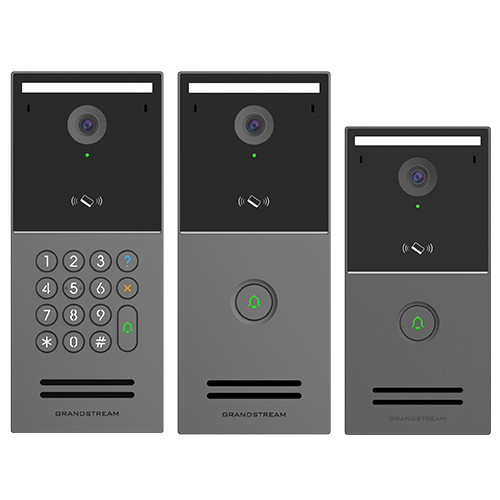
The family spans different generations and use cases. The GDS3705 is an audio-focused IP door system with RFID and SIP calling. The GDS3710 adds high-definition video, a hemispheric camera, RFID, motion detection, PoE and ONVIF Profile S interoperability. The GDS3712 provides HD video intercom functionality with door and alarm interfaces. Grandstream’s newer GDS3720 Series moves the concept further with the GDS3725, GDS3726 and GDS3727 smart IP video door stations, adding a 4MP camera sensor, wide dynamic range, AI-assisted image processing, multiple credential methods, Bluetooth Low Energy, SecureAccess mobile management and model-specific options such as dual-band Wi-Fi 6 on the GDS3727.
For a UAE buyer, the important question is not simply whether the series supports access control. It is which model fits the entrance. A reception door may need video calling to an IP phone. A staff door may place more importance on credentials and auditability. A warehouse gate may need a durable unit, appropriate relay wiring and video visibility. A residential or mixed-use property may benefit from temporary credentials and mobile access workflows on a newer GDS3720 model. A site that already uses SIP phones or Grandstream communication endpoints can also consider how the door station will participate in the existing call path.
FourTeck can help turn those operational questions into a model shortlist. Buyers can share the number of entrances, door-lock type, preferred credential method, need for camera recording, existing PBX or SIP environment, PoE availability, mobile-access expectations and delivery location. That information is more useful than choosing only from a model list because access projects depend on both IT infrastructure and physical door hardware.
Key Business Benefits of the Grandstream GDS Family
A well-selected GDS model can reduce the gap between front-door communication and the systems already used by reception, security and IT teams. The value comes from how the access endpoint fits the operating process, not from adding features that the site does not need.
Bring Entry Decisions Into a Managed Workflow
Instead of treating the door as an isolated device, GDS systems can connect entry requests with SIP communication, credential handling, relay control and event management. That helps reception or security teams establish who can enter, how visitors are verified and where calls should be answered. The exact workflow depends on the model and deployment design.
Select Audio or Video Around the Real Need
An audio-only entrance does not need the same hardware as a visitor-verification point. The family lets buyers choose between established audio solutions and video door systems, including newer smart video models. This makes it easier to avoid paying for capability that does not improve the access process.
Use IP Infrastructure for Communication and Management
PoE-capable models can receive network and power through Ethernet, reducing separate power runs where the site is designed accordingly. SIP support can also route door communication to compatible phones or platforms. Proper VLAN, switch, cabling and security planning remains important.
Match Entry Methods to Users and Visitors
Older GDS models cover established RFID or PIN-style access needs, while GDS3720 models add options such as NFC, Bluetooth, QR code, SecureAccess app and SIP-call based opening methods. The best mix depends on who enters the site, how often credentials change and how temporary visitors are handled.
Add Visual Context Where the Door Requires It
Video-capable models help teams see who is at the entrance before releasing a door. The GDS3710 supports video up to 1080p with a 180-degree hemispheric view, while the current GDS3720 Series uses a 4MP camera sensor with a 127-degree view and wide dynamic range. Camera selection should follow the doorway geometry, lighting and recording requirement.
Plan for Multiple Doors and Sites
Management tools can support organized credential and device administration rather than maintaining each entrance informally. Buyers with several branches should confirm management method, network reachability, credential policy and whether the selected generation fits their multi-site operating model.
What Defines the GDS Access Control Range
The family is built around the idea that a door station should work as a network endpoint, not only as a mechanical access accessory. That is why the product range combines SIP communication, door-control interfaces, credential handling and management software in different combinations. The newer smart video range adds broader credential options and stronger software-assisted workflows, while established models remain relevant where simpler audio or video requirements are preferred.
The GDS3710 remains a useful reference point for buyers who need 1080p video, RFID entry, SIP video streaming, a 180-degree hemispheric view, PoE and ONVIF Profile S compatibility. The GDS3705 is oriented toward audio access with RFID and SIP calling. The GDS3725, GDS3726 and GDS3727 form the current smart video family and introduce a 4MP camera sensor, WDR, AI-assisted image processing, Bluetooth 5.0, multiple door-opening methods and management through SecureAccess and GDS Manager. The GDS3727 differs by adding dual-band Wi-Fi 6 and uses a lighter enclosure with IK07 impact protection, while GDS3725 and GDS3726 use metal construction and IK10 protection.
These differences matter in procurement. A keypad requirement points the buyer toward a model that physically provides it. A project that needs Wi-Fi as a connectivity option should examine the GDS3727 specifically. A more exposed location may put greater emphasis on enclosure and vandal-resistance ratings. A site that depends on legacy Wiegand wiring or multiple relay paths should verify the exact I/O profile before ordering. FourTeck can review these details against the selected door hardware and network design.
Grandstream GDS Series Technical Specifications
The GDS range contains several models and generations, so specifications are not identical across the family. The table below separates established GDS capabilities from the current GDS3720 smart video family and highlights the fields that most often affect purchasing decisions.
| Specification | Confirmed GDS Family Details | Buyer Note |
|---|---|---|
| Brand / Series | Grandstream GDS Facility Access Systems | Choose exact model before final quotation. |
| Current smart video models | GDS3725, GDS3726, GDS3727 | All support smart IP video door-station use; physical controls and interfaces vary. |
| Established family models | GDS3710, GDS3712, GDS3705, GDS3702 | Availability may vary by model and lifecycle status. |
| Video | GDS3710/3712: up to 1080p. GDS3720 Series: 4MP camera sensor with video up to 1920×1080 at up to 30 fps. | Audio-only models do not provide a camera. |
| Field of view | GDS3710/3712 use hemispheric 180-degree coverage. GDS3720 Series lists 127° horizontal field of view. | Match lens geometry to door position and visitor standing area. |
| Image handling | GDS3720 Series: WDR up to 120 dB, AI ISP and AI-based motion / behavior analysis. | Useful where lighting or proactive event detection is important. |
| Audio | Intercom audio is supported across the series. GDS3720 Series uses two microphones and a 3W speaker with AI noise reduction. | Acoustic conditions at gates and entrances should be assessed. |
| Door opening methods | Model dependent. GDS3720 Series supports methods including PIN, RFID/IC/ID, NFC, Bluetooth, SecureAccess app, QR code and SIP call. | Confirm which credentials are needed for staff, visitors and contractors. |
| RFID capacity | GDS3720 Series: up to 5,000 RFID entries supported in the vendor datasheet. | Older models use different credential types and capacity limits. |
| Network | GDS3720 Series: 10/100 Mbps RJ45 with integrated PoE. GDS3710 and GDS3705 also support integrated PoE. | Verify PoE budget, switch port and network policy. |
| Wireless | GDS3720 Series: Bluetooth LE 5.0 on all three models; dual-band Wi-Fi 6 on GDS3727 only. | Do not assume Wi-Fi is present on GDS3725 or GDS3726. |
| Door / alarm interfaces | Configuration dependent. GDS3725/3726 provide two SSR relay controls, three alarm inputs and two alarm outputs; GDS3727 provides one relay, two alarm inputs and one alarm output. | Door hardware and required sensors must be mapped before purchase. |
| Expansion interfaces | GDS3725/3726: RS485, Wiegand 26/34 input/output and SD card slot. GDS3727: RS485 and SD card slot. | Legacy access integration may depend on these interfaces. |
| Local storage | GDS3720 Series: SD card support up to 256GB. | Recording design may also involve NVR or network storage. |
| Interoperability | SIP is a core communication method; GDS3710 and GDS3720 Series document ONVIF Profile S interoperability. | Confirm the exact PBX, NVR or VMS integration requirement. |
| Environmental protection | GDS3725/3726: IP66 and IK10. GDS3727: IP66 and IK07. Other GDS models have their own protection ratings. | Mounting, sun exposure, rain path and cable sealing still matter. |
| Operating temperature | GDS3720 Series datasheet: -30°C to 60°C. | Validate the complete installation environment, including power and connected door hardware. |
Buyers should read this table as a family-selection guide rather than as a promise that every feature exists on every GDS model. The highest-risk mistakes usually come from assuming that all units have the same keypad, relay count, credential support, Wi-Fi capability or management path. A project that needs Wiegand integration, for example, should verify the exact selected model. A project that needs mobile visitor credentials should focus on the GDS3720 generation and its SecureAccess workflow. A project that only needs audio calling and RFID may be better served by an audio-focused GDS model if currently available. FourTeck can review the bill of materials before quotation so the door station, PoE, lock interface, mounting accessories and receiving endpoints are considered together.
How to Choose the Right GDS Model
The correct model is determined by the entrance workflow. Start with the door and the people who use it, then work outward to network, communication and management requirements. This avoids selecting a feature-rich unit that cannot connect cleanly to the existing lock or choosing a simple model that later cannot support the desired visitor process.
What must happen at the door?
Decide whether the entrance needs staff credentialing, visitor calls, video verification, remote release, temporary passes, event recording or a combination. This single question normally determines whether an audio model, established video model or GDS3720 smart video model is the better starting point.
Which door hardware is already installed?
Identify electric lock type, exit button, door sensor, relay requirement, fail-safe or fail-secure design and any Wiegand reader/controller. A network door station cannot be selected correctly without understanding the electrical and access-control side of the opening.
Where should calls and video go?
Confirm whether the door should call reception, security, a video phone, a SIP extension, mobile users or several destinations. If recording is needed, identify the NVR, VMS or storage platform and confirm supported integration rather than assuming every stream will work identically.
Can the network support the entrance?
Check Ethernet reach, PoE availability, switch capacity, VLAN design, IP addressing, firewall policy and remote-management requirements. The GDS3727 offers Wi-Fi 6, but wired Ethernet remains an important planning option for fixed door infrastructure when practical.
How many users, doors and sites are involved?
A one-door office and a multi-building project have different administration needs. Define credential counts, temporary visitor volume, reporting expectations and whether centralized management is required. The GDS3720 Series supports up to 5,000 RFID entries, but the wider workflow matters as much as raw capacity.
What should be sent with a quote request?
Share preferred model if known, number of doors, quantity, credential type, lock hardware, SIP/PBX details, recording requirement, PoE status, mounting environment, delivery location and target date. FourTeck can use this information to identify missing accessories or a better-matched model before the order is finalized.
Ideal Business Use Cases
GDS systems are most useful where the entrance is part of a repeatable business process. The strongest deployments define who approaches the door, how identity is checked, who receives the call, how the door is released and what event information should be retained.
Office Reception and Controlled Visitor Entry
A reception entrance often needs both communication and a controlled release action. Video-capable GDS models let reception staff see a visitor, speak through SIP-based intercom communication and trigger a planned door-release process. Staff credentials can provide a separate entry path from visitors. The model choice should depend on whether the business wants established RFID workflows or newer options such as QR codes, mobile app control, NFC and Bluetooth.
Warehouses and Service Entrances
Loading and staff doors may be physically exposed and may need communication with an operations desk rather than a formal reception. Environmental protection, vandal resistance, clear audio, relay wiring and network reach become key. Video can help identify drivers, vendors or service personnel before entry.
Schools, Clinics and Managed Public Entrances
Sites with frequent visitors benefit from a clear procedure before a door is released. A GDS video station can provide visual confirmation and intercom conversation at the entry point. The project should also define accessibility, reception staffing, after-hours handling and how door events are managed.
Residential Towers and Community Entrances
The GDS3720 Series can suit buildings where residents, staff and temporary visitors need different entry methods. SecureAccess can support remote user and visitor administration, temporary credentials and mobile interaction. The final design should confirm resident count, door count, call destinations and property-management procedures.
Server Rooms and Restricted Internal Doors
Internal controlled rooms may not require the same camera or weather protection as a front entrance, but credential control, auditability and door-sensor logic can be important. Buyers should decide whether a GDS door station is the right endpoint or whether a simpler access-control component would be more appropriate for the internal use case.
Multi-Site Businesses
Standardizing a GDS generation across branches can simplify training and management, but only when the doors, networks and credential policies are sufficiently similar. Multi-site buyers should document a repeatable installation standard, approved accessories, management method, firmware policy and escalation process before purchasing at scale.
Grandstream GDS Access Control — SIP Intercom and Door Workflow
SIP support is one of the features that makes the GDS family relevant to IT-led access projects. Instead of installing a door intercom that operates outside the organization’s communication environment, a GDS door station can participate in SIP calling so a visitor request can reach compatible IP phones, video stations or other supported endpoints.
For a business, this means the access conversation can be designed around staff roles. A front entrance may call a reception extension during working hours and a security endpoint after hours. A warehouse entrance may call a dispatch desk. A school gate may need a controlled answer point. These workflows require PBX, extension, network and failover planning; the door station does not replace the need for a properly designed calling path.
Video-capable models extend the process by allowing visual confirmation before the relay is activated. When recording is also required, buyers should identify the NVR or VMS platform and verify ONVIF or stream compatibility on the exact model. The GDS3710 documents ONVIF Profile S compliance, and the GDS3720 Series datasheet also lists ONVIF Profile S interoperability.
Grandstream GDS Access Control — Smart Credentials and GDS3720 Management
The GDS3720 generation changes the buying conversation because access is no longer limited to a single credential method. Grandstream documents PIN codes, RFID cards and stickers, NFC, Bluetooth, SecureAccess app, QR codes and SIP-call based opening methods across the family, with physical controls and interfaces varying by model. This lets a business create different access paths for employees, residents, contractors and temporary visitors.
SecureAccess adds a cloud-based management layer for supported GDS3725, GDS3726 and GDS3727 deployments. Administrators can manage users and residents, visitors, door stations, alarms and logs, while mobile users can interact with door functions according to assigned permissions. This is especially useful when temporary access has to be created and withdrawn without distributing a permanent physical card.
Grandstream GDS Access Control — Outdoor Installation, Video and Integration
Door systems sit at one of the most demanding points in a building: the boundary between public and controlled space. The selected GDS model therefore needs to be evaluated not only for features but also for enclosure protection, camera view, lighting, cable route and physical mounting. The newer GDS3725 and GDS3726 carry IP66 weather protection and IK10 vandal resistance, while the GDS3727 is IP66 and IK07. The GDS3710 also uses a weatherproof, vandal-resistant metal enclosure.
Camera geometry is equally important. A 180-degree hemispheric view on the GDS3710 is different from the 127-degree horizontal view of the GDS3720 Series. Neither is automatically better for every door. The installer must consider how close visitors stand, whether the doorway is recessed, whether strong backlight exists and whether a person approaching from the side must remain visible.
Installation decision checklist
- Check wall type and whether surface or in-wall mounting is preferred.
- Confirm cable route, PoE source and network port availability.
- Map the relay to the electric lock and confirm fail-safe or fail-secure behavior.
- Position the camera around visitor height, doorway geometry and expected lighting.
- Confirm rain, direct sun, dust and impact exposure at the mounting point.
- List every input and output required, including exit button, door sensor and alarm connection.
- Verify NVR, VMS, SIP and management compatibility before installation day.
What Buyers Should Check Before Purchase
The biggest purchase risk is choosing a GDS model before documenting the door, credential and network requirements. A model can look suitable on a feature list yet still require different relays, reader interfaces, mounting accessories or management methods than the site expects.
Configuration Fit
Confirm whether the requirement is audio-only, video intercom, smart visitor access or a mixed workflow. Then confirm keypad, RFID type, mobile access, relay count, alarm inputs, Wi-Fi need and camera coverage. The GDS3725, GDS3726 and GDS3727 are closely related but not identical, and established GDS models serve different purposes.
Compatibility Check
Check the electric lock, power design, PoE switch, SIP server, IP phones, NVR or VMS, Wiegand components, network segmentation and mounting environment. Compatibility should be confirmed against exact models and firmware rather than assumed from the fact that all devices use IP networking.
Availability and Warranty
Ask which exact GDS model and accessories can be supplied, expected lead time, warranty route and whether replacement options exist if an older model is not currently available. Availability can differ between established GDS models and the newer GDS3720 Series, and final warranty handling can depend on supply source and order terms.
Quote Preparation
Provide door count, preferred GDS model, quantity, site type, credential method, lock details, receiver endpoints, recording requirement, network/PoE status, installation scope, delivery city and target date. For project orders, add drawings or a door schedule when available so the quotation can cover accessories and model differences more accurately.
Buyers comparing similar GDS models should focus on the feature that changes the workflow. Choose the GDS3725 when the physical keypad and current smart-video feature set align with the project. Consider the GDS3726 when a simpler doorbell-style front panel is preferred but the metal enclosure and current smart-video platform remain important. Consider the GDS3727 when integrated Wi-Fi 6 is specifically required and its interface/protection profile suits the location. Established GDS3710, GDS3712 or GDS3705 projects may still make sense where their specific video, intercom or audio functions match the requirement and supply is confirmed.
UAE Availability, Selection and Service Guidance
FourTeck supports Grandstream facility-access inquiries across Dubai and the wider UAE with model selection, quotation assistance, delivery coordination and warranty guidance. Availability is not assumed from the model name because GDS products span multiple generations and supplier conditions can change. The exact model, quantity and accessories should be confirmed at the time of request.
Dubai, Abu Dhabi, Sharjah and Ajman Coverage
Businesses in Dubai, Abu Dhabi, Sharjah and Ajman can contact FourTeck for GDS model guidance, quote preparation and delivery coordination. The buying requirement often changes by site type rather than by city. A Dubai office fit-out may need a reception video door station tied to a SIP phone; an Abu Dhabi branch may need the same access policy as its head office; a Sharjah warehouse may emphasize outdoor durability and operations-desk calling; an Ajman residential or commercial property may prioritize simpler visitor handling.
For each location, the useful information is the same: number of doors, lock hardware, network readiness, expected users, preferred credentials, call destination and installation environment. Supplying these details helps FourTeck recommend a model and accessory set without creating separate product assumptions for each emirate. Delivery timing, model availability and support scope should be confirmed for the actual order.
GCC and Africa Project Inquiries
FourTeck also receives business technology inquiries connected with selected GCC and Africa markets. Organizations in Saudi Arabia, Qatar, Oman, Kuwait and Bahrain may be planning office, hospitality, education, logistics or residential access projects that use SIP communication and network-based door control. In Kenya, Uganda and other African markets, similar requirements can arise when businesses move from basic analog entry systems to IP-based intercom and access workflows.
Regional supply should be treated as project-specific. Product availability, shipping method, warranty handling, compliance expectations and installation support can differ by country. Buyers should therefore provide the destination country, quantity, exact model or desired feature set and required delivery date before relying on a particular configuration. Regional inquiry channels include FourTeck Kenya, FourTeck Uganda, FourTeck Africa and FourTeck Kuwait.
Other Grandstream Products to Consider Around an Access Project
A door station rarely works alone. The surrounding solution may include a receiving video endpoint, SIP call control, network switching, recording and project-specific mounting hardware. These FourTeck pages help buyers compare exact GDS models or build the communication side of the access workflow.
Grandstream GDS3710 Video Door System
Useful when the requirement specifically calls for the established 1080p hemispheric video door model with RFID, SIP video, PoE and ONVIF Profile S support.
Grandstream GDS3712 IP Video Intercom
Consider this model when an HD hemispheric intercom with SIP streaming, PoE and door/alarm interfaces matches the project better than an RFID-focused door station.
Grandstream GSC3574 Control Station
A wall-mounted facility control endpoint that can be relevant where a project needs an indoor screen for intercom and facility workflows.
Grandstream UCM6301 IP PBX
A related communications appliance to consider when the door-intercom call flow must be part of a planned Grandstream SIP environment.
Grandstream Brand Range
Browse related Grandstream phones, PBX, networking and facility-access products when standardizing a broader business environment.
Grandstream IP PBX Options
Compare PBX platforms when door calls need extension routing, schedules or integration with a wider office voice system.
Why Business Buyers Contact FourTeck
Access-control purchases often sit between procurement, IT, facilities and an installer. FourTeck helps buyers translate those different requirements into a clearer product request so the quotation is based on the actual entrance rather than an incomplete model name.
Grandstream GDS Access Control FAQ
What is the Grandstream GDS series used for?
The GDS series is used for IP-based facility access, door intercom communication and entrance security workflows. Depending on the model, it can provide audio or video calling, credentials such as RFID or newer mobile methods, door relay control, PoE networking, event management and integration with compatible SIP or surveillance systems. The exact capability depends on the selected GDS model.
Which GDS model should I choose for video door access?
Start by deciding whether you need the established GDS3710/GDS3712 style of HD video intercom or the newer GDS3720 smart-video platform. The GDS3725, GDS3726 and GDS3727 add a 4MP sensor, broader credential methods and SecureAccess management. Keypad, Wi-Fi, relay count and enclosure differences should be checked before ordering.
Can Grandstream GDS work with an IP PBX or SIP phone?
Yes, SIP communication is a core part of the GDS family and can be used for intercom calling to compatible SIP endpoints. The actual call route depends on the PBX, phone model, account configuration, network policy and desired workflow. Before deployment, buyers should confirm where the door call should ring, how release is triggered and what happens after hours.
Does the GDS3720 Series support mobile and temporary access?
The GDS3725, GDS3726 and GDS3727 support multiple access methods including NFC, Bluetooth, SecureAccess app, QR codes, PIN and supported card credentials. SecureAccess can be used for user and visitor administration, temporary permissions and remote interaction on supported deployments. The business should define its credential policy before deciding which methods to enable.
Is Wi-Fi available on every current GDS3720 model?
No. Grandstream lists Bluetooth Low Energy 5.0 across the GDS3725, GDS3726 and GDS3727, but dual-band Wi-Fi 6 is specific to the GDS3727. The GDS3720 family also supports wired 10/100 Ethernet with integrated PoE. Buyers should choose connectivity around the actual network design instead of assuming that all three models have wireless LAN capability.
What should I check before connecting a GDS unit to an electric lock?
Confirm lock type, voltage and power source, fail-safe or fail-secure behavior, relay requirements, exit button, door sensor and any existing access controller. GDS models provide different relay and alarm interface counts, so the wiring plan should be matched to the exact product. A qualified installer should validate the low-voltage door circuit and local installation requirements.
Can FourTeck help with GDS availability in the UAE?
Yes. FourTeck can support model inquiries, configuration review, quote requests and delivery coordination for UAE projects. Availability should be checked for the exact GDS model, quantity and accessories because the family includes current and established products with different supplier conditions. Share the delivery location and target date so the request can be evaluated against current options.
What information should I send to request a useful quotation?
Send the preferred model if known, number of doors, required quantity, site type, credential method, electric-lock details, SIP/PBX platform, recording requirement, PoE availability, mounting environment, delivery location and target date. For larger projects, a door schedule or brief scope is helpful. These details allow the quotation to include the right model and identify likely accessories or compatibility questions.
Can businesses request multiple GDS units for a project?
Yes, businesses can request project quantities, but multi-door or multi-site orders should be planned as a system rather than a collection of identical devices. Confirm whether every entrance has the same lock hardware, camera requirement, credential policy and network connection. FourTeck can review the requirement so model standardization does not create avoidable compatibility or installation issues.
Need Help Choosing the Right GDS Model?
FourTeck can review the entrance type, required credentials, door hardware, network, SIP environment, video requirement, quantity, delivery location and warranty expectations before preparing a quote. This is especially useful when deciding between established GDS models and the newer GDS3720 smart video range.
Share the model or desired features, number of doors, credential method, lock details, quantity, delivery location and target use.