
Yealink Call Center Headsets in Dubai, UAE
A Yealink call center headset is a professional voice accessory designed to help agents, reception users, sales teams and support staff communicate clearly through compatible desk phones, computers and collaboration platforms.
The right model depends on more than the logo on the ear cup. Connection type, mono or dual wearing style, call platform, desk-phone compatibility, mobility, microphone design and management requirements can all change the buying decision. FourTeck helps UAE organisations review these points before a quotation is prepared.
Compatibility Review
Bulk Quote Support
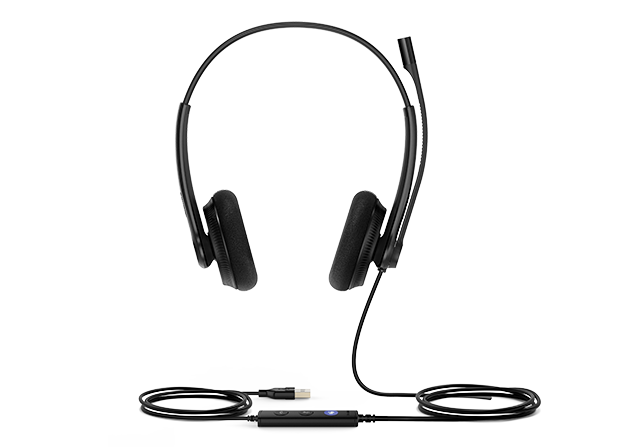
Representative official Yealink product image shown. Final appearance and accessories depend on the selected headset model.
A Headset Range That Should Be Selected by Workstation, Not Guesswork
Yealink offers several business headset families that suit call-intensive environments, but they are not interchangeable. The correct choice starts with the device the agent actually uses and the way the person works during a shift.
What Are Yealink Call Center Headsets Used For?
They are built for voice-heavy business roles where staff spend significant time speaking with customers, colleagues or partners and need a more controlled audio experience than laptop speakers or a desk-phone handset can provide. The key value is not simply louder sound. A suitable headset gives the agent a repeatable way to hear calls, position a microphone close to the mouth, keep hands available for typing and manage long conversations with less physical interruption.
Yealink’s range covers different endpoint environments. YHS models such as the YHS34 family are built around QD-to-RJ connectivity for compatible Yealink desk phones. UH families such as UH34, UH35 and UH46 use USB-oriented connectivity for PC calling and unified communications, with selected editions providing different connector and certification choices. Wireless requirements are served by families such as WH64 for DECT and Bluetooth working patterns and BH70 for Bluetooth-oriented mobility. Because these product families address different workstyles, selecting only by appearance can create an avoidable compatibility problem.
In a busy support floor, a dual-ear model may help an agent concentrate on the conversation while colleagues are speaking nearby. At a reception counter, a mono headset can be more practical because the user may need to hear both the caller and visitors in the room. A fixed desk user on a Yealink IP phone may prefer a simple wired QD model, while a supervisor who walks between desks may need DECT freedom. A hybrid employee who alternates between laptop meetings and mobile calls may instead find a Bluetooth business headset easier to manage.
For UAE organisations, this variety is useful because call environments are rarely identical across a company. One business may have a reception team on desk phones, a support department on a cloud contact-centre application and managers using mobile and laptop meetings. FourTeck can help separate these requirements before procurement, so the order can be organised by role rather than forcing every employee into one model.
The most productive starting point is to list the endpoint model, calling application, number of users, preferred wearing style and whether staff must move away from the desk. With those details, headset selection becomes a practical compatibility exercise instead of a trial-and-error purchase.
Why the Right Headset Matters to a Call-Intensive Team
A headset becomes a productivity tool when it fits the user’s endpoint, working pattern and acoustic environment. These buyer outcomes matter more than choosing the model with the longest feature list.
Clearer Voice Exchange in Busy Work Areas
Several Yealink business headset families use microphone noise-control approaches, passive acoustic isolation or multiple microphones depending on model. In a support floor, that can help the person at the other end hear the agent more consistently while the wearer has a more focused listening experience. The purchasing point is to match the level of noise control to the actual environment rather than assuming every model performs the same way.
Comfort for Long Calling Periods
Yealink provides lightweight wired designs as well as wireless business models with ergonomic ear-cup and headband approaches. For an agent who wears a headset for much of the shift, comfort should be treated as a procurement requirement. Wearing style, ear cushion material, clamping pressure and mono-versus-dual preference can influence user acceptance.
Faster Call Handling
USB models can include in-line controls, while selected wireless models provide on-headset controls and busylights. Direct access to mute, volume or call actions reduces the need to reach for the application window during every conversation. The exact control behaviour can depend on headset model and calling platform, so it should be checked before a large deployment.
Multiple Connection Paths
The portfolio spans direct desk-phone connections, USB PC connectivity and wireless options. That breadth is useful for organisations with mixed endpoints, but it also makes model discipline important. A QD-to-RJ headset is a different purchase from a USB headset, and a Bluetooth headset solves a different mobility problem from a DECT model.
A More Consistent Standard for Larger Teams
When many agents use the same calling platform, standardising a small number of validated headset models can simplify onboarding, spare planning and user guidance. Yealink also provides USB device management capabilities for supported USB devices. For IT teams, this can be more manageable than allowing every department to buy unrelated consumer headsets with different control behaviour and support expectations.
Better Role-Based Selection
A receptionist, call-centre agent, supervisor and hybrid manager do not work the same way. Choosing a model by role allows the company to spend on mobility or advanced noise control only where it provides practical value while keeping straightforward wired options for fixed desks.
One Brand, Several Practical Headset Architectures
The strongest reason to treat Yealink headsets as a range rather than a single item is the variety of deployment methods. The YHS34 family is designed around QD-to-RJ9 plug-and-play use with compatible Yealink desk phones and is offered in mono and dual formats. The UH34 family moves the conversation to USB-based PC and soft-client working, with selected editions also offering USB-C or 3.5 mm connection choices.
UH35 adds a 35 mm speaker design, dual-microphone noise reduction, dynamic call/music audio behaviour and a busylight, while UH46 uses a three-microphone approach with Yealink Acoustic Shield Technology 3.0 and provides USB-C with USB-A adapter flexibility. For users who need to move, WH64 combines DECT and Bluetooth wireless modes, and the BH70 family is built for Bluetooth business communication with a three-microphone noise-cancellation system and up to 35 hours of stated battery operation on the referenced model.
These examples show why the quotation should name the exact model and edition. Connector, wearing style, certification variant, wireless technology, talk time and included accessories can differ. FourTeck can help align those differences with the real workstation.
Yealink Call Center Headset Specifications
This page covers a product family, so exact specifications are configuration dependent. The table below identifies confirmed connection and capability patterns across representative Yealink business headset families. Always confirm the exact part number before ordering.
| Specification area | Confirmed family guidance | Buyer note |
|---|---|---|
| Brand | Yealink | Business communication headset portfolio |
| Representative wired desk-phone family | YHS34 / YHS34 Lite, YHS36 families | QD-to-RJ9 designs for compatible Yealink desk phones |
| Representative USB families | UH34, UH35, UH46 and related UH series | Connector and certification vary by edition |
| Representative wireless families | WH64 DECT/Bluetooth; BH70 Bluetooth | Select according to mobility, endpoints and charging needs |
| Wearing style | Mono and dual options across selected families | Choose based on concentration needs and awareness of surroundings |
| Microphone approach | Single, dual or multi-microphone designs depending on model | Noise-control capability is model specific |
| Speaker design | Configuration dependent; UH35 and UH46 use 35 mm speaker designs | Do not assume one audio specification applies across the range |
| Call controls | In-line or headset controls on selected USB and wireless models | Platform integration should be verified |
| Busylight | Available on selected models such as UH35, UH46 and WH64 | Useful in open-plan teams where call status visibility matters |
| Device management | Yealink USB Connect supports management of multiple Yealink USB devices | Supported features depend on model and management environment |
| Compatibility | Model and platform dependent | Check Yealink’s compatibility information for the exact endpoint |
| Warranty | Based on selected model, channel and supplier terms | Ask FourTeck for current warranty guidance before purchase |
| UAE availability | Contact FourTeck for current options | Model, edition, quantity and supplier status can affect lead time |
When comparing specifications, start with connection type before looking at audio features. A high-specification Bluetooth headset is not a replacement for a QD headset if the agent’s desk phone workflow requires a direct wired port, and a USB headset does not automatically provide identical call-control behaviour on every softphone. Next, decide mono or dual wearing style, then confirm the microphone requirement, platform edition and any wireless range or battery needs. For large orders, request a validated sample or compatibility review around the actual phone and application environment before standardising the full quantity.
How to Choose the Correct Yealink Headset for Your Agents
The highest-risk question is simple: what device will the headset plug into? If that answer is unclear, everything else should wait. Connector and endpoint compatibility determine whether the headset can become part of the workflow at all.
Desk Phone, PC, Laptop, Mobile or a Mixed Setup?
Record the exact Yealink phone model, computer port type and calling application. A YHS family headset may suit a direct Yealink phone connection, while a UH USB model can be more appropriate for computer calling. Wireless teams may need WH or BH options. Mixed environments should be checked rather than assumed.
Choose Mono or Dual Intentionally
Mono keeps one ear open to the local environment, which can suit reception and collaborative desks. Dual can support greater concentration for agents who spend most of the shift on calls. Ask users how they actually work rather than making the choice from a catalogue image.
Plan for Nearby Speech and Background Noise
A quiet private office and a 60-seat customer-service floor need different microphone behaviour. Identify the dominant noise source and how close agents sit to one another, then choose a model whose microphone and ear-cup design fit that environment.
Wired Simplicity or Wireless Movement?
Wired models avoid battery planning and suit fixed agent stations. Wireless models can help supervisors, managers and mobile staff move away from the desk. For wireless use, review charging routines, connection mode and the distance users genuinely need to cover.
Do You Need Integrated Call Buttons?
Mute and volume controls are straightforward, but answer/end or meeting controls may depend on the edition and platform. Confirm Microsoft Teams or general UC requirements where relevant and test the workflow if call-control behaviour is operationally important.
Send the Details That Change the Order
Provide endpoint model, application, quantity, mono or dual preference, wired or wireless preference, connector type, delivery location and any target date. This lets FourTeck quote a defined model rather than a vague headset category.
Where Yealink Headsets Fit in Real Communication Environments
They fit best where voice communication is a repeatable part of the job rather than an occasional meeting. The model should follow the environment and endpoint used in each role.
Customer Service and Contact Centre Agents
This is the most obvious fit. Agents may spend much of the day answering customer calls while entering notes, checking CRM records and navigating a ticketing system. A professional headset keeps both hands available and places the microphone at a repeatable speaking position. For a crowded floor, microphone noise control and dual-ear wearing may deserve more weight. If agents use a cloud softphone on PCs, USB models are a logical starting point; if they use compatible Yealink desk phones, QD-to-RJ models may be more direct.
Reception and Front Desk
Reception users often need to hear a caller and people physically standing at the desk. A mono headset can therefore be useful, provided it matches the phone or computer. Comfort matters because the headset may stay on for long periods even when calls are intermittent.
Sales and Telesales Teams
Outbound sales users need clear voice transmission, convenient mute and volume control and a wearing style that remains comfortable across repeated conversations. A dual headset can support focus in busy sales floors, while USB connectivity can be practical where dialing happens through CRM-integrated calling software.
IT Helpdesk and Service Desks
Helpdesk staff often switch between speaking, typing commands, writing tickets and consulting colleagues. A wired USB headset gives a simple fixed-station workflow, while a wireless option can help team leads move between desks while remaining connected to a call. Compatibility with the helpdesk calling platform should be tested before bulk rollout.
Supervisors and Floor Managers
A supervisor may start a conversation at a desk, walk to an agent station and continue speaking while reviewing an issue. This makes wireless mobility more valuable than it is for a fixed-seat agent. DECT or Bluetooth options should be compared around the devices the supervisor actually uses, required roaming distance and charging routine.
Hybrid and Remote Support Staff
Hybrid users may move between home, office and mobile work. A Bluetooth model can simplify that pattern when laptop and mobile connectivity are important, while USB remains attractive where predictable plug-and-play behaviour is preferred. The choice should reflect whether the user values mobility, battery life or cable simplicity most.
Yealink Call Center Headsets + Voice Clarity
Voice clarity begins with selecting a microphone system that matches the room, not simply choosing the model with the largest number of microphones. Yealink uses different approaches across the portfolio. The YHS34 family uses a single microphone and passive acoustic design intended for professional calls. UH35 uses dual-microphone noise reduction, while UH46 employs three microphones with Acoustic Shield Technology 3.0. WH64 and BH70 also use three-microphone noise-cancellation approaches in their respective wireless designs.
For a procurement team, the practical question is where unwanted sound comes from. If the dominant issue is nearby agents speaking, microphone voice isolation matters because the customer should hear the intended speaker rather than the whole floor. If the wearer is distracted by surrounding conversation, dual-ear coverage and passive isolation can be equally important. Those are two different acoustic problems and should not be confused.
During a pilot, test the headset with normal agent volume, normal seat spacing and the actual calling application. A quiet meeting-room demonstration does not reproduce a live call floor. Ask a person at the remote end to evaluate speech consistency while another staff member listens for comfort and audibility.
Yealink Call Center Headsets + Connectivity and Mobility
The connection method is the single most important feature because it defines where the headset can work. Yealink’s portfolio deliberately spans multiple architectures, so buyers can align the headset with a desk phone, PC or mobile workflow rather than trying to make one connection type do everything.
A common purchasing mistake is to start with “wired or wireless?” before documenting the endpoint. Reverse that order. First confirm what the headset must connect to, then decide how much movement the user needs. For wireless models, include charging behaviour in the workflow: a headset with excellent mobility still causes operational friction if users do not have a practical place and routine to charge it. For fixed-seat agents, a straightforward wired connection can remain the most predictable choice.
Yealink Call Center Headsets + Comfort and Fleet Consistency
A headset can meet every technical requirement and still fail a deployment if agents dislike wearing it. Comfort is therefore an operational consideration, especially when a device is used for several hours per day. Yealink’s wired and wireless ranges include lightweight designs, soft ear cushions and ergonomic headband approaches, but the exact construction varies by model.
The best way to evaluate comfort is to let representative users wear shortlisted models through a realistic period rather than a five-minute demonstration. Include people with different head sizes, glasses and wearing preferences. A model that feels light to one user may create pressure for another. Also decide whether replaceable ear cushions or spares matter for hygiene and long-term maintenance.
For large projects, standardisation does not necessarily mean buying one model for everyone. A better standard may be two or three approved models: a fixed-agent wired headset, a reception-friendly mono option and a wireless model for supervisors. That preserves support consistency while respecting different roles.
What Buyers Should Check Before Purchase
The main purchasing risk is ordering a headset family that does not match the user’s endpoint or daily work pattern. Before asking for a price, confirm the calling device, connector, application and user role. Those four details eliminate many avoidable selection errors.
Configuration Fit
Confirm whether the user needs QD-to-RJ, USB-A, USB-C, Bluetooth, DECT or a combination supported by the chosen model. Then choose mono or dual wearing style. For wireless users, include battery and charging expectations. For USB users, identify the platform edition and whether integrated meeting controls matter.
Compatibility Check
Write down the exact Yealink desk-phone model, PC port and calling application. Do not assume a physical connection guarantees full call-control integration. If another phone brand or platform is involved, verify the required adapter or supported workflow against the exact headset model before purchase.
Availability and Warranty
Ask for the exact model number, included accessories, current supply status and applicable warranty terms. These can vary by edition, channel and quantity. For a project order, also ask whether the quoted item is the mono or dual version and whether it is a Teams-oriented or general UC edition where relevant.
Quote Preparation
Send the number of users, phone or computer model, calling software, wired or wireless preference, mono or dual preference, quantity, delivery location and desired project date. If the team is replacing an existing headset, include the old model and what users liked or disliked about it.
Accessories are another common gap. A wireless headset may require a specific base, dongle or optional phone connection accessory depending on the product. A wired desk-phone headset may need the correct QD cable. If training, call monitoring or side-by-side coaching is part of the contact-centre process, mention that requirement before the order so the correct accessory path can be reviewed. Long-term cost should include replacement cushions, cables, batteries where applicable and the operational impact of supporting too many unrelated models.
Availability, Configuration and Service Guidance in the UAE
FourTeck supports headset enquiries across Dubai and the UAE with model selection, configuration review, quotation assistance and delivery coordination. Availability is not assumed to be identical for every Yealink family or edition. It can change according to the specific model, connector, certification version, supplier position and project quantity.
For a small requirement, a model and quantity may be enough to start the conversation. For a contact-centre rollout, more information creates a better result: number of seats, shift pattern, endpoint type, preferred wearing style, whether agents hot-desk, whether users share equipment, and whether the company needs a standard spare pool. These details can change the recommended model mix.
Support for Dubai, Abu Dhabi, Sharjah and Ajman Requirements
Businesses in Dubai, Abu Dhabi, Sharjah, Ajman and other UAE locations can contact FourTeck for Yealink headset selection and quotation support. A city does not change headset compatibility, but the receiving location, installation schedule and number of sites can influence delivery planning. Multi-office organisations should identify whether every branch uses the same desk phones and calling platform. If one branch uses Yealink IP phones while another uses PCs and a cloud calling application, the correct order may contain more than one headset family. FourTeck can help organise those requirements into a clearer bill of materials before the project proceeds.
GCC and Africa Business Headset Requirements
FourTeck also supports business technology enquiries through its regional channels for selected GCC and Africa markets. Organisations with operations in Saudi Arabia, Qatar, Oman, Kuwait, Bahrain, Kenya, Uganda and other locations may need the same headset standard across several offices, but local availability, delivery routes, applicable warranty handling and supplier position can differ by country.
For a regional contact-centre project, provide a location-by-location seat count and endpoint list. This helps identify whether one common headset can be used everywhere or whether different connectors and models are required. A company with a single softphone standard may be able to simplify the deployment with a consistent USB model. A business with mixed desk phones, PCs and mobile users will need a more deliberate model matrix.
Regional enquiries can be routed through FourTeck UAE, FourTeck Kuwait, FourTeck Kenya, FourTeck Uganda or the broader FourTeck Africa platform. Confirm the country, quantity, target deployment date and required support expectations so the enquiry can be handled against current conditions.
Other Yealink Headsets Buyers May Consider
A family page is most useful when it helps buyers move from a broad requirement to a defined model. The options below illustrate different purchasing directions rather than ranking one headset as universally better.
Yealink UH35
A professional USB wired option for teams that want a 35 mm speaker design, dual-microphone noise reduction, busylight and straightforward PC-oriented connectivity.
Yealink UH46
A USB wired model with a three-microphone system, Acoustic Shield Technology 3.0, USB-C cable with USB-A adapter and dual busylights for professional calling.
Yealink YHS34
Consider this QD-to-RJ9 family when compatible Yealink desk-phone use is the main requirement.
Yealink BH70
A Bluetooth business headset path for hybrid users who need wireless movement between laptop and mobile-oriented workflows.
Contact Center Headset Category
Compare professional call-handling headset types when the project is not limited to one brand or connection method.
Business Headsets
Use the wider headset category when comparing office, call centre, USB and wireless options for different staff roles.
Why Business Buyers Contact FourTeck for Headset Projects
The value of procurement support is reducing selection uncertainty before the order is placed. A headset project can look simple until connector type, phone compatibility, application integration, user comfort and quantity are considered together. FourTeck helps turn those details into a clearer request.
For SMB buyers, this can prevent a small purchase from becoming a compatibility problem. For enterprise and BPO projects, it helps keep model selection, accessories and deployment assumptions consistent across many seats. The objective is a headset choice that fits the communication workflow, not simply a model that looks attractive on a product list.
Questions UAE Buyers Ask About Yealink Call Center Headsets
Which Yealink headset is best for a call centre?
There is no single best model for every call centre. Start with the endpoint and environment. YHS models can suit compatible Yealink desk-phone workflows, UH models suit USB-based computer calling, WH models address DECT wireless needs and BH models address Bluetooth mobility. Then choose mono or dual wearing style and the level of microphone noise control required for the floor.
Can a Yealink headset work with my existing desk phone?
It depends on both the headset and phone model. YHS34 and related QD-to-RJ models are designed for compatible Yealink desk phones. Wireless models may use different connection methods or optional accessories. Provide the exact phone model when requesting a quote so compatibility can be checked before ordering.
Should call centre agents use mono or dual headsets?
Dual headsets can help agents focus on the call in busy environments because both ears are covered. Mono models leave one ear open, which can be useful for reception, supervisors and staff who must remain aware of people nearby. The better choice depends on role, office noise and user preference rather than a universal rule.
Are wired or wireless Yealink headsets better for support teams?
Wired headsets are often simpler for fixed stations because they avoid battery management and can provide predictable connectivity. Wireless headsets are useful when employees need to move away from the desk during calls. A supervisor may benefit from DECT or Bluetooth mobility, while a seated agent may prefer the simplicity of USB or QD wiring.
Can FourTeck help check Microsoft Teams or softphone compatibility?
Yes. Share the exact headset model under consideration, computer connection and calling application. Selected Yealink models are offered in Teams-certified and general UC variants, and call-control behaviour can differ by platform. A compatibility review is especially important when answer/end controls, meeting buttons or central device management are part of the requirement.
Are Yealink call centre headsets available in Dubai and the UAE?
FourTeck can check current UAE options and prepare a quotation based on the requested model, edition and quantity. Availability can vary between wired, wireless, mono, dual and platform-specific versions, so it should be confirmed for the exact item rather than assumed from the general product family.
What information should I send for a bulk headset quotation?
Send the number of users, exact desk-phone or computer environment, calling platform, wired or wireless preference, mono or dual preference, quantity, delivery location and target project date. If agents work in a noisy room, mention that too. For multi-site deployments, include the endpoint type and seat count for each location.
Do all Yealink headsets have the same noise cancellation?
No. The microphone architecture varies by family and model. Some professional wired models use single-microphone or passive noise-control approaches, while models such as UH35 use dual-microphone reduction and UH46, WH64 or BH70 use multi-microphone designs. Choose according to the real noise environment and verify the exact model specification before ordering.
What should I confirm about warranty and accessories?
Ask for warranty terms for the exact quoted model and confirm what is included in the box. Wireless options may involve a dongle, base or optional phone accessory, while wired desk-phone models may rely on a particular QD cable. For larger fleets, also ask about replacement ear cushions, cables or other service parts that affect long-term operation.
Need Help Matching the Headset to Your Call Platform?
FourTeck can review the workstation before a quote is prepared. Send the phone or computer model, calling software, number of users, mono or dual preference, wired or wireless preference, delivery location and any required deployment date. If you are replacing an existing headset, include its model and the problem you want the new purchase to solve.
Useful quote details: endpoint model, connector, platform, quantity, wearing style, mobility needs, acoustic environment and delivery location.