
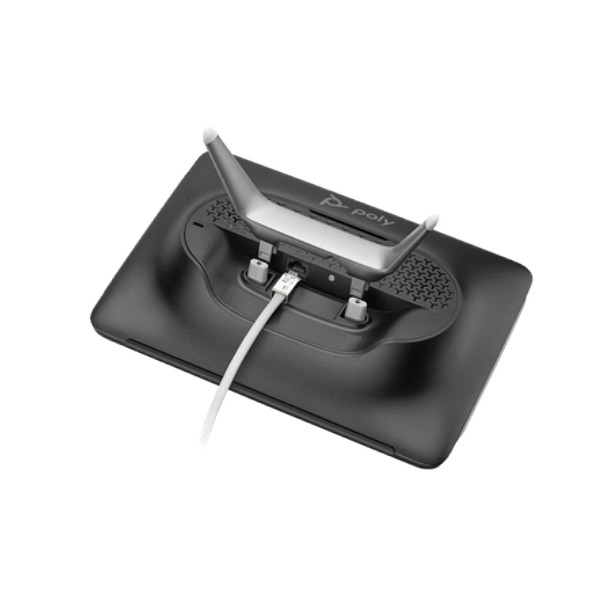
Poly TC10 Touch Controller in Dubai, UAE
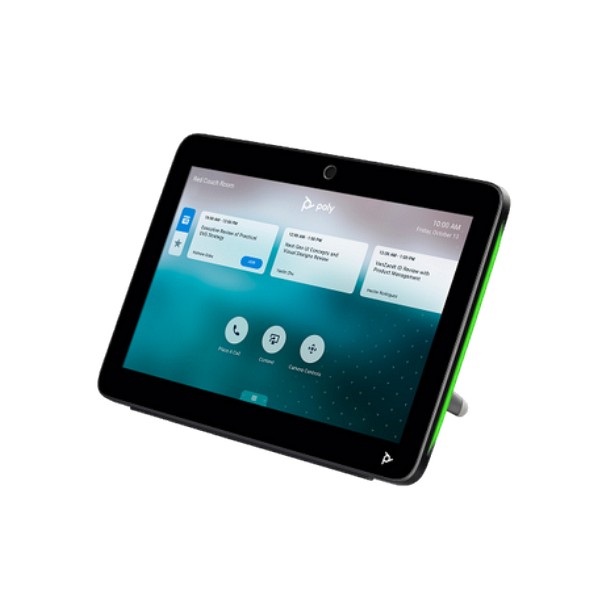
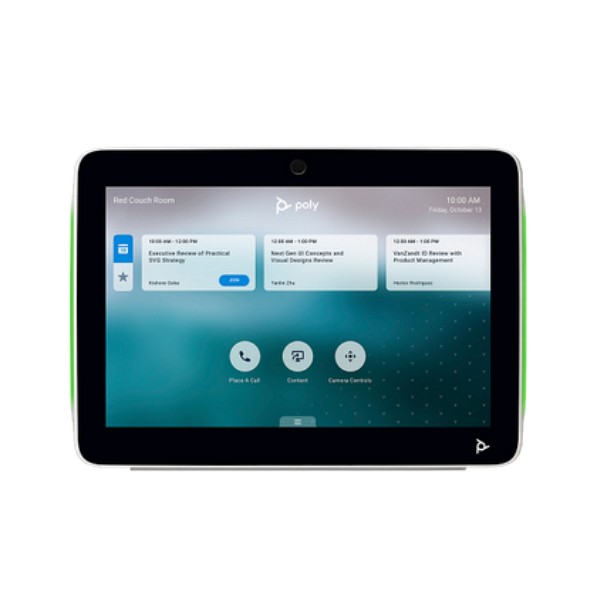
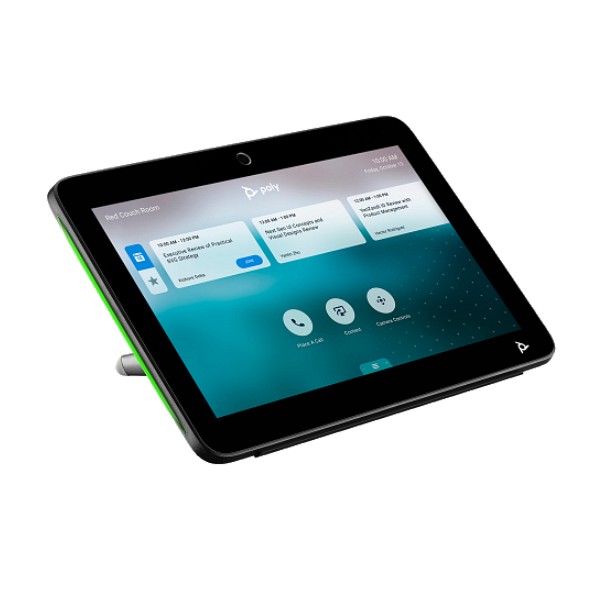
The Poly TC10 Touch Controller gives businesses one adaptable interface for managing compatible video meetings from inside the room or displaying scheduling information outside the room. Its 10.1-inch touch display, clear status lighting, flexible mounting system, and Power over Ethernet connection help create a professional meeting experience without adding unnecessary cables or confusing controls. FourTeck can help UAE organizations review the correct part number, room-system compatibility, platform requirements, mounting method, network readiness, and project quantity before purchase.
Request QuoteCheck UAE Availability
Quick Product Information
A Practical Control Point for Hybrid Meeting Rooms
A modern meeting room needs more than a camera and display. People entering the space must be able to understand what is scheduled, join the right call, adjust common meeting functions, share content, and leave the room ready for the next group. When these actions depend on several remotes, wall switches, personal laptops, or unfamiliar interfaces, valuable meeting time is lost. The TC10 addresses that operational gap by providing a dedicated touch surface designed around room control and scheduling workflows.
Inside a compatible room, the panel can act as the user-facing controller for a Poly video system. Participants can work from a consistent screen rather than learning the physical controls of every camera, codec, or display. Depending on the selected application and room configuration, users can join scheduled meetings, manage participants, select layouts, share content, and reach configured AV functions. Outside the room, the same hardware can be deployed as a scheduling panel so employees can check the current room state, see upcoming meetings, and reserve or release the space when the platform and administrator settings allow it.
This dual-role design is especially useful for UAE businesses that are standardizing several room types. A company may use one deployment pattern for boardrooms, another for medium collaboration spaces, and scheduling panels for shared meeting areas. Keeping a common control family can simplify user training, visual standards, support processes, and future room expansion. The 10.1-inch IPS display is large enough to present controls and calendar information clearly, while the table stand and mounting accessories support different interior layouts.
FourTeck approaches the purchase as a room-solution decision rather than a standalone accessory order. Buyers can request help reviewing the Poly video system, collaboration platform, room account, licensing, network VLAN, PoE availability, mounting location, cable route, device management plan, and expected number of rooms. This prevents a common mistake: selecting a touch panel by model name without confirming how it will operate in the intended meeting environment.
Key Business Benefits
Faster Meeting Starts
A dedicated room controller gives participants an obvious place to begin. Instead of searching for a remote or asking which laptop owns the call, users can view scheduled meetings and operate available call controls from the room interface. The practical value is reduced setup friction, fewer interruptions at the start of sessions, and a more repeatable experience for visitors and employees.
One Device, Two Deployment Roles
The panel can be considered for in-room control or outside-room scheduling, subject to the chosen platform and configuration. This gives workplace teams flexibility when designing a consistent meeting-room standard. A project can use the device where hands-on control is needed and apply the same visual hardware family to room-booking points in corridors or shared office zones.
Cleaner PoE Installation
Power and network traffic use a single Ethernet connection. When the switch port, cabling, and power budget are correctly planned, this reduces the need for a separate local power adapter at the panel location. The result can be a neater table, wall, or glass installation, with easier cable management and fewer visible components in client-facing rooms.
Visible Room-State Feedback
Side LED bars help communicate device or room status from a distance. In scheduling modes, configured colors can show whether a room is available or occupied. In controller use, lighting can reflect call or mute conditions. This visual signal reduces unnecessary door opening, helps employees find free rooms, and supports a more orderly shared-space experience.
Flexible Physical Placement
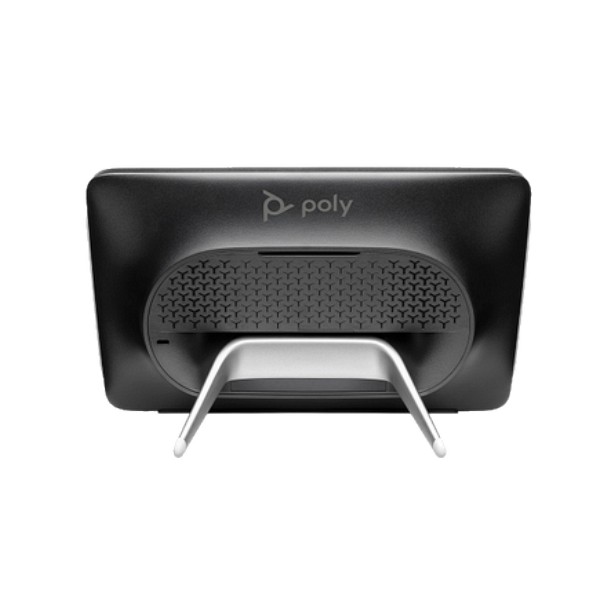
The supplied table stand and mounting components support different room designs. A table installation keeps controls close to participants. A wall or glass installation can present booking information outside a room. Buyers can select the location according to visibility, cable route, accessibility, furniture layout, and the interior standards used across their office portfolio.
Consistent User Experience
Organizations with multiple rooms benefit when the control method feels familiar. A common interface reduces the amount of room-specific training and makes it easier for facilities, IT, and support teams to document standard operating steps. Consistency is particularly helpful in offices with visiting executives, rotating teams, shared workspaces, and frequent external meetings.
Centralized Device Oversight
The official product information lists Poly Lens and device management services. The exact management workflow depends on deployment mode and software requirements, but the broader benefit is clear: administrators can plan a structured method for inventory, updates, status checking, and support rather than treating every room panel as an unmanaged standalone screen.
These benefits depend on correct integration. A touch panel cannot compensate for an unsupported room system, missing platform license, insufficient PoE budget, unsuitable network policy, or poor mounting position. FourTeck can help collect the technical and commercial details before the quotation so buyers understand what is included, what must already exist, and which services or accessories may be required for a complete deployment.
Product Highlights That Matter in Daily Use
10.1-inch IPS Touch Surface
The WXGA 1280 x 800 screen uses a 16:10 format and offers a practical balance between readable room controls and a compact footprint. A 300-nit brightness rating and 1000:1 static contrast support clear on-screen information in typical indoor meeting environments.
Proximity-Aware Wake Behaviour
The controller includes a motion or proximity sensor that can wake the display when movement is detected, subject to configured system behaviour. This supports an interface that is ready when users approach while allowing the screen to sleep during periods of inactivity.
Highly Visible LED Bars
LED bars on both sides of the screen communicate relevant status information. The exact color meaning changes by operating mode, but examples in the official guide include available or occupied room states, call status, mute indication, sleep, boot, and update activity.
Physical Security Provision
A standard Kensington lock slot is listed for the black model. This is useful for open collaboration areas, training facilities, reception-adjacent rooms, and other spaces where the business wants an additional physical-security measure for table-mounted equipment.
AV Control Access
Poly documentation describes direct access to configured third-party AV interfaces, allowing organizations to bring selected controls such as lighting, temperature, blinds, cameras, or video inputs into an approved web-based control experience. This capability requires administrator setup and compatible AV integration.
Professional Installation Kit
The documented package includes the controller, wall mount kit, table stand, mounting hardware, RJ-45 cable, quick-start access information, warranty card, and Poly Lens coaster. Buyers should still verify the exact box contents for the supplied regional part number.
The TC10 is not simply a generic Android tablet placed in a meeting room. It is purpose-built around room workflows, device pairing, status visibility, fixed installation, PoE connectivity, and managed collaboration use. That distinction matters for companies seeking a repeatable business solution rather than an improvised consumer-device arrangement.
Technical Specifications
The table describes the referenced official black model and should be used as a technical baseline, not as a substitute for project validation. A buyer may receive a different color, regional regulatory variant, government variant, bundle, or service combination with another part number. The room platform and paired system also influence what the screen can do. For example, a scheduling deployment and an in-room controller deployment use different accounts, interface modes, administrator steps, and room-placement decisions. FourTeck can confirm the proposed SKU and compare the quotation against the required use before the order is finalized.
Network design deserves equal attention. The device requires a suitable Ethernet path and PoE source. The switch must provide the required power standard and enough total power budget for every connected panel. IT teams should also decide which VLAN will carry the device, how it will obtain addressing and time information, which services it must reach, and how updates will be managed. For wall or glass installation, the cable exit point and surface type should be reviewed before mounting begins. These practical checks often determine whether a room deployment looks clean and operates reliably.
Configuration and Buyer Guidance
The correct purchase starts by defining the role of the panel. An in-room controller normally sits on the conference table or another accessible surface and works with a compatible room system. An outside-room scheduler is mounted where approaching users can see the calendar and room state. These uses may involve different platform licenses, account types, pairing steps, administrator portals, mounting accessories, network permissions, and support responsibilities. Buyers should identify the intended mode before requesting a part number or project price.
Which Room System Is Installed?
Provide the exact Poly video bar, codec, room bundle, current software version, and intended meeting platform. Compatibility should be checked against the current vendor support matrix rather than assumed from the brand name alone.
Controller or Scheduling Panel?
State whether the screen will control calls inside a room, display booking information outside a room, or be evaluated for both roles across a project. This determines placement, licensing, and configuration planning.
Is PoE Ready?
Confirm IEEE 802.3at support, switch power budget, cabling category, patching route, and port availability. Where a suitable PoE switch is not present, ask whether an approved injector or network upgrade should be included.
Which Platform and License?
Teams Rooms, Teams Panel, Zoom Rooms Controller, and Zoom Rooms Scheduler are different operating scenarios. Buyers should confirm resource accounts, subscriptions, calendar integration, and administrator ownership before deployment.
How Will It Be Mounted?
Choose table, wall, or glass placement by considering visibility, reach, surface suitability, cable entry, security, cleaning, accessibility, and interior design. The included hardware should be checked against the actual site condition.
Who Will Manage Updates?
Assign responsibility for device inventory, credentials, updates, incident logging, and vendor support. Update paths can differ between paired and standalone modes, so the management plan should match the chosen deployment.
For multi-room orders, buyers should also prepare a room schedule showing each location, room size, installed video system, panel role, mounting type, cable readiness, network switch, platform account, and desired installation date. This creates a clearer bill of materials and reduces the chance of ordering the right controller in the wrong color, quantity, or mounting arrangement. FourTeck can use this information to structure a quotation and identify open technical questions before procurement approval.
Ideal Business Use Cases
Executive and Board Meetings
Boardrooms benefit from a dedicated, predictable interface that avoids dependence on a participant’s laptop for basic room operation. When paired and configured correctly, the panel gives executives or assistants a clear point for joining scheduled calls, managing meeting functions, and reaching approved room controls.
Shared Corporate Meeting Rooms
High-turnover spaces need simple controls because different teams use them throughout the day. A consistent touch interface reduces room-specific learning and can help support desks solve issues more quickly by following a standard device layout across multiple rooms.
Room Scheduling Outside the Door
Mounted outside a bookable space, the TC10 can present room status and scheduling actions supported by the configured Teams or Zoom environment. Visible LED bars make availability easier to understand from a distance, helping employees find open rooms without interrupting meetings.
Training and Education Spaces
Training rooms often host instructors, guest speakers, remote students, and changing groups. A fixed room controller can provide a more dependable starting point than a collection of remotes. The larger touch display supports clear interaction for common joining, sharing, and meeting-management tasks.
Hybrid Project Rooms
Project teams that mix in-person and remote participants need rooms that can be started quickly. A dedicated controller supports a consistent workflow while the paired video system handles camera, audio, and conferencing functions. This is useful for engineering, consulting, construction, financial, and regional project groups.
Multi-Office Standardization
Organizations operating several UAE sites can use a common design guide for panel height, cable routing, room naming, platform mode, device ownership, and support escalation. Standardization makes future expansion easier and gives employees a familiar experience when moving between offices.
The panel is most valuable where a compatible room ecosystem and clear operating process already exist or are being designed. It is not a replacement for the room camera, microphone, speakers, display, codec, calendar service, network infrastructure, or collaboration subscription. FourTeck can help buyers map the controller to the complete room requirement so the quotation reflects the full solution rather than one isolated component.
TC10 Flexible Room Control and Scheduling
The most important design feature is the ability to serve different room workflows. In an in-room deployment, the touch panel becomes the physical control point that participants expect to find on the table or at a designated operating position. It can present the interface of the configured conferencing application and, when paired with an appropriate Poly system, provide access to meeting controls. Employees can join a scheduled session, start a new meeting, manage available call functions, share content, and view meeting information according to the platform mode and administrator configuration.
In a scheduling deployment, the panel moves outside the room and becomes part of workplace navigation. Calendar information and room-state indicators help people understand whether the space is free, occupied, or reserved. When the environment allows it, users may reserve time, check in, extend a booking, or release the space. The exact actions depend on the selected Teams or Zoom application, license, room account, calendar connection, and policy settings. Buyers should therefore evaluate the scheduling workflow as a software and workplace process, not only as a hardware feature.
This flexibility is valuable during phased office projects. A company may first standardize several conference rooms with controllers, then add scheduling panels as room booking becomes more structured. Another organization may use the same hardware family across floors but configure each unit according to room type. Consistent physical design helps facilities teams maintain a unified appearance, while IT teams benefit from clearer inventory and support documentation.
Before ordering, the project team should define the intended role of every unit and document whether it will be paired or standalone. This affects account setup, update method, mounting position, cable route, user permissions, and acceptance testing. FourTeck can review the room list and help identify where a controller, scheduler, or different accessory is the correct fit.
TC10 Single-Cable PoE Deployment
A purpose-built meeting-room device should not introduce avoidable visual clutter. The TC10 uses one RJ-45 connection for both data and power, relying on an IEEE 802.3at Class 0 PoE source. This can make table and wall installations cleaner because a separate mains adapter does not need to be placed beside the panel. The same principle also supports centralized power planning: when the controller is connected to a managed PoE switch backed by the organization’s network and power-protection strategy, the device can be treated as part of the room infrastructure rather than as an isolated consumer accessory.
Single-cable does not mean no planning. The Ethernet path must reach the mounting point without excessive strain, exposed loops, sharp bends, or interference with doors and furniture. The switch must support the required PoE standard and have enough remaining budget for all panels, access points, phones, cameras, and other powered devices on the same chassis. The port also needs the correct network configuration. Device VLAN rules, DHCP, DNS, NTP, firewall access, proxy requirements, certificate policy, and cloud service reachability may all influence deployment.
For glass mounting, the installer should consider visibility from both sides, the appearance of the cable route, adhesion or mounting instructions, and the possibility of future removal. For wall mounting, surface construction, anchor suitability, cable exit position, and display height matter. For a table stand, the team should confirm that the cable can travel through or around the furniture without creating a snag point. A Kensington lock may be considered in open areas where additional physical security is appropriate.
FourTeck can include network and installation questions in the pre-sales review. Buyers should provide the switch model, available port, cabling information, room photos or drawings, and preferred panel location. These details help determine whether the order needs only the controller or also cabling, PoE equipment, mounting work, configuration services, or site coordination.
TC10 Platform Integration and Managed Operation
The value of the panel comes from its integration with the meeting environment. Official product information describes certified uses with Zoom and Microsoft Teams. In Teams scenarios, the device can be deployed as a controller when paired to a supported Poly video system or as a standalone Teams Panel for room scheduling. In Zoom scenarios, it can operate in controller or scheduler modes according to the room design. The user interface, account requirements, available functions, and update path vary between these modes.
Platform licensing is therefore a purchase dependency. A Microsoft Teams Rooms controller or panel requires the appropriate account and licensing arrangement. A Zoom Rooms controller or scheduler likewise depends on the relevant Zoom room service and calendar configuration. Calendar providers, resource-mailbox permissions, room naming, check-in policies, and booking rules should be agreed before installation. Without these foundations, the hardware may power on correctly but still be unable to deliver the intended workplace workflow.
The controller also supports access to configured AV interfaces. Poly documentation describes a web-based wrapper that administrators can use to present approved controls for third-party room systems. This can bring lighting, blinds, temperature, camera selection, or video-input actions into the room interface when the AV design supports it. Such integration is project-specific and may require programming, network access, an AV control platform, and testing. It should not be assumed to work automatically with every building-control system.
Long-term operation should include a device-management plan. The official datasheet lists Poly Lens and Device Management Service, while the user guide explains that update methods differ by paired or standalone mode. Businesses should assign owners for credentials, firmware scheduling, platform updates, room-account changes, replacement handling, and incident escalation. FourTeck can help clarify these responsibilities during the purchasing stage so the room is supportable after handover, not only functional on installation day.
What Buyers Should Check Before Purchase
Before requesting a quote, buyers should confirm the complete room requirement rather than selecting the panel only by model name or advertised price. The same TC10 hardware can appear in different colors, regional part numbers, government variants, bundles, and service packages. Its final behaviour also changes according to the paired video system, collaboration platform, software version, room account, network, and mounting method. A structured checklist helps avoid receiving the wrong part, missing a required license, or discovering that the selected room cannot provide PoE at the intended location.
Model and Color Fit
Specify black or white, commercial or special regional requirement, and the expected HP or Poly part number. Ask the quotation to identify the exact SKU rather than using only the family name.
Compatibility Check
Share the installed Poly room system, its software version, meeting platform, and desired mode. Compatibility should be reviewed against current vendor documentation because supported combinations can change with software releases.
License and Account Readiness
Confirm the Teams or Zoom license, room resource account, calendar integration, administrator access, and booking policy. A controller license and a scheduling-panel license are not automatically the same requirement.
Network and PoE Capacity
Identify the switch model, PoE standard, available budget, VLAN, IP assignment method, and required service access. Include an injector or network upgrade only when it is approved and suitable for the project.
Mounting and Cabling
Decide whether each unit will be placed on a table, wall, or glass. Confirm the surface, viewing height, cable exit, furniture route, security requirement, and whether the included kit matches the actual site.
Warranty and Support Expectations
Request the applicable warranty term for the quoted SKU and country. Ask how fault diagnosis, return handling, optional services, installation support, and replacement coordination will be managed.
Project Quantity and Timing
Provide room count, required delivery location, target deployment date, phased-rollout plan, and whether units must arrive together. Availability can differ by quantity, part number, and supplier status.
Quote Preparation
Send the room-system model, platform, controller role, color, quantity, site, PoE details, mounting preference, licensing status, service request, and desired schedule. This gives FourTeck enough information to prepare a more relevant proposal.
Businesses should also consider the long-term cost of ownership. The purchase price is only one element. Installation labor, network changes, licenses, support services, mounting work, replacement planning, and administrator time can affect the total project. For a large rollout, a pilot room is often useful. The pilot can validate screen placement, cable routing, booking behaviour, platform sign-in, update process, room naming, LED visibility, user guidance, and support procedures before the organization repeats the design across many spaces. FourTeck can help buyers frame these questions so the final order matches operational needs and budget approval.
UAE Availability and Service Support
FourTeck supports inquiries for the TC10 across Dubai and the wider UAE with assistance for product selection, part-number review, quotation, delivery coordination, and warranty guidance. Availability is not presented as fixed because it can change according to color, regional SKU, supplier status, order quantity, project schedule, and whether the buyer needs a standalone unit, room bundle, service package, or installation support. The sales team can confirm current options after receiving the business requirement.
Pre-sales support can include a review of the intended room role, paired Poly system, Microsoft Teams or Zoom plan, PoE capability, network information, mounting location, and quantity. For project orders, buyers may provide a room list or bill of materials so the quotation distinguishes controllers, video bars, cameras, mounts, cabling, network components, licenses, and services. This helps purchasing teams compare proposals on a like-for-like basis rather than evaluating a single hardware line without its dependencies.
Delivery coordination is based on confirmed supplier information and the destination details supplied by the customer. Warranty guidance is based on the exact quoted item and sales channel. Businesses that need installation, configuration, or migration support should mention this during the inquiry so responsibilities can be defined before the purchase order is issued.
Dubai, Abu Dhabi, Sharjah, and Ajman Coverage
Businesses in Dubai, Abu Dhabi, Sharjah, Ajman, and other UAE locations can contact FourTeck for product inquiries, configuration review, quotation support, and delivery coordination. The process is designed for single-room purchases as well as larger office, education, hospitality, healthcare, government, and enterprise projects. Buyers should share the delivery destination, required quantity, target date, and whether the equipment will be installed at one site or distributed across several branches.
For multi-site deployments, FourTeck can help organize the request by location and room type. A structured list can show the controller role, associated room system, color, mounting method, PoE readiness, platform, and service requirement for each site. This approach gives procurement, IT, and facilities teams a common document and reduces confusion when different offices have different room standards or completion dates.
GCC and Africa Availability
FourTeck also supports business technology inquiries through regional channels serving selected GCC and Africa markets. Organizations with operations in Saudi Arabia, Qatar, Oman, Kuwait, Bahrain, Kenya, Uganda, and other parts of the region can submit a requirement for review. Product availability, accepted commercial terms, delivery route, local taxes, warranty handling, platform licensing, and installation support can differ by country, so each request is assessed according to destination and supplier status.
Regional projects often involve more than shipping hardware. The buyer may need a consistent room standard, approved part numbers, documentation, remote configuration, local installation coordination, or a phased plan for several countries. Providing the room-system models, platform, quantity by destination, required date, and support expectations helps the team determine which options can be proposed.
For more information, buyers can use the main FourTeck UAE technology platform, the Kuwait inquiry channel, the Kenya business technology site, the Uganda inquiry platform, or the FourTeck Africa regional site. Country support remains configuration and supplier dependent.
Other Poly Options Buyers May Consider
A controller is only one component of a collaboration room. Depending on the room size, installed platform, camera requirement, audio coverage, and project budget, buyers may need a complete video bar, a modular codec, a dedicated camera, or an earlier-generation controller for an existing system. The options below are useful starting points for a broader requirement review. Compatibility, lifecycle, availability, and the correct bundle must be confirmed before purchase.
Poly Studio X52
An all-in-one video bar often considered for medium meeting spaces. Buyers can review camera, audio, platform mode, display connections, and controller bundle requirements.
Poly Studio X70
A larger all-in-one room system option for bigger collaboration spaces. Room dimensions, seating distance, audio coverage, displays, and platform requirements should be reviewed.
Poly G7500
A modular conferencing platform suited to rooms that need separate camera, audio, display, and control design. Integration details and supported components should be planned as a system.
Poly Studio E70
A smart camera option for compatible larger-room and modular designs. Buyers should evaluate placement, field of view, processing, codec support, mounting, and room lighting.
Poly TC8
An earlier 8-inch Poly touch controller used with defined room systems. It may be relevant for existing estates, but compatibility, lifecycle, and replacement strategy should be checked carefully.
Complete Room Design Support
For rooms that need displays, cabling, switching, audio, microphones, cameras, network readiness, and installation coordination, submit the full requirement instead of choosing components separately.
Why Business Buyers Choose FourTeck
Requirement-Based Sourcing
The inquiry can begin with the room objective, installed equipment, platform, quantity, and location. This helps align the proposed hardware with the business use rather than treating every request as a simple catalogue order.
Configuration Guidance
FourTeck can help identify questions around controller role, part number, color, pairing, platform account, license, PoE, mounting, and accessories so the buyer has a clearer basis for approval.
Transparent Quote Support
Quotations are prepared according to current supplier information and the submitted requirement. Availability and delivery are confirmed through the commercial process rather than represented through unsupported claims on the page.
Business IT Understanding
Meeting-room hardware depends on networks, identity, cloud services, displays, AV integration, cabling, and support ownership. A broader technology view helps uncover dependencies that may not appear in a basic product list.
UAE Delivery Coordination
The team can review the destination, quantity, target date, and site distribution, then coordinate delivery information based on confirmed product status and the commercial terms of the order.
Warranty Guidance
Warranty information is tied to the exact quoted SKU and supply channel. Buyers can ask about the documented manufacturer coverage, optional service choices, and the process used if a fault occurs.
FourTeck supports SMB, enterprise, education, hospitality, healthcare, and project buyers that need a clear path from requirement to quotation. The value is not based on claims of permanent stock, instant delivery, or universal compatibility. It comes from gathering the right information, presenting suitable options, and helping the customer avoid purchasing a controller that does not match the room system, platform, network, mounting environment, or support plan.
Frequently Asked Questions
What is the TC10 used for?
It is a dedicated meeting-room touch panel that can be deployed for in-room video and room control or as an outside-room scheduling display. The exact functions depend on the paired Poly system, selected Teams or Zoom mode, licenses, account configuration, software version, and administrator settings.
Does the device need a separate power adapter?
The official specification lists Power over Ethernet compatible with IEEE 802.3at Class 0, using the RJ-45 connection for power and network. Buyers must confirm that the network switch or approved injector can supply the required standard and that enough PoE budget remains for every device on the switch.
Can it work with Microsoft Teams Rooms?
Yes, official guidance describes use as a Microsoft Teams Rooms controller when paired with a supported Poly video system and as a standalone Microsoft Teams Panel for scheduling. The correct Teams account, license, room resource, pairing method, software level, and administrator configuration are required.
Can it be used with Zoom Rooms?
The product is documented for Zoom controller and scheduler use. A working deployment depends on the appropriate Zoom Rooms service, room calendar, account credentials, network access, supported mode, and administrator setup. Buyers should confirm the intended role and current compatibility before ordering.
Can the panel be mounted on a wall or glass?
Official product information describes wall, glass, and table placement and lists mounting components and a flexible table stand in the documented package. The installer must still confirm the surface, fixing method, cable route, visibility, accessibility, and exact kit contents for the supplied regional part number.
Is the TC10 available in black and white?
HP publishes black and white variants with different product numbers, along with certain regional or special variants. Availability can vary by country and supplier. Tell FourTeck the preferred color, required quantity, and any part-number restrictions so the quotation can identify the exact proposed SKU.
What information is needed for a quotation?
Provide the controller role, paired Poly system, collaboration platform, desired color, quantity, delivery location, target date, PoE readiness, mounting preference, license status, and whether installation or configuration support is needed. A room list is helpful for multi-site or multi-room projects.
What warranty applies?
The referenced official black-model datasheet lists a Poly standard one-year limited warranty. Final warranty coverage, service process, and optional support depend on the exact part number, country, supplier, and quotation. Buyers should request the applicable terms in writing for the proposed SKU.
Can FourTeck support bulk or project orders?
Yes. Businesses can submit a room-by-room requirement covering quantity, controller mode, video system, platform, mounting, PoE, delivery site, and target schedule. FourTeck can organize the inquiry, review dependencies, prepare a structured quotation, and coordinate available supply options based on confirmed supplier information.
Does the panel control lighting or other room equipment?
Poly documentation describes access to configured third-party AV interfaces for functions such as lighting, temperature, blinds, cameras, and video inputs. This is not automatic universal control. It requires a compatible AV environment, administrator configuration, network access, and potentially project-specific integration or programming.
Need Help Planning the Right Meeting Room Setup?
FourTeck can help review the intended controller or scheduling role, compatible Poly room system, collaboration platform, PoE network, mounting approach, quantity, warranty guidance, and UAE delivery requirement. Share your room details to receive a relevant quotation based on current options.




Reviews
There are no reviews yet.