
Professional Meeting Room AV Processor
Yealink AVHub Dubai
Yealink AVHub Dubai is built for large and extra-large meeting rooms where one camera angle is not enough, cable routes must remain neat, and audio-video devices need stable centralized control. It helps organizations connect compatible Yealink cameras, microphones and speakers through a room-ready processor designed for Microsoft Teams Rooms, divisible spaces, training halls, boardrooms, government meeting areas, education rooms and enterprise collaboration environments.
PoE Device Cabling
BYOD Ready
Large Room Processing
Yealink AVHub Dubai Information
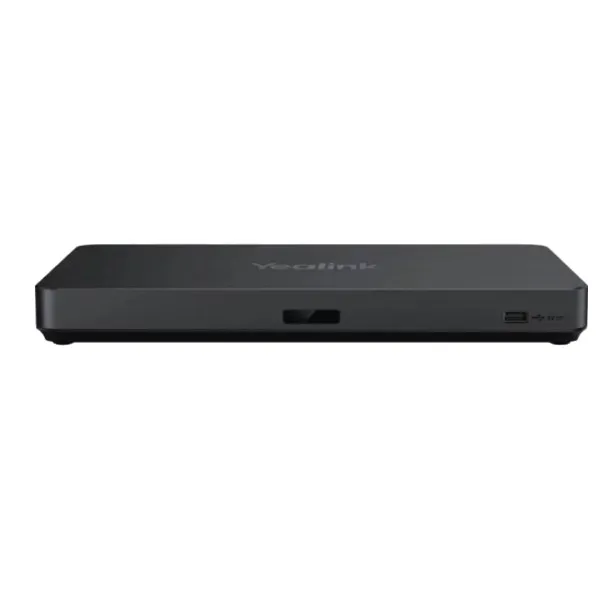
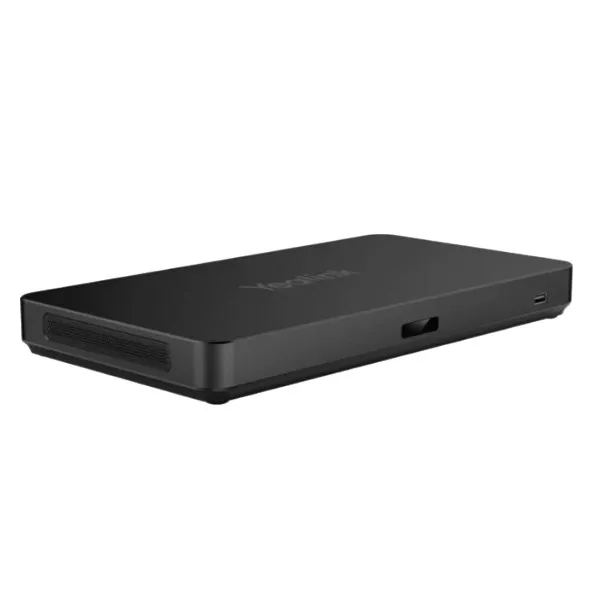
Yealink AVHub is a meeting audio and video processor made for large conference rooms and professional collaboration environments. Its main value is simple: it brings cameras, microphones and speakers into one managed meeting-room platform, so users can capture different areas of a room and send a more complete meeting experience to remote participants. In Dubai offices, this is useful for boardroom tables, U-shaped training rooms, council-style layouts, divisible halls and executive meeting suites where people sit across a wide space.
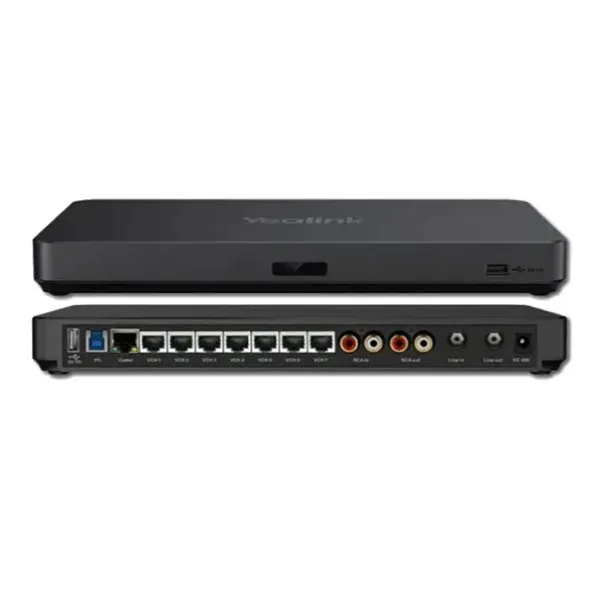
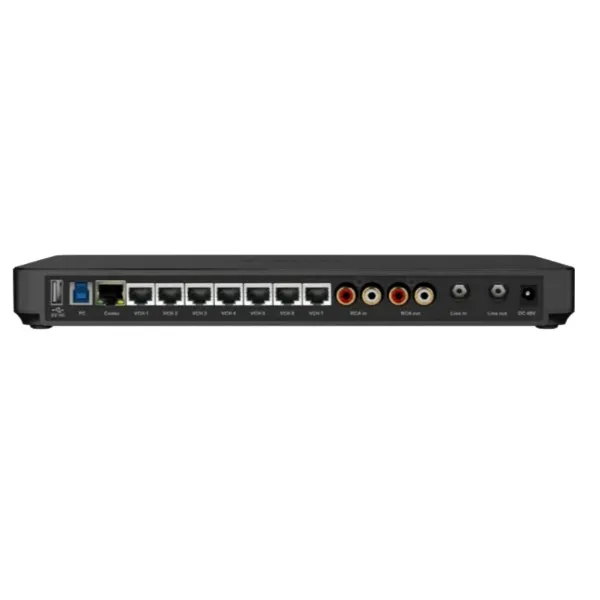
The device supports direct connection of compatible Yealink room peripherals through Ethernet cabling with Power over Ethernet. This reduces exposed cabling and helps integrators design neater rack, wall and table layouts. AVHub also supports camera layout adjustment through the Yealink plug-in before or during Microsoft Teams Rooms meetings. For buyers, that means the room can show a customized view instead of a fixed single-camera frame. Fourteck positions this product for companies that want a cleaner, scalable and more controlled meeting room rather than a basic webcam setup.
Yealink AVHub Dubai Highlights
Connect multiple compatible Yealink cameras and create better coverage for long tables, wide rooms and audience-style spaces.
Bring cameras, microphones and speakers into a controlled room architecture that is easier for IT teams to maintain.
PoE-based Ethernet connectivity supports cleaner installation and avoids excessive USB cable runs across tables.
Supports modern meeting environments where teams may need room hardware to work with different meeting workflows.
Yealink AVHub Dubai Features
A major reason buyers choose Yealink AVHub is its practical approach to bigger rooms. Instead of forcing every space into one camera view, AVHub enables a multi-camera layout that can better represent the people in the room. Different camera positions can focus on the presenter, audience, panel table or discussion side, which is helpful for management meetings, finance reviews, legal briefings, hybrid classrooms and public-sector sessions.
The product also helps the room PC by handling audio and video processing tasks. In demanding Microsoft Teams Rooms deployments, this matters because a larger room often has more devices, more video feeds and heavier collaboration activity. AVHub gives the system a dedicated processing point, making the installation more organized and future-friendly.
Fourteck recommends Yealink AVHub Dubai when a customer is planning a professional room upgrade rather than a simple plug-in meeting device. It fits projects where a consultant, IT manager or facility team wants proper wiring, predictable peripheral placement and a smooth user experience for daily meetings.
Yealink AVHub Dubai Specifications
The following specification view is written for purchasing and project planning. Final compatibility should be checked against the selected Yealink cameras, microphones, speakers and room system bundle.
Yealink AVHub Details
Yealink AVHub, Yealink AV Hub, Yealink Meeting AV Processor, Yealink audio video processor and Yealink AVHub for Microsoft Teams Rooms are common ways business buyers describe this device during procurement discussions. The product is usually considered when the meeting room is too large for a single all-in-one bar or when the customer wants independent camera, microphone and speaker placement. It is also relevant for conference halls that need multiple room views and a more managed hardware structure.
In a Dubai business environment, many meeting rooms are shared by directors, consultants, visiting partners and remote teams. A processor like AVHub helps standardize the room experience. Users can walk into the room, start the meeting and depend on the planned camera and audio layout instead of adjusting multiple loose devices. Fourteck can assist with choosing compatible Yealink room components, planning table microphone positions, reviewing camera angles and preparing supply for corporate IT projects.
Yealink AVHub Dubai Descriptions
Fourteck supports Yealink AVHub enquiries across Dubai and the wider UAE, including Abu Dhabi, Sharjah, Ajman, Ras Al Khaimah, Fujairah, Umm Al Quwain and Al Ain. The product is suitable for business districts, corporate towers, universities, clinics, training centers, boardrooms and government-related offices that need a serious meeting room solution rather than a single USB device.
For Dubai city deployments, the most common requirements include multi-camera coverage, clean table cabling, reliable Microsoft Teams Rooms use, executive-grade meeting quality and easy maintenance. Fourteck can help customers select the right combination of AVHub, cameras, microphones, speakers and room control accessories based on room size, table shape, seating position and meeting style.
Yealink AVHub GCC Uses
Across the GCC, organizations in the UAE, Saudi Arabia, Qatar, Kuwait, Oman and Bahrain are upgrading meeting rooms for hybrid work. Yealink AVHub supports these projects by allowing scalable room designs for large conference spaces, leadership meeting rooms, training centers, public-sector communication rooms and cross-border project offices. Businesses often look for Yealink AVHub UAE, Yealink AVHub Saudi Arabia, Yealink AVHub Qatar, Yealink AVHub Kuwait, Yealink AVHub Oman and Yealink AVHub Bahrain when they want a regional meeting room solution that can be repeated across multiple branches. Fourteck can support customers from Dubai with product guidance, regional project discussions and compatible meeting room planning for organizations standardizing Yealink collaboration hardware.
Yealink AVHub Africa Availability
African businesses in Kenya, Uganda, Tanzania, Ethiopia, Nigeria, Ghana, Rwanda and South Africa increasingly need reliable hybrid meeting spaces for regional management, education, healthcare, finance, logistics and government collaboration. Yealink AVHub is a suitable choice where organizations want larger room coverage with multiple cameras and planned microphone placement. Fourteck’s regional presence helps customers discuss conferencing projects for Africa-linked offices, whether the buying team is in Dubai or the deployment is connected to Nairobi, Kampala or wider African operations. This makes AVHub practical for companies that want one collaboration standard across headquarters, branch offices and partner locations.
Yealink AVHub Understanding With Other Models
Yealink AVHub is often used with related Yealink room products rather than as a standalone meeting accessory. Buyers may also review Yealink WPP30 Dubai for wireless presentation needs, Yealink T43U Dubai for SIP desk phone requirements, Yealink SIP-T31G Dubai for office voice users and Fourteck’s AI video conferencing solution pages for full-room design planning. These pages help customers understand how voice, video, wireless sharing and room control can work together in one communication environment.
Useful Fourteck references include Yealink WPP30 Dubai, Yealink T43U Dubai, Yealink SIP-T31G Dubai and Video Conferencing Solutions UAE.
Yealink AVHub GCC Usage
For GCC headquarters and branch offices, Yealink AVHub can be used in executive rooms, project war rooms, leadership floors, board meeting venues, hybrid classrooms and shared training halls. A company with offices in Dubai, Riyadh, Doha, Kuwait City, Muscat and Manama may prefer one meeting-room architecture so users do not need to relearn the system in every location. AVHub helps create this consistency because it brings connected room AV devices into a more structured layout. Fourteck can help customers plan repeatable room designs, matching AVHub with the right cameras, microphones, speakers, control panels and network readiness.
Yealink AVHub Dubai Service Availability
Fourteck supports Yealink AVHub Dubai projects with product consultation, supply coordination, compatibility review and meeting room solution planning. For new offices, the team can help buyers understand whether AVHub is the right fit compared with a video bar or a smaller conferencing device. For existing rooms, Fourteck can review upgrade goals such as adding more cameras, improving table audio, reducing cable clutter or preparing a larger Microsoft Teams Rooms setup. This service-focused approach helps customers buy with confidence because the product is selected around room size, user behavior and future expansion needs.
Fourteck Yealink AVHub Dubai Reference
A useful related product for collaboration rooms is Yealink WPP30 Dubai. While AVHub focuses on meeting room audio-video processing and large-room peripheral control, WPP30 helps users share content wirelessly in compatible meeting spaces. Many modern rooms need both strong participant capture and quick presentation sharing. Fourteck can guide buyers on how AVHub, WPP30, cameras, microphones and room displays can work as part of a clean collaboration workflow.
Yealink AVHub Dubai Multi-Camera Layout
The multi-camera layout is one of the strongest reasons to choose AVHub. In large rooms, one camera may show the whole table but miss expressions, speaker focus and side discussions. With the right camera placement, AVHub helps meeting participants appear in a more practical view for remote attendees. This supports clearer decision-making, better training interaction and more natural hybrid communication. For boardrooms in Business Bay, DIFC, JLT, Deira, Al Barsha and Dubai Silicon Oasis, this feature can significantly improve the meeting experience.
Yealink AVHub Dubai PoE Cabling
PoE-based Ethernet connectivity helps installers reduce long exposed cable runs and makes the room easier to maintain. Cameras, microphones and speakers can be planned around real seating and wall positions instead of being limited by short USB distances. This is especially important in premium rooms where furniture finish, floor boxes, table grommets and wall routes must remain neat. Fourteck can help customers review cabling expectations before ordering, reducing installation surprises and improving the final room appearance.
Market Availability Yealink AVHub Dubai
For organizations checking availability, Check UAE Availability through Fourteck before confirming a room project. Yealink AVHub Best price support is useful for procurement teams comparing a professional meeting room processor against basic conferencing kits. Yealink AVHub Buy now assistance is available for customers who already know the room design and need fast quotation support. Yealink AVHub Authorized partner sourcing helps companies prioritize genuine channel supply, while Ready Stock Dubai and Ready stock Dubai city updates can be requested from the sales team based on current movement.
Yealink AVHub AbuDhabi
Abu Dhabi organizations often require high-quality meeting room systems for leadership offices, government departments, energy companies, universities, hospitals and corporate training spaces. Yealink AVHub is suitable for these environments because it supports structured room audio-video control and multiple camera views. Fourteck can assist Abu Dhabi buyers from the planning stage, helping them choose compatible Yealink components and prepare a professional meeting room solution that fits the room layout.
Yealink AVHub Dubai Deployment
A good AVHub deployment starts with room assessment. The table size, ceiling height, screen position, camera mounting point, speaker requirement, microphone pickup area and network route should be reviewed before installation. The processor should be placed where cable management, access and ventilation are practical. Compatible Yealink cameras can then be planned for presenter view, room view or participant zones. Microphones should be placed around real speaking positions, while speakers should deliver clear sound without creating echo issues. Fourteck can help customers prepare a deployment discussion so the hardware order matches the room requirement.
Yealink AVHub Dubai Installation Details
Installation should focus on clean cabling, correct compatible device connection, stable network readiness and simple user operation. In most professional rooms, the goal is to hide unnecessary cable exposure while keeping service access available. After physical placement, the room system should be checked for camera recognition, audio pickup, speaker output, meeting platform behavior and camera layout control. Users should also receive basic guidance on how to start meetings, share content, use available views and request support. Fourteck recommends planning installation around the full room experience, not only the processor itself.
Yealink AVHub Sharjah
Sharjah companies, educational institutions, healthcare facilities and trading offices can use Yealink AVHub for larger meeting spaces that need better participant visibility. It is especially helpful for classrooms, boardrooms, training rooms and shared management areas where people sit across wide layouts. Fourteck can support Sharjah buyers with product selection and compatible solution planning from Dubai, helping customers choose a practical AVHub-based setup without unnecessary complexity.
Product Availability Yealink AVHub Dubai
Get Yealink AVHub support from Fourteck when you need a genuine large-room meeting processor with proper accessory guidance. Buying Support for Yealink AVHub is useful for IT managers, procurement teams and consultants who need to confirm compatibility before purchase. Genuine Yealink AVHub Guide assistance helps customers avoid mismatched devices, unclear room designs and incomplete meeting room orders. Contact Fourteck for product quotation, project discussions and room-ready recommendations.
Yealink AVHub Ajman
Ajman businesses can use Yealink AVHub for conference rooms, management cabins, training areas and customer presentation spaces where clear remote participation is important. The device helps organize AV hardware into a cleaner system, making it easier for users to run meetings without handling multiple separate devices. Fourteck supports Ajman customers with Dubai-based sales assistance, product guidance and compatible meeting-room planning.
Fourteck Dealing Product Dubai
Fourteck supplies and supports communication products for offices that need voice, video and collaboration systems. For buyers reviewing Yealink AVHub Dubai, related options include Yealink WPP30 Dubai for presentation sharing, Yealink T43U Dubai for office SIP calling, Yealink SIP-T31G Dubai for practical desk phone users and full video conferencing solution pages for larger room planning. These internal references help customers build a more complete collaboration environment instead of purchasing one product without considering the full meeting workflow.
Yealink AVHub Dubai Comparisons
The right Yealink solution depends on room size, meeting style and the number of connected devices. AVHub is best suited for large spaces that need centralized AV processing, while other Yealink products may focus on presentation sharing, IP voice, compact meeting bars or wireless meeting accessories.
Yealink AVHub Dubai Divisible Room Use
Divisible meeting spaces are becoming common in training centers and enterprise offices. A room may operate as one large hall in the morning and two smaller spaces later in the day. Yealink AVHub can be part of a room design where audio and video devices are planned for flexible usage. This helps organizations reduce duplicate equipment, keep a professional meeting standard and make the room easier to use for different events. Fourteck can discuss room behavior before purchase so the selected hardware reflects the way the space is actually used.
Fourteck Regional Support Network
Yealink AVHub FAQ
It is used to manage audio and video processing in large meeting rooms with compatible Yealink cameras, microphones and speakers.
Yes, it is suitable for boardrooms that need multiple camera views, cleaner cabling and a structured Microsoft Teams Rooms experience.
Yes, it is designed for multi-camera layouts with compatible Yealink camera models.
Yes, its Ethernet and PoE approach helps reduce messy device cabling in professional room installations.
It is strongly positioned for Microsoft Teams Rooms, and room compatibility should be confirmed before ordering.
Yes, Fourteck can help select compatible Yealink cameras, microphones, speakers and related room accessories.
Yes, it is useful for training rooms where presenters and participants need better camera coverage.
Yes, BYOD support is one of the key usage benefits for flexible meeting environments.
Yes, contact Fourteck to confirm current availability and quotation details.
Use the Fourteck contact page to request quotation, buying support and project guidance.




Reviews
There are no reviews yet.