

Yealink CAM50 Camera in Dubai, UAE
The CAM50 is a USB HD camera built to add desktop video calling to compatible Yealink SIP-T58 series IP phones. It is aimed at business users who want an integrated camera on the phone they already use for daily communication.
For procurement teams, the most important checks are phone compatibility, exact hardware revision, quantity, and whether a compact 720p desktop camera is the right fit for the user workflow. FourTeck can review those points before quotation and help coordinate UAE supply requirements without assuming stock, warranty terms, or delivery timing.
USB 2.0 plug-and-play
Physical privacy shutter
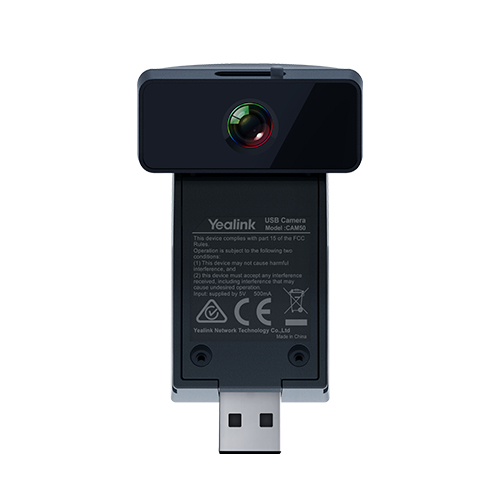
A focused camera upgrade for compatible Yealink desk phones
The Yealink CAM50 Camera is designed for a specific business scenario: adding video to a compatible Yealink desk-phone environment without introducing a separate webcam-and-PC workflow. The camera connects through USB and is intended to sit directly with the supported phone, giving a user a compact way to participate in visual conversations from the desk. That makes it relevant for executive cabins, branch managers, reception supervisors, sales leaders, remote coordinators, and other users who spend much of their day on an IP phone but occasionally need to move from voice to face-to-face communication.
Yealink’s current product page identifies compatibility with SIP-T58W and SIP-T58A IP phones and lists a 5-megapixel HD camera capable of 720p video at 30 frames per second. It also lists H.264 High Profile, H.264, and VP8 video codecs, automatic exposure, white balance, an LED indicator, USB 2.0 connectivity, and a physical privacy shutter. These are practical rather than extravagant capabilities. For a buyer, that distinction matters: the CAM50 is not positioned as a room camera, a wide-angle conference bar, or a general-purpose premium webcam. Its purpose is to extend a compatible Yealink phone into a desktop video endpoint with a simple, integrated accessory.
A key procurement point is revision awareness. Older Yealink CAM50 documentation found online may list different sensor and field-of-view values from the current product page. Rather than assuming that every unit in circulation has identical published figures, business buyers should ask the supplier to confirm the exact current revision and compatible host phone before purchase. FourTeck can help review those details and align the quote to the phones already deployed at the customer site.
For UAE organizations, this kind of compatibility-led buying is often more important than choosing solely by price. A camera accessory only delivers value if it matches the phone model, firmware environment, desk layout, user expectations, and quantity plan. FourTeck supports that decision with pre-sales review, quotation assistance, delivery coordination, and guidance on related Yealink communication products when a different endpoint would suit the requirement better.
Why the CAM50 can make sense in a T58 desktop deployment
Its value comes from being a purpose-built accessory for a compatible phone environment, not from trying to replace a meeting-room video system.
Keep video on the phone workflow
For users who already conduct most calls from a Yealink T58 desk phone, a compatible camera can reduce the need to switch to a laptop just to add video. This is particularly useful at executive desks, reception control points, and branch offices where the phone is the primary communication device. The benefit is not simply fewer cables; it is a more consistent user experience in which voice and video stay within one endpoint workflow.
USB plug-and-play design
Yealink positions the camera as a plug-and-play accessory using USB 2.0. In a matched phone environment, that can simplify desk deployment because there is no separate camera power supply or PC driver workflow to plan. Procurement still needs to confirm host-phone compatibility, but the physical connection is intentionally straightforward.
Visible control over the lens
A physical privacy shutter gives the user an immediate, mechanical way to cover the camera when video is not required. In executive offices, shared desks, clinics, and customer-facing environments, that simple control can be easier to understand than relying only on a software icon or application setting.
720p video for business conversations
The listed 720p at 30fps video format is suited to the product’s role as a desktop communication accessory. It is intended for one-person framing and everyday professional calls, where the priority is a usable visual presence from the desk rather than cinematic resolution. Buyers seeking boardroom coverage, speaker tracking, optical zoom, or multi-person wide-angle capture should consider a dedicated conference camera or room system instead.
Automatic exposure and white balance
Automatic exposure and white balance help the camera adapt to ordinary office lighting without requiring the user to manage technical image settings during every call. Good room lighting still matters, but these controls support a more practical everyday experience for non-specialist users.
A targeted accessory instead of a full replacement
If a business already owns compatible Yealink T58 phones, adding cameras for selected users may be more practical than replacing every endpoint. This lets IT teams assign video capability only where it supports real work, such as management, remote coordination, and customer consultation, while keeping standard voice-only phones elsewhere.
Compact hardware with a very specific deployment role
The CAM50 is easy to understand once the buyer starts with the host phone rather than the camera itself. It is not a universal collaboration camera marketed for every laptop, application, or meeting room. The current Yealink product page identifies it as an HD camera for SIP-T58W and SIP-T58A phones. That focused compatibility makes the buying process clearer: confirm the phone, confirm the camera revision, confirm that desktop video is actually needed, and then decide how many users should receive the accessory.
The present manufacturer listing states a 5-megapixel camera and 720p at 30fps output, along with a horizontal field of view of 62±3 degrees, vertical field of view of 47±3 degrees, and diagonal field of view of 75±5 degrees. It supports H.264 High Profile, H.264, and VP8 video codecs. The camera takes power from the USB connection at 5V and less than 500mA, which keeps the accessory self-contained at the desk. Operating guidance lists 0 to 40°C and 10% to 95% humidity. Because older Yealink documents may show legacy values, FourTeck recommends confirming the exact supplied revision when technical consistency across a fleet matters.
Confirmed CAM50 specifications from Yealink’s current product page
The table below uses the current manufacturer product page as the primary technical reference. Because older Yealink CAM50 datasheets available online show legacy values, buyers should confirm the exact hardware revision when they require fleet consistency or are matching an older installed base.
| Specification | Current listed detail | Buyer note |
|---|---|---|
| Brand / Model | Yealink CAM50 | USB camera accessory for supported Yealink desk phones |
| Compatible phones | SIP-T58W / SIP-T58A | Confirm exact host phone and revision before ordering |
| Camera | 5 megapixel HD camera | Current official product page value |
| Video output | 720p at 30fps | Designed for desktop business video use |
| Video codecs | H.264 High Profile, H.264, VP8 | Codec behavior depends on the phone and calling environment |
| Field of view | Horizontal 62±3°; Vertical 47±3°; Diagonal 75±5° | Appropriate for personal desktop framing rather than room coverage |
| Image controls | White balance; automatic exposure | Good office lighting still improves the result |
| Privacy / status | Adjustable privacy shutter; LED indicator | Useful for visible user control at the desk |
| Interface | USB 2.0 | Plug-and-play accessory connection |
| Power | 5V at less than 500mA via USB | Powered through the compatible host connection |
| Operating temperature | 0 to 40°C | Deploy within normal supported office conditions |
| Operating humidity | 10% to 95% | Avoid environments outside vendor operating guidance |
Choosing the right configuration is mostly a compatibility exercise rather than a performance-sizing exercise. Start by reading the exact model label on the Yealink phone that will host the camera. If the business has several generations of T58 phones, do not assume one accessory batch will behave identically across every unit. Check firmware and deployment standards used by the IT team, verify that the required USB connection is available for the camera, and decide whether any user is already relying on that port or on an accessory workflow that could create a conflict. For large quantities, request a sample or staged compatibility check before a full rollout. The camera’s listed resolution and field of view are appropriate for a person at a desk; if the requirement is to capture several people, a whiteboard, or a meeting table, a dedicated conferencing endpoint is a better category to evaluate.
Confirm the phone first, then decide where video adds value
The CAM50 does not need CPU sizing, storage planning, or license selection, but it still requires careful procurement. The highest-risk mistake is ordering the camera because the model name looks familiar without checking the exact Yealink phone that will use it. A short compatibility review can prevent wasted accessories and deployment delays.
What exact phone model is installed?
Read the model label or device information from the phone. The current manufacturer page lists SIP-T58W and SIP-T58A. If your environment uses another T58 revision or an older deployment, ask FourTeck to verify before quotation rather than assuming compatibility from the family name.
Is the USB accessory path available?
Review how the phone’s USB connection is currently used and whether another accessory is already part of the desk setup. The camera itself uses USB 2.0 and draws power from the host connection, so the physical and operational accessory plan should be checked before rollout.
Which users actually need desktop video?
Assign cameras to roles where visual communication supports daily work: executives, remote managers, branch coordinators, customer advisers, or supervisors. Not every voice user needs video, and selective deployment can keep the project focused on business value rather than accessory count.
Does 720p personal framing fit the requirement?
For a single person at a desk, the listed viewing angle and 720p output may be appropriate. For group meetings, training rooms, demonstrations, or boardrooms, a dedicated room camera or collaboration system should be considered instead.
Do hardware revisions need to match?
If a company is extending an older installed base, check whether previously purchased units use different published specifications. Consistency can matter for user experience, support documentation, and internal asset standards, especially in larger deployments.
What should be included in a quote request?
Send the host phone model, quantity, delivery location, target date, existing firmware or deployment notes if relevant, and whether the project is a new rollout or an add-on to older phones. These details help FourTeck return a more useful quotation.
Where a phone-mounted desktop camera is genuinely useful
The strongest use cases are environments where a compatible Yealink phone is already central to the user’s work and occasional video improves communication. The product should be selected for that role, not because a camera is assumed to be necessary at every desk.
Executive and management desks
Executives who already use a compatible T58 phone for high-value calling may benefit from a camera that keeps video on the same desktop endpoint. This can support internal leadership conversations, supplier discussions, branch reviews, and short remote meetings without moving the user to a separate room system. The physical shutter is also useful in a private office because the user can visibly cover the lens when video is not required.
Branch-to-head-office communication
A branch manager who regularly speaks with a head office can use desktop video for quicker visual check-ins while keeping the same phone-based calling workflow. This is most useful when meetings are short and person-to-person rather than group sessions.
Reception supervision and customer consultation
Selected reception or service desks may need occasional video contact with internal teams, remote specialists, or customers. When the desk already uses a compatible T58 phone, a camera can add visual communication without requiring a separate computer camera setup.
Remote technical coordination
IT leads, service coordinators, and operations managers sometimes need to show a face, confirm an item visually, or hold a quick video discussion during a phone-based support call. A desk camera can make those short sessions easier when the calling platform and phone configuration support the intended workflow.
Selective upgrade of an existing phone fleet
Companies do not need to replace an entire compatible phone estate just to add video to a few roles. A targeted accessory deployment can give managers or specialist users additional capability while standard voice users remain on their existing configuration. The project should still be checked for model and revision consistency.
CAM50 compatibility and phone integration
Compatibility is the defining feature because the product is designed as an accessory for selected Yealink phones rather than as a generic camera. Yealink’s current page specifically identifies SIP-T58W and SIP-T58A. That gives buyers a clear starting point, but it also means the model name of the phone should be treated as a purchase requirement, not a minor detail.
In an existing deployment, procurement teams should check device labels, inventory records, and firmware standards before ordering in quantity. A branch may have a different T58 generation from head office even if the phones look similar from a distance. The camera uses USB 2.0 and receives power from the host, so the phone’s USB accessory plan should also be reviewed. If another USB device is already part of the desk workflow, discuss that setup before committing to the camera. For new deployments, it can be useful to decide whether the current T58 platform remains the right endpoint for the user or whether a newer integrated video or Teams device would better match the communication platform.
Buyer outcomes
- Lower risk of ordering an accessory for the wrong host phone.
- Cleaner planning for mixed-generation T58 estates.
- Better visibility of USB accessory conflicts before rollout.
- More accurate quotation when quantity and phone models are known.
- A clearer decision on whether to upgrade the accessory or replace the endpoint.
CAM50 video framing, image handling, and desk conditions
The camera’s listed field of view and 720p output should be evaluated against the physical desk environment. The current official values are 62±3 degrees horizontal, 47±3 degrees vertical, and 75±5 degrees diagonal. That framing is well suited to a personal camera position where one user sits in front of the phone. It is not intended to capture a broad conference table or several people spread across a room.
Desk placement still matters. Strong backlighting from a window, very dark rooms, or a camera positioned far below eye level can reduce the quality of the user experience even when automatic image controls are working. Before a bulk rollout, test one unit at a representative desk and check framing, lighting, privacy-shutter access, and the user’s normal seating position. This practical test is more useful than judging the camera only from a specification sheet. If the business wants wider coverage, active speaker tracking, optical zoom, 4K room capture, or flexible PC connectivity, the requirement has moved into a different product category and should be reviewed accordingly.
CAM50 privacy, user control, and day-to-day usability
For an always-visible camera at a personal desk, privacy is not a decorative feature. The physical shutter gives the user a direct way to cover the lens when a call is audio-only, when the desk is unattended, or when the phone is used in a space where camera access should be visibly disabled. The LED indicator adds another layer of user awareness. These controls are simple, but simplicity is valuable in a mixed workplace where not every user is technically confident.
Deployment checklist for a comfortable user experience
- Make sure the shutter can be reached easily without moving the phone.
- Set the camera angle so the user is centered naturally in a normal seated position.
- Avoid placing the desk directly against a bright window if possible.
- Explain the LED and shutter behavior during user handover.
- Confirm the phone firmware and calling platform support the intended video workflow.
- For shared desks, document who is responsible for changing camera angle and privacy position.
The business benefit is fewer support calls caused by avoidable user confusion. A camera that is technically compatible can still create frustration if the user cannot tell whether it is active, does not know how to close the shutter, or sees an awkward framing angle on every call. A brief desk-level setup check improves adoption and gives IT teams a repeatable standard for larger deployments.
What Buyers Should Check Before Purchase
The biggest purchase risk is assuming that every phone carrying the T58 family name will accept the same camera revision in exactly the same way. Confirm the host model, current accessory use, intended video workflow, quantity, and revision expectations before ordering.
Configuration Fit
Check the exact phone model, the camera revision being quoted, USB accessory use, and the role of each user receiving the camera. If the project mixes older and newer T58 phones, provide that inventory to FourTeck so compatibility can be reviewed before a bulk purchase.
Compatibility Check
Confirm the intended calling platform and phone firmware with your IT team. The hardware connection is USB 2.0, but the complete video experience depends on the compatible phone and its configured communication environment. If another USB accessory is already in use, discuss that before ordering.
Availability and Warranty
Do not assume current stock, delivery timing, or warranty terms from an older online listing. Availability can vary with supplier status, quantity, and product revision. Ask FourTeck to confirm current commercial options and warranty guidance for the specific quotation.
Quote Preparation
Send the exact Yealink phone model, number of cameras required, project location, target date, whether the order extends an older camera fleet, and any special deployment requirement. That information helps the sales team identify the right option and avoid a quote based only on the model name.
Buying support for compatibility-led camera procurement
FourTeck supports product inquiries across Dubai and the UAE with assistance for product selection, compatibility review, quotation, delivery coordination, and warranty guidance. Availability may vary according to product revision, supplier status, quantity, and the timing of the request. For this camera in particular, a useful inquiry should include the exact Yealink phone model because that detail is more important than simply asking for a generic USB camera.
Support for Dubai, Abu Dhabi, Sharjah, and Ajman requirements
Businesses in Dubai, Abu Dhabi, Sharjah, Ajman, and other UAE locations can contact FourTeck for CAM50 availability guidance, compatibility review, quantity planning, and quotation assistance. A small office may need one or two cameras for managers, while a multi-branch organization may be extending a larger Yealink phone estate. The information required is similar in both cases: exact host phone model, quantity, delivery location, target date, and whether the cameras must match an existing installed revision.
For project orders, it is useful to identify which locations will receive the cameras and whether the same phone model is used across all sites. This prevents a procurement team from assuming that a single accessory plan automatically fits every branch. FourTeck can also help buyers review related Yealink phone options when an older endpoint is no longer the best platform for the required communication workflow.
GCC and Africa business inquiries
FourTeck also supports business technology inquiries across selected GCC and Africa markets through regional channels. Companies with operations in Saudi Arabia, Qatar, Oman, Kuwait, Bahrain, Kenya, Uganda, and other Africa locations may need the same model for branch standardization or replacement of an existing Yealink deployment. Availability, delivery arrangements, warranty handling, and exact product revision can vary by destination and supplier status, so regional requirements should be quoted individually.
For cross-border projects, share the destination country, quantity by location, required date, host phone models, and whether all branches need identical hardware. This makes it easier to assess whether one standardized camera batch is practical or whether alternative endpoint planning is required. Buyers can use FourTeck UAE, FourTeck Kenya, FourTeck Uganda, FourTeck Africa, and FourTeck Kuwait as relevant inquiry points.
Other products and services to consider around the CAM50
The right alternative depends on whether the buyer needs a compatible phone camera, a newer desk endpoint, a Teams-native device, or a broader telephony project. These FourTeck pages provide useful next steps without assuming that every buyer should remain on the same accessory path.
Yealink Phones Dubai
Best starting point when the camera request is part of a wider Yealink desk-phone refresh or when the host phone itself may need replacement.
Yealink MP58-WH E2 Teams
Relevant when the business is moving toward a Microsoft Teams-native desk-phone workflow rather than extending an older SIP-T58 video setup.
Yealink Microsoft Teams Panels
Useful for buyers planning room scheduling and collaboration infrastructure alongside desktop communication devices.
3CX Configuration Dubai
Consider this service when the camera purchase is part of a broader SIP-phone and IP PBX deployment that needs extension, routing, and provisioning review.
IPBX and Telecommunication Solutions
Suitable when the requirement involves phones, PBX, SIP services, network readiness, and communication infrastructure rather than a single accessory.
FourTeck Sales Assistance
Use the contact page when you already know the phone model, quantity, and delivery location and need a current quotation or compatibility check.
Practical support before an accessory becomes a procurement problem
A small accessory can create a surprisingly large support issue when it is ordered against the wrong host device. FourTeck’s role is to help business buyers check the environment first and then move toward a suitable quotation. That approach is especially useful for legacy or mixed-generation communication estates where one model family may include several hardware revisions across different offices.
Common questions before ordering the CAM50
What is the CAM50 used for?
It is a USB HD camera accessory intended to add desktop video capability to compatible Yealink SIP-T58 series phones. The current Yealink product page lists SIP-T58W and SIP-T58A compatibility. It is best suited to one-person desk use such as executive calls, branch coordination, and short professional video conversations rather than group-room coverage.
Does the camera support 1080p or 4K video?
No. Yealink’s current product information lists 720p video at 30 frames per second. That specification fits the product’s role as a compact desktop camera for a compatible IP phone. If your requirement is higher-resolution capture, room coverage, optical zoom, or multi-person framing, ask FourTeck to review a dedicated video-conferencing camera or room solution instead.
Which Yealink phones are listed as compatible?
The current Yealink CAM50 product page identifies SIP-T58W and SIP-T58A. Older documentation found online may refer to legacy T58 variants or different published hardware values, so businesses extending an older deployment should provide the exact phone model and, where relevant, existing camera details before ordering additional units.
Is installation complicated?
The physical connection is designed to be simple because the camera uses USB 2.0 and receives power through the host connection. The more important step is compatibility. Confirm the exact phone model, firmware environment, and existing USB accessory use before rollout. For multiple units, a test deployment at one representative desk is a sensible way to validate framing and workflow.
Does the CAM50 include a privacy feature?
Yes. Yealink lists an adjustable privacy shutter and an LED indicator. The shutter is valuable because it gives the user a visible, physical way to cover the lens when video is not needed. This can be useful at executive desks, shared work areas, consultation spaces, and any environment where users want clear control over camera visibility.
Why do some online datasheets show different camera specifications?
Older Yealink documents available online may show legacy values that differ from the current manufacturer product page. For example, historical material can list a different megapixel figure. FourTeck recommends treating the current manufacturer page as the primary reference while still confirming the exact quoted hardware revision if the buyer needs consistency with an older installed fleet.
Can FourTeck help confirm compatibility before quotation?
Yes. Share the exact Yealink phone model, quantity, location, and whether the project is a new deployment or an extension of older cameras. FourTeck can use that information to review the requirement and discuss current supply options. Compatibility review is especially useful when several T58 phone revisions are present across different departments or branches.
Is the CAM50 suitable for a meeting room?
It is better viewed as a personal desktop camera. Its listed field of view and phone-mounted design are intended for a user seated at a desk. For meeting rooms with several participants, a whiteboard, a conference table, or a need for wider framing and speaker-focused features, a dedicated Yealink room camera or collaboration system is more appropriate.
How do I request current UAE pricing and availability?
Contact FourTeck with the model, quantity, host phone type, delivery location, and target date. Current pricing and availability can change with supplier status, order quantity, and product revision, so the quotation should be based on the actual requirement rather than an old marketplace listing. For larger projects, include branch quantities and any need to match existing hardware.
Need Help Confirming the Right CAM50 Requirement?
FourTeck can review the host Yealink phone, quantity, deployment location, revision concerns, and intended video use before preparing a quotation. This is the fastest way to avoid ordering a camera that does not match the phone or the actual business workflow.
Share the phone model, required quantity, delivery location, target date, and whether the order must match an existing camera fleet.



