
YEALINK Microsoft Teams Panels Dubai
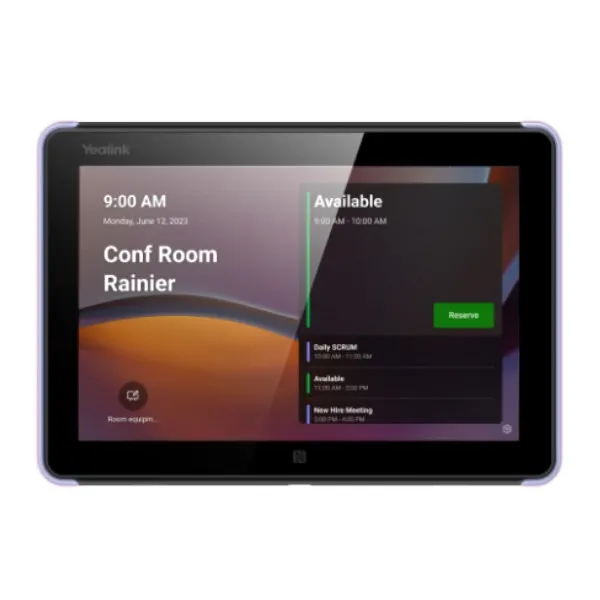
YEALINK Microsoft Teams Panels Dubai are built for businesses that want a simple, professional and visible way to manage meeting rooms. Instead of staff checking calendars from laptops or asking reception about room status, a Teams panel mounted outside the meeting space shows whether the room is free, occupied or reserved. Fourteck supplies Yealink room scheduling panels for Dubai offices that need a practical purchase path, correct Microsoft Teams compatibility guidance, installation planning and long-term support.
Door-Side Room Visibility
PoE Friendly Installation
Dubai Deployment Support
YEALINK Microsoft Teams Panels Dubai Information
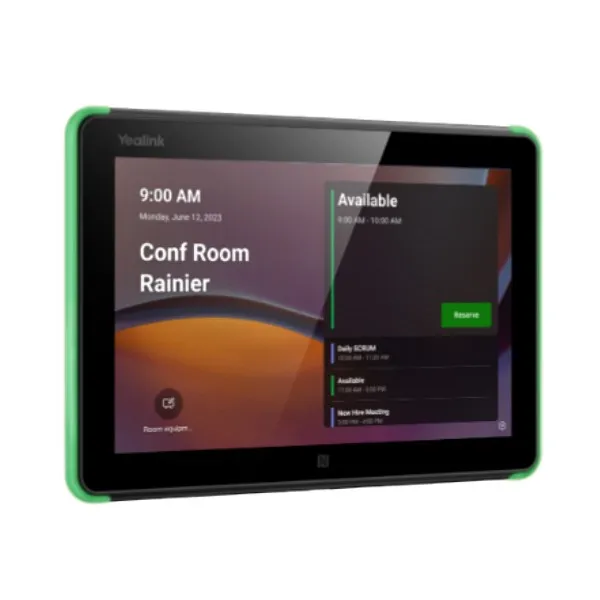
Yealink offers room scheduling panel solutions designed to make meeting room availability easy to understand at the doorway. The Yealink RoomPanel Plus family is positioned for a clear scheduling experience, with a spacious interactive display, modern Android platform, colored status visibility and simple mounting options. Yealink also highlights wireless connectivity, Bluetooth support, RFID and NFC capability, and one-cable style deployment for practical room installations. Microsoft lists the Yealink RoomPanel Plus E2 as a Teams-enabled room scheduling device with a 10-inch touch screen, anti-fingerprint surface and integrated colored LED light bar for room status visibility.
For Dubai buyers, the important point is not only the screen size or the mounting kit. The real value comes from reducing room booking friction across busy office floors. A sales team in Business Bay, a clinic in Jumeirah, a school in Al Barsha or a boardroom in DIFC may all need the same result: quick room check-in, visible availability and fewer interruptions. Fourteck writes this page for procurement teams, IT managers and facility coordinators who want a genuine Yealink Teams panel with local buying assistance, deployment discussion and support after delivery.
YEALINK Microsoft Teams Panels Dubai Highlights
Clear Room Status
The panel helps visitors and staff understand meeting room availability from outside the door, reducing unnecessary knocks and calendar confusion.
Touch Booking
Users can check details and reserve spaces directly through an interactive panel experience, making ad hoc meetings easier to manage.
Professional Finish
Wall, glass or mullion-style mounting options help maintain a neat appearance for executive floors and customer-facing meeting spaces.
Teams Ready Workflow
The panel is suitable for Microsoft Teams room scheduling environments where central calendar visibility and reliable access matter.
YEALINK Microsoft Teams Panels Dubai Features
Competitor listings often focus only on a few headline specifications such as touch display, LED light bar, Wi-Fi and NFC. Fourteck focuses on the complete buying decision. A Teams panel should be selected according to room count, Microsoft tenant readiness, power availability, mounting surface, network policy, security needs and user behavior. A single executive room may need a premium-looking installation. A full office floor may need multiple panels with consistent naming, calendar mapping and user training.
The Yealink panel range is a strong fit when organizations want visible room control without adding complicated equipment at every doorway. The device can support modern scheduling behavior for boardrooms, interview rooms, training rooms, consultation spaces and shared collaboration areas. Fourteck can also help buyers align it with related Yealink products such as wireless sharing pods, Teams room bars and video meeting systems, so the room becomes easier to use from booking to meeting start.
YEALINK Microsoft Teams Panels Dubai Specifications
Specifications may vary by selected Yealink RoomPanel model and firmware region. The below table is written for buying guidance and should be confirmed at quotation stage based on the exact RoomPanel or RoomPanel Plus E2 variant.
YEALINK Microsoft Teams Panels Detailes
Dubai customers may search for this solution in different ways, including Yealink RoomPanel Teams, Yealink Teams room panel, Yealink room booking panel, Microsoft Teams scheduling display, Yealink RoomPanel Plus E2, Yealink door display, meeting room booking screen, Teams room scheduler and Yealink conference room panel. Fourteck uses the product name clearly so procurement teams can match it with quotations, internal approvals and IT requirements. The panel is suitable for workplaces that already use Microsoft 365 calendars, Teams Rooms or centralized room booking. It is also useful for companies planning a new office fit-out where each meeting room needs a visible booking interface from the first day of operation. YEALINK Microsoft Teams Panels Dubai Buy now support is available through Fourteck for companies that want genuine hardware, practical advice and installation coordination.
YEALINK Microsoft Teams Panels Dubai Descriptions
Fourteck supports meeting room technology requirements across Dubai, including Deira, Bur Dubai, Business Bay, Downtown Dubai, Dubai Marina, JLT, JBR, Al Barsha, Dubai Silicon Oasis, Dubai Investment Park, Jebel Ali, Al Quoz, Sheikh Zayed Road, DIFC, Dubai Internet City, Dubai Media City, Dubai Healthcare City, Mirdif, Nad Al Sheba and Dubai South. These locations include corporate offices, logistics firms, clinics, hotel meeting spaces, educational campuses, showrooms and coworking centers. A Yealink Teams panel is especially useful where multiple teams share rooms throughout the day. It allows users to see room availability before entering, helps reception guide guests, and supports a more organized workplace experience. Fourteck can discuss room count, mounting points, network readiness and Teams account requirements before supply.
YEALINK Microsoft Teams Panels GCC Uses
Across the GCC, meeting rooms are now part of daily digital operations. Businesses in the UAE, Saudi Arabia, Qatar, Oman, Bahrain and Kuwait often run hybrid meetings across branches, project sites and regional offices. A Yealink Teams panel helps simplify the physical room layer by showing who booked the space and when it is available. For enterprise floors in Riyadh, finance offices in Doha, oil and gas service providers in Muscat, training rooms in Manama and corporate teams in Kuwait City, the same need appears: fewer booking conflicts and cleaner room usage. Fourteck writes this content for Dubai purchase intent while recognizing that many regional buyers compare Microsoft Teams room panel solutions before standardizing across multiple offices.
YEALINK Microsoft Teams Panels Africa Availability
Organizations in Kenya, Uganda, Tanzania, Ethiopia, Nigeria, Ghana and South Africa are increasingly planning modern meeting rooms for hybrid work, training and customer engagement. Yealink room scheduling panels can support these environments when teams need visible room booking and Microsoft Teams-based coordination. Fourteck’s regional web presence helps African customers discover collaboration products while Dubai buyers can coordinate UAE purchasing through Fourteck. For multi-country companies, a consistent room panel experience can reduce user training time because staff see the same room availability process in every branch. The result is smoother scheduling, better meeting discipline and fewer facility management complaints.
YEALINK Microsoft Teams Panels Understanding With Other Models
Fourteck also lists Yealink WPP30 Dubai, a 4K wireless sharing pod that complements meeting room collaboration by helping users present content without messy cables. When paired conceptually with a Teams scheduling panel, the meeting room becomes easier to use before and during the meeting: the panel manages room availability, while the sharing pod supports fast content presentation. Explore the related Fourteck page here: Yealink WPP30 Dubai.
Other Yealink collaboration devices that may be considered for a full room plan include MeetingBar A10 for small spaces, MeetingBar A40 for small to medium meeting rooms, MeetingBoard Pro for interactive collaboration, MCore kits for Windows-based Teams rooms, RoomCast E2 for presentation needs and Yealink audio accessories for improved microphone coverage. Fourteck can help align the room panel with the correct room endpoint instead of treating each device as a separate purchase.
YEALINK Microsoft Teams Panels GCC Usage
GCC companies often use Microsoft Teams for internal meetings, vendor calls, remote interviews and management reviews. A Yealink scheduling panel supports this workflow by connecting the physical doorway with the digital calendar. In Dubai and Abu Dhabi, it helps corporate towers manage shared boardrooms. In Riyadh and Jeddah, it can support large office floors with many meeting spaces. In Doha, it is useful for project teams that rely on accurate room timing. In Muscat, Manama and Kuwait City, it helps IT and facilities teams reduce room disputes. For procurement teams comparing price, warranty, delivery and setup, Fourteck provides a practical route to confirm model suitability before issuing a purchase order.
YEALINK Microsoft Teams Panels Dubai Service Availability
Fourteck supports Yealink Teams panel buying, consultation and deployment planning for Dubai businesses. Service support may include product selection, quotation assistance, Teams room suitability discussion, mounting guidance, network readiness checks and post-purchase support coordination. This is useful for IT managers who need to avoid mistakes such as choosing the wrong panel model, missing PoE planning, installing panels at inconvenient heights or assigning incorrect room accounts. Fourteck’s role is to help buyers move from product interest to a working room scheduling setup with less uncertainty.
Fourteck YEALINK Microsoft Teams Panels Dubai Reference
A useful related Fourteck product is Yealink WPP30 Dubai. While the WPP30 is a wireless sharing accessory and not a room scheduling panel, it belongs to the same modern meeting room ecosystem. Companies planning a Microsoft Teams room may need a panel for booking, a camera or video bar for meetings, a touch console for room control and a wireless sharing device for presentations. Fourteck can help buyers understand how these devices fit together in Dubai boardrooms, classrooms and collaboration spaces.
YEALINK Microsoft Teams Panels Dubai Room Status Feature Used
The room status feature is one of the most valuable parts of a scheduling panel. A visible colored indicator helps staff quickly understand whether a room is available, occupied or reserved. This is especially helpful in busy Dubai offices where rooms are used for sales calls, interviews, vendor meetings and management discussions. Instead of opening doors or disturbing ongoing meetings, users can check status at a glance. For reception teams, the panel also helps guide visitors confidently to the correct meeting space.
YEALINK Microsoft Teams Panels Dubai Touch Scheduling Feature Used
Touch scheduling helps teams reserve or check rooms without returning to a desk. In a fast-moving office, employees may need an urgent discussion space for ten or fifteen minutes. A room panel can make this easier by showing available time and supporting quick booking behavior within the Teams room scheduling environment. This is useful for agile teams, HR interviews, project standups and executive assistants who manage multiple meeting spaces throughout the day.
YEALINK Microsoft Teams Panels Dubai Specifications
| Product Family | Yealink RoomPanel and RoomPanel Plus E2 Microsoft Teams scheduling panel range |
| Best For | Meeting room booking, doorway status display, calendar visibility and room management |
| Typical Users | Corporate offices, education, healthcare, hospitality, government and coworking spaces |
| Installation Style | Door-side wall, glass or mullion installation according to selected accessory and room design |
| Support Area | Dubai and UAE business customers through Fourteck sales support |
YEALINK Microsoft Teams Panels Dubai One-Cable Deployment Feature Used
A clean deployment is important because room panels are visible to employees and guests. Yealink’s panel design supports practical cable management, and supported setups can be planned around PoE to reduce cable clutter. For Dubai offices with glass partitions and premium interiors, this matters. A messy installation can reduce the professional look of a meeting area. Fourteck can help buyers discuss power, network path, mounting surface and placement before installation begins.
YEALINK Microsoft Teams Panels Comparisons
When selecting a Yealink room solution, buyers should decide whether they need only room scheduling or a complete meeting system. A Teams panel manages room availability, while other Yealink devices manage video, audio, sharing or room control.
| Yealink Model | Use Case | Buyer Note |
|---|---|---|
| RoomPanel / RoomPanel Plus E2 | Room scheduling and status display | Best when the doorway needs booking visibility |
| MeetingBar A10 | Small rooms and focus spaces | Compact video meeting setup |
| MeetingBar A40 | Small to medium Teams rooms | All-in-one room video bar option |
| MeetingBoard Pro | Interactive collaboration | Useful for whiteboarding and presentations |
| MCore Kit | Windows-based Teams room compute | Suitable for more structured MTR deployments |
| WPP30 | Wireless content sharing | Useful accessory for presentation rooms |
YEALINK Microsoft Teams Panels Dubai NFC And RFID Feature Used
Supported Yealink panel models include NFC and RFID capability for identity-related workflows. This can be useful for workplaces that want more structured room access or future-ready authentication options. While every organization may not use these functions immediately, the availability of such features helps IT teams plan a more secure meeting room environment. Fourteck can help buyers confirm whether the selected model and software environment match the required authentication workflow.
Market Availability YEALINK Microsoft Teams Panels Dubai Business Bay
Dubai buyers often ask for YEALINK Microsoft Teams Panels Dubai Authorized partner guidance because meeting room products must match Microsoft environment requirements, mounting needs and warranty expectations. Fourteck supports procurement teams looking for Ready Stock Dubai confirmation, price discussion and delivery planning. Request Quote through Fourteck when your office needs a Teams panel for Business Bay, DIFC, Dubai Marina, JLT, Deira or Al Quoz. Check UAE Availability before confirming a large-room rollout, especially when multiple panels are required for a new office fit-out or renovation project.
YEALINK Microsoft Teams Panels AbuDhabi
Abu Dhabi organizations use Teams meeting rooms across government offices, energy companies, education campuses, healthcare facilities and corporate towers. A Yealink Teams panel can support these environments by making meeting room status visible before users enter. Buyers in Abu Dhabi may compare panel availability, installation support, warranty and compatibility with their existing Microsoft 365 tenant. Fourteck can support UAE procurement discussions from Dubai while helping buyers understand model selection, room count and deployment planning.
YEALINK Microsoft Teams Panels Dubai Deployment
A successful deployment starts with room mapping. Each room should have a clear name, calendar account, network route and installation position. The panel should be installed where users naturally approach the meeting room, normally outside the door at a comfortable viewing height. IT teams should confirm licensing, Teams panel configuration, network security rules and device management preferences. Facilities teams should confirm wall type, glass mounting needs, cable route and interior finish. Fourteck can help buyers discuss these details before supply so that the Yealink panel becomes part of a working room management process, not just a screen mounted on the wall.
YEALINK Microsoft Teams Panels Dubai Installation Details
Installation should consider visibility, access, safety and cable finish. The panel should not be hidden behind door swing areas or placed where sunlight causes glare. For glass rooms, the correct mounting approach is important to maintain a neat look. For gypsum or concrete walls, cable path and power planning should be checked early. PoE planning can simplify installation when supported, but the network switch and cabling must be ready. After installation, the panel should be assigned to the correct room account and tested for meeting display, booking behavior and status updates. Fourteck can guide buyers through this planning stage.
YEALINK Microsoft Teams Panels Sharjah
Sharjah businesses, universities, clinics and trading companies may use Teams panels to organize shared meeting rooms and training spaces. A clear room scheduling display helps employees check availability without calling admin staff or opening multiple calendars. For companies with offices between Sharjah and Dubai, using the same Yealink panel experience across branches can make room usage more consistent. Fourteck can discuss supply and compatibility for UAE customers who want a professional room booking solution.
Product Availability YEALINK Microsoft Teams Panels Dubai
Get YEALINK Microsoft Teams Panels Dubai from Fourteck for professional meeting room booking projects. Buying Support for YEALINK Microsoft Teams Panels Dubai is useful when your IT team needs model advice, license clarity and installation planning before purchase. Genuine YEALINK Microsoft Teams Panels Dubai Guide support helps procurement teams avoid mismatched products and incomplete deployment preparation. Contact Fourteck to discuss quantity, delivery, warranty and room setup requirements.
YEALINK Microsoft Teams Panels Ajman
Ajman offices, educational institutes, clinics and shared service companies can use Yealink Teams panels to improve room booking discipline. Instead of manual room lists or reception-led scheduling, a Teams panel gives users a visible and modern way to confirm room availability. This is helpful for growing companies that are standardizing meeting spaces across Ajman, Sharjah and Dubai. Fourteck can support UAE buyers with product guidance and quotation assistance.
Fourteck Dealing Product Dubai
Fourteck deals with meeting room and collaboration products that support modern workspaces. For a Yealink Teams panel project, buyers may also consider video conferencing systems, wireless presentation tools, meeting room displays, network accessories and installation services. A room scheduling panel is most effective when the complete meeting room is planned properly. Explore Fourteck’s video conferencing solution page for a wider meeting room direction: Video Conferencing Solutions Dubai. This helps buyers connect the scheduling requirement with the full room collaboration plan.
Fourteck Regional Support Connections
YEALINK Microsoft Teams Panels FAQ
What is a Yealink Microsoft Teams Panel?
It is a room scheduling display installed outside a meeting room to show availability, meeting details and booking status through a Teams-friendly experience.
Is it suitable for Dubai offices?
Yes. It is suitable for Dubai offices, clinics, schools, hotels and shared workplaces that need better room booking visibility.
Does it work with Microsoft Teams?
Yealink offers Teams-enabled scheduling panels, and the exact model should be confirmed before purchase according to your Microsoft environment.
Can Fourteck help with model selection?
Yes. Fourteck can help buyers select the correct Yealink panel based on room count, mounting type, network readiness and meeting workflow.
Can it be installed on glass?
Supported mounting accessories may allow glass installation, but the exact package and site condition should be checked before installation.
Does it support PoE?
Many room panel installations are planned around PoE or structured cabling, but power method should be verified for the selected model.
Can it reduce double booking?
Yes. By showing room status at the doorway, it helps users avoid entering or reserving rooms that are already occupied or scheduled.
Is it useful for multiple rooms?
It is especially useful for offices with multiple meeting rooms because each doorway can display status and booking details consistently.
Does Fourteck provide UAE quotation support?
Yes. Fourteck can provide quotation support for Dubai and UAE business customers based on quantity and model requirement.
What should be checked before ordering?
Check Teams licensing, room account setup, network path, mounting surface, power availability, quantity and warranty expectations.
Contact Fourteck Sales

Reviews
There are no reviews yet.