
Yealink EHS61 Dubai
Yealink EHS61 Dubai is a professional wireless headset adapter for businesses that need reliable headset-to-desk-phone call control. It is built for selected Yealink WH62 and WH63 DECT headset bases and helps teams connect with compatible Mitel, Unify, Poly, and Yealink T2X/T4XG desk phones. For UAE offices that manage daily customer calls, front desk communication, service counters, sales follow-up, and internal support calls, this small adapter can make a big difference in comfort, mobility, and response time.
Yealink EHS61 Dubai Information
The Yealink EHS61 is made to bridge a compatible Yealink wireless headset base with selected desk phones, giving users a cleaner way to manage calls from the headset. Instead of staying tied to the handset or repeatedly reaching for desk phone buttons, users can handle essential call actions from the wireless headset. This is valuable in busy Dubai workplaces where employees need to check documents, greet visitors, update CRM entries, or move around a small office while staying connected to live calls.
The adapter is especially useful for reception areas, customer care desks, shared admin counters, call handling teams, finance departments, clinics, education offices, retail back offices, and SME environments. Its role is practical: it supports remote answering, call ending, and volume adjustment when paired with the right headset and phone combination. Fourteck positions this product for buyers who already use or plan to use Yealink WH62 or WH63 headsets and need compatibility support before purchasing.
Before ordering, Fourteck can help confirm the headset hardware mark, phone model, cable requirement, and installation expectation. This reduces purchase mistakes and supports faster deployment for UAE teams that cannot afford desk-phone downtime.
Yealink EHS61 Dubai Highlights
Manage important call actions from a compatible Yealink wireless headset, helping staff stay productive while moving around the desk.
Designed for straightforward connection when the correct phone, headset hardware, and cable are used together.
Suitable for selected Mitel, Unify, Poly, and Yealink T2X/T4XG desk phones, subject to model compatibility.
Compact adapter format keeps the desk tidy and supports professional communication areas with limited space.
Yealink EHS61 Dubai Features
Businesses often look for the Yealink EHS61 when they need a simple accessory that solves a very specific communication problem: connecting wireless headset control to a desk phone environment. Many competitor listings focus only on the adapter name, but buyers usually need more clarity. The important questions are whether the headset base supports EHS61, whether the desk phone is in the supported family, and whether the installation includes the correct cables for the brand being connected.
Fourteck adds value by helping customers understand these points before procurement. This is useful for companies upgrading from wired headsets, replacing older headset adapters, or building a new VoIP desk setup in Dubai. The EHS61 is not a universal Bluetooth dongle or a general audio converter. It is a focused headset adapter for Yealink DECT headset control with selected desk phones.
For purchase teams comparing Yealink accessories, the EHS61 stands out when the requirement includes WH62 or WH63 headset support, plug-and-play operation, remote call management, and compatibility with specific third-party desk phones. This makes it a practical accessory for offices that want mobility without replacing an existing phone fleet.
Yealink EHS61 Dubai Specifications
The Yealink EHS61 is a compact accessory with a focused set of technical functions. The table below helps UAE buyers review the main specification points before confirming compatibility with Fourteck sales or technical support.
Yealink EHS61 Details
Customers may search for this accessory as Yealink EHS61, Yealink EHS61 adapter, Yealink wireless headset adapter, EHS61 headset adapter, Yealink WH62 EHS61, Yealink WH63 EHS61, Yealink EHS61 Dubai, or Yealink EHS61 UAE. All these names point toward the same buying need: a small interface that helps a compatible headset control a compatible desk phone.
The product is best understood as a communication workflow accessory. It does not replace the headset, phone, PBX, or VoIP service. Instead, it helps the headset and desk phone communicate in a way that supports remote call control. When a user receives a call, the incoming call can be handled through the wireless headset rather than only through the desk phone keypad. This gives employees a better working posture and helps reduce missed calls at busy desks.
Fourteck recommends confirming the phone model and headset hardware before purchase. For example, WH62 and WH63 units should carry the correct support marking. This matters because older hardware may not provide the same EHS61 support. With the correct match, the adapter is a neat and practical solution for professional communication spaces.
Yealink EHS61 Dubai Descriptions
Fourteck supports Yealink EHS61 requirements across Dubai business areas including Deira, Bur Dubai, Business Bay, Downtown Dubai, Dubai Marina, Jumeirah, Al Quoz, Dubai Silicon Oasis, Dubai Internet City, Dubai Media City, Jebel Ali, Al Barsha, Nad Al Sheba, Dubai Investment Park, and Dubai South. The adapter is suitable for front offices, trading companies, clinics, logistics counters, real estate branches, education teams, finance desks, hotel back offices, and customer service rooms.
Many UAE companies now keep a hybrid mix of VoIP desk phones, wireless headsets, softphone users, and branch office extensions. The Yealink EHS61 helps one important part of that setup by improving headset control for physical desk phones. This is especially useful where employees still prefer a desk phone for stable calling but need the comfort of a wireless headset during long working hours.
Fourteck can assist customers in Dubai, Abu Dhabi, Sharjah, Ajman, Ras Al Khaimah, Fujairah, and Umm Al Quwain with product selection, quotation support, and related telecom accessories. Whether the buyer needs one adapter for a reception desk or multiple pieces for a customer care floor, the product can be matched with the right Yealink headset and desk phone environment.
Yealink EHS61 GCC Uses
Across the GCC, buyers search for Yealink EHS61 in UAE, Saudi Arabia, Qatar, Oman, Bahrain, and Kuwait when they need a dependable desk-phone headset accessory for business calling. The use case is similar across the region: organizations want wireless movement, desk phone stability, and faster call handling without replacing the entire communication system. In corporate offices, hotel operations, healthcare clinics, call handling teams, trading companies, schools, and public-facing counters, the EHS61 can help employees answer or end calls smoothly while staying focused on the customer.
For Dubai-headquartered businesses with GCC branches, standardizing small accessories can reduce confusion. When teams use compatible Yealink WH62 or WH63 headsets, the EHS61 helps create a consistent headset experience with supported phones. This makes branch rollouts easier for IT teams because the accessory is simple, compact, and easy to document.
Fourteck can guide UAE buyers who are sourcing for local offices and regional projects. The goal is to make sure the purchase fits the desk phone model, headset generation, and installation plan before order confirmation.
Yealink EHS61 Africa Availability
Businesses in Kenya, Uganda, Tanzania, Nigeria, South Africa, Ghana, Ethiopia, and other African markets often look for Yealink communication accessories to support office telephony and customer service operations. The Yealink EHS61 is relevant for offices that already use compatible Yealink wireless headsets and selected desk phones. It can support structured communication setups in banks, logistics firms, clinics, training centers, universities, retail operations, and SME branches.
Fourteck has regional web presence for UAE and Africa-focused IT equipment support, which helps customers review related telecom, networking, CCTV, firewall, server, and office infrastructure solutions from one technology partner. For African projects, buyers should still confirm local model availability, headset hardware marking, and desk phone compatibility before placing bulk requirements.
The EHS61 is practical for growing teams because it improves call handling without adding heavy infrastructure. It is a small accessory, but the right accessory can protect productivity when the team depends on desk calls every day.
Yealink EHS61 Understanding With Other Models
Fourteck lists a wide Yealink supplier category with many Yealink products including meeting bars, headset models, speakerphones, and video collaboration accessories. Buyers reviewing the Yealink EHS61 may also want to compare related products such as Yealink BH70 Dubai, Yealink BH71 Dubai, Yealink BH72 Dubai, Yealink BH76 Dubai, Yealink BH78 Dubai, Yealink A30 Dubai, Yealink AP08 Dubai, and Yealink CM20 Dubai. These products serve different communication needs, so the best choice depends on whether the requirement is wireless headset control, Bluetooth headset use, meeting room audio, video conferencing, or IP phone desk operation.
The EHS61 is not meant to compete with a headset. It supports a compatible headset by enabling desk phone control. A Bluetooth headset may be preferred for laptop and mobile calling, while a DECT headset with EHS61 support is often better for desk phone call stability and office movement. A meeting bar or conference microphone is suitable for rooms, not individual desk calls.
Fourteck helps customers choose the correct product path so they do not buy an accessory when they actually need a headset, or buy a headset when their real requirement is compatibility between headset and desk phone.
Yealink EHS61 GCC Usage
GCC buyers often prioritize genuine telecom accessories, fast response, warranty clarity, and technical confirmation before order placement. The Yealink EHS61 suits this buying pattern because compatibility is the most important part of the purchase. In UAE, Saudi Arabia, Kuwait, Qatar, Bahrain, and Oman, businesses may use the adapter in front office desks, support counters, call routing teams, reservation desks, and internal admin departments.
For companies managing multiple brands of desk phones, the EHS61 can be useful where supported phone families are present. It helps preserve existing phone investments while improving the user experience through headset-based call handling. This can reduce desk clutter, improve response speed, and support a more comfortable communication workflow for staff who spend long hours on calls.
Fourteck supports GCC-focused buyers from Dubai with product advice, related accessory selection, and quotation assistance. The product is a smart fit when the purchase goal is simple: keep desk phone calling stable and make wireless headset control easier for daily users.
Yealink EHS61 Dubai Service Availability
Fourteck supports Yealink EHS61 purchase requirements with practical pre-sales advice, compatibility checking, quotation assistance, and related telecom product guidance. The most important service step is confirming the environment: headset model, headset hardware label, phone model, desk location, number of users, and whether the product is needed for a single desk or a wider team rollout.
For business users in Dubai, the service discussion may include headset comfort, desk phone cabling, reception desk workflows, call center movement, and integration with the existing PBX or VoIP setup. Fourteck can also help buyers source suitable Yealink headsets or phone models if the existing devices are not compatible.
This support is valuable because telecom accessories are small but critical. A wrong accessory can delay installation, while the correct one can be installed quickly and quietly without disrupting the team.
Fourteck Yealink EHS61 Dubai Reference
Fourteck’s Yealink supplier category includes a wide range of Yealink communication products for UAE buyers. A suitable related reference is Yealink BH70 Dubai, which is listed among the Yealink products on Fourteck. While the BH70 is a headset product and the EHS61 is an adapter, both are part of the larger conversation around business audio, professional calling, and user comfort.
Buyers who are planning a full headset refresh may review headset models first, then confirm whether an EHS adapter is required for desk phone control. This approach avoids mismatched purchases and supports a cleaner user experience for office teams.
Yealink EHS61 Dubai Remote Call Control Used
Remote call control is one of the most important reasons to buy the Yealink EHS61. In a busy office, users cannot always keep one hand on the phone. A receptionist may be checking visitor details, a sales executive may be opening a customer file, and a support agent may be walking to a nearby printer or supervisor. The EHS61 helps the headset act as part of the call handling flow, not just as an audio device.
With the correct setup, users can answer calls, end calls, and adjust volume from the wireless headset. This makes daily communication smoother and helps staff maintain a professional response rhythm. For Dubai businesses that rely on quick customer engagement, the benefit is not only convenience; it is better call discipline and fewer missed interactions.
Yealink EHS61 Dubai Plug-And-Play Feature Used
The plug-and-play nature of the Yealink EHS61 is attractive for IT teams that want simple accessory deployment. When the headset hardware and phone model are suitable, the installation process is designed to be straightforward. This matters in offices where downtime must be short and users need quick access to their desk phone calling functions.
Fourteck still recommends confirming compatibility before installation, because plug-and-play works best when the correct devices are selected from the beginning. Once matched, the adapter can support a clean desk setup and a more comfortable calling experience without complicated configuration work.
Yealink EHS61 Dubai Specifications
| Included Items | EHS61 adapter, connection cables for supported phone families, and user guide |
| Primary Use | Wireless headset control for selected desk phones |
| Suitable Teams | Reception, call center, admin, customer service, finance, clinics, schools, and SME users |
| Business Benefit | More flexible call handling and improved desk productivity |
For procurement teams, the key specification is compatibility rather than size. The EHS61 should be purchased with awareness of the headset generation and phone model. Fourteck can guide this selection for Dubai and UAE customers.
Yealink EHS61 Dubai Desk Phone Compatibility Used
Desk phone compatibility is the feature that decides whether the EHS61 is the correct accessory for a buyer. The adapter supports selected desk phone families, including models from Mitel, Unify, Poly, and Yealink T2X/T4XG ranges. This gives businesses flexibility when they are not using only one phone brand across all desks.
In real office environments, phones may vary by department or branch. A company may keep older desk phones at reception, newer IP phones in sales, and mixed models in branch offices. Fourteck can help review the requirement and guide the buyer toward the right adapter or alternative accessory. This step supports reliable installation and helps avoid unnecessary returns or delays.
Yealink EHS61 Dubai Comparisons
The Yealink EHS61 belongs to a wider Yealink workplace communication family. The table below helps buyers understand where it fits when reviewing other Yealink options from Fourteck.
| Model | Best Use | Buyer Note |
|---|---|---|
| Yealink EHS61 | Headset adapter for desk phone control | Check WH62/WH63 support marking |
| Yealink BH70 | Business headset requirement | Useful for modern workplace audio |
| Yealink BH71 | Portable calling users | Good for mobile professionals |
| Yealink BH76 | Premium headset use | Suitable for heavy calling teams |
| Yealink A30 | Meeting room video collaboration | Different use case from headset adapter |
| Yealink CM20 | Meeting room microphone requirement | For room audio, not individual desk phone control |
Yealink EHS61 Dubai WH62 And WH63 Hardware Support Used
The EHS61 works only with compatible WH62 and WH63 headset hardware that is marked for EHS61 support. This is an important feature because it protects the buyer from assuming that every WH62 or WH63 base will automatically work. The support mark on the package or base helps identify suitable hardware.
Fourteck recommends checking this detail before purchase, especially when the headset was bought earlier, transferred between departments, or sourced from a previous project. Correct hardware confirmation helps ensure the adapter performs as expected in Dubai office environments.
Market Availability Yealink EHS61 Dubai Business Bay
For companies checking Yealink EHS61 Best price, Yealink EHS61 Buy now, Yealink EHS61 Authorized partner, Ready Stock Dubai, Ready stock Business Bay, WhatsApp Fourteck Sales, and UAE telecom accessory availability, Fourteck provides quotation support through its contact team. The adapter is suitable for buyers who need genuine Yealink accessory guidance, fast communication, and compatibility support before order confirmation. Dubai businesses in Business Bay, Deira, Al Quoz, Dubai Marina, Jebel Ali, and Dubai Silicon Oasis can request assistance for single-unit purchases or multi-desk rollout planning.
Yealink EHS61 AbuDhabi
Abu Dhabi businesses often search for Yealink EHS61 when upgrading reception desks, corporate communication rooms, healthcare desks, education offices, and service counters. The adapter helps users manage calls from compatible wireless headsets while keeping the desk phone as the main calling device. Fourteck can assist Abu Dhabi customers with model confirmation, quotation support, and related Yealink accessory selection for offices in the city, Mussafah, Khalifa City, Al Maryah Island, and surrounding business districts.
Yealink EHS61 Dubai Deployment
Deployment should begin with a simple device review. The IT or admin team should identify the desk phone model, confirm the Yealink headset base model, check for EHS61 support marking, and decide where the adapter will be installed. This avoids confusion during installation and helps the purchase team order the correct quantity.
For small offices, deployment may involve one reception desk or manager desk. For larger teams, Fourteck recommends planning by department so each desk receives the correct accessory and headset setup. The adapter should be connected using the correct included cable for the phone family. After connection, users should test incoming calls, answer control, hang-up control, and volume adjustment.
A clean deployment improves user confidence. Staff should know how to answer calls from the headset, how to return to desk phone control if required, and when to contact IT support. Fourteck can help guide this process for Dubai and UAE business customers.
Yealink EHS61 Dubai Installation Details
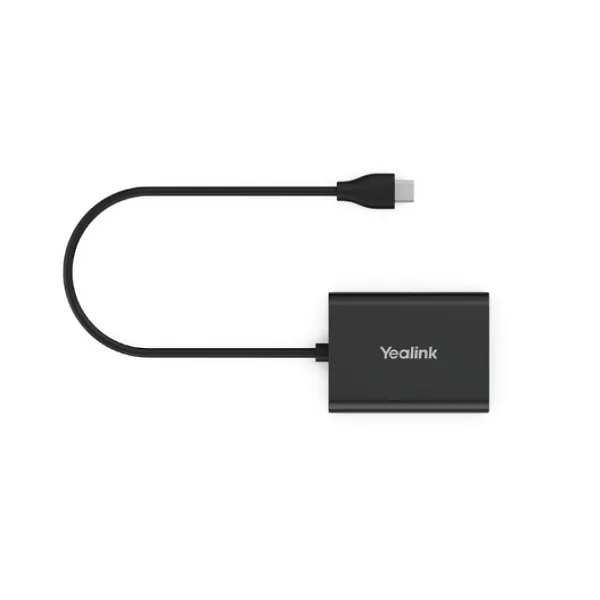
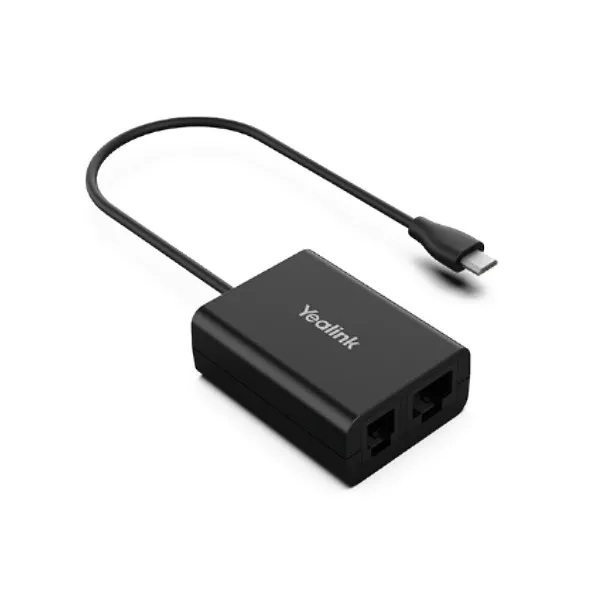
Installation is usually straightforward when the product is matched correctly. The EHS61 connects between the compatible Yealink headset base and the supported desk phone using the relevant cable. The Micro USB connection supports the headset side, while the included cables support selected phone connection requirements. Once connected, the team should test call alerting, answer, end, and volume functions.
The product is best installed at a desk where the phone, headset base, and user workflow are already clear. Avoid forcing cable connections or assuming compatibility with unsupported phones. If the desk phone model is not known, take a photo of the phone label and share it with Fourteck for buying support.
For daily use, the adapter stays connected and works quietly in the background. Users can focus on professional calls while gaining the freedom of wireless headset movement. This makes it a strong fit for call-heavy UAE offices.
Yealink EHS61 Sharjah
Sharjah companies in industrial areas, schools, clinics, trading offices, and service centers may use the Yealink EHS61 to improve call handling at front desks and admin counters. The adapter is useful when staff need wireless headset convenience but still rely on desk phones for business calling. Fourteck can support Sharjah buyers with compatibility guidance, product quotation, and related Yealink headset or desk phone requirements.
Product Availability Yealink EHS61 Dubai
Get Yealink EHS61 from Fourteck for Dubai business headset adapter requirements. Buying Support for Yealink EHS61 is available for teams that need help checking WH62 or WH63 compatibility, desk phone model support, and installation expectations. Genuine Yealink EHS61 Guide support helps customers choose the right accessory before order confirmation and reduces the risk of mismatched desk phone setups.
Yealink EHS61 Ajman
Ajman businesses searching for Yealink EHS61 usually need a dependable accessory for reception phones, small call teams, and office communication desks. Fourteck supports Ajman customers with UAE-based product guidance, quotation handling, and accessory recommendations. The adapter is a practical option for teams that want better headset mobility with compatible desk phones while maintaining a simple and professional desk setup.
Fourteck Dealing Product Dubai
Fourteck supports related Yealink communication products across Dubai and UAE. Customers reviewing the EHS61 may also explore Yealink BH70 Dubai, Yealink BH71 Dubai, Yealink BH72 Dubai, Yealink BH76 Dubai, Yealink BH78 Dubai, Yealink A30 Dubai, Yealink AP08 Dubai, and Yealink CM20 Dubai through the Fourteck Yealink supplier category. These products help businesses build stronger calling, meeting, and collaboration environments.
For a desk phone user, the right path may be a compatible Yealink DECT headset plus the EHS61 adapter. For laptop-first users, a business headset may be enough. For boardrooms, a meeting solution is more suitable. Fourteck helps match the product to the workflow so buyers invest in the right equipment.
Fourteck Regional Technology Support
Yealink EHS61 FAQ
It is used to connect compatible Yealink wireless headsets with selected desk phones for remote call control.
It works with WH62 and WH63 headset hardware that is marked as EHS61 supported.
It supports selected Mitel, Unify, Poly, and Yealink T2X/T4XG desk phones depending on the model and cable setup.
Yes, it is designed for simple plug-and-play use when the correct headset and phone are selected.
Yes, Fourteck can help review the headset base and desk phone model before order confirmation.
Yes, it is suitable for call centers, reception desks, service teams, and customer support environments using compatible devices.
No. It is an adapter that supports compatible wireless headset call control with selected desk phones.
Dubai buyers can contact Fourteck for quotation support, model guidance, and UAE availability assistance.
Check the headset model, EHS61 support marking, desk phone model, and required cable type.
Yes, Fourteck can support UAE customers in Abu Dhabi, Sharjah, Ajman, and other locations with buying guidance.




Reviews
There are no reviews yet.