

Microsoft Teams Desk Phone • UAE Business Supply • Fourteck Support
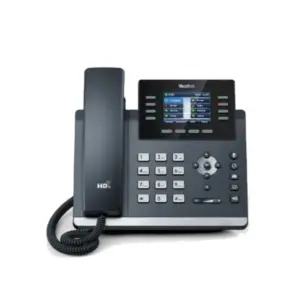
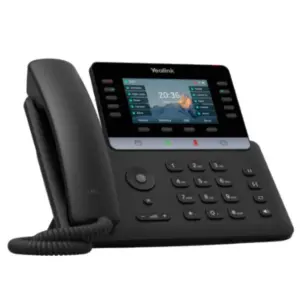
Yealink MP54 E2 Dubai
A professional entry-level Microsoft Teams desk phone for businesses that want clear voice, simple user handling, fast deployment and a cleaner calling experience across front desks, office desks, reception points and shared workspaces.
Quick Buying Notes
- Dedicated Microsoft Teams button for faster calling access.
- 4-inch capacitive touch display for daily office use.
- HD voice with Yealink noise reduction for clearer conversations.
- Built-in Bluetooth 5.2, dual-band Wi-Fi and USB headset support.
- Dual Gigabit Ethernet with PoE support for neat desk deployment.
Yealink MP54 E2 Dubai Information
Yealink MP54 E2 Dubai is designed for organisations that need a reliable Teams-ready desk phone without pushing every user to a complex executive endpoint. It fits practical locations such as reception counters, help desks, manager desks, branch offices, clinic counters, school administration rooms, warehouse supervisors, hotel back offices and shared office areas. The device combines a familiar physical handset with a modern touch interface, so staff can answer, transfer and manage calls with less training.
The MP54 E2 is especially useful where a business wants Microsoft Teams calling to feel like a normal desk phone experience. The dedicated Teams button, colour display, hard keys and handset design reduce hesitation for users who still prefer a physical phone. At the same time, IT teams get practical deployment options through network provisioning, device management platforms, PoE cabling and headset flexibility.
Fourteck positions this model for buyers who want dependable communication hardware with installation awareness. A phone purchase becomes more successful when the network switch, VLAN, PoE budget, Teams license, SIP requirement, user profile and desk layout are considered together. That is why Fourteck supports product supply with guidance for Dubai businesses that expect clean setup, stable voice and quick support after purchase.
Yealink MP54 E2 Dubai Highlights
Teams Focused
A dedicated Microsoft Teams key and Teams-tailored interface help users reach calling features quickly.
Clear Voice
HD handset, HD speaker and noise reduction support cleaner conversations in active office environments.
Flexible Headsets
Bluetooth, RJ9 and USB headset options help staff choose a comfortable working style.
Neat Networking
Dual Gigabit Ethernet and PoE support reduce cable clutter and simplify desk phone installation.
Yealink MP54 E2 Dubai Features
In the UAE market, many buyers compare Teams desk phones based on price, display size, platform support, audio quality and ease of rollout. Yealink MP54 E2 Dubai stands out because it balances these areas for normal business users. It is not positioned as a large executive phone, but it still gives the key features needed for daily calling: a touch screen, physical dial pad, call handling keys, Teams access, handset comfort, headset options and enterprise deployment support.
Competitor listings usually focus on short feature bullets, but real buyers often need more practical clarity. They want to know whether the phone can sit at a reception desk, whether it can work with PoE, whether a Bluetooth headset can be paired, whether Wi-Fi is built in, whether the screen is easy to use, and whether the model is suitable for office workers and common areas. MP54 E2 answers these needs with a compact but capable design.
For Dubai offices, the value is not only the device. It is also the installation environment. A Teams phone depends on licensing, network quality, firewall rules, switching, cabling and user profiles. Fourteck helps businesses choose the correct quantity, plan desk placement, prepare network connectivity and align the phone with existing IPBX or Microsoft Teams communication requirements.
Yealink MP54 E2 Dubai Specifications
The specification below is written for buyers who want a quick technical view before requesting a quotation. Some software details may vary by region, firmware and edition, so Fourteck can confirm the exact unit version during procurement.
Yealink MP54 E2 Details
Businesses may search for this phone using different names, including Yealink MP54 E2 Teams Phone, MP54 E2 Microsoft Phone, Yealink Microsoft Teams Phone MP54 E2, Yealink MP54 E2 IP Phone, Yealink MP54 E2 desk phone and Yealink MP54 E2 VoIP phone. These names generally refer to the same business communication device, although the exact edition and firmware should be checked before purchase.
The product is popular among teams that need a fixed desk calling device rather than softphone-only communication. Reception staff, administration users and office employees often prefer a handset for quick answering and predictable call control. Managers may also use it when they want Teams calling on the desk while keeping the computer free for normal work.
For Dubai buyers, the main purchase questions are usually availability, compatibility, warranty, configuration, headset support, PoE readiness and Teams account setup. Fourteck can help align these points so that the device is not purchased as a standalone box only, but as a working part of the company communication system.
Yealink MP54 E2 Dubai Descriptions
Dubai businesses often operate across multiple city zones and connected Emirates. Yealink MP54 E2 can be planned for offices in Dubai, Abu Dhabi, Sharjah, Ajman, Ras Al Khaimah, Fujairah and Umm Al Quwain where branch calling, reception routing and staff communication need to remain consistent. In Dubai, it suits Business Bay, Deira, Bur Dubai, Al Quoz, Jebel Ali, Dubai Silicon Oasis, Dubai Investment Park, Jumeirah Lake Towers, Dubai Marina and logistics or retail sites that require reliable desk calling.
A company opening a new branch may use the MP54 E2 for reception, accounts, customer service, admin, procurement and management desks. A business replacing older analog systems may use it as part of a Teams calling transition. A warehouse may place it at dispatch or supervisor stations. A clinic may use it for appointment counters. A hotel may use it in back-office operations where Teams calling is required.
Fourteck supports UAE customers with practical product guidance and communication system awareness. The phone can be selected alongside switches, routers, headsets, structured cabling, IPBX planning and managed support, helping the buyer reduce delays after delivery.
Yealink MP54 E2 GCC Uses
Across the GCC, companies in the UAE, Saudi Arabia, Qatar, Kuwait, Bahrain and Oman are moving toward cleaner cloud communication and hybrid calling models. Yealink MP54 E2 is suitable for organisations that want a desk phone experience while keeping collaboration aligned with Microsoft Teams. It can support offices, branches, service counters, retail chains, clinics, logistics hubs, schools and corporate administration points.
In Saudi Arabia, buyers often need Teams phones for growing enterprise offices and distributed branches. In Qatar, the model fits administration and customer-facing counters. In Kuwait and Bahrain, companies may use it for compact offices that require headset flexibility and PoE cabling. In Oman, it can support branch teams that need a simple, stable endpoint without a complicated interface.
Fourteck’s regional presence and partner approach allow businesses to discuss product selection with a team that understands IT infrastructure, network readiness and business calling needs. Instead of choosing only by price, customers can evaluate deployment suitability, licensing, cabling, warranty and support expectations.
Yealink MP54 E2 Africa Availability
African businesses in Kenya, Uganda, Tanzania, Rwanda, Ethiopia, Nigeria, Ghana and South Africa are increasingly choosing VoIP, IP PBX and cloud communication devices to reduce communication gaps and improve branch coordination. Yealink MP54 E2 can be considered for organisations that require Teams-compatible desk calling with reliable hardware, clear audio and easy staff adoption.
For offices in Nairobi, Kampala, Dar es Salaam, Kigali, Addis Ababa, Lagos, Accra and Johannesburg, the MP54 E2 can serve reception, operations, administration and customer service teams. Built-in Wi-Fi can help in locations where desk cabling is limited, while PoE is useful for structured office networks. Bluetooth and USB headset support also help call-handling staff work more comfortably during long calling hours.
Fourteck’s Africa-facing technology support pages show a broader focus on IT equipment, IP PBX, networking, Wi-Fi, firewall, CCTV and managed support. That wider infrastructure understanding matters because a Teams phone performs best when the network, internet, firewall and user setup are correctly planned.
Yealink MP54 E2 Dubai Understanding With Other Models
When selecting a Yealink phone, businesses should compare the role of each model rather than choosing only by model number. Fourteck already presents Yealink-related VoIP categories and IP telecommunication services, including pages for Yealink SIP-T31G Dubai and IPBX communication solutions. These links help customers move from a single device search to a full communication solution discussion.
The MP54 E2 is ideal when the buyer wants a Microsoft Teams desk phone with a compact screen and modern connectivity. A SIP-T31G type phone is usually considered for basic SIP calling environments. Higher Teams phones such as MP56 E2 or MP58-WH E2 can be considered where users require more premium display or executive features. Conference phones such as CP965 suit meeting rooms rather than individual desks.
Explore related Fourteck pages for product and service planning: Best VoIP Phones Dubai, Yealink Supplier UAE, Yealink Brand and IPBX Telecommunication Solutions Dubai.
Yealink MP54 E2 GCC Usage
Yealink MP54 E2 is suitable for GCC businesses that want a cost-conscious desk phone for Teams calling without sacrificing daily usability. Corporate offices can use it for employee desks and department lines. Retail groups can deploy it at store back offices. Healthcare facilities can use it for admin counters. Schools and training centres can use it in reception and staff rooms. Logistics companies can use it for operations desks where quick calling matters.
The device offers a practical mix of touch control and hard keys. This is valuable in GCC workplaces where staff may come from different working backgrounds and need an interface that is easy to understand. The presence of a physical handset also helps users who prefer traditional calling behaviour while the Teams button supports modern collaboration workflows.
For multi-branch operations in the UAE, Saudi Arabia, Kuwait, Qatar, Bahrain and Oman, Fourteck can assist with consistent device selection, compatible headset planning, power and network readiness, and support mapping so every desk receives the correct communication endpoint.
Yealink MP54 E2 Dubai Service Availability
Fourteck supports Yealink MP54 E2 Dubai buyers with a service-led approach. Before purchase, the team can help review the number of users, desk locations, headset requirements, PoE switch availability, Wi-Fi coverage, Teams licensing and calling workflow. This reduces the chance of ordering a product that does not match the actual office environment.
After procurement, support may include basic setup guidance, extension mapping, device placement planning, network recommendations and coordination for IPBX or Teams calling environments. Businesses that need a wider solution can also discuss structured cabling, switches, firewall readiness, Wi-Fi improvement and ongoing managed IT support.
The goal is to help the customer achieve a working communication setup, not only a product delivery. This is useful for Dubai companies that need fast rollout, neat installation and a partner who can understand both telecom and network infrastructure.
Fourteck Yealink MP54 E2 Dubai Reference
Fourteck’s IPBX and Telecommunication Solutions in Dubai page is a useful reference for customers planning Yealink MP54 E2 deployment. It explains Fourteck’s broader ability to supply, install and configure business communication systems from recognised telecom brands, including Yealink.
This matters because a Teams phone purchase is connected to network design, cabling, switching, extensions, call flow and support planning. Customers can use the service page to understand how Fourteck approaches telecommunication projects, then request a specific quotation for Yealink MP54 E2 units, compatible headsets, PoE switches or related deployment support.
Yealink MP54 E2 Dubai Teams Button Used
The dedicated Microsoft Teams button is one of the most useful daily features on the MP54 E2. It keeps the phone aligned with Teams calling habits and helps users access the collaboration environment without searching through complicated menus. For front desk and office users, a simple button can reduce hesitation during busy calling periods.
In practical Dubai office use, this feature is helpful for reception users, administrative staff and departments that receive regular calls. It makes the desk phone feel more connected to the Teams environment while still keeping the comfort of a physical handset, dial pad and call keys. For organisations transitioning from traditional phones to Teams calling, this familiar-meets-modern design can support smoother staff adoption.
Yealink MP54 E2 Dubai HD Audio Used
Clear audio is more important than many buyers realise. A phone may have many features, but poor voice quality can affect customer confidence, staff productivity and meeting flow. Yealink MP54 E2 supports HD handset and HD speaker audio, full-duplex hands-free calling and noise-reduction features that help conversations sound more professional.
This is useful in Dubai offices where background noise can come from open work areas, customer counters, shared desks or active reception locations. With the right network and headset setup, the MP54 E2 can help staff hear customers clearly and respond without repeating information unnecessarily. Fourteck can also advise on headset choices for users who spend long hours on calls.
Yealink MP54 E2 Dubai Connectivity Used
Connectivity flexibility makes the MP54 E2 suitable for different office conditions. Dual Gigabit Ethernet helps keep wired voice traffic stable, while PoE support can power the phone through a compatible network switch and reduce the need for separate power adapters. Built-in dual-band Wi-Fi can help where cabling is not immediately available, although wired deployment is usually preferred for permanent business desks.
Bluetooth 5.2 and USB Type-A support also give headset options. This matters for reception teams, call-handling staff and managers who need hands-free communication. Fourteck can help evaluate whether the site needs PoE switches, network separation, router changes or headset bundles before installation.
Yealink MP54 E2 Dubai Model Selection Guide
Yealink MP54 E2 Dubai Device Management Used
Device management is a major advantage for IT teams. A business with multiple phones cannot depend only on manual desk-by-desk handling. MP54 E2 supports provisioning and management options that can help teams deploy, monitor, update and maintain devices more efficiently. This is important for growing offices, branch networks and managed IT environments.
Fourteck can help buyers understand how management choices connect with their environment. For example, a small office may need basic setup and user guidance, while a larger company may need device profiles, network readiness checks, firmware planning and support documentation. Good management planning reduces downtime and makes the phone fleet easier to control.
Market Availability Yealink MP54 E2 Dubai
Buyers looking for Yealink MP54 E2 Best price can contact Fourteck for current UAE pricing, stock position and compatible deployment accessories. Yealink MP54 E2 Buy now enquiries can be handled through the Fourteck contact page with model name, quantity, location and preferred delivery schedule. Customers also searching for Yealink MP54 E2 Authorized partner support can share their Teams phone requirement for proper procurement guidance.
Ready Stock Dubai and Ready stock Business Bay requirements may vary based on incoming shipments and confirmed customer orders. For quick assistance, use Get Dubai Price, Request Quote, Check UAE Availability or WhatsApp Fourteck Sales through the contact page. Fourteck can guide offices in Dubai, Abu Dhabi, Sharjah and Ajman with product selection, supply and deployment support.
Yealink MP54 E2 AbuDhabi
Abu Dhabi businesses often search for Teams phones for corporate offices, government-related suppliers, education facilities, healthcare counters, hospitality offices and branch communication. Yealink MP54 E2 is suitable where the team needs a desk phone that is easy to use and practical for daily calling. It gives staff a physical handset while keeping Microsoft Teams calling within reach.
Fourteck can support Abu Dhabi enquiries by helping customers confirm quantity, user roles, headset requirements, PoE readiness and delivery planning. Companies in Mussafah, Khalifa City, Al Reem Island, Al Maryah Island and central Abu Dhabi can request guidance for Teams phone rollout, IP telephony upgrades and related network equipment.
Yealink MP54 E2 Dubai Deployment
A successful Yealink MP54 E2 deployment begins with checking the calling environment. The business should confirm whether the phone will be used for Microsoft Teams calling, SIP and Teams hybrid use, or a specific desk role such as reception, admin, support or shared area. The next step is to review cabling, PoE switch capacity, internet quality, VLAN settings, firewall access and user licenses.
Fourteck can help prepare a practical rollout plan. For a small office, this may include device supply, basic placement guidance and setup notes. For a larger organisation, the deployment may include desk mapping, headset matching, network readiness checks, provisioning guidance and after-sales support coordination. This planning helps reduce call quality issues and avoids confusion after delivery.
The MP54 E2 is also suitable for phased deployment. A business can begin with front desk and management users, then expand to departments or branches as the Teams calling environment grows.
Yealink MP54 E2 Dubai Installation Details
Installation starts with selecting the right desk position. The phone should be placed where the user can reach the handset, screen and keypad comfortably. If PoE is available, a single network cable can provide both data and power through a compatible switch. Where PoE is not available, an approved power adapter may be required. For stable office calling, wired network installation is usually preferred, while Wi-Fi can be useful for flexible areas.
After physical placement, the phone must be connected to the correct network and configured according to the company calling environment. Teams sign-in, account assignment, device policy, headset pairing and call testing should be completed before handing the device to the user. Testing should include incoming calls, outgoing calls, speakerphone, handset, headset, transfer, mute and voicemail where applicable.
Fourteck can guide customers through product selection and installation planning so that the phone is delivered with a clear understanding of how it will be used in the office.
Yealink MP54 E2 Sharjah
Sharjah companies often look for reliable desk phones for trading offices, warehouses, schools, clinics, showrooms and administration teams. Yealink MP54 E2 fits these requirements when the organisation wants Teams calling with physical phone comfort. The touch display and hard keys support simple daily use, while Bluetooth, Wi-Fi and USB headset support help different staff roles work comfortably.
Fourteck can assist Sharjah buyers from areas such as Industrial Area, Al Nahda, Al Majaz, Muwailih and Rolla with product availability, quotation support and deployment planning. The team can also discuss related network switches, IPBX service needs, structured cabling and headset recommendations.
Product Availability Yealink MP54 E2 Dubai
Get Yealink MP54 E2 from Fourteck with buying guidance for Dubai business environments. Buying Support for Yealink MP54 E2 is available for customers who want to understand compatibility, current supply, Teams calling use, headset matching, network readiness and service support before confirming an order.
Genuine Yealink MP54 E2 Guide support helps buyers avoid wrong model selection, mismatched accessories and unclear installation expectations. Share your quantity, office location, planned calling platform and preferred delivery schedule with Fourteck so the team can guide the next step professionally.
Yealink MP54 E2 Ajman
Ajman businesses searching for Yealink Teams phones usually need dependable communication for small offices, retail counters, warehouses, clinics, educational centres and professional services. Yealink MP54 E2 gives these teams a smart balance of affordability, desk comfort and Microsoft Teams calling access.
Fourteck can support Ajman buyers with product quotation, delivery guidance and compatibility discussion. Businesses in Ajman Industrial Area, Al Jurf, Al Nuaimiya, Al Rashidiya and nearby commercial zones can request help with MP54 E2 phones, headsets, PoE switching and IP telephony planning.
Fourteck Dealing Product Dubai
Customers considering Yealink MP54 E2 may also review Yealink SIP-T31G Dubai on Fourteck. While the SIP-T31G is more suitable for standard SIP phone requirements, the MP54 E2 is a better fit when Microsoft Teams calling, touch operation, Bluetooth, Wi-Fi and Teams device management are important.
This helps buyers understand the difference between a simple SIP endpoint and a Teams-focused desk phone. Fourteck can recommend the correct product after reviewing whether the business uses Teams calling, SIP trunking, IPBX extensions, call queues, reception routing or a mixed communication system.
Fourteck Support Locations
Yealink MP54 E2 Dubai FAQ
Is Yealink MP54 E2 suitable for Microsoft Teams calling?
Yes, the MP54 E2 is designed as a Microsoft Teams desk phone and includes a Teams-focused interface and dedicated Teams button.
Can I use Yealink MP54 E2 at a reception desk?
Yes, it is a practical choice for reception, front desk, administration and shared office calling points.
Does the MP54 E2 support PoE?
Yes, it supports Power over Ethernet through compatible network switching, helping reduce desk power clutter.
Does the phone include Wi-Fi?
Yes, it supports built-in dual-band 2.4G/5G Wi-Fi, useful where wired cabling is limited.
Can I connect a Bluetooth headset?
Yes, the phone includes built-in Bluetooth 5.2 for compatible Bluetooth headset use.
Does it support USB headsets?
Yes, the USB Type-A port supports USB headset connection for hands-free working.
Is it good for open offices?
Yes, its HD audio and noise-reduction features help improve call clarity when installed on a stable network.
Can Fourteck help with deployment?
Yes, Fourteck can guide product selection, network readiness, desk placement, headset matching and communication system planning.
Can it be wall mounted?
Yes, the model supports wall mounting where a desk surface is not suitable.
How can I get the current Dubai price?
Send the model name, quantity and delivery location through the Fourteck contact page for current quotation support.
Plan Your Yealink MP54 E2 Purchase With Fourteck
For current pricing, availability, headset matching and deployment guidance, contact Fourteck with your required quantity and office location.

Reviews
There are no reviews yet.