
YEALINK MShare E2 Dubai
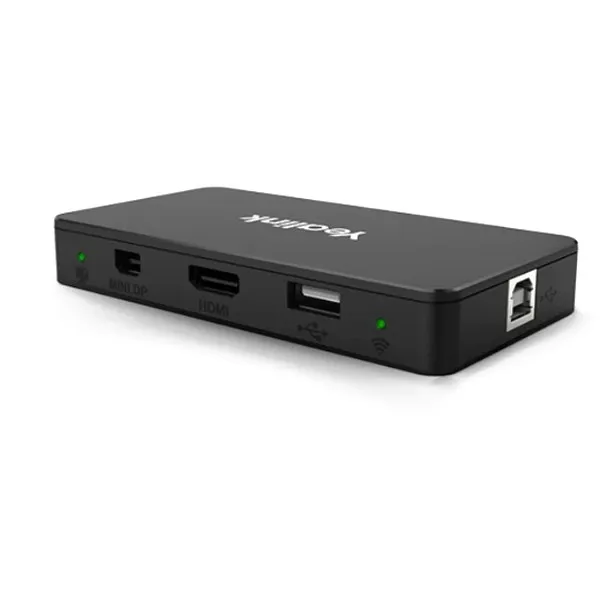
The YEALINK MShare E2 Dubai is a compact MVC screen sharing box designed for meeting rooms that need neat wired presentation access without disturbing the room console layout. It is useful for boardrooms, executive meeting spaces, training rooms, huddle areas and collaboration rooms where presenters require a stable connection for content sharing. With USB-C, HDMI input and USB Type-B connectivity, it supports flexible meeting room arrangements while keeping the table clean and professional.
YEALINK MShare E2 Dubai Information
The MShare E2 is made for Yealink meeting room environments where content sharing should remain convenient even when the touch console cable is not in the ideal presenter position. Instead of forcing users to sit near the console, the unit can be positioned close to the table cable area, giving meeting participants a more natural way to connect their device and share content. This is especially valuable for Dubai offices where meeting spaces are often designed with hidden cable routing, central table boxes, AV racks and clean interiors.
The product is suitable for teams using Yealink MVC room systems and compatible meeting room designs. Its separate design gives integrators more flexibility during deployment. The bi-color LED helps users understand casting status quickly, reducing confusion during client presentations, board meetings and internal reviews. For companies upgrading from simple HDMI extenders or older sharing cables, MShare E2 gives a more meeting-room-focused approach with Yealink ecosystem alignment.
YEALINK MShare E2 Dubai Highlights
Place the sharing box near the user area instead of depending only on the touch console cable position.
Compact construction supports concealed installation inside meeting desks or cable compartments.
USB-C and HDMI input support common laptop presentation needs in office environments.
The LED status indicator helps users confirm whether wired sharing is active.
YEALINK MShare E2 Dubai Features
Buyers usually compare MShare E2 with simple HDMI cable runs, wireless presentation dongles and meeting room AV accessories. The difference is its focus on Yealink room integration and structured wired auxiliary stream sharing. Wired presentation remains preferred in many enterprise locations because it avoids wireless pairing delays, guest network restrictions and inconsistent casting behavior. MShare E2 gives the presenter a direct connection path while keeping the meeting table organized.
Its Full HD content sharing, audio sharing support and multi-port design make it suitable for sales presentations, training decks, dashboard reviews, finance meetings, design walkthroughs and technical support sessions. For UAE companies with meeting rooms across multiple offices, a consistent accessory standard can reduce user confusion and help IT teams support rooms more efficiently.
YEALINK MShare E2 Dubai Specifications
The MShare E2 focuses on practical content sharing rather than complex user controls. The specification set is simple, which is a benefit for meeting rooms where reliability and fast user adoption matter more than unnecessary configuration.
YEALINK MShare E2 Detailes
Businesses may describe this product as Yealink MShare E2, MShare E2 USB Sharing Box, Yealink MVC Screen Sharing Box, Yealink wired content sharing accessory, Yealink screen sharing module, Yealink Teams Room sharing box, Yealink Zoom Room sharing box, or a meeting room presentation sharing unit. These naming variations are useful because procurement teams, AV integrators and IT managers often search differently depending on the project. Some buyers look for a direct replacement accessory, while others search for a professional device that improves content sharing in Yealink meeting room setups. Fourteck writes the requirement around the meeting room need first, then matches the correct Yealink accessory to the room design, display routing, cable location and user workflow.
YEALINK MShare E2 Dubai Descriptions
Fourteck supports meeting room product enquiries across Dubai, Abu Dhabi, Sharjah, Ajman, Ras Al Khaimah, Fujairah and Umm Al Quwain. Dubai buyers often request fast quotation support for business towers, hotels, training centers and corporate offices. Abu Dhabi teams usually focus on boardroom standardization and dependable installation planning. Sharjah and Ajman customers often ask for practical pricing and quick supply for small and medium meeting rooms. Across UAE cities, MShare E2 is a sensible choice when the room already uses compatible Yealink meeting technology and the presenter connection point needs to be better placed.
YEALINK MShare E2 GCC Uses
Across the GCC, meeting rooms in UAE, Saudi Arabia, Qatar, Kuwait, Bahrain and Oman require dependable presentation accessories for hybrid meetings. MShare E2 is relevant for organizations that host supplier meetings, board discussions, project updates, classroom training, remote sales reviews and executive presentations. The demand is especially strong where Teams Rooms and Zoom Rooms are used daily and where visitors need to share content without changing network settings. In GCC offices, the clean table appearance also matters. A compact wired sharing box helps IT and AV teams deliver a professional room experience while reducing visible cables and user confusion.
YEALINK MShare E2 Africa Availability
Fourteck also works with collaboration technology requirements across Africa through regional web presence for Kenya, Uganda and wider African markets. Enterprises, universities, government offices, NGOs, banks and service companies across Nairobi, Kampala and other major African business locations increasingly need stable meeting room sharing devices. MShare E2 can support standardized meeting rooms where users need a simple way to connect laptops and present. For growing organizations, the benefit is not only the device. It is the ability to plan a consistent meeting room experience with clear support, suitable accessories and professional guidance.
YEALINK MShare E2 Understanding With Other Models
MShare E2 is best understood beside Yealink room products such as MeetingBoard, MeetingBar A30, MeetingBar A50, UVC camera solutions, RoomPanel, RoomCast and compatible MVC accessories. While meeting bars and cameras focus on video and audio capture, MShare E2 focuses on the presenter’s content path. It is not a replacement for a camera, microphone or room display. It complements the meeting room by giving users an easier wired sharing point.
For related Fourteck assistance, buyers can explore Fourteck UAE, Fourteck Kenya, Fourteck Uganda, Fourteck Africa and Fourteck Kuwait for regional product support and business communication solutions.
YEALINK MShare E2 GCC Usage
Organizations in Dubai, Riyadh, Doha, Kuwait City, Manama and Muscat often plan meeting rooms with a strong preference for predictable user experience. MShare E2 helps support that experience by making wired content sharing available in a practical desk-level position. It is useful in executive rooms where visitors may not have access to internal Wi-Fi, in training rooms where several presenters rotate during the same session, and in project offices where drawings, dashboards and reports must be shown clearly. With local Fourteck support, buyers can align the accessory with display placement, room size, cabling, conferencing platform and future expansion needs.
YEALINK MShare E2 Dubai Service Availability
Fourteck assists with product selection, quotation, compatibility discussion, delivery coordination and deployment guidance for Yealink meeting room accessories in Dubai and across UAE. Service support can include matching MShare E2 with existing Yealink room systems, advising cable routing options, planning table box placement, and helping procurement teams understand the correct accessory for their meeting room. For multi-branch businesses, Fourteck can also help standardize room accessory selection so users receive a familiar experience in every office.
Fourteck YEALINK MShare E2 Dubai Reference
Fourteck provides business communication, collaboration and IT hardware support through its UAE website. Customers looking for Yealink accessories can start from the main Fourteck platform at Fourteck UAE and contact the sales team for model confirmation, quotation and compatible product guidance. This is useful when a buyer is not sure whether MShare E2 is the right unit for an existing Yealink MVC room or whether another Yealink sharing option is better for the room layout.
YEALINK MShare E2 Dubai Flexible Deployment Used
Flexible deployment is one of the strongest reasons to choose this accessory. In many rooms, the main touch console is placed where it is comfortable to control the meeting, but not always where presenters naturally connect their laptops. MShare E2 allows the sharing connection to be moved closer to the user position. This improves the meeting flow because guests can connect quickly, share their content and continue the discussion without rearranging the room.
YEALINK MShare E2 Dubai Versatile Connectivity Used
The combination of HDMI input, USB-C input and USB Type-B connectivity supports many modern presentation scenarios. Visitors may bring different laptops, and meeting rooms need to accept content without delays. By keeping the input options simple and familiar, MShare E2 helps reduce the time spent finding adapters or troubleshooting wireless casting. This is useful in client-facing rooms where every minute matters.
YEALINK MShare E2 Dubai LED Status Used
The LED status indicator gives users a simple visual cue during wired sharing. In professional rooms, small usability details matter. A clear light indicator can help the presenter confirm that casting is active and reduce calls to IT support. This is especially helpful in training rooms, shared boardrooms and hotel meeting facilities where different users operate the room each day.
YEALINK MShare E2 Dubai Compact Design Used
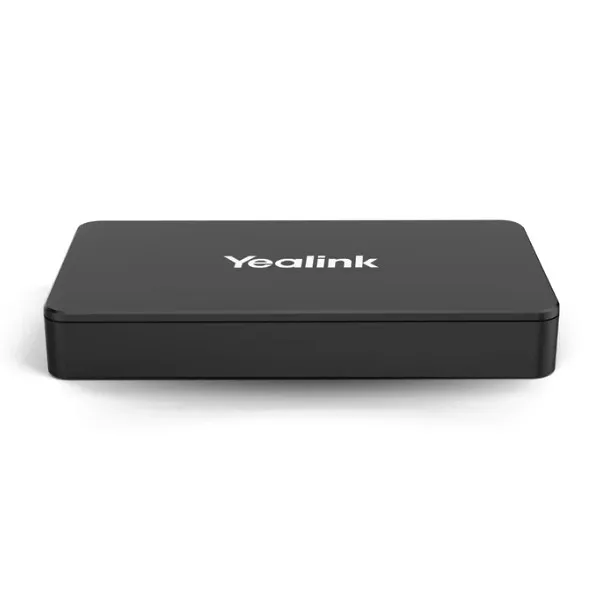
The compact form helps AV installers keep the room clean. It can be placed in proximity spaces, integrated into conference desks or positioned near cable management areas. This matters for premium offices in Dubai where meeting rooms must look organized for customers, partners and leadership teams. A smaller accessory also makes maintenance easier because the unit can be accessed without redesigning the entire room.
YEALINK MShare E2 Dubai Comparisons
Yealink meeting rooms may use different devices depending on the room purpose. MShare E2 is a focused sharing accessory, while other Yealink models handle video, room control, scheduling or wireless presentation. The table below helps buyers see where it fits inside a wider collaboration setup.
| Yealink Model | Best Fit | Buyer Note |
|---|---|---|
| MShare E2 | Wired content sharing in MVC rooms | Choose when presenter cable placement needs improvement. |
| MeetingBar A30 | Video meetings for small and medium rooms | All-in-one room video device for collaboration spaces. |
| MeetingBoard | Interactive collaboration and display-based meetings | Useful when whiteboarding and visual teamwork are required. |
| RoomPanel | Room scheduling and availability display | Helps manage meeting room booking outside the room. |
| RoomCast | Wireless presentation sharing | Consider when wireless casting is preferred. |
Market Availability YEALINK MShare E2 Dubai
Customers searching for YEALINK MShare E2 Best price, YEALINK MShare E2 Buy now, YEALINK MShare E2 Authorized partner, Ready Stock Dubai, Ready stock Abu Dhabi, WhatsApp Fourteck Sales, Get Dubai Price, Request Quote and Check UAE Availability can contact Fourteck for guided buying support. Availability can vary by project quantity and supplier movement, so the best approach is to share room details, required quantity and delivery location. Fourteck can help confirm the suitable model, quote the product and support the purchase process for UAE businesses.
YEALINK MShare E2 AbuDhabi
Abu Dhabi organizations often use premium boardrooms and controlled meeting spaces where reliable presentation sharing is essential. MShare E2 helps support formal meetings, leadership presentations, government office discussions, energy sector project reviews and training programs. Fourteck can assist Abu Dhabi customers with product confirmation, quotation and compatible Yealink room accessory planning.
YEALINK MShare E2 Dubai Deployment
Deployment begins with understanding the meeting room layout. The installer should review the display location, table cable box, room PC or conferencing system position, touch console placement and presenter seating area. MShare E2 is most effective when it is positioned where presenters naturally connect their laptops. A clean cable path, suitable cable length and accessible service point help keep the room reliable. Fourteck can guide buyers on whether the unit suits the intended Yealink room setup before procurement.
YEALINK MShare E2 Dubai Installation Details
Installation should be planned with the meeting room cable design. The HDMI and USB cable path should be neat, protected and easy for users to access. The unit can be placed in a desk compartment or close to the presenter area depending on the room style. After connection, the room should be tested with common laptops to confirm video sharing, audio sharing and LED status behavior. For best results, keep the installation simple and document the cable route for future maintenance.
YEALINK MShare E2 Sharjah
Sharjah buyers often need practical meeting room accessories for offices, education institutions, trading companies and service businesses. MShare E2 is useful where teams want a stable wired presentation method without overcomplicating the room. Fourteck can support Sharjah customers with model guidance, UAE quotation assistance and delivery coordination for Yealink meeting room accessories.
Product Availability YEALINK MShare E2 Dubai
Get YEALINK MShare E2 support from Fourteck when you need a clear model guide, buying advice and business quotation. Buying Support for YEALINK MShare E2 is helpful when customers are unsure about compatibility with existing Yealink MVC rooms or when they need multiple units for branch offices. Genuine YEALINK MShare E2 Guide assistance can reduce wrong accessory purchases and improve the final meeting room experience.
YEALINK MShare E2 Ajman
Ajman businesses searching for Yealink meeting room accessories often want straightforward pricing, quick confirmation and simple support. MShare E2 can be used in management rooms, customer meeting spaces, training rooms and sales offices where content sharing needs to be reliable. Fourteck helps Ajman customers confirm the correct product and proceed with a suitable UAE purchase request.
Fourteck Dealing Product Dubai
For compatible meeting room planning, Fourteck can also assist with Yealink video conferencing systems, Teams Room accessories, Zoom Room solutions, IP phones and collaboration hardware. Customers can begin at Fourteck UAE and request a product recommendation based on the room size, conferencing platform and existing hardware. The aim is to choose the right accessory rather than buying a device that does not match the room design.
Fourteck Regional Support Network
YEALINK MShare E2 FAQ
It is a Yealink MVC screen sharing box used for wired content sharing in compatible meeting room setups.
Yes, it supports screen sharing up to 1080p at 30fps.
It includes USB Type-B, HDMI input and USB-C input connections.
Yes, it suits Dubai offices that need a clean and reliable wired presentation point in meeting rooms.
Yes, Fourteck can assist with product quotation, compatibility discussion and UAE purchase support.
Yes, audio sharing support is included.
It can be placed near the presenter area, inside a desk compartment or within a planned cable management space.
MShare E2 is focused on wired sharing through its available ports.
Fourteck can support enquiries from Dubai, Abu Dhabi, Sharjah, Ajman, Ras Al Khaimah, Fujairah and Umm Al Quwain.
Use the contact button below and share quantity, location and meeting room details for sales assistance.




Reviews
There are no reviews yet.