
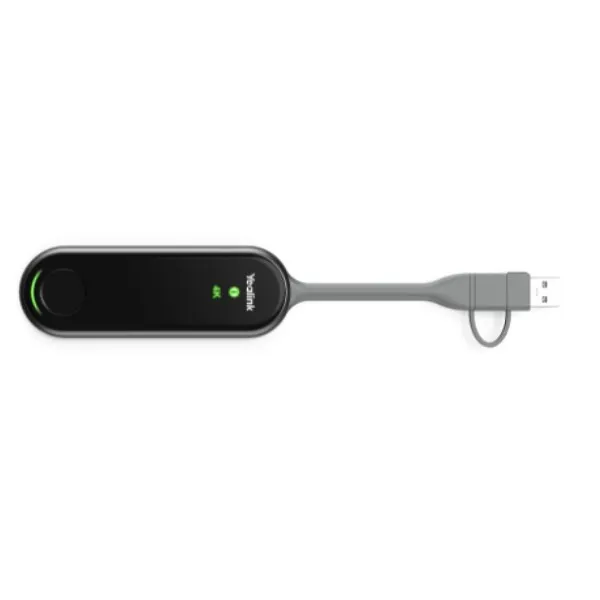
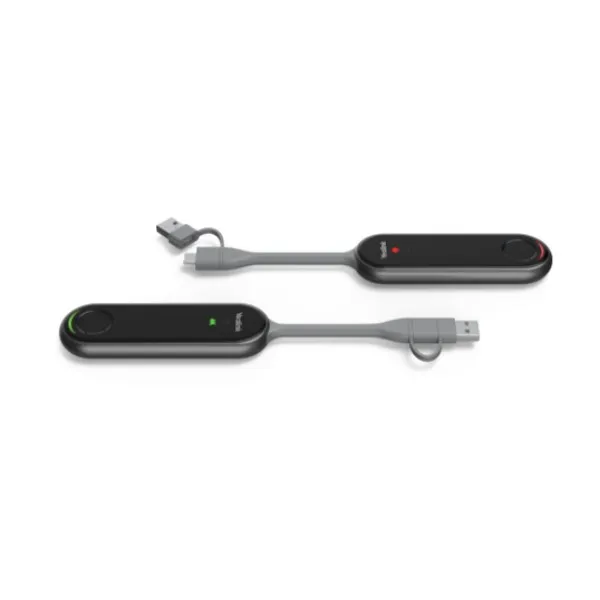
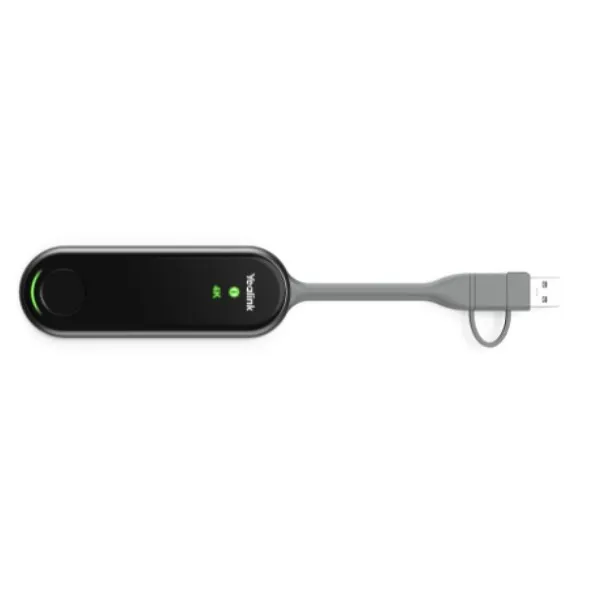
YEALINK PA20 Dubai 4K Wireless Presentation Assistant
YEALINK PA20 Dubai is designed for professional meeting spaces that need instant content sharing from laptops and compatible devices without forcing presenters to install extra software. It gives offices, classrooms, training rooms and executive spaces a smooth way to share ideas in 4K clarity while keeping the meeting table simple, neat and ready for different users.
Wi‑Fi 6 Dual Band
USB-C + USB-A Flexibility
Driver-Free Sharing
YEALINK PA20 Dubai Information
The YEALINK PA20 is a compact content sharing IP BYOD device for meeting rooms that require fast, reliable and professional wireless presentation. It is especially useful where multiple staff members, guests, consultants or trainers need to present from their own computers during the same session. Instead of relying on fixed cables, repeated settings changes or application downloads, the presenter connects the PA20 and starts sharing with one clear action.
For Dubai businesses, PA20 fits naturally into boardrooms, sales presentation rooms, project review spaces, client demonstration areas and education environments. The unit supports 4K Ultra HD presentation at up to 30 frames per second, making text, dashboards, charts and visual content easier to read on modern displays. Its Wi‑Fi 6 module and dual-band 2.4GHz/5GHz support help maintain stable wireless transmission in busy office networks where many devices may be active at the same time.
Fourteck positions this device as a practical upgrade for companies that already use Yealink meeting room systems or want a cleaner wireless presentation experience. Our support approach focuses on genuine product supply, correct room compatibility, smooth handover, deployment advice and guidance for long-term meeting room use across the UAE.
YEALINK PA20 Dubai Highlights
Clear 4K Sharing
PA20 delivers up to 4K/30fps presentation output, helping meeting rooms show spreadsheets, design files, web dashboards and visual reports with improved clarity.
Fast Guest Use
The plug-and-play design reduces meeting delays because users can present without installing a separate driver on supported systems.
Modern Wireless Link
Wi‑Fi 6 with dual-band operation supports dependable wireless sharing in offices where many wireless devices compete for attention.
Small Device, Big Value
At about 75 g, the PA20 is lightweight enough for flexible meeting room use while still supporting serious business presentation needs.
YEALINK PA20 Dubai Features
In the UAE market, buyers often compare wireless presentation tools by video quality, guest convenience, stability, security and meeting room fit. YEALINK PA20 stands out because it is not simply a cable replacement; it is a focused presentation assistant for IP BYOD meeting room workflows. The unit supports both USB Type-C and USB-A use, making it friendlier for mixed laptop environments where newer and older devices may be present.
A major benefit is the built-in hardware encoding approach, which helps reduce dependence on the computer’s processing load during sharing. This matters during sales demos, finance reviews, construction meetings, classrooms and management briefings where the presenter may already be running heavy applications. With one physical START/STOP button and status indicators, the user experience remains easy for non-technical presenters.
For meeting spaces using Yealink MeetingBoard, MeetingBar or compatible room systems, PA20 can become part of a cleaner collaboration workflow. Fourteck helps customers review compatibility, room layout, display requirements and network environment before recommending the right accessories.
YEALINK PA20 Dubai Specifications
The specifications below are written to help procurement teams, IT managers and meeting room planners understand how PA20 fits into practical deployment. Exact compatibility should be checked with the target Yealink room system and the customer’s meeting room environment before purchase.
YEALINK PA20 Details
Customers may refer to this model in different ways while planning a purchase: Yealink PA20, PA20 presentation pod, Yealink wireless sharing pod, Yealink 4K presentation assistant, Yealink IP BYOD content sharing device and Yealink PA20 USB-C wireless presenter. In practical office use, all these phrases usually point to the same requirement: a simple method to let users share a screen onto a meeting room display with fewer cables and fewer technical interruptions.
For Dubai offices, the value is clear. Meeting rooms host internal staff, contractors, international guests, sales teams and management users. Each person may bring a different laptop. A clean presentation device reduces the need to search for display cables, change adapters or install unfamiliar software. PA20 is built for this kind of mixed-user environment.
Fourteck supports buyers who want the right accessory for a Yealink room setup, not just a product box. Our team can guide on device purpose, system fit, meeting room usage and procurement planning so businesses get a stable presentation workflow from day one.
YEALINK PA20 Dubai Descriptions
YEALINK PA20 Dubai is suitable for organisations across Dubai, Abu Dhabi, Sharjah, Ajman, Ras Al Khaimah, Fujairah and Umm Al Quwain. Each city has different meeting room requirements, but the need is similar: presenters should connect quickly, share clearly and complete meetings without technical delays. In Dubai, the PA20 fits corporate towers, free zone offices, training centres and hospitality meeting spaces. In Abu Dhabi, it supports government-related offices, enterprise boardrooms, energy sector teams and education institutions. In Sharjah and Ajman, it is useful for SMEs, institutes, clinics, warehouses and service businesses modernising their meeting rooms.
For Ras Al Khaimah, Fujairah and Umm Al Quwain, PA20 can help branch offices maintain consistent presentation standards without complex room installations. A compact device can make meeting rooms more flexible while still giving users a professional 4K sharing experience. The USB-C and USB-A approach is also helpful in mixed hardware environments where users may bring different laptop generations.
Fourteck can assist with purchasing, compatibility guidance and service coordination for businesses that need Yealink PA20 UAE supply with practical support and trusted communication.
YEALINK PA20 GCC Uses
Across the GCC, organisations in the UAE, Saudi Arabia, Kuwait, Qatar, Bahrain and Oman are redesigning meeting rooms for hybrid work, executive presentations and fast collaboration. The YEALINK PA20 supports this trend by giving presenters a simple device for sharing content in high resolution without depending on long HDMI cables or frequent software downloads. It is useful in corporate headquarters, consulting firms, training academies, logistics offices, hotels and government-style meeting rooms where many people may present during the same day.
In Saudi Arabia and Qatar, large project teams can use PA20 for dashboard reviews, construction drawings and management reporting. In Kuwait and Bahrain, it fits professional offices and boardrooms where guests need to present with minimal setup. In Oman, education, hospitality and enterprise branches can use it for smoother meeting room sharing.
The GCC buyer usually values genuine product supply, support response and proper compatibility checks. Fourteck helps customers match PA20 with meeting room requirements so the device becomes part of a reliable collaboration system instead of a standalone accessory.
YEALINK PA20 Africa Availability
For African business locations, the YEALINK PA20 can support modern meeting spaces in Kenya, Uganda, Tanzania, Rwanda, Ethiopia, Nigeria, Ghana and South Africa. Many growing offices want presentation tools that are simple for visitors, easy for IT teams to manage and suitable for mixed laptop environments. PA20 answers this need with compact hardware, 4K sharing ability and convenient USB connection options.
In Nairobi, Kampala, Kigali and Dar es Salaam, companies that operate training rooms, executive meeting areas, NGO offices, financial service branches and education spaces can benefit from a wireless presentation approach that reduces dependence on fixed cables. For larger African markets such as Nigeria and South Africa, PA20 can help standardise meeting rooms across multiple branches.
Fourteck’s regional web presence supports customers who need guidance beyond a single UAE purchase. Businesses can connect with Fourteck UAE, Kenya, Uganda, Africa and Kuwait channels for regional technology buying conversations and meeting room planning.
YEALINK PA20 Understanding With Other Models
YEALINK PA20 is commonly considered alongside Yealink MeetingBoard, MeetingBar, MVC room systems, RoomCast style sharing devices and Yealink room accessories. The PA20 is not meant to replace a full video bar, display system or conference room bundle. Instead, it improves the user side of content sharing by making it easier to start a presentation from a personal device.
A company with a Yealink MeetingBoard may use PA20 to allow a guest presenter to share quickly. A company with a MeetingBar room may consider PA20 when the room needs smoother wireless content sharing. Teams standardising multiple rooms may combine room cameras, speakerphones, video bars, control panels and presentation accessories to create a complete meeting experience.
Fourteck supports this decision process by helping customers compare practical use, not only model numbers. For Yealink accessories, the correct question is often about room workflow: who presents, how often guests join, whether users bring USB-C or USB-A laptops, how important 4K clarity is and what support is needed after delivery.
YEALINK PA20 GCC Usage
The YEALINK PA20 is useful for GCC organisations that want meeting rooms to feel ready before the meeting begins. In Dubai, a sales manager can share a proposal without calling IT for cables. In Abu Dhabi, a project team can review technical drawings on a large display. In Riyadh, a training manager can let different presenters switch sessions smoothly. In Doha, a consultant can share reports during client workshops. In Kuwait City, a boardroom can support visitors with less setup time. In Muscat and Manama, branch offices can keep collaboration simple and professional.
The PA20’s value is strongest where different presenters rotate during the day. It helps reduce meeting friction, supports cleaner tables and keeps the focus on the discussion rather than the connection method. Wi‑Fi 6 support, dual-band connectivity and 4K capability make it a strong choice for offices upgrading from cable-based display sharing.
For procurement teams, Fourteck can support product selection, quotation, delivery discussion and compatible Yealink meeting room planning across GCC-focused buying requirements.
YEALINK PA20 Dubai Service Availability
Fourteck supports YEALINK PA20 customers with practical service guidance before and after purchase. Our support is useful for buyers who need to understand whether PA20 is suitable for their room, whether it matches the existing Yealink system, what type of users will connect and how the product will be used in daily meetings. This helps reduce purchase mistakes and improves the end-user experience.
Service availability can include sales consultation, quotation assistance, compatibility review, delivery coordination and deployment guidance. For offices in Dubai, Abu Dhabi, Sharjah and Ajman, Fourteck can help teams plan the device as part of a full meeting room setup. For multi-branch customers, we can also discuss standardisation across locations.
When buying presentation accessories, choosing the right supplier matters because the product must work within a real meeting room environment. Fourteck’s IT industry experience helps customers move from product interest to practical use with less confusion.
Fourteck YEALINK PA20 Dubai Reference
Fourteck provides business communication, collaboration and IT infrastructure products for customers who need genuine hardware with responsive support. For customers reviewing YEALINK PA20, the most useful reference point is Fourteck’s contact and product support channel, where buyers can ask for room-specific advice before confirming purchase.
Visit Fourteck Contact to request PA20 availability, Yealink accessory guidance or meeting room upgrade assistance. This is especially helpful when the purchase is linked to a larger setup involving Yealink video bars, meeting boards, touch panels, microphones or room displays.
YEALINK PA20 Dubai 4K Presentation Feature Used
The 4K presentation feature is one of the strongest reasons to choose PA20 for modern meeting rooms. Many business screens are now larger and sharper than older conference displays. When users share financial dashboards, architectural drawings, product images, training materials or spreadsheets, low-resolution sharing can make the session harder to follow. PA20 supports up to 4K/30fps output, giving content a cleaner appearance on compatible room displays.
This is valuable for Dubai businesses that regularly host clients or management teams. Clearer presentation quality improves confidence, reduces repeated zooming and helps participants focus on the message. Fourteck recommends considering PA20 when display quality is important and the room already supports a high-quality visual workflow.
YEALINK PA20 Dubai Wi‑Fi 6 Feature Used
Wireless presentation depends heavily on connection stability. PA20 includes Wi‑Fi 6 capability with dual-band wireless support, helping it perform better in busy office spaces where laptops, phones, tablets and meeting room devices may all be active. This matters in Dubai offices, free zones and shared workspaces where wireless traffic is common throughout the day.
A more stable wireless sharing experience means fewer interruptions during client discussions and less pressure on IT teams. Fourteck can help customers review room layout, network conditions and compatible Yealink equipment so the PA20 is deployed in the right environment for consistent results.
YEALINK PA20 Dubai USB-C And USB-A Feature Used
Many meeting rooms struggle because presenters bring different laptop generations. Some users have modern USB-C laptops, while others still depend on USB-A. PA20 helps by supporting a full-featured USB Type-C interface and a USB-C to USB-A adapter approach. This flexibility is practical for companies that host guests, vendors, trainers and internal teams.
For UAE offices, this reduces the need to maintain multiple adapters on the meeting table. It also makes the room easier for non-technical users. A presenter can focus on the meeting instead of asking which cable is required. Fourteck can guide customers on the best way to position and manage the device within daily meeting room use.
YEALINK PA20 Dubai Driver-Free Feature Used
Driver-free presentation is valuable because meetings often include guests who do not have admin access to install applications. PA20 is built to reduce this friction by allowing supported users to connect and present without extra driver installation. This makes it suitable for executive rooms, client discussion areas and training spaces where time matters.
The simple START/STOP button also helps users understand when sharing begins and ends. This reduces accidental sharing and creates a more confident meeting experience. Fourteck recommends PA20 for organisations that want a clean presentation workflow with less dependency on technical assistance during every meeting.
YEALINK PA20 Dubai Smart Room Selection
For many businesses, choosing a presentation pod is part of a larger meeting room plan. YEALINK PA20 may be matched with Yealink MeetingBoard, MeetingBar A-series devices, MVC room solutions, room panels and compatible display systems. The best choice depends on the room size, display type, meeting platform, number of guest presenters and expected content quality.
Fourteck helps customers look at the complete room rather than buying accessories in isolation. This approach supports better performance, cleaner installation and improved user satisfaction. It also helps procurement teams select a genuine Yealink solution that matches business requirements and budget planning.
YEALINK PA20 Comparisons
The table below helps buyers understand how PA20 may sit within a wider Yealink meeting room family. The goal is to choose the right device for the right job, whether that means content sharing, complete video conferencing, interactive display work or room control.
Market Availability YEALINK PA20 Dubai
YEALINK PA20 Best price discussions in Dubai should include more than the product cost. Buyers should also consider genuine supply, compatibility advice, after-sales support and deployment readiness. YEALINK PA20 Buy now requests are best handled through a trusted supplier who understands Yealink meeting room environments. YEALINK PA20 Authorized partner support gives businesses more confidence when planning standardised meeting spaces.
Ready Stock Dubai and Ready stock City availability can change based on current demand, project orders and distributor movement. For accurate confirmation, contact Fourteck to Request Quote, Check UAE Availability and receive guidance for your meeting room requirement.
YEALINK PA20 AbuDhabi
In Abu Dhabi, YEALINK PA20 is suitable for boardrooms, government-related offices, energy companies, construction consultants, education organisations and enterprise meeting rooms. Many Abu Dhabi teams work with detailed documents, project dashboards, compliance reports and management presentations. A 4K wireless presentation assistant can make shared content easier to view on large room displays.
Fourteck can support Abu Dhabi buyers with product guidance, availability discussion and compatibility review for Yealink room setups. The PA20 is especially useful for meeting spaces where visitors and internal teams need to share from different laptops throughout the day.
YEALINK PA20 Dubai Deployment
Deploying YEALINK PA20 begins with understanding the room workflow. The IT team should confirm the meeting display, compatible Yealink room system, expected presenter devices and wireless environment. Because PA20 is compact, it can be placed for easy presenter access while keeping the table neat. The device should be managed so users know where to find it, how to connect and how to stop sharing after a meeting.
For Dubai offices, deployment may include executive rooms, project discussion areas, training rooms and multipurpose meeting spaces. The goal is to make screen sharing predictable. Fourteck can guide customers on room readiness, user handover, accessory planning and support expectations.
A successful deployment is not only about plugging in hardware. It is about giving users a clear, repeatable meeting experience. PA20 helps achieve that by combining simple control with high-quality sharing capability.
YEALINK PA20 Dubai Installation Details
YEALINK PA20 installation is designed to be simple for supported meeting room environments. The presenter connects the device through the available USB interface, uses the START/STOP button and shares content through the room system workflow. For best results, the room display, Yealink device compatibility and network conditions should be reviewed before handing the room to daily users.
In daily use, PA20 is helpful for sales presentations, training sessions, finance reviews, management meetings, technical workshops and client demonstrations. It reduces the need for multiple cables and helps users avoid installing unfamiliar software during important meetings.
Fourteck can assist customers with purchase planning, product handover guidance and room-use recommendations so presenters understand how to use PA20 confidently and safely.
YEALINK PA20 Sharjah
Sharjah businesses, universities, training centres, clinics and service companies can use YEALINK PA20 to modernise meeting room presentations without creating complex user steps. The device is useful where users frequently move between rooms and need a quick way to present. Its compact size also makes it suitable for smaller meeting spaces with limited table space.
Fourteck supports Sharjah customers who need Yealink PA20 purchasing assistance, meeting room accessory guidance and practical advice for integrating wireless presentation into existing collaboration spaces.
Product Availability YEALINK PA20 Dubai
Get YEALINK PA20 through Fourteck for business meeting rooms that need genuine Yealink hardware and dependable buying support. Buying Support for YEALINK PA20 helps customers confirm the right fit before ordering, especially when the device is part of a larger Yealink room setup. Genuine YEALINK PA20 Guide discussions can include connection type, expected room use, presentation quality, compatibility and after-sales assistance.
For Dubai, Abu Dhabi, Sharjah and Ajman buyers, Fourteck can help with quotation requests, availability confirmation and meeting room planning so your team receives a practical solution, not only a product code.
YEALINK PA20 Ajman
Ajman companies, education providers, trading offices, warehouses and professional service teams can benefit from YEALINK PA20 when they want a clean method for wireless presentation. Many Ajman businesses need practical technology that is easy for staff to use and simple for management to justify. PA20 gives meeting rooms a professional content sharing upgrade without overcomplicating the setup.
Fourteck can support Ajman buyers with product advice, UAE availability checks and Yealink meeting room accessory planning. The device is a strong fit for offices that hold regular training, supplier meetings and client presentations.
Fourteck Dealing Product Dubai
Fourteck works with collaboration, networking, security and communication products for customers who need business-ready IT solutions. Customers considering YEALINK PA20 may also need related products such as meeting room video bars, conference room displays, speakerphones, IP phones, wireless headsets, room panels and cabling accessories. These supporting products help create a complete meeting room experience rather than a single-device setup.
For the most relevant product guidance, connect through Fourteck Sales Support. The team can recommend compatible options based on your room size, display setup, meeting platform and user requirements.
Fourteck Regional Support Network
YEALINK PA20 FAQ
What is the YEALINK PA20 used for?
It is used for wireless content sharing in compatible meeting room environments, helping presenters share from supported devices with less setup effort.
Does YEALINK PA20 support 4K?
Yes, it supports up to 4K Ultra HD content sharing at 30fps when used with compatible systems and display conditions.
Does PA20 need a driver?
The device is designed for plug-and-play use without extra driver installation on supported systems.
Does PA20 work with USB-C laptops?
Yes, it supports a full-featured USB Type-C interface and includes USB-A flexibility through adapter support.
Is PA20 suitable for Dubai meeting rooms?
Yes, it is suitable for professional meeting rooms, boardrooms, training spaces and client presentation areas in Dubai.
Can Fourteck help with compatibility?
Yes, Fourteck can help review Yealink room system compatibility and buying requirements before purchase.
Is PA20 useful for guest presenters?
Yes, it is useful when visitors or staff need to share content quickly without complex setup steps.
Does PA20 use Wi‑Fi 6?
Yes, it includes Wi‑Fi 6 support with dual-band wireless operation for stable presentation sharing.
Where can I request YEALINK PA20 Dubai price?
You can contact Fourteck through the official contact page for pricing, availability and purchasing guidance.
Can PA20 be used in Abu Dhabi, Sharjah and Ajman?
Yes, Fourteck can support UAE customers across Dubai, Abu Dhabi, Sharjah, Ajman and other emirates.

Reviews
There are no reviews yet.