

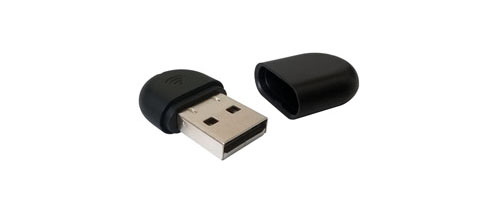
A Practical Way to Add Wi-Fi to Compatible Yealink Desk Phones
The Yealink WF40 Wi-Fi USB Dongle is a purpose-built wireless accessory for supported Yealink SIP desk phones. Its job is straightforward: it plugs into the phone’s USB port and allows the phone to join a compatible 2.4GHz wireless network instead of depending on a direct Ethernet connection for network access. For a buyer, that makes the WF40 less about adding a new feature to every phone and more about solving a specific placement or cabling problem while keeping an existing Yealink voice environment intact.
This can be useful in serviced offices, temporary project rooms, reception counters, meeting-support desks, training areas and branch spaces where an IP phone is needed but running a new cable is inconvenient. A business may also use the adapter during a relocation or phased network change where telephone positions need to move before structured cabling is completed. Because the WF40 is small and low-power, the physical installation is simple, but the deployment still depends on the phone model, firmware level, wireless security settings and the quality of the local Wi-Fi signal.
Official Yealink information lists support for a defined range of SIP phones, including selected T2, T4 and T5-series models. That compatibility detail is important. The WF40 should not be purchased as though it were a generic USB Wi-Fi adapter for any handset, laptop or desktop. The phone must explicitly support the accessory, and some older models require minimum firmware versions before the Wi-Fi function is available. For an IT administrator, this means the first buying step is to identify the exact model printed on the phone and check the installed firmware before ordering quantities.
For UAE buyers, FourTeck can help turn that technical check into a cleaner procurement process. Share the Yealink phone models, firmware versions if known, required quantity, wireless network type and delivery location. The team can then help review accessory fit, discuss whether the WF40 or a newer dual-band option is more appropriate, coordinate a quotation and provide warranty and delivery guidance. The result is a purchase based on the actual voice environment rather than on the accessory name alone.
Why Businesses Use the WF40 in Real Office Deployments
The main value is deployment flexibility. The dongle is useful when a supported Yealink phone needs reliable network access but the desk position cannot easily use a wired Ethernet drop.
Keep the IP phone where the user actually needs it
When a desk, counter or temporary workspace does not have an Ethernet outlet in the right place, a compatible wireless adapter can avoid unnecessary furniture changes or short-term cabling work. This is particularly relevant for offices that frequently move teams, add temporary workstations or operate in leased spaces where infrastructure changes may require landlord approval. The phone can remain part of the same SIP-based communication environment while connecting through the local 2.4GHz wireless network.
A compact add-on instead of replacing the phone
If the existing Yealink phone is already suitable for the user’s calling needs, replacing the complete handset only to gain wireless networking may be unnecessary. The WF40 can add Wi-Fi to supported models through USB, allowing a business to preserve familiar phones, extension settings and user training while solving a connectivity requirement.
Straightforward physical installation
The dongle uses a USB 2.0 interface and is designed for plug-and-play style use with supported phones. Physical connection is quick, but IT teams should still plan the wireless credentials, signal coverage and firmware readiness. The best deployment is simple for the user because the compatibility work has already been completed before the accessory reaches the desk.
Useful where 2.4GHz coverage is already established
The WF40 works on the 2.4GHz band using IEEE 802.11b/g/n. In many offices, that band offers broad coverage and can reach through walls more effectively than higher-frequency alternatives, although it may also be more crowded. For voice deployments, IT teams should check signal quality, interference, access-point load and roaming expectations instead of assuming that a strong Wi-Fi icon alone guarantees call stability.
Works with supported protected wireless networks
Yealink lists WEP encryption, WPA-PSK and WPA2-PSK support. In a modern business environment, WPA2-PSK is generally the more appropriate choice when it matches the organization’s wireless policy. Buyers should confirm the actual security method in use because an accessory that cannot join the configured authentication mode will not solve the deployment problem.
Minimal impact on a professional desk setup
At approximately 26.9 x 18 x 8 mm, the adapter is physically compact. That matters in reception areas, executive desks and shared workstations where visible technology should stay tidy. The small format also makes it practical for staged deployments, spares and service kits, provided each unit is matched to a supported phone.
The Important Facts Behind This Small Accessory
The WF40 is intentionally narrow in purpose. It does not add a new phone system, new SIP accounts or new voice features. It adds Wi-Fi connectivity to compatible Yealink phones. That clarity helps procurement teams evaluate it correctly: the purchase decision should be based on handset compatibility and wireless requirements rather than on broad networking specifications.
Its 2.4GHz radio supports IEEE 802.11b/g/n and a transmission rate of up to 150 Mbps. That is more than enough raw network throughput for ordinary VoIP traffic, but call quality still depends on the access point, internet or PBX path, interference, network design and voice configuration. A 150 Mbps adapter does not remove the need for proper Wi-Fi planning. In a busy environment, the number of devices sharing the 2.4GHz band may matter more than the headline link rate.
The current Yealink product page lists compatibility with SIP-T27G, T29G, T46G, T48G, T41S, T42S, T46S, T48S, T42U, T43U, T44U, T46U, T48U, T52S, T54S and T53 models. Some legacy phones require minimum firmware levels, which is why buyers should confirm version information before a rollout. FourTeck can help review this compatibility as part of the quotation process.
WF40 Technical Specification Table
These specifications are based on official Yealink product information. Compatibility and firmware requirements should be checked against the exact phone before purchase.
| Specification | Confirmed detail | Buyer note |
|---|---|---|
| Brand / Model | Yealink WF40 | Purpose-built IP phone Wi-Fi accessory |
| Product type | Wi-Fi USB dongle | Not a universal adapter for every USB device |
| Network standard | IEEE 802.11b/g/n | 2.4GHz wireless networking |
| Transmission rate | Up to 150 Mbps | Actual performance depends on Wi-Fi conditions |
| Frequency range | 2.4GHz | No 5GHz support on WF40 |
| Security | 64/128/152-bit WEP, WPA-PSK, WPA2-PSK | Match the site’s configured wireless security method |
| Interface | USB 2.0 | Requires a supported Yealink phone USB port |
| Dimensions | 26.9 x 18 x 8 mm | Compact desk accessory |
| Working temperature | 0°C to +50°C | Designed for normal indoor office environments |
| Storage temperature | -40°C to +85°C | Storage conditions should remain within vendor limits |
| Compatible phone families | Selected T2, T4 and T5-series SIP phones | Exact model and firmware confirmation required |
| Warranty | Contact FourTeck for current options | Terms can vary by supply channel and order |
| UAE availability | Contact FourTeck for current options | Depends on supplier status, quantity and order timing |
How to interpret these specifications
For a voice accessory, the most important specification is not the maximum transfer rate. A VoIP call uses far less than 150 Mbps, so the real purchase questions are whether the phone supports the dongle, whether the phone firmware is at the required level, whether the business Wi-Fi uses a supported security method and whether 2.4GHz coverage is stable at the intended desk position.
The lack of 5GHz support is also a meaningful decision point. A small office with a clean 2.4GHz environment may have no reason to pay for a more advanced adapter. A dense floor with many neighboring networks, newer access points or a policy that prioritizes 5GHz clients may be better served by a compatible dual-band option such as the Yealink WF50, subject to phone support. FourTeck can help compare these choices before the order is placed.
Confirm the Environment Before You Order the Dongle
The WF40 has no selectable hardware configuration, but the buying decision is still configuration-sensitive because the phone and wireless network determine whether it will work as intended. The highest-risk mistake is ordering by brand alone without checking the exact Yealink handset and firmware.
Which exact phone model will use it?
Record the complete model name from the phone label or device information screen. Do not assume that every T-series handset supports the WF40 simply because it has a USB port. The compatibility list is model-specific, and some variants use newer wireless accessories.
Is the firmware ready?
Older supported phones may require minimum firmware before the Wi-Fi menu recognizes the accessory. For example, Yealink specifies version 35.80.0.95 or higher for T48G, version 81 or higher for T29G, T46G, T46S and T48S, and x.81.0.110 or higher for T27G, T41S and T42S.
Does the wireless security match?
Confirm whether the target network uses WPA2-PSK, WPA-PSK or another authentication method. The WF40 supports WEP and WPA/WPA2 pre-shared-key modes according to Yealink. Corporate networks that require enterprise authentication should be reviewed carefully because this model may not match the policy.
Is 2.4GHz suitable at the desk?
Check signal quality where the phone will actually sit, not only near the access point. Walls, metal partitions, neighboring wireless networks and crowded channels can affect voice stability. If the site prefers 5GHz or has a congested 2.4GHz environment, compare a compatible dual-band accessory.
How many phones are moving to Wi-Fi?
One phone is a simple accessory decision. A rollout across many desks becomes a wireless capacity question. Review the number of clients per access point, voice VLAN or network policy, SSID design and support process. A large deployment may benefit from staged testing before all units are installed.
What should you provide for a useful quote?
Share the phone model, quantity, firmware if known, office location, target delivery date and whether the Wi-Fi network is 2.4GHz-only or dual-band. Mention if the order is for replacement, expansion or a new voice rollout. That information helps FourTeck check fit before quoting.
Where the WF40 Makes Practical Business Sense
This accessory is most useful when wireless placement solves a real operational issue. It is not automatically better than Ethernet. A wired phone connection is often preferred for fixed desks, but Wi-Fi can be valuable when flexibility or building limitations make cabling less practical.
Temporary and flexible office desks
Project teams, serviced offices and growing departments often change seating before the cabling plan catches up. If the business already uses compatible Yealink phones, the dongle can support temporary wireless placement while preserving the familiar SIP endpoint. This avoids turning a short-term desk move into a full handset replacement project. The Wi-Fi network still needs stable 2.4GHz coverage and enough capacity for voice traffic.
Reception counters and visitor areas
A reception phone may need to sit on a polished counter or in a location where visible cabling is undesirable. When the compatible phone supports WF40, wireless networking can reduce the need to route an Ethernet lead across the furniture. The deployment should still consider call-critical reliability and strong access-point coverage.
Training rooms and event spaces
A temporary support phone can be useful in a training room, seminar area or internal event zone where a fixed desk phone is not normally installed. The adapter gives the organization a way to connect a supported Yealink handset to the available Wi-Fi during the period it is needed.
Small branch offices
A compact branch may have reliable Wi-Fi but limited structured cabling. If the branch uses supported Yealink SIP phones and the wireless policy matches the adapter’s capabilities, the WF40 can help add voice endpoints without immediately expanding cabling. For permanent high-call desks, the business should still compare the long-term reliability of wired and wireless deployment.
Office relocation and phased fit-out
During a move, users may need working extensions before every network point is finished. A compatible wireless dongle can bridge that timing gap. IT teams can keep selected phones operational while the permanent structured cabling is being finalized, then decide later whether each phone should remain on Wi-Fi or return to Ethernet.
Replacement of a failed wireless accessory
Organizations with older supported Yealink phones may simply need a like-for-like replacement for a missing or damaged dongle. In this case, the key checks are the phone model, firmware and existing wireless settings. Matching the original use case can be more practical than redesigning the endpoint setup.
WF40 2.4GHz Wireless Connectivity
The WF40 supports IEEE 802.11b/g/n on the 2.4GHz band, with a listed transmission rate of up to 150 Mbps. For a business phone, this specification should be understood in context. Voice traffic does not need anywhere near the full headline throughput, so the more important factors are signal consistency, latency, packet loss and interference. A stable 2.4GHz connection can work well for supported desk phones, especially in smaller offices with a controlled wireless environment.
The trade-off is that 2.4GHz is commonly shared by many Wi-Fi devices and other radio sources. In dense office buildings, neighboring access points can create channel congestion. For a single phone in a quiet branch, this may not be important. For dozens of voice devices on a busy floor, it becomes a design consideration. The correct question is therefore not simply whether the adapter can connect, but whether the site can provide a clean enough wireless path for dependable calling.
WF40 Compatibility and Firmware Readiness
Compatibility is the most important technical buying point for this accessory. A USB connector does not automatically mean a phone can use the dongle. Yealink’s product information identifies specific supported SIP models, and some older handsets need minimum firmware versions before Wi-Fi functions are available. This makes model verification part of procurement, not something to discover after delivery.
For newer listed models, buyers should still confirm the current compatibility guidance because product firmware evolves and accessory support can vary by model generation. In a multi-site rollout, it is useful to create a simple inventory showing phone model and firmware before ordering accessories. That small preparation step can prevent mixed results where some phones detect the dongle immediately while others need updates or use a different wireless accessory. FourTeck can review that model list during quote preparation.
WF40 Deployment Simplicity and Wireless Security
Physically, deployment is simple: the adapter connects through USB 2.0 and is designed for easy use with compatible Yealink phones. Operationally, a professional installation still needs a few decisions. The phone must be connected to the correct service set identifier (SSID), the security credentials must match, and the access point should provide stable signal at the desk. The goal is to make the user experience simple by completing those checks before the phone is handed over.
Yealink lists 64/128/152-bit WEP encryption together with WPA-PSK and WPA2-PSK. WEP remains part of the compatibility specification, but it is a legacy security method and is generally not preferred for modern business networks. Where the organization’s policy allows it, WPA2-PSK is a more appropriate choice among the supported pre-shared-key modes. If the company uses enterprise-grade authentication, certificate-based access or a wireless method outside the WF40’s supported list, the IT team should review another approach instead of weakening the network just to accommodate an accessory.
Deployment decision checklist
- Confirm the correct SSID and 2.4GHz availability.
- Use a supported security method that matches company policy.
- Check signal strength at the final desk location.
- Test inbound and outbound calls after connection.
- Monitor call stability before scaling to many phones.
- Document the phone model, firmware and wireless settings for support.
What Buyers Should Check Before Purchase
The main purchase risk is choosing the WF40 because it is a Yealink accessory without confirming whether the exact phone and wireless policy support it. A short compatibility review before the quote can prevent firmware problems, unsupported authentication methods and unnecessary replacement orders.
Configuration Fit
Start with the complete phone model and firmware. If the phone is not on Yealink’s supported list, do not assume the WF40 will work. If the phone is supported but old, check the minimum firmware requirement. For a mixed fleet, separate the phones by model so the business can buy only the accessories that match each device group.
Compatibility Check
Confirm the wireless network provides 2.4GHz service and uses a security method the adapter supports. If the corporate WLAN requires enterprise authentication or the office is intentionally designed around 5GHz-only client access, the WF40 may not match the environment. Check the access point, not only the phone.
Availability and Warranty
Accessory availability can change because older phones and their matching add-ons may move through different supply cycles. Ask for current availability, quantity options and warranty terms at quotation stage. For a large or urgent requirement, provide the quantity and required date early so FourTeck can advise on realistic supply options or compatible alternatives.
Quote Preparation
A useful quote request should include model, quantity, firmware if known, delivery location and intended deployment. Mention whether the dongles are for a new office, desk relocation, replacement of existing WF40 units or a multi-branch project. If Wi-Fi design is part of the concern, share the access-point type or security method as well.
WF40 or WF50: which direction should you consider?
If the supported phone only needs 2.4GHz Wi-Fi and the environment is clean, the WF40 may be the straightforward choice. If the phone supports the WF50 and the office needs dual-band connectivity, the WF50 adds 5GHz support with higher listed throughput on compatible networks. The decision should follow phone compatibility and wireless design rather than choosing the newer model automatically.
Buying Support for Dubai and UAE Business Requirements
FourTeck supports product inquiries across Dubai and the UAE with practical assistance before an order is finalized. For the WF40, that support is particularly useful because the accessory decision depends on the installed Yealink phone and the wireless network. A buyer can send the phone model, quantity and delivery requirement, and the team can help review whether the requested adapter matches the intended use.
Availability can vary by supplier, quantity and lifecycle position, so the page does not assume ready stock or a fixed delivery promise. For urgent replacement needs, mention the failed phone accessory, exact handset model and required date. For project quantities, provide the expected number of phones and whether the rollout is taking place at one site or across several branches.
Support Across Dubai, Abu Dhabi, Sharjah and Ajman
Businesses in Dubai, Abu Dhabi, Sharjah and Ajman can contact FourTeck for product availability, compatibility guidance and quotation assistance for Yealink phone accessories. A Dubai serviced office may need a few adapters for flexible desks, while an Abu Dhabi branch may require replacements for an established phone fleet. A Sharjah warehouse office or Ajman trading company may be checking whether existing Yealink phones can use Wi-Fi before changing cabling. In each case, the useful starting information is the same: exact phone model, required quantity, wireless environment and delivery location. FourTeck can use those details to review suitable options and advise on the purchasing path without creating separate product assumptions for each city.
GCC and Africa Availability Guidance
FourTeck also supports business technology inquiries across selected GCC and Africa markets through regional platforms and inquiry channels. Companies sourcing Yealink accessories for branches in Saudi Arabia, Qatar, Oman, Kuwait or Bahrain may have the same compatibility questions as UAE buyers, particularly when older phone fleets are being maintained across several offices. The model, firmware and local wireless policy should be confirmed before accessories are standardized across countries.
For Kenya, Uganda and wider Africa requirements, supply and delivery planning may vary by destination, order size and supplier status. A regional procurement team can reduce mistakes by sending a single device inventory showing which Yealink phone models are installed at each branch and how many wireless adapters are required. This makes it easier to identify whether one accessory can serve the whole fleet or whether different sites need different options.
Regional buyers can use FourTeck Kenya, FourTeck Uganda, FourTeck Africa or FourTeck Kuwait for country-specific inquiry routing. Availability, warranty handling and delivery arrangements should be confirmed for the destination at quotation stage.
Other Options Buyers May Consider
A wireless dongle is only one part of an IP phone deployment. Depending on the handset, Wi-Fi requirement and user role, buyers may also need a newer wireless accessory, a compatible Yealink phone or wider PBX and network planning. These FourTeck references can help connect the accessory decision with the broader communication environment.
Yealink WF50 Dual-Band Wi-Fi Dongle
Consider WF50 when the supported phone and office network need dual-band operation, including 5GHz. It is not automatically a replacement for every WF40 deployment, so confirm the exact phone model before changing accessory type.
Yealink T43U Business IP Phone
A current FourTeck reference for a Yealink business phone that supports optional Wi-Fi through compatible dongles. Useful when the phone itself is also being refreshed.
Yealink SIP T31G IP Phone
A practical wired business IP phone for general desk users. It may suit teams that do not require Wi-Fi at the handset and prefer a clean PoE-based Ethernet deployment.
Yealink T21P IP Phone
A legacy-style Yealink desk-phone reference for buyers maintaining mixed handset fleets and evaluating whether replacement or accessory support is the better path.
IPBX and Telecommunication Solutions
Useful when the requirement extends beyond one accessory into SIP extensions, PBX planning, switching, cabling, provisioning or complete office voice deployment.
Yealink Phone Collection
Browse related Yealink desk-phone references when a handset replacement may provide a cleaner long-term answer than adding wireless capability to an older endpoint.
Practical Support Around the Product, Not Just the Part Number
A small accessory can create a disproportionate support problem when it is ordered without checking compatibility. FourTeck’s value in this type of purchase is helping the buyer connect the part number with the actual phone fleet and wireless environment. That is useful for office managers who may not know the firmware details, IT teams managing several handset generations and procurement departments that need a clear specification before issuing a purchase order.
This approach is particularly helpful when a company is maintaining older Yealink phones while gradually moving to newer models. Instead of forcing one accessory choice across the entire estate, the business can identify which phones should keep using WF40, which can use WF50 and which are better replaced as part of the next phone refresh. That keeps the purchase tied to real operational needs and avoids spending on accessories that will not be useful after deployment.
WF40 Buyer Questions
What is the WF40 used for?
It adds 2.4GHz Wi-Fi connectivity to supported Yealink SIP desk phones through the phone’s USB 2.0 port. The main use is to place a compatible phone where a direct Ethernet connection is inconvenient. It does not replace the SIP phone or PBX; it changes how the phone reaches the network.
Does the WF40 work with every Yealink phone?
No. Yealink lists specific compatible models, and some older phones require minimum firmware versions. Before ordering, identify the exact model and firmware level. If you are buying for a mixed phone fleet, check each model group separately because a newer phone may use a different wireless accessory.
Does it support 5GHz Wi-Fi?
No. The WF40 operates on 2.4GHz and supports IEEE 802.11b/g/n. If 5GHz is required, check whether the Yealink phone supports the WF50 dual-band dongle or another current option. The correct alternative depends on the exact handset and firmware, so compatibility should be verified first.
Is 150 Mbps enough for business VoIP calls?
Yes, the listed transmission rate is far above the bandwidth normally required by an individual voice call. However, call quality depends more on wireless stability, latency, packet loss, interference and the wider network path. A fast link rate cannot compensate for weak signal or a congested access point.
Which wireless security methods are supported?
Yealink specifies WEP encryption, WPA-PSK and WPA2-PSK support for WF40. For modern business networks, WPA2-PSK is generally preferable among those choices where it matches company policy. If the organization requires enterprise authentication or another method, confirm compatibility before ordering rather than changing security settings without review.
Can FourTeck help confirm phone compatibility?
Yes. Send the exact Yealink phone model, quantity and firmware version if known. FourTeck can use those details to review the accessory requirement and discuss whether WF40, a newer dongle or another deployment approach is more suitable before the quotation is prepared.
Is the WF40 suitable for a large office rollout?
It can be used in larger deployments when the phones are compatible and the wireless network is designed for the client load. For many Wi-Fi phones, review access-point capacity, 2.4GHz congestion, signal coverage and voice policies before ordering all units. A pilot on representative desks is a sensible step.
Is it available in Dubai and the UAE?
FourTeck can support Dubai and UAE inquiries for the WF40, but current availability should be confirmed at the time of quotation. Supply can vary by quantity, supplier status and product lifecycle. Share the required number of units and delivery location so the team can advise on current options.
What information should I send when requesting a quote?
Provide the phone model, quantity, firmware if known, delivery location and required date. It is also helpful to mention whether the order is for replacement units, new wireless desks or a larger voice project. If the network uses a specific security method, include that detail for compatibility review.
When should I consider the WF50 instead?
Consider WF50 when the phone supports it and the office needs dual-band wireless, particularly 5GHz. Yealink lists WF50 with 2.4GHz and 5GHz support, while WF40 is 2.4GHz-only. The newer adapter is not automatically the right choice for every older phone, so check handset compatibility first.
Need Help Matching the Dongle to Your Yealink Phones?
FourTeck can review the intended phones, required quantity, firmware, wireless environment, delivery location and warranty expectations before preparing a quote. This is especially useful for mixed or older Yealink phone fleets where one accessory may not suit every handset.
Share the phone model, quantity, firmware if known, delivery location and target use.



