

ZKTeco iClock360 Fingerprint Time Attendance Terminal in Dubai, UAE
A business attendance terminal for fingerprint-based employee verification, local transaction storage and network-connected attendance data management.
It is best suited to organizations that need a dedicated clocking device with substantial fingerprint and record capacity rather than relying on paper registers or ad-hoc spreadsheets. FourTeck can help buyers confirm the required option set, software environment, network connection, installation position and rollout quantity before the order is prepared.
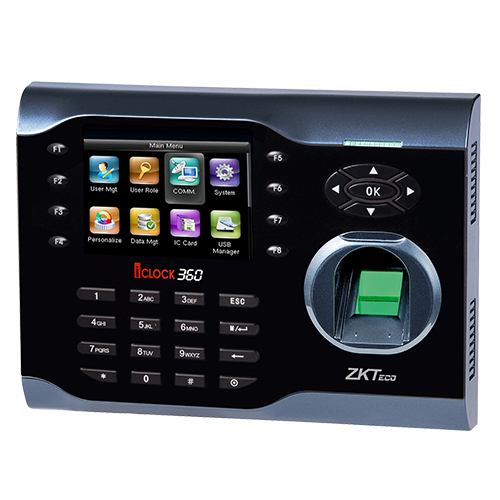
A Dedicated Attendance Endpoint for Structured Workforce Records
The iClock360 is designed to answer a simple operational problem: how can a business capture employee attendance events consistently at a fixed point, keep a substantial local record history, and transfer those records into an attendance-management workflow? It uses fingerprint verification as the primary identity method and combines a local display, keypad-style interaction, storage for attendance transactions and network communication in one wall-mountable terminal.
For buyers, the important point is that fingerprint capacity and employee count are not always the same number. The published capacity is 8,000 fingerprints. A company that enrolls two or more fingers for each employee will consume that template capacity faster than a company using one enrolled finger per person. The 200,000-record transaction capacity is equally important because every clock-in, clock-out or related attendance event consumes record space. That makes retention planning, data synchronization and periodic administration part of a good deployment.
The current ZKTeco product information lists TCP/IP networking and support for ZKBio Time.Net / ZKBio Time. Optional capabilities can include ID, IC or HID card functions, webserver, Wi-Fi, ADMS, external bell and printer support. These options should not be assumed on every unit. The exact hardware revision and supplied option set should be confirmed before purchase, especially when a project depends on wireless connectivity, a particular card technology or centralized server communication.
For UAE organizations, a practical procurement process includes checking the number of employees, number of enrollment templates required, expected daily attendance events, network availability at the mounting point, software version, branch count and whether an optional card or wireless feature is necessary. FourTeck can review these details and help align the terminal with the intended business attendance workflow rather than selecting the unit only from the model name.
Why This Terminal Fits Routine Attendance Operations
Its value is not simply the presence of a fingerprint reader. The real business benefit comes from combining identity verification, local record retention and practical data transfer in a device that can become a consistent daily attendance point.
Room for Larger Enrollment Sets
Up to 8,000 fingerprint templates gives organizations room to enroll a substantial workforce or retain multiple fingerprints for selected users. Capacity planning still matters: two templates per employee effectively consumes twice the enrollment space, so buyers should map template policy to workforce size before deployment.
Large Local Record Buffer
A 200,000-record capacity can provide useful local headroom between synchronization or export cycles. It reduces pressure on very small record buffers, but administrators should still schedule data collection and archive attendance information in the management platform.
Fast Routine Verification
The vendor specifies verification in one second or less. In a real workplace, fast matching helps reduce queues at common arrival and departure times, provided fingerprint enrollment quality and the physical installation are handled correctly.
Practical TCP/IP Integration
Ethernet networking gives IT teams a straightforward path for connecting the terminal to an attendance-management environment. Before installation, confirm an available network point, IP addressing method, firewall rules if relevant and the route to the management server.
Expandable Verification and Communication Choices
Optional ID, IC or HID card functions, Wi-Fi, ADMS, webserver, external bell and printer support can make the model adaptable to different attendance processes. The procurement risk is assuming those options are standard. FourTeck can help identify which functions must be included in the quoted variant.
Backup and Retrieval Support
ZKTeco describes data backup and retrieval features for the platform. That can help reduce the impact of accidental local deletion, but organizations should still maintain proper attendance exports, server backups and documented administrator procedures.
Important Capabilities at a Glance
The strongest purchasing case for this terminal is the balance between fingerprint capacity, transaction storage and familiar network connectivity. It is not a cloud-only appliance and it is not simply a USB data logger; it is intended to sit at the attendance point and participate in a broader management workflow.
The 3.5-inch screen provides the local interface for enrollment, verification feedback and device administration. Standard functions described in ZKTeco regional documentation include work codes, messaging, daylight-saving settings, scheduled bell, self-service query, automatic status switching and T9-style input. Feature availability can vary with firmware and region, so the final quote should identify the current unit revision rather than assuming every historical function list applies unchanged.
ZKTeco iClock360 Technical Specifications
The table below uses current ZKTeco product information and regional ZKTeco documentation. Interface and optional-function details should be confirmed against the exact hardware revision supplied for the order.
| Specification | Published detail | Buyer note |
|---|---|---|
| Brand / model | ZKTeco / iClock360 | Fingerprint time attendance terminal |
| Fingerprint capacity | 8,000 | Plan number of templates per employee |
| Record capacity | 200,000 | Regular synchronization still recommended |
| Display | 3.5-inch screen | Local enrollment and feedback interface |
| Communication | TCP/IP; USB host/client support depending on configuration; RS232/485 appears in ZKTeco regional documentation | Confirm exact revision and required interface |
| Optional verification / functions | ID / IC / HID, webserver, Wi-Fi, ADMS, external bell and printer | Not all options are standard |
| Supported software | ZKBio Time.Net / ZKBio Time | Confirm version, deployment and licensing needs |
| Power supply | DC 12V 1.5A | Plan protected power where continuity matters |
| Verification speed | ≤ 1 second | Enrollment quality affects user experience |
| Operating temperature | 0°C to 45°C | Use within suitable indoor environmental conditions |
| Operating humidity | 20% to 80% | Avoid unsuitable moisture exposure |
| Dimensions | 192 × 140 × 41 mm in ZKTeco regional documentation | Confirm current casing revision if space is tight |
| Gross weight | 1.05 kg | Published vendor value |
Choosing the correct configuration starts with the features that are actually required rather than the longest possible option list. If a site has wired Ethernet at the attendance point, Wi-Fi may not be necessary. If employees already carry a particular card technology and dual-method verification is desired, the exact ID, IC or HID option should be stated in the request. If the unit must communicate with a centralized attendance server, provide the intended ZKBio software environment and network topology. Where a project depends on RS232/485, printer output, external bell or ADMS, those requirements should be written into the quotation so the supplied variant is checked against them. This is particularly important because ZKTeco documentation from different regions and dates can describe interface sets slightly differently.
What Should You Confirm Before Ordering?
The biggest risk is not choosing a terminal with too little capability; it is ordering the right model name with the wrong option set or software assumption. Use the checks below before requesting a final quote.
Confirm Enrollment Policy
Estimate how many fingerprint templates will be enrolled, not only headcount. Decide whether each person needs one primary finger, a backup finger, or an alternative card method.
Match the Software
Confirm whether the organization uses ZKBio Time.Net, ZKBio Time or another supported workflow. Version, database, server placement and license requirements may affect deployment.
Check the Network Point
Verify that Ethernet, IP addressing and power are available at the mounting location. If Wi-Fi is mandatory, specify it as an option instead of assuming every unit includes wireless connectivity.
State Optional Functions Clearly
List required card technology, ADMS, webserver, external bell, printer or any serial interface. Optional items should be part of the purchasing specification.
Plan Multi-Site Administration
For branches, decide whether devices will sync to one central system, operate locally, or export data periodically. Network routing and security rules may need coordination.
Review Support Expectations
Clarify installation, enrollment, software configuration, user training, warranty expectations and post-deployment support separately from the device-only supply.
For a useful FourTeck quote, share the required quantity, approximate employee count, number of branches, preferred verification methods, software environment, network availability, delivery location and whether installation or configuration assistance is needed.
Where the iClock360 Can Fit Well
This model is most credible where employees report through a known attendance point and the organization wants a dedicated biometric endpoint tied to a formal time-management process.
Corporate Office Attendance
For head offices and departmental workplaces, the terminal can provide a common clocking point for arrival, departure and shift records. The large local transaction capacity is useful where many daily events are generated, while TCP/IP supports integration into a managed attendance workflow.
Warehouse and Logistics Teams
Warehouses often have shift changes and concentrated clocking periods. Fast verification and fixed-position deployment can help create a consistent attendance process near staff entry points, provided the terminal is installed within its environmental limits.
Schools and Training Centers
Administrative and teaching staff can use biometric clocking to create consistent attendance records. Buyers should separately define whether student attendance is part of the requirement because that can change capacity, privacy and workflow planning.
Retail and Service Operations
Stores, service centers and multi-shift teams can use a local attendance point where manual registers are difficult to standardize. Multi-location projects should plan how each device will reach the central attendance system.
Workshops and Light Industrial Sites
The model can suit staff attendance in controlled indoor areas of workshops or industrial premises. It should not be treated as an outdoor or harsh-environment terminal unless the installation environment is separately protected and verified.
Growing Multi-Department Businesses
The 8,000-template capacity offers room for organizations that expect more enrollments over time. Growth planning should include attendance software, branch connectivity and administrator processes, not only the terminal capacity.
iClock360 Fingerprint Capacity and Record Planning
Yes, the published 8,000-fingerprint capacity can suit a sizeable workforce, but the correct sizing method is to count templates rather than employees. A company that enrolls a backup finger for each user will use roughly two templates per person. Administrators may also keep inactive users temporarily during payroll review or transition periods, which adds to the stored enrollment set.
The 200,000-record capacity should also be translated into daily events. If 500 employees create two normal events per day, the system could generate around 1,000 records per working day before additional events or exceptions. That does not mean a business should wait until the local memory is nearly full. Regular synchronization gives HR or operations teams a safer, more current dataset and reduces dependency on the terminal as the only record location.
iClock360 Connectivity and Attendance Data Flow
TCP/IP is the central connectivity method to plan around. That makes the device familiar to IT teams: it needs an appropriate network connection, IP settings and a reachable management environment. In a small office, the terminal may sit on the same local network as the attendance computer or server. In a branch deployment, routing, VPN design or other secure inter-site connectivity may be needed before a central server can communicate with remote devices.
USB host/client functions are described by ZKTeco, while regional documentation also references RS232/485. Because current and regional documentation can differ in how these interfaces are presented, serial connectivity should be treated as a confirmation item for the exact unit revision. Optional Wi-Fi can be useful where cabling is impractical, but wired Ethernet is often easier to troubleshoot and may be preferable where stable network infrastructure is already available.
ADMS and webserver functionality are also option-dependent. Buyers planning centralized, internet-reachable or server-push workflows should state that requirement clearly. Network design should include administrator access control, device address management and sensible firewall rules instead of exposing a terminal directly to the public internet.
iClock360 Verification Options and User Experience
Fingerprint verification is the core function. Good user experience begins at enrollment: a clean, well-captured fingerprint template generally gives the matcher better data to work with. Employees should be enrolled consistently, ideally with a backup method or second finger where the organization’s policy and template capacity allow. Physical placement also matters. The reader should be mounted at a comfortable height, protected from unsuitable environmental exposure and positioned so users can present a finger naturally.
Optional ID, IC or HID card functions can be valuable when a site needs an alternative to fingerprint verification for certain users. However, card technology is not interchangeable: the reader option must match the credential technology in use. This is why a request such as “with card” is not specific enough for procurement. The buyer should identify whether the requirement is for ID/EM-style credentials, IC/MIFARE-style credentials, HID or another supported option.
Define who enrolls users, how backup fingers are handled and how former employees are removed.
Specify the exact credential technology rather than requesting an unspecified card reader.
Plan how HR handles missed punches, damaged fingers, temporary staff and approved manual corrections.
What Buyers Should Check Before Purchase
The most important purchase risk is ordering a generic iClock360 description without identifying the option set, software workflow and installation environment. A clear requirement prevents avoidable compatibility problems and gives the supplier a better basis for quotation.
Configuration Fit
Confirm fingerprint template policy, expected record volume, optional card technology, Wi-Fi requirement, ADMS or webserver needs, external bell or printer use and the number of devices required.
Compatibility Check
Match the terminal to ZKBio software version, network design, credential type, power availability and data-collection method. If serial communication is essential, confirm that interface on the exact supplied revision.
Availability and Warranty
Availability can vary by option set, quantity and supplier status. Ask which warranty applies to the quoted unit, where service is handled and whether installation or software support is included or quoted separately.
Quote Preparation
Provide quantity, employee count, branches, verification method, software environment, required options, delivery location, target date and whether FourTeck should include installation or configuration assistance.
Buying Support for Dubai and the UAE
FourTeck supports product inquiries across Dubai and the UAE with assistance for model selection, option review, quotation, delivery coordination and warranty guidance. Availability may vary based on the current terminal revision, required card or wireless functions, order quantity and supplier status, so the correct approach is to confirm the exact requirement before treating any configuration as available.
Review employee count, template policy, software and optional functions.
Plan the delivery location, quantity and required date after availability is checked.
Confirm applicable warranty terms and support scope with the quoted product.
Dubai, Abu Dhabi, Sharjah and Ajman Coverage
Businesses in Dubai, Abu Dhabi, Sharjah, Ajman and other UAE locations can contact FourTeck for attendance-terminal sourcing, configuration guidance and quote assistance. A multi-branch request should include the number of devices per site, intended management software, network connectivity between sites, preferred verification method and whether the business wants centralized administration. Delivery and installation planning should be discussed after the required configuration is clear. For organizations with several offices, FourTeck can also help structure the request so each branch receives the same approved option set rather than a mixture of different card readers, wireless functions or firmware expectations.
Regional Supply Enquiries Across GCC and Africa
FourTeck also supports business technology inquiries across selected GCC and Africa markets through regional inquiry channels. Buyers in Saudi Arabia, Qatar, Oman, Kuwait, Bahrain, Kenya, Uganda and other supported locations can ask about suitable attendance products, configuration guidance and regional supply coordination. Availability, delivery method, applicable warranty handling and support scope can vary by country and supplier channel, so these points should be confirmed for the destination rather than assumed from a UAE quotation.
For regional projects, provide the destination country, quantity, branch locations, required card or network options, software model and target deployment schedule. Regional platforms include FourTeck Kenya, FourTeck Uganda, FourTeck Africa and FourTeck Kuwait. Large rollouts should be quoted as projects so device consistency, accessory requirements and software planning can be reviewed together.
Other ZKTeco Models Buyers May Consider
The right alternative depends on whether the project needs access-control interfaces, a different biometric method, a different capacity level or newer connectivity. FourTeck can help shortlist the model family before the quote is finalized.
ZKTeco iClock700
A related iClock-series option worth reviewing when the requirement also extends toward attendance plus access-control connectivity or different communications. Exact fit should be compared against the current vendor specification.
ZKTeco iClock680
Another model in the same family that may suit projects needing different access-control or interface characteristics.
ZKTeco UA860
A fingerprint attendance terminal option to compare when display, capacity or deployment preferences differ from the iClock family.
ZKTeco X628-C
A related fingerprint attendance product that may be suitable where a different interface or established deployment standard is preferred.
Broader Access Control and Attendance Solutions
If the requirement includes door control, facial recognition, visitor handling or CCTV integration, review the wider physical-security scope rather than selecting an attendance device in isolation.
Why Business Buyers Contact FourTeck
Attendance projects combine hardware, employee enrollment, software, networking and operating procedures. FourTeck’s role is to help buyers organize those requirements before procurement, so the quote reflects the actual project rather than an incomplete model name.
Review workforce size, fingerprint policy and optional verification methods.
Discuss software, network, power and credential compatibility before supply.
Structure the commercial request around quantity, options, location and project support.
Coordinate delivery after the selected configuration and supplier availability are checked.
Clarify applicable warranty expectations for the quoted item and support scope.
Consider switching, cabling, server access and related infrastructure where the attendance deployment depends on them.
Common Questions About the iClock360
What is this terminal mainly used for?
It is primarily used to record employee time and attendance through fingerprint verification. The terminal stores enrollment templates and attendance transactions locally, then supports data transfer into a compatible attendance-management workflow. It is suited to organizations that want a dedicated staff clocking point rather than manual registers. Final software and connectivity planning should be confirmed as part of the deployment.
Does 8,000 fingerprints mean 8,000 employees?
Not necessarily. The published figure refers to fingerprint templates. If each employee has one enrolled finger, the capacity can correspond closely to the number of enrolled people. If users are given a second or backup fingerprint, each person consumes more template space. Buyers should decide their enrollment policy first and use that policy to estimate practical workforce capacity.
Can it connect over a business network?
Yes. TCP/IP is a published connectivity method, so the device can be planned as a network-connected attendance endpoint. The site should provide suitable Ethernet connectivity, power and IP configuration. For branch or remote-site use, the network route to the attendance server may need additional planning. Wi-Fi is an optional function and should be requested explicitly if wired Ethernet is not available.
Which attendance software is supported?
The current ZKTeco product page lists ZKBio Time.Net and ZKBio Time. Buyers should still confirm the exact software version, licensing model, database or server requirements and integration method before deployment. Older regional documentation can reference earlier ZKTime.Net naming, so a current project should be designed around the actual software environment the organization plans to use.
Does every iClock360 include card and Wi-Fi functions?
No. ZKTeco lists ID, IC or HID card functions, Wi-Fi, ADMS, webserver, external bell and printer among optional capabilities. The exact unit should be checked before ordering. If a project requires a specific credential type or wireless connection, state that in the quotation request so the supplied configuration can be matched to the requirement.
Is it suitable for a multi-branch company?
It can be used in multi-branch attendance projects when each site has an appropriate way to transfer data to the chosen management system. The design should consider network connectivity, secure routing between branches, device naming, administrator responsibility and software licensing. FourTeck can help buyers organize these requirements before multiple units are quoted.
What should I provide to get an accurate quote?
Provide the model, quantity, employee count, number of sites, preferred fingerprint policy, card type if needed, Wi-Fi or ADMS requirement, software environment, delivery location, target date and whether installation or configuration support is required. These details help the quote identify the intended option set instead of treating all iClock360 units as identical.
Is the terminal available in Dubai and the UAE?
FourTeck can support availability checks and quote requests for Dubai and UAE customers. Availability can change with supplier status, order quantity and the option set requested, especially for card, Wi-Fi or other optional functions. Contact FourTeck with the required configuration and delivery location so the current supply position can be checked before purchase commitments are made.
Can FourTeck help with installation and configuration planning?
FourTeck can discuss installation and configuration requirements as part of the inquiry. The scope may include mounting position, power and network readiness, software connectivity, option verification and deployment planning. Installation services, attendance software setup, user enrollment and ongoing support should be defined clearly because they may be separate from device supply.
How do I choose between this model and another ZKTeco terminal?
Compare the requirement, not only the price. Start with employee and template capacity, record volume, attendance-only versus access-control needs, card technology, display preference, network method, software support and future growth. If another model provides an interface or biometric method that better matches the project, it may be the more suitable choice. FourTeck can help shortlist alternatives using these decision points.
Need Help Choosing the Right Attendance Configuration?
FourTeck can review the intended workforce size, fingerprint policy, required options, software environment, network connection, quantity, delivery location and support expectations before preparing a quote.
Share the required quantity, number of employees, card or Wi-Fi needs, software platform, site count and delivery location.




Reviews
There are no reviews yet.