

ZKTeco InBio160 Pro Plus Biometric Access Controller in Dubai, UAE
A single-access-point controller for organizations that want centralized door control with card, fingerprint, face, password and QR-based authentication through compatible readers.
The controller combines TCP/IP management, RS-485/OSDP reader connectivity, Wiegand inputs and ZKBio CVSecurity support in a compact platform. FourTeck can help buyers review reader compatibility, power, locking hardware, enclosure requirements and deployment scope before quotation.
TCP/IP Management
RS-485 / OSDP / Wiegand
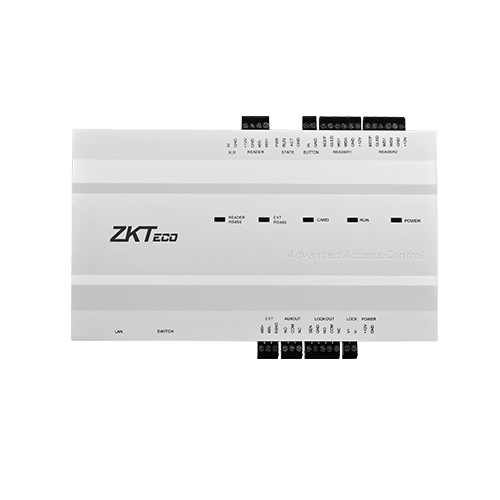
Centralized Control for a Single Secured Entry
The ZKTeco InBio160 Pro Plus is built for projects where one controlled entry needs more capability than a simple standalone reader can provide. Instead of placing all access logic at the reader, the controller becomes the central decision point for credentials, access schedules, lock operation, door status and related events. That architecture is useful for businesses that want a cleaner separation between the reader at the doorway and the control electronics installed in a protected location.
Its key role is to coordinate a single access point while allowing multiple credential technologies. Depending on the connected readers and software design, a site can use cards, passwords, fingerprints, facial credentials or QR codes. This flexibility matters when one building has different user groups. Employees may use biometric or card credentials, contractors may use controlled temporary methods, and visitors may use QR workflows when the wider ZKBio CVSecurity environment is configured for them.
The panel communicates over TCP/IP for network-based administration and supports two RS-485 readers using ZKTeco RS-485 or optional OSDP connectivity, plus two Wiegand reader inputs supporting 26, 34 and 66-bit formats. For a buyer, this means the controller can fit both newer deployments and projects that still depend on common Wiegand readers. The choice of interface should be confirmed before purchase because reader protocol, wiring method, security expectations and available accessories directly affect the installation design.
The controller is relevant to UAE offices, equipment rooms, clinics, schools, retail support areas, warehouses and other facilities where a single door needs centrally managed access policies. It is not simply a fingerprint box. It is part of a complete access-control system that can include a reader, electric lock or strike, door sensor, exit button, alarm integration, power supply, enclosure, network connection and server software. FourTeck can help buyers review this complete system rather than quoting only the controller board and leaving critical installation items undefined.
For procurement teams, the most important question is whether one access point is enough for the requirement. If the project will soon expand to multiple controlled doors, the InBio260 Pro Plus or InBio460 Pro Plus may be more appropriate. If the requirement is genuinely one door, the InBio160 Pro Plus allows a project to use the same product family and management platform without purchasing unused door capacity.
Why the Controller Matters in a Real Access Project
The value is not only the number of credentials it can store. The controller helps organizations centralize access decisions, preserve expansion choices and connect several reader technologies to one managed entry.
Keep access logic away from the doorway
A controller-based design lets the reader remain at the entrance while door logic and data are handled by the protected panel. For security teams, this is a more structured architecture than relying only on a standalone terminal. It also gives administrators a single place to manage door status, lock relay behavior, access schedules and events through the supported software environment.
Support different user populations
Card, fingerprint, face, password and QR-based workflows give system designers options for employees, visitors and contractors. The actual method depends on the reader and software configuration, so buyers can choose the credential mix that matches privacy, convenience and operational policy instead of being locked to one technique.
Room for larger identity databases
The family specification supports up to 100,000 users, 100,000 cards, 20,000 fingerprint templates, 3,000 face templates, 100,000 QR codes and 500,000 standard transactions. Even when only one door is controlled, this capacity can be useful at large facilities where many people may need entitlement to the same high-traffic entry.
Bridge modern and established reader wiring
RS-485 with ZKTeco protocols, optional OSDP and Wiegand inputs allow the controller to work across different reader strategies. For an upgrade project, that may help retain suitable existing readers. For a new installation, it allows a design based on the preferred communication method. FourTeck recommends confirming reader model and protocol before ordering because physical compatibility does not automatically mean every authentication feature will be available.
Use stronger access rules
Access levels, groups, holidays, anti-passback, linkage and multiple verification methods give administrators more control than a basic open-or-deny setup. These functions help projects apply policies that reflect shift patterns, restricted zones and specific operating conditions.
Plan a cleaner panel installation
DIN rail, wall mounting and an optional metal enclosure give installers several ways to protect and organize the controller. The enclosure option also creates a structured location for power equipment and battery planning, subject to the selected package and project design.
A One-Door Platform with Enterprise-Style Access Functions
The standout strength of the InBio160 Pro Plus is its ability to bring the broader InBio Pro Plus feature set to a single access point. That makes it a practical fit when the door is important enough to need centralized policy control, yet the site does not justify a two-door or four-door controller.
The hardware platform uses Linux, a 1.0 GHz single-core processor, 128 MB RAM and 256 MB ROM. Those specifications matter less to a buyer than the access functions they support: sizable identity storage, multiple reader technologies, event capacity, web server functions and connection to ZKBio CVSecurity. The controller also offers a USB Type-A port for USB-drive use and supports network communications over TCP/IP.
Security design is another important point. ZKTeco documents AES 256-bit encryption for stored data, AES 128-bit encryption for communication with readers over RS-485 or OSDP, and HTTPS/TLS 1.2 for secure server-to-web-client communication. Buyers should still review the whole network architecture, software server security, credential policy and installer practices because device-level encryption is only one part of a complete physical-security system.
InBio160 Pro Plus Specification Reference
The following figures are based on ZKTeco’s published InBio Pro Plus information for the InBio160 Pro Plus. Installation accessories, software licensing, enclosure contents and project wiring should be confirmed in the final quotation.
| Specification | Confirmed detail | Buyer relevance |
|---|---|---|
| Brand / Model | ZKTeco InBio160 Pro Plus | Single-door member of the InBio Pro Plus family |
| Product type | IP-based biometric access control panel | Centralizes access decisions and door I/O |
| Operating system / hardware | Linux OS; 1.0 GHz single-core CPU; 128 MB RAM; 256 MB ROM | Embedded platform for controller operation |
| Access point capacity | 1 access point | Key sizing decision for one-door projects |
| Reader capacity | 2 × RS-485 readers; 2 × 26/34/66-bit Wiegand readers | Check entrance/exit reader design and protocol |
| Authentication methods | Card, password, fingerprint, face, QR code | Requires suitable readers and software configuration |
| User / card capacity | 100,000 users; 100,000 cards | Useful where many identities share one controlled entry |
| Biometric / QR capacity | 20,000 fingerprint templates; 3,000 face templates; 100,000 static/dynamic QR codes | Confirm expected credential mix before deployment |
| Transaction capacity | 500,000 standard transactions | Supports event history before synchronization policies are considered |
| Communication | TCP/IP ×1; RS-485 / optional OSDP ×1; Wiegand input ×2; USB Type-A ×1 | Network, reader and service connectivity planning |
| Door I/O | 1 exit button; 1 door status; 1 AUX input; 1 lock relay; 1 AUX output; 1 alarm | Supports core single-door peripherals and automation links |
| I/O expansion | Up to 8 EX0808 boards via RS-485; up to 64 I/O points as documented | Relevant for integrated alarms, lighting or other controlled outputs |
| Power supply | 9.6 V to 14.4 V DC | Power design must include controller and lock load requirements |
| Operating environment | 0°C to 45°C; 20% to 80% RH non-condensing | Install in a suitable protected indoor/controlled environment |
| Dimensions / net weight | 185.12 × 106 × 36.07 mm; 0.390 kg | Useful for enclosure and mounting layout |
| Supported software | ZKBio CVSecurity | Confirm server, licensing and project architecture |
| Installation | DIN rail, wall mount or optional metal enclosure | Choose the physical format before site installation |
Configuration selection should start with the door design, not with the controller alone. Confirm whether the project uses reader-in/reader-out, what credential types will be issued, whether existing readers must be retained, and how the lock will be powered. If a metal enclosure is required, confirm whether the quotation includes the enclosure, power supply and reserved battery space or only the controller board. Network teams should also confirm an available Ethernet connection and the server path to ZKBio CVSecurity. For projects that use dynamic QR, facial readers or fingerprint readers, verify the exact reader model and its supported interface. A correct bill of materials should include all required control, reader, power, locking, sensing and cabling components.
Questions to Confirm Before You Order
The safest purchase starts by matching the controller to the complete door and user workflow. The following questions help avoid a quote that contains the correct model but an incomplete or incompatible system.
Is one access point enough?
This is the highest-risk sizing question. If the current project needs one door but a second or fourth door is likely soon, compare the InBio260 Pro Plus and InBio460 Pro Plus before committing to the one-door model.
Which readers will be connected?
List the exact entrance and exit reader models, credential methods and communication protocol. RS-485, optional OSDP and Wiegand support different design approaches, but the reader must be checked against the intended authentication features.
What lock and power arrangement is required?
Magnetic locks, electric strikes and other locking devices have different electrical requirements. The controller’s power specification does not replace the need to size the complete power supply, account for lock current and plan backup power where required.
Is ZKBio CVSecurity already deployed?
Existing customers should confirm server version, licensing, network reachability and whether the new panel is being added to a current access project. New deployments should include the software and server plan as part of the project scope.
What enclosure and site environment apply?
The controller supports DIN rail, wall mounting and an optional metal enclosure. Confirm cabinet space, cable routes, ventilation, environmental conditions and access for maintenance before the installation team arrives.
What should be sent with the quote request?
Share quantity, number of doors, reader models, credential type, lock type, software requirement, delivery location, installation requirement and target project date. These details make the quotation much more useful than a model-only request.
Where a One-Door Biometric Controller Fits Best
This controller is most credible where one important entry needs centralized access control, multiple credential choices and integration with a wider security policy. It can serve small sites, but its large credential capacity also makes sense at larger organizations when a particular restricted door is shared by many users.
Restricted IT or Equipment Room
A server room, network room or electrical control area may have only one entrance but require stronger identity control than an ordinary office door. Administrators can use centrally managed credentials, access schedules, door status monitoring and multiple verification methods. The controller can be installed away from the public side of the door, while the reader remains at the entry point. For these environments, buyers should also consider UPS-backed power, lock behavior during power loss and procedures for emergency access.
Office Main Door or Staff Entrance
An office that needs a controlled staff entrance can combine card or biometric readers with central software management. This gives administrators a practical way to add or revoke users, assign schedules and review events without depending on a purely standalone terminal. If the office has several controlled doors, however, a higher-door-count model should be evaluated.
Clinic, School or Training Facility
Facilities that need to protect staff-only rooms, records areas, laboratories or administration zones can use the controller to manage a focused access point. Different credential methods can be considered for permanent staff and temporary visitors, subject to the wider software and reader design.
Retail Back Office or Cash Handling Room
Retail sites often have one staff-only room that needs more control than the public sales floor. A centrally managed door controller can help restrict access to approved personnel and create transaction records. Installation planning should include the correct lock, exit arrangement, door contact and emergency procedures.
Warehouse Cage or Controlled Store
Within a larger warehouse, a high-value cage, tool store or controlled inventory room may be a single access point used by many employees. The high user and transaction capacities can be relevant in such cases, while anti-passback or linkage functions may support the site’s broader security policy when configured correctly.
Is this model suitable for a small office? Yes, when that office has one controlled door and wants centralized management rather than a simple standalone device. Is it suitable for a large enterprise? It can be, especially for a single restricted point with a large user population, but enterprises with multiple doors should consider the two-door or four-door models to reduce panel count and simplify architecture. The right choice depends on door count, user volume, credential policy, reader design and future expansion rather than company size alone.
InBio160 Pro Plus Multi-Modal Authentication
The controller is designed to support several ways of proving identity: card, password, fingerprint, face and QR code. That does not mean every deployment automatically has all five methods at the door. The actual experience depends on the readers connected, software configuration and credential policy. This distinction is important for buyers because the controller should be treated as the access engine, while the reader defines what the user physically presents.
A company might use cards for most employees and a fingerprint reader for a smaller restricted group. Another site might use facial readers at the entrance and temporary QR credentials for visitor workflows. The controller’s reader interfaces create room for these designs, but each project should confirm model compatibility rather than assuming any third-party biometric reader can deliver full biometric functionality.
For procurement, the benefit is choice. The organization can select credential methods based on convenience, security policy and the needs of different user groups. The corresponding responsibility is to document which method is required at entry and exit, how credentials are enrolled, what happens when a credential is lost or revoked, and how visitor access is handled.
InBio160 Pro Plus Reader Connectivity and Data Protection
Reader communication is one of the most important technical choices in an access-control project. The controller supports two RS-485 readers using ZKTeco RS-485 or optional OSDP and also provides two Wiegand inputs supporting 26, 34 and 66-bit formats. This gives installers the ability to work with newer supervised digital reader links or established Wiegand designs, depending on the reader and project requirement.
Which interface should a buyer choose? For a new system, the decision should consider reader compatibility, desired security architecture, cable type and installer experience. For an upgrade, existing wiring and readers may influence the choice. FourTeck can review the exact reader models and current site infrastructure so the selected panel is matched to the planned credential method rather than ordered in isolation.
InBio160 Pro Plus Access Rules, I/O and Expansion
A door controller becomes more valuable when it can apply policy and interact with the surrounding building systems. Standard functions documented for the InBio Pro Plus family include access levels, access groups, holiday schedules, anti-passback, anti-tailgating, linkage, global linkage and multiple verification methods. These features let administrators move beyond a simple list of allowed cards and build rules that reflect business operations.
The InBio160 Pro Plus has one exit-button input, one door-status input, one auxiliary input, one Form C relay for the lock, one Form C auxiliary output and one alarm connection in its standard arrangement. ZKTeco also documents support for up to eight EX0808 I/O expansion boards over RS-485, allowing larger I/O designs where the project needs additional interfaces. Expansion should be engineered carefully because a larger automation project introduces more power, wiring, programming and documentation requirements.
Decision checklist
- Confirm whether anti-passback or multiple verification is actually required.
- Define what should happen when the door is forced or held open.
- Check whether auxiliary outputs will control alarms, gates, lighting or another system.
- Document fail-safe or fail-secure lock behavior with the project’s safety requirements.
- Plan expansion boards only when the extra I/O has a defined business purpose.
- Include commissioning and testing in the project scope, not only hardware supply.
For buyers, this deep functionality is useful only when the installation team translates it into tested operating rules. A sophisticated controller with poorly defined access groups or undocumented linkage can create more maintenance work than a simpler system. FourTeck can help structure the quotation around the real door behavior, connected equipment and support expectations.
What Buyers Should Check Before Purchase
The biggest purchase risk is treating the controller as a complete access-control system. The board may be the correct model, but the project can still fail if readers, lock hardware, power, software, cabling or expansion requirements are missing from the bill of materials.
Configuration Fit
Confirm door count, entry and exit reader arrangement, credential types and user population. If the project may grow beyond one controlled entry, ask for a comparison with the two-door and four-door models before ordering. This avoids creating a design that needs another controller almost immediately.
Compatibility Check
Provide exact reader models, lock type, door sensor, exit button, cabling and existing software version. Wiegand, RS-485 and optional OSDP give flexibility, but not every reader or biometric workflow should be assumed compatible without checking the vendor-supported path.
Commercial and Warranty Expectations
Ask what is included in the quoted package: controller only, enclosure, power supply, battery space, readers, locking hardware, software, installation or commissioning. Availability and warranty terms can vary with supplier source, quantity and package, so these items should appear clearly in the quotation rather than being assumed.
Quote Preparation
Send the required quantity, number of doors, user count, credential method, reader preference, lock type, software requirement, delivery location, installation requirement and target date. For replacement projects, include the existing controller and reader models so FourTeck can review migration concerns.
What accessories may be required? A typical door project can include readers, an electric lock or strike, door contact, exit button, power supply, enclosure, backup battery, Ethernet connection, structured cabling, software licensing and commissioning services. The exact list changes with the door and security policy. What affects long-term cost? Consider software licensing, replacement batteries where used, reader maintenance, future door expansion, credential administration and support—not only the controller purchase price. A slightly broader initial review can prevent expensive rewiring or replacement later.
Buying Support for Dubai and UAE Projects
FourTeck supports inquiries for the ZKTeco InBio160 Pro Plus in Dubai and the UAE with product-selection guidance, quotation support, accessory review and delivery coordination. Availability may vary based on supplier status, order quantity, package type and project schedule. Because this is a controller that normally forms part of a larger access system, buyers are encouraged to request a complete bill of materials rather than confirming the board alone.
Buyers can also discuss related installation requirements, including readers, power supplies, door locks, structured cabling, network connectivity and software deployment. Visit the FourTeck CCTV and access control solutions page for broader project support, or use the FourTeck contact page to send the exact requirement.
Dubai, Abu Dhabi, Sharjah and Ajman Coverage
Businesses in Dubai, Abu Dhabi, Sharjah, Ajman and other UAE locations can contact FourTeck for access-control product inquiries, configuration review and quotation assistance. The support process can cover the controller, compatible readers, locking hardware, enclosure and power planning, network requirements and deployment services where relevant. For multi-site projects, it is helpful to provide the number of locations and doors at each location so the controller family can be sized consistently. A single-door branch may suit this model, while a larger branch may benefit from a multi-door panel. This approach keeps the hardware aligned with the actual site layout instead of repeating the same controller at every location without considering door density.
Regional Inquiry Support for GCC and Africa
FourTeck also supports business technology inquiries across selected GCC and Africa markets through regional inquiry channels. Customers in Saudi Arabia, Qatar, Oman, Kuwait and Bahrain, as well as businesses in Kenya, Uganda and other Africa-region markets, can discuss access-control requirements, quantities, compatible options and delivery planning. Availability, warranty handling, shipping arrangements and local installation scope may vary by country, so these details should be confirmed for each project.
For regional planning, buyers can review FourTeck Kenya, FourTeck Uganda, FourTeck Africa and FourTeck Kuwait. A regional quote request should include country, delivery city, quantity, door count, credential type, software requirement and whether the project needs hardware supply only or wider implementation support.
Other Access-Control Options Buyers May Consider
The best alternative depends mainly on door count, reader technology and whether the project is expanding an existing ZKTeco environment. These are practical directions to discuss with FourTeck before the final bill of materials is prepared.
ZKTeco InBio260 Pro Plus
The two-access-point model is worth reviewing when the project needs two controlled doors or when a single-door site is likely to expand soon. It stays within the same product family while providing more native door capacity.
ZKTeco InBio460 Pro Plus
The four-access-point model may reduce controller count in larger projects. It is a logical comparison when several doors are located in the same area and can be served by one panel design.
ZKTeco C3 Plus Series
Consider the C3 Plus direction when the requirement is primarily card-based access control and the project does not need the same biometric controller architecture.
Compatible ZKTeco Readers
The right reader is determined by credential type and interface. ZKTeco documentation references compatible RS-485 face, fingerprint, card and QR reader families for the InBio Pro Plus platform.
PoE and Network Infrastructure
Access-control projects often depend on reliable switching, structured cabling and UPS-backed network equipment. These items should be reviewed when the controller connects to a larger security network.
Why Business Buyers Contact FourTeck
Access control is a system purchase, not just a controller purchase. FourTeck’s role is to help business buyers turn a model request into a clearer project requirement so the quotation can include the correct controller family, reader interfaces, locking accessories, power design and deployment support.
This is particularly useful for procurement teams that receive a model number from a consultant or installer but do not yet know the complete accessory list. FourTeck can help translate that request into commercial questions: Is the enclosure included? Are readers part of the price? Does the site need an exit reader? Who supplies the lock? Is the server software already licensed? Is installation included? What warranty applies to the quoted source? By resolving these points before order approval, the buyer can compare quotations on a more consistent basis.
ZKTeco InBio160 Pro Plus Buyer FAQ
What is this controller used for?
It is used to control one access point in a centrally managed access-control system. The panel receives credential information from compatible readers, applies access rules, controls the lock relay, monitors door status and records events. It is suitable when a business wants more centralized control than a simple standalone reader provides.
Does it support fingerprint and facial recognition?
Yes, the InBio Pro Plus platform supports fingerprint and facial authentication when suitable compatible biometric readers are used. The controller also supports card, password and QR-based methods. Buyers should specify the exact reader models and desired authentication workflow so compatibility can be confirmed before ordering.
How many doors can the InBio160 Pro Plus control?
The model is specified for one access point. If the project needs two or four controlled doors, the related InBio260 Pro Plus or InBio460 Pro Plus should be reviewed. Choosing the correct door capacity at the beginning can reduce extra panel hardware and simplify installation as the site grows.
Can it work with existing Wiegand readers?
The controller provides two Wiegand inputs and supports 26, 34 and 66-bit card lengths. That can make it suitable for upgrade projects with compatible Wiegand readers. However, the reader model and credential format should be checked because interface support alone does not guarantee every biometric or advanced function will carry over.
What software is used to manage the controller?
ZKTeco lists ZKBio CVSecurity as the supported software platform. A project should confirm the required software edition, licensing, server environment, network connectivity and whether the controller will be added to an existing system or deployed as part of a new server installation.
Is the metal enclosure included?
ZKTeco documents a metal enclosure as an optional installation method. Package contents can vary, so buyers should not assume the enclosure, power supply or battery arrangement is included with every controller quotation. Ask FourTeck to list the exact package contents and required accessories in the commercial offer.
Is the product available in Dubai and the UAE?
FourTeck can support UAE product inquiries and quotation requests. Current availability can vary with supplier status, quantity, package and project schedule. Send the required quantity, delivery location and whether you need controller-only supply or a complete access package so the team can check suitable current options.
What information should I provide for a quote?
Provide quantity, number of doors, entry and exit reader requirements, credential type, lock type, software requirement, enclosure preference, installation location and target date. For replacement projects, add the existing controller and reader models. These details help FourTeck prepare a more complete quotation with fewer assumptions.
Can businesses request bulk or project supply?
Yes, project and quantity-based inquiries can be submitted to FourTeck. For larger deployments, include a door schedule or site list if available. That helps determine whether one-door, two-door and four-door controllers should be mixed across locations for a cleaner architecture and more efficient panel utilization.
Need Help Building the Correct One-Door Access Package?
FourTeck can review the intended door, reader technology, lock type, user population, software requirement, delivery location and installation scope before preparing a quote. This helps distinguish the controller itself from the complete set of parts needed for a working access-control deployment.
Share the model, required quantity, number of doors, preferred credential method, reader type, delivery location and target project date.



