

ZKTeco SenseFace T3 Multi-Biometric Attendance Terminal in Dubai, UAE
A compact attendance terminal for organizations that want face, palm, fingerprint, password, and optional card verification in one device.
Designed for small and medium-sized workplaces, the terminal combines local biometric verification with network connectivity and ZKBio Zlink compatibility. FourTeck can help buyers confirm the right credential method, software workflow, network connection, mounting location, quantity, and support expectations before purchase.
A Practical Attendance Terminal for Mixed-Credential Workplaces
The SenseFace T3 is best understood as a flexible employee attendance endpoint rather than a single-method fingerprint clock. It gives a business several ways to identify staff at the same wall-mounted terminal, making it useful where different employees, departments, or workplace conditions call for different verification methods.
ZKTeco positions the model for small and medium-sized businesses that want to simplify workforce attendance. The standard terminal supports up to 1,000 users and stores up to 50,000 transactions. Face, palm, and fingerprint template capacities are each listed at 1,000 in standard 1:N use. Password entry is available through the physical keypad, while card authentication is optional and should be specified carefully because card technology choices can differ. This combination can help a company avoid designing an attendance process around one biometric method alone.
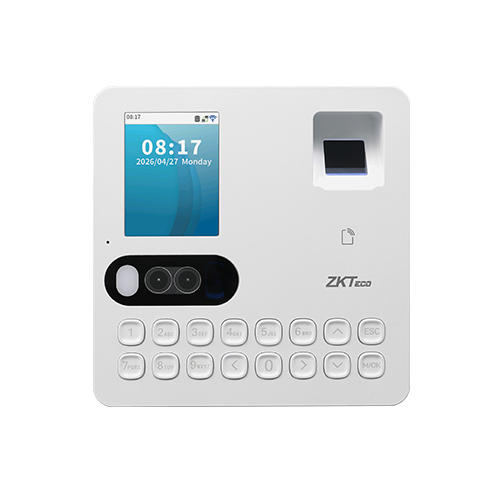
For daily operation, the terminal includes a 2.4-inch color display, dual 1MP cameras, a ZK optical fingerprint sensor, speaker, supplementary light, and a 16-key physical keypad. Face and palm authentication are specified at under half a second, while fingerprint authentication is specified at under one second. Touchless working distance is listed as 40 to 110 cm for face and 8 to 25 cm for palm. These details matter in reception areas, staff entrances, workshops, clinics, stores, offices, and branch sites where a queue can form during shift changes.
The device can communicate over TCP/IP or 2.4 GHz Wi-Fi, with Wi-Fi 6 support, and it also provides USB Type-A for USB drive use. ZKBio Zlink compatibility is important for organizations that want attendance information, employee management, device administration, rules, and reporting available through a cloud-supported workflow rather than relying only on local terminal interaction. The exact software subscription, account setup, network policies, and management process should be reviewed as part of the deployment plan.
For UAE buyers, the purchasing question is therefore not simply whether the device can recognize a face or fingerprint. The more useful question is whether its 1,000-user capacity, selected credential mix, network method, software workflow, mounting location, and reporting process fit the organization. FourTeck can review those practical points before preparing a quotation, helping procurement teams turn a model request into a workable attendance deployment.
Key Business Benefits
The main value comes from giving administrators several verification choices while keeping attendance collection centered on one compact endpoint.
Multiple Ways for Employees to Verify
Face, palm, fingerprint, password, and optional card verification let a business create a more adaptable attendance process. A workplace can use touchless methods where convenience matters, fingerprint where established policies already exist, password as an additional method, and cards where credential-based workflows are preferred. The advantage is not simply having more features; it is being able to match the method to the real environment without replacing the entire terminal.
Faster Shift Check-In
Specified sub-second face and palm verification can support smoother arrival periods where many employees clock in around the same time. Good placement, lighting, enrollment quality, and network planning still matter, but the terminal is designed for quick daily interaction rather than lengthy manual entry.
Anti-Spoofing Support
ZKTeco states that the applied deep-learning algorithms improve anti-spoofing handling for face and palm authentication. For buyers, this means the terminal is intended to do more than simple image matching. It should still be deployed with sensible attendance policies and controlled enrollment procedures.
Cloud-Supported Administration
Compatibility with ZKBio Zlink allows managers to work with employees, devices, attendance rules, and reports through the supported web and mobile environment. This can reduce the need to treat every terminal as an isolated device, especially when administration is handled away from the entry point.
Wired or Wireless Network Choice
TCP/IP is useful where structured cabling is available, while 2.4 GHz Wi-Fi with Wi-Fi 6 support can simplify installation where pulling a new data cable is inconvenient. Buyers should still check wireless coverage, firewall policy, device addressing, and the preferred management architecture before deciding how each terminal will connect.
Capacity Sized for Many SMB Deployments
A standard capacity of 1,000 users and 50,000 transactions makes the terminal relevant to offices and operational sites that are beyond very small teams but do not need a large enterprise biometric appliance at every entry. The right design depends on staff count, number of sites, shift patterns, retention requirements, reporting workflow, and whether several terminals will be managed together. FourTeck can help buyers review those quantities before purchase.
What Stands Out in Daily Attendance Use
The terminal combines three biometric technologies in the standard platform and can add card authentication as an option. This helps an employer create a consistent attendance point while retaining choice for different teams and workplace conditions. Face and palm offer touchless interaction; fingerprint provides a familiar biometric method; password entry gives a keypad-based route; and optional RFID supports card-oriented environments.
Another practical highlight is pose tolerance. ZKTeco specifies ±25° rotation and ±25° tilt support for face and palm authentication through the applied deep-learning algorithm. That can help normal everyday use because employees do not always approach a terminal at exactly the same angle. Buyers should still plan sensible mounting height, lighting, queue position, and enrollment quality because physical installation remains part of recognition performance.
Technical Specifications
The table below summarizes confirmed manufacturer parameters. Card technology and commercial package details should be checked for the exact unit being quoted.
| Specification | SenseFace T3 Detail |
|---|---|
| Brand / Model | ZKTeco / SenseFace T3 |
| Product Type | Multi-biometric time and attendance terminal |
| Display | 2.4-inch TFT color LCD, 240 × 320 |
| Camera | Dual 1MP; 160° diagonal, 142° horizontal, 83.2° vertical field of view |
| Operating System / Hardware | Linux; ARM Cortex-A7 950 MHz; 128 MB RAM; 128 MB ROM |
| Authentication | Face, palm, fingerprint, optional card, password via physical keypad |
| User / Template Capacity | 1,000 users; 1,000 face; 1,000 palm; 1,000 fingerprint; 1,000 card templates in standard 1:N mode |
| Transaction Capacity | 50,000 |
| Authentication Speed | Face <0.5 sec; palm <0.5 sec; fingerprint <1 sec |
| Recognition Distance | Face 40–110 cm; palm 8–25 cm |
| Biometric Algorithms | ZKFingerprint V13.0, ZKFace V34, ZKPalm V34 |
| Card Options | 125 kHz ID, 13.56 MHz IC; multi-tech options include ID, IC, DESFire EV1/EV2 — configuration dependent |
| Connectivity | 1 × TCP/IP; 2.4 GHz Wi-Fi IEEE 802.11 a/b/g/n/ac/ax with Wi-Fi 6; 1 × USB Type-A 2.0 for USB drive |
| Software | ZKBio Zlink cloud-based software with web portal and mobile app support |
| Power | DC 5V 2A via USB Type-C |
| Environment | -10°C to 45°C; up to 90% RH non-condensing |
| Dimensions / Net Weight | 125 × 128 × 31 mm; 0.24 kg net |
| Installation | Wall-mount |
| Order ID | TA01-VL07H-53 |
The configuration that most often changes the buying decision is the credential plan rather than the processor or memory inside the device. If an organization intends to use cards, confirm whether the project uses 125 kHz ID credentials, 13.56 MHz IC credentials, DESFire, or a mixed environment. If the attendance workflow is cloud-managed, confirm ZKBio Zlink requirements, network access, account ownership, subscription or service expectations, and how reports will be used. Also verify the number of terminals required: one device may be enough for a small office, while multiple entrances, separate shifts, or branch sites may require several units. Power availability, wall location, user approach distance, and reliable network coverage should be included in the site plan before installation.
Configuration and Buyer Guidance
Choose the terminal only after confirming how employees will authenticate and how attendance data will be managed. The device supports several methods, but the best deployment is the one that matches staff count, working conditions, credential policy, network design, and reporting responsibilities.
Which authentication methods are required?
Decide whether the project will use face, palm, fingerprint, password, cards, or a combination. If cards matter, identify the credential technology before ordering because card support is an option and the type can vary.
How many employees and entrances?
Compare the 1,000-user capacity with current headcount, planned growth, shift overlap, and number of physical entry points. More than one terminal may be sensible even when total headcount is below the device limit.
How will the terminal reach the network?
Use TCP/IP where a stable wired run is available. Consider Wi-Fi where cabling is difficult, but check 2.4 GHz signal quality, network segmentation, device addressing, internet reachability, and firewall rules first.
What is the reporting workflow?
Clarify who enrolls employees, who reviews exceptions, how attendance rules are applied, how reports are exported, and whether ZKBio Zlink is part of the intended management model.
Is the mounting area suitable?
Plan a wall position with convenient power, clear approach space, appropriate viewing height, stable indoor conditions, and enough room for face and palm recognition distances without obstructing normal staff movement.
Prepare a useful quote request
Share employee count, quantity, chosen biometric methods, card type if needed, number of sites, preferred network connection, software expectation, installation requirement, delivery location, target date, and warranty preference.
Ideal Business Use Cases
This model fits best where attendance needs to be captured quickly at one or more controlled staff points and the organization values more than one authentication choice. It is not necessary to use every method at once; the value is being able to standardize one terminal platform while selecting the methods that suit each workplace.
Office and Headquarters Attendance
Corporate offices with several departments can use the terminal at a staff entrance or designated clocking point. Face or palm can reduce touch interaction, while fingerprint, password, or card options remain available for policy flexibility. The 1,000-user scale is relevant to many medium-sized sites, and cloud-supported administration can help HR or operations teams manage rules and reports without relying only on the local device screen.
Retail and Branch Networks
A shop, showroom, or service branch may need a compact attendance point that is easy for staff to use without adding a large access-control appliance. Multiple sites can be planned around the same terminal family, provided software, network, and reporting requirements are reviewed centrally.
Clinics and Service Facilities
Touchless face or palm verification can be useful in environments where staff prefer to minimize repeated contact with shared surfaces. Buyers should plan enrollment, privacy policies, placement, and attendance rules according to their own operational and regulatory requirements.
Warehouses and Operational Sites
Sites with fixed shift changes can benefit from fast recognition and a physical keypad. The operating environment must remain within the specified temperature and humidity range, and the mounting area should be protected from conditions that would interfere with normal biometric use or device longevity.
Schools and Training Centers
Administrative and support staff attendance can be centralized through a dedicated terminal where organizations want a repeatable clock-in process. The correct approach depends on user count, data handling policies, network availability, and whether attendance records need to feed a broader HR process.
Multi-Shift SMB Operations
Businesses running staggered teams can use schedule and attendance rules alongside rapid authentication to reduce manual sign-in work. Capacity planning should account for transaction retention, exception handling, and how frequently attendance data is reviewed or synchronized.
SenseFace T3 Multi-Biometric Authentication
A single biometric method can become a limitation when staff preferences, working conditions, or company policies vary. The SenseFace T3 addresses that issue by supporting face, palm, fingerprint, password, and optional card verification. For a buyer, this means the terminal can be planned around the operating environment instead of forcing every employee into the same interaction.
Face recognition uses visible light while palm recognition works through a near-infrared approach. ZKTeco specifies face use at 40 to 110 cm and palm use at 8 to 25 cm, which creates different physical interaction zones. Fingerprint remains useful where an organization already has a biometric enrollment process. Password adds keypad entry, while optional cards can support credential-based workflows when the correct technology is selected.
SenseFace T3 Recognition Speed and Pose Tolerance
The practical test of an attendance terminal happens during the busiest few minutes of a shift. ZKTeco specifies face and palm authentication at less than 0.5 second and fingerprint authentication at less than one second. The applied deep-learning algorithm also supports ±25° rotation and ±25° tilt for face and palm recognition. These specifications are relevant because employees do not approach a clocking point with laboratory-perfect alignment.
Specified recognition time under normal supported conditions.
Touchless method with an 8 to 25 cm operating distance.
Uses the integrated ZK optical fingerprint sensor.
Speed specifications do not remove the need for good deployment practice. Mounting height, light direction, enrollment quality, queue flow, clean fingerprint capture surfaces, user training, and reliable power all influence the real experience. For multi-shift workplaces, it is worth testing the intended mounting point with representative users before final rollout rather than assuming the device location is suitable simply because a wall and power socket are available.
SenseFace T3 Connectivity and ZKBio Zlink Management
A modern attendance terminal is only as useful as the path from the employee clocking event to the people who manage attendance. The SenseFace T3 supports TCP/IP, 2.4 GHz Wi-Fi with Wi-Fi 6 capability, and USB Type-A for USB drive use. It is also compatible with ZKBio Zlink, which supports web portal and mobile app workflows for employee, device, attendance-rule, and reporting administration.
Wired Ethernet is usually easier to govern in structured office networks because it provides a predictable physical link. Wi-Fi can be valuable in sites where a new cable would be disruptive, but buyers should not treat wireless as configuration-free. Signal quality, 2.4 GHz channel conditions, guest-network isolation, firewall controls, DHCP or static addressing, and internet access to required cloud services must be checked. USB can support local data handling scenarios, but the broader reporting workflow should still be defined before deployment.
Management readiness checklist
- Confirm whether administration will be cloud-supported through ZKBio Zlink.
- Identify who owns user enrollment, device setup, and attendance rules.
- Check whether corporate network security policies allow the required communication.
- Decide how reports will be reviewed, exported, and retained.
- Plan firmware maintenance and account access responsibilities.
- Document each terminal location and network path for easier support.
What Buyers Should Check Before Purchase
The biggest purchase risk is ordering by model name without confirming credential type, software workflow, and deployment environment. Two businesses can buy the same terminal yet need different card modules, different network methods, different quantities, and different attendance administration processes. A good quote request should make those differences explicit.
Configuration Fit
Check headcount, number of entrances, shift peaks, preferred authentication method, and whether 1,000 users and 50,000 transactions suit the deployment. Card users should confirm exact credential technology. If several sites are involved, consider whether one standardized configuration should be used across all locations.
Compatibility Check
Review network availability, ZKBio Zlink expectations, power location, wall-mounting area, and any existing card estate. If attendance data must connect to payroll, HR, or another business platform, verify the required integration path before treating the terminal as a complete end-to-end solution.
Availability and Warranty
Ask for the exact quoted variant, included accessories, card option if required, supplier lead time, warranty terms, and support route. Availability can change according to supplier status, quantity, and project timing, so procurement approval should use the current quotation rather than an assumed stock position.
Quote Preparation
Provide quantity, employee count, shift pattern, number of sites, authentication methods, card type, software preference, network method, delivery location, target date, installation requirement, and warranty expectations. These details let FourTeck prepare a more relevant commercial response and flag missing items before the order is placed.
Buyers should also consider long-term operating tasks. Who will enroll new employees? Who removes departed users? How often will attendance exceptions be reviewed? Is there a backup process if a network connection is unavailable? Does the organization have a policy for biometric information and credential management? These questions are not product specifications, but they determine whether the device becomes a useful business tool or just another piece of hardware mounted on a wall.
UAE Availability and Service Support
FourTeck supports product inquiries across Dubai and the UAE with assistance for model selection, configuration review, quotation requests, delivery coordination, and warranty guidance. Availability can vary according to the selected card option, supplier status, quantity, and timing, so a current quotation is the right place to confirm commercial details.
Selection Support
FourTeck can review headcount, authentication choices, card requirements, software expectations, network approach, and the number of terminals needed for the site.
Delivery Coordination
Business orders can be discussed according to delivery location, required quantity, project schedule, and supplier availability. Delivery promises are confirmed through the current commercial process.
Warranty Guidance
Warranty expectations should be checked against the quoted supply source and package. FourTeck can help clarify the applicable terms before procurement approval.
Dubai, Abu Dhabi, Sharjah, and Ajman Coverage
Businesses in Dubai, Abu Dhabi, Sharjah, Ajman, and other UAE locations can contact FourTeck for attendance terminal enquiries, configuration discussion, and quotation support. The useful starting point is the project requirement rather than the city name: employee count, number of entrances, preferred biometric methods, card credential type if applicable, network method, management software, quantity, and desired delivery timing.
For multi-location organizations, FourTeck can also discuss whether the same terminal and configuration should be standardized across branches or whether different sites need different credential approaches. Standardization can simplify administration and user training, but only when network, power, mounting, software, and policy requirements are sufficiently similar. Buyers planning a phased rollout can share the first-site requirement and the expected expansion plan so product selection is made with the broader deployment in mind.
GCC and Africa Regional Inquiry Support
FourTeck also supports business technology inquiries across selected GCC and Africa markets through regional platforms and inquiry channels. Organizations in Saudi Arabia, Qatar, Oman, Kuwait, Bahrain, Kenya, Uganda, and other supported markets can discuss attendance terminal requirements, but supply conditions, delivery methods, warranty handling, card options, and support arrangements may differ by country and supplier source.
Regional buyers should provide the destination country, quantity, required authentication methods, card technology, number of sites, target deployment date, and whether software or installation assistance is required. This helps the team determine which commercial route is practical instead of assuming that one UAE configuration or service package applies everywhere.
Other Options Buyers May Consider
A different model may make more sense when the required user capacity, screen size, access-control functions, recognition methods, or project architecture changes. FourTeck can help compare the requirement rather than assuming the newest model is automatically the best fit.
ZKTeco SenseFace T1 & SenseFace T2
Consider these family models when the requirement is for a simpler SMB attendance terminal and the organization wants to compare authentication options, capacity, and commercial positioning within the SenseFP range.
ZKTeco SpeedFace Series
A SpeedFace model may be worth reviewing when the project moves beyond basic time attendance and needs a different biometric terminal class or access-oriented capability. Final model selection should be based on verified requirements rather than family name alone.
ZKTeco ProFace Family
Suitable to evaluate when larger-scale face-oriented or access-control requirements call for another class of terminal.
Biometric Access Control Solutions
If the real requirement includes door control as well as attendance, review the broader system architecture before selecting a time-attendance-only endpoint.
Network and PoE Planning
Attendance and access projects often share network cabinets with cameras, controllers, and other endpoints. Review switching and power design where the wider project requires it.
Why Buyers Choose FourTeck
FourTeck approaches biometric attendance as a business technology requirement, not just a device request. That matters because an attendance terminal sits at the intersection of identity methods, staff workflow, network access, reporting, mounting, power, software, and ongoing administration. A buyer who orders only by model name may discover later that the card technology, software route, site quantity, or installation conditions were not fully considered.
This support is particularly useful for SMB buyers who may not have a dedicated biometric systems engineer. Procurement can share a straightforward requirement — number of employees, sites, shifts, preferred authentication, card type, desired management method, and delivery location — and use that information as the basis for the commercial discussion. The goal is to reduce mismatches, missing options, and unclear expectations before the purchase is approved.
Frequently Asked Questions
What is the SenseFace T3 used for?
It is a time and attendance terminal for recording employee attendance through biometric or credential-based verification. It supports face, palm, fingerprint, password, and optional card methods. ZKTeco positions it for small and medium-sized businesses that need a compact wall-mounted attendance point with local verification, network connectivity, and compatibility with ZKBio Zlink for supported cloud-based administration.
How many users can the terminal support?
The manufacturer lists a standard capacity of 1,000 users, with 1,000 face, palm, fingerprint, and card templates in standard 1:N operation, plus 50,000 transactions. Buyers should compare those limits with present headcount, future growth, number of entrances, shift overlap, and how long records need to remain on the terminal before deciding how many devices are required.
Does it support touchless attendance?
Yes. Face and palm are touchless authentication methods on this model. ZKTeco specifies a face recognition distance of 40 to 110 cm and a palm distance of 8 to 25 cm, with both methods listed at under 0.5 second authentication speed. Mounting height, user approach, lighting, enrollment quality, and site conditions should still be planned carefully for consistent daily use.
Can it work over Wi-Fi?
Yes. The terminal supports 2.4 GHz Wi-Fi using IEEE 802.11 a/b/g/n/ac/ax and is Wi-Fi 6 enabled. TCP/IP is also available for wired networking. When choosing Wi-Fi, check signal strength, network policies, device addressing, firewall rules, and access to any required cloud service. A stable wired connection may still be preferable where structured cabling is available.
Which card types can be used?
Card authentication is optional, so the required module should be confirmed before purchase. ZKTeco lists 125 kHz ID and 13.56 MHz IC card support, with multi-tech options that can include ID, IC, and DESFire EV1/EV2. If your business already has employee cards, share the credential technology with FourTeck so the quoted configuration can be checked against the existing card estate.
Does the device support cloud management?
The manufacturer lists ZKBio Zlink as supported cloud-based software with web portal and mobile app access. This can support management of employees, devices, attendance rules, and reports. Buyers should confirm account setup, service terms, network requirements, and any integration expectations as part of the deployment rather than assuming the hardware purchase alone covers every software requirement.
Can FourTeck help with choosing the right configuration?
Yes. Share the employee count, number of entrances, preferred authentication methods, card type, number of branches, network preference, software approach, delivery location, and installation requirement. FourTeck can use those details to discuss the suitable configuration, quantity, related items, commercial availability, and warranty expectations before a quotation is finalized.
Is the terminal suitable for a small office?
It can be a strong fit when a small or medium-sized office wants flexible biometric attendance and centralized management without installing a larger enterprise terminal. The key is whether the 1,000-user capacity, wall-mount format, available power, network method, and chosen authentication methods match the office. Very small teams should still compare the operational benefit with simpler attendance options before purchasing.
What should be checked before installation?
Confirm the wall position, DC 5V 2A power source, network connection, employee approach space, face and palm recognition distances, lighting, indoor environmental conditions, and software ownership. Also decide who will enroll users and manage attendance rules. Preparing these items before mounting the terminal can reduce rework and makes initial commissioning more predictable.
How do I request a business quotation?
Contact FourTeck and provide the model name, required quantity, employee count, number of sites, preferred biometric methods, card technology if needed, software expectations, delivery location, target timeline, and whether installation or warranty guidance is required. A detailed request helps the team respond with a configuration and commercial scope that are closer to the real project requirement.
Need Help Planning the Right Attendance Setup?
FourTeck can review the intended staff count, biometric methods, card technology, terminal quantity, network connection, ZKBio Zlink expectations, delivery location, and warranty requirements before preparing a quote. This helps turn a simple model request into a clearer deployment plan.
Share the model, quantity, employee count, preferred authentication methods, card type, number of sites, network preference, delivery location, and target date.




Reviews
There are no reviews yet.