

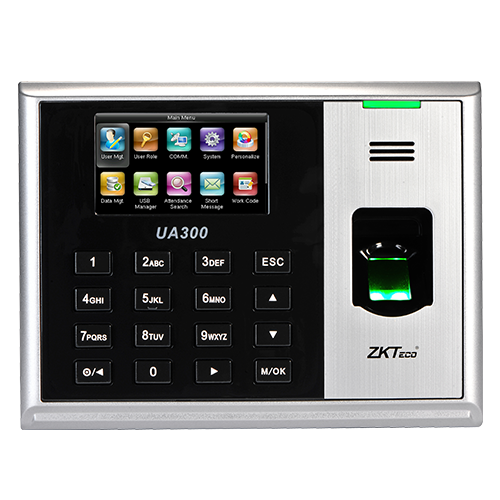
A Practical Attendance Endpoint for Structured Workforce Tracking
The ZKTeco UA300 is designed to capture employee attendance through fingerprint verification and maintain a usable local record history for routine workforce time management. Its role is straightforward: staff authenticate at the terminal, the device records the attendance event, and authorized administrators move or manage those records through supported connectivity and attendance software. For businesses replacing paper sheets, manual spreadsheet entry, or an older standalone clocking device, this creates a more structured source of attendance data.
Capacity is one of the first reasons a buyer may consider this model. ZKTeco specifies support for up to 3,000 fingerprint templates in 1:N mode and up to 100,000 attendance records. That does not automatically mean every organization with 3,000 people should choose it. Administrators should also consider how frequently records are downloaded, how many terminals are deployed, whether employees are divided across several sites, and how the attendance application will be managed. Capacity is useful only when the operational workflow around the device is equally clear.
The 2.8-inch TFT display supports local interaction, while ZKTeco lists TCP/IP, USB Host, and USB Client as data-management paths. This mix can suit a fixed office network where the terminal is connected to the local infrastructure, as well as environments where an administrator may need USB-based transfer or backup. ZKTeco also states that the device supports data backup and retrieval, helping reduce the operational impact of accidental deletion when the feature is used correctly as part of an attendance-management process.
For Dubai and UAE organizations, the main buying question is rarely the fingerprint reader alone. The more important question is whether the terminal fits the required staff count, software workflow, network arrangement, credential method, and reporting process. Some functions—including ID, IC, or HID credential options, external printer and bell, Photo ID, and ADMS—are listed by ZKTeco as optional. Buyers should therefore avoid assuming that every UA300 supplied in the market includes every possible function.
FourTeck can help review the intended deployment before quotation: number of employees, number of branches, required credential method, existing ZKTeco software, attendance-reporting expectations, network availability at the installation point, and any integration or accessory requirements. That review helps procurement teams request the correct version and avoids making the purchase decision from a model name alone.
Why the UA300 Can Simplify Everyday Attendance Operations
Its strongest business value comes from combining biometric identification, meaningful local capacity, practical data-transfer options, and software compatibility in one attendance-focused terminal.
Fingerprint-based staff verification
Fingerprint attendance helps a business associate a clocking event with an enrolled employee rather than relying only on handwritten entries or easily shared manual identifiers. For teams that want a more consistent attendance process, biometric verification can reduce administrative ambiguity around who created a record. It should still be supported by clear HR policies, enrollment procedures, employee communication, and appropriate handling of biometric data.
Room for everyday record accumulation
A 100,000-record capacity gives administrators useful headroom between data transfers. This matters where attendance events occur multiple times per employee each day. A good deployment still includes a regular download and backup routine so the terminal is not treated as the only long-term record repository.
Fast verification for busy clocking periods
ZKTeco specifies verification speed at 0.5 seconds or less. In practical terms, fast matching can help reduce hesitation at the terminal during shift starts, lunch returns, or closing periods. Actual user flow also depends on enrollment quality, terminal placement, staff familiarity, and how many employees arrive at the same time.
Network and USB management choices
TCP/IP provides a path for networked management, while USB Host and USB Client support alternative transfer workflows. That flexibility is useful when different sites have different infrastructure conditions. A head office may prefer a network connection, while a smaller branch may use a controlled USB process. The right method should be chosen with data ownership, backup, administrator access, and software workflow in mind.
Optional functions for broader requirements
ZKTeco lists ID, IC, and HID credential choices, external printer and bell, Photo ID, and ADMS as optional functions. These can matter where a business wants card-based fallback, visual identity support, a signal bell, printed output, or a particular management approach. Buyers should specify the required option during quotation.
Fits supported ZKTeco attendance platforms
The official specification lists ZKBio Time.Net and ZKBio Time. This is important for organizations that already use or plan to use ZKTeco attendance software. Software version, deployment type, operating environment, licensing, and any existing database or integration should still be reviewed before a migration or expansion project.
The Technical Strengths That Matter Most in Daily Use
The UA300 is not a general-purpose access-control platform presented as an attendance device. Its official positioning centers on fingerprint time attendance, with the practical characteristics buyers usually need to evaluate first: enrollment capacity, record capacity, verification speed, display, connectivity, software fit, and optional functions.
The 3,000-template fingerprint capacity makes the terminal relevant to many small and mid-sized workforce environments, while the 100,000-record limit provides meaningful local logging. A buyer should translate those numbers into the real operating pattern. For example, a 400-person organization that records entry, exit, lunch-out, and lunch-in could generate many more events per day than a similarly sized organization with only two daily punches. Record capacity therefore needs to be considered alongside the planned download schedule.
The device also has operating limits that influence placement. ZKTeco specifies 0°C to 45°C operating temperature and 20% to 80% operating humidity. Buyers should therefore plan installation in a protected indoor environment that stays within the published range. If the intended location is exposed to direct weather, extreme heat, dust, moisture, or other challenging conditions, FourTeck should review a more appropriate device or installation approach rather than assuming the terminal is suitable.
ZKTeco UA300 Technical Specification Summary
The table below uses currently published ZKTeco information. Functions marked optional should be confirmed for the exact unit and supply configuration before ordering.
| Specification | Published detail | Buyer note |
|---|---|---|
| Brand | ZKTeco | Time-attendance product family |
| Model | UA300 | Confirm exact requested model on quotation |
| Product type | Fingerprint time attendance terminal | Designed for staff attendance recording |
| Fingerprint capacity | 3,000 (1:N) | Plan enrollment count and future growth |
| Record capacity | 100,000 | Set a regular transfer and backup routine |
| Display | 2.8-inch TFT screen | Local interface for terminal operation |
| Verification speed | ≤ 0.5 second | Actual throughput also depends on user flow and enrollment quality |
| Connectivity | TCP/IP, USB Host, USB Client | Choose network or USB workflow to suit the site |
| Supported software | ZKBio Time.Net, ZKBio Time | Confirm software version and deployment requirements |
| Optional functions | ID / IC / HID, external printer and bell, Photo ID, ADMS | Not every supply configuration includes every option |
| Operating temperature | 0°C to 45°C | Use in a suitable protected environment |
| Operating humidity | 20% to 80% | Avoid unsuitable high-moisture locations |
| Warranty / supply | Configuration dependent | Contact FourTeck for current options and terms |
Choosing the correct configuration starts with the parts of the specification that directly change the daily workflow. If the business only needs fingerprint attendance, the baseline requirement is easier to define. If the organization also wants a card credential, Photo ID, ADMS, an external bell, or printer support, that requirement must appear clearly in the request for quotation. Software matters as well: a terminal can be technically capable of recording attendance while still being a poor fit for a business if its reporting, database, or management process is not aligned with the supported application. Buyers should also confirm how the terminal will reach the management system. A nearby network outlet may make TCP/IP the most practical choice, while a branch without suitable cabling might require a different workflow. FourTeck can use these details to review the requested configuration before supply.
Five Questions to Answer Before Ordering
The correct purchase is not simply “one UA300.” The useful requirement describes how many people will use it, how the data will be managed, which optional functions are needed, and what the installation environment looks like.
How many employees will enroll?
Count current staff, contractors who may need attendance records, planned hiring, and whether different sites will share the same management environment. Stay comfortably within the published fingerprint capacity rather than designing a deployment at the edge of a limit.
Which software will manage attendance?
If the business already uses ZKBio Time.Net or ZKBio Time, provide the version and current deployment details. If this is a new system, define the required reports, administrator roles, payroll handoff, and number of terminals before choosing the final software path.
How will data move from the terminal?
Decide whether the installation point has a suitable network connection for TCP/IP or whether a controlled USB process is required. For multiple branches, think about who is responsible for collection, backup, and reconciliation of attendance records.
Do you need optional credentials or functions?
If cards, Photo ID, ADMS, an external bell, or printer support are part of the requirement, state that clearly. Optional functionality should never be assumed from a product photograph or a generic listing title.
Is the location suitable?
Confirm mounting position, nearby power and network access, employee queue space, administrator access, and environmental conditions. The published temperature and humidity limits should be respected, especially in UAE sites where exposed spaces can become very hot.
For a useful quote: send FourTeck the model, quantity, employee count, number of locations, preferred attendance software, required optional functions, delivery location, target date, and whether installation or configuration support is needed.
Where This Attendance Terminal Fits Best
The model is most useful where employees report to a known physical location and the organization wants a consistent biometric clocking process with centralized or periodic data management.
Office and headquarters attendance
A fixed office is a natural deployment environment because the terminal can be positioned near a staff entrance, connected to the business network when appropriate, and managed by HR or an administrator. The 3,000-fingerprint capacity can cover many office populations while leaving room for normal workforce change. Companies should still plan enrollment ownership, exception handling, attendance policy, and how records are transferred into payroll or HR processes.
Retail and service locations
Shops, salons, service centers, and customer-facing branches often have defined opening and closing shifts. A fingerprint terminal can provide a consistent attendance point for employees, but multi-branch businesses should decide whether each location manages records locally or whether the data should be consolidated through a supported central workflow.
Warehouses and back-office teams
Warehouses with structured shifts may benefit from a fast clocking point at a protected staff entrance. Placement matters: the UA300 should not be treated as an outdoor or harsh-environment terminal without confirmation. Dust, heat, moisture, and queue congestion should be considered when selecting the mounting location or an alternative device.
Schools, training centers, and clinics
Institutions with administrative, teaching, technical, or clinical staff can use biometric attendance to create a consistent staff time record. The organization should define which employee groups are enrolled and maintain a clear process for temporary staff, fingerprint-enrollment issues, and users who need an approved alternative verification method.
SMB workforce administration
Small and mid-sized businesses that are moving away from manual attendance can use the terminal as part of a more disciplined HR process. The biggest gain is often not the hardware itself but the creation of a repeatable enrollment, clocking, record-transfer, correction, and reporting routine.
ZKTeco UA300 Fingerprint Capacity and Verification Workflow
The most important feature is not simply that the terminal reads fingerprints. It is that the device is specified for 3,000 fingerprint templates in 1:N matching mode, where the captured fingerprint can be matched against enrolled templates. For buyers, this defines the approximate enrollment scale the hardware is designed to handle and helps determine whether one terminal is suitable for a single site.
ZKTeco also publishes a verification speed of 0.5 seconds or less. That matters during concentrated attendance periods, but a fast matcher cannot compensate for poor enrollment or poor terminal placement. Administrators should capture fingerprints carefully, give staff clear instructions, position the sensor at a comfortable height, and avoid creating a narrow entrance where several employees have to queue around the device.
A well-planned biometric workflow includes an exception process. Some employees may have fingerprints that are difficult to enroll or read consistently due to work conditions, skin condition, or other factors. Buyers considering optional card support should clarify whether an approved alternative credential is part of the policy. The attendance system should serve the business process, not force every exception into an unreliable workaround.
ZKTeco UA300 Connectivity, Data Transfer, and Backup Planning
The terminal supports TCP/IP, USB Host, and USB Client, giving administrators more than one way to work with attendance data. For a fixed corporate installation, TCP/IP may be the clearest choice because the device can sit on a managed network and communicate with the required attendance environment. That should be treated as an IT deployment rather than simply plugging a cable into the nearest port: addressing, network segmentation, administrator access, software reachability, and security policy should all be considered.
USB support can be valuable for branches, controlled offline workflows, or backup procedures. ZKTeco also states that the UA300 supports data backup and retrieval and compatibility with various USB flash disks. A business should still define which media are approved, who can export data, where exported files are stored, and how long they are retained. Attendance records contain employee information and should be handled with appropriate internal controls.
ZKTeco UA300 Software and Optional Function Fit
ZKTeco lists ZKBio Time.Net and ZKBio Time as supported software. That is an important buying fact because attendance hardware becomes useful only when administrators can turn raw clocking events into usable attendance information. If the organization already operates a ZKTeco environment, the current software version, server arrangement, database, and existing terminal list should be documented before adding another device. If this is a new deployment, the reporting and administration process should be designed at the same time as the terminal purchase.
Optional functions deserve similar attention. ID, IC, and HID support, an external printer and bell, Photo ID, and ADMS are listed as options, which means procurement should identify the required capabilities rather than assuming all units are identical. This is especially important when comparing offers from different sources, because two listings carrying the same base model name may not represent the same functional package.
Decision checklist
- Confirm the exact attendance software and version.
- List any required card credential type.
- State whether ADMS is part of the management plan.
- Identify external bell or printer requirements.
- Clarify whether Photo ID is required.
- Confirm who will configure, enroll, administer, and back up the system.
The result is a better quotation and a cleaner deployment plan. Instead of buying a terminal and discovering later that a credential, software path, or accessory was assumed incorrectly, the business can define the complete operating requirement before supply.
What Buyers Should Check Before Purchase
The biggest purchase risk is assuming that every unit sold under the UA300 model name includes the same optional functions and will connect to an existing attendance workflow without any planning. Confirm the functional package, software path, site conditions, and support expectations before comparing quotations.
Configuration Fit
Start with employee count, attendance event frequency, number of locations, and desired optional functions. A company with 250 employees and one entrance has a different design problem from a multi-branch organization with several terminals and centralized HR reporting. State whether fingerprint-only attendance is enough or whether card credentials, Photo ID, ADMS, a bell, or printer support are required. This prevents optional capabilities from being mistaken for standard ones.
Compatibility Check
Check the attendance application, network design, administrator computer or server, and branch connectivity. The official software list includes ZKBio Time.Net and ZKBio Time, but that does not remove the need to verify version and deployment details. If the terminal is replacing another device, ask whether existing employee templates, records, or database structures can be migrated in the intended workflow instead of assuming a direct transfer.
Availability and Warranty Expectations
Ask for the current supply status, exact included functions, accessories, warranty terms, and any configuration or installation service required. Availability can change by quantity and source, so an online listing should not be treated as confirmation for a project order. For replacement projects, also ask whether a newer or more suitable model should be considered if the exact requested configuration is not practical.
Quote Preparation
Provide quantity, employee count, delivery location, target date, number of sites, current attendance software, required credential method, network availability at the mounting point, and whether configuration or installation support is expected. For a bulk or multi-site project, include a simple site schedule. That allows FourTeck to review whether the request is a straightforward unit supply or a wider attendance deployment.
Also consider long-term administrative cost. A low hardware price does not help if staff spend excessive time manually collecting files, correcting mismatched user records, or working around an unsuitable software arrangement. The better buying decision is the one that fits the organization’s attendance process, provides a workable data path, and leaves administrators with a clear procedure for enrollment, backup, reporting, and employee exceptions.
Buying Support for Dubai and UAE Attendance Projects
FourTeck supports product inquiries for the ZKTeco UA300 Fingerprint Time Attendance Terminal in Dubai and across the UAE with assistance that goes beyond naming the model. Buyers can request help reviewing employee capacity, software requirements, optional functions, network placement, quantity, and the expected installation or configuration scope. Current availability may vary according to supplier status, exact functional requirement, order quantity, and project timing, so stock or delivery speed should be confirmed as part of the quotation process rather than assumed.
For replacement projects, share the existing terminal model and attendance application. That helps determine whether the UA300 is an appropriate direct choice or whether another ZKTeco device should be reviewed for compatibility or lifecycle reasons. For new projects, employee count, number of sites, required reports, and preferred management method are enough to begin a useful pre-sales discussion.
Support for Dubai, Abu Dhabi, Sharjah, and Ajman Requirements
Businesses in Dubai, Abu Dhabi, Sharjah, Ajman, and other UAE locations can contact FourTeck for product availability, configuration guidance, quotation support, and delivery coordination. A single-site request may only need a model, quantity, employee count, and delivery address. A multi-site deployment benefits from a more structured site list showing the number of staff, number of terminals, connectivity available at each location, and whether attendance data needs to be managed centrally.
For companies opening a new office or branch, it is helpful to involve IT and facilities teams before the device arrives. Confirm the mounting position, power point, network outlet when TCP/IP will be used, employee approach path, and administrator access. If the attendance project is being delivered alongside CCTV, access control, networking, or general office IT work, FourTeck can review the wider environment so cabling and system responsibilities are clearer from the start. Explore FourTeck CCTV and access control solutions or review business IT services in the UAE for related project support.
GCC and Africa Business Supply Enquiries
FourTeck also supports business technology enquiries across selected GCC and Africa markets through regional inquiry channels. Organizations in Saudi Arabia, Qatar, Oman, Kuwait, Bahrain, Kenya, Uganda, and other markets can ask about suitable attendance products, project quantities, compatibility questions, and regional delivery possibilities. Availability, warranty handling, commercial terms, and deployment support may differ by country and supplier route, so these details should be confirmed for the destination rather than assumed from a UAE quotation.
For regional projects, provide the destination country, city, quantity, number of sites, required configuration, target date, and whether the request is product-only or includes technical deployment assistance. Cross-border projects often benefit from standardizing the same attendance workflow across sites, but local HR rules, network conditions, and support arrangements may differ. The product choice should therefore be reviewed as part of the wider rollout plan.
Regional inquiry channels include FourTeck Kenya, FourTeck Uganda, FourTeck Africa, and FourTeck Kuwait. Each enquiry should be treated according to current country-specific availability and support conditions.
Other ZKTeco Options Buyers May Consider
A related model should be chosen because it solves a different requirement—not simply because its model number is higher. If the requested UA300 configuration is unavailable, does not match the required connectivity, or does not fit the desired management method, ask FourTeck to review alternatives before substituting hardware.
ZKTeco UA760
A UA-series alternative listed by ZKTeco with fingerprint time-attendance positioning and additional communication characteristics. It may suit buyers whose requirements differ from the UA300, but current lifecycle, supply, software fit, and exact functions should be checked before substitution.
ZKTeco UA860
Another UA-series biometric terminal that can be reviewed when a buyer wants to compare communication, fingerprint hardware, or deployment options within the same family. The correct decision depends on current product status and the required attendance workflow.
ZKBio Time
Attendance management software listed as supported for the UA300. Buyers should confirm version, licensing, deployment architecture, database requirements, and reporting needs.
Access Control Solutions
If the requirement is door control rather than attendance alone, review a dedicated access-control solution instead of assuming a time-attendance terminal covers every door-security need.
Why Business Buyers Contact FourTeck
Attendance equipment sits between HR operations, employee behavior, networking, software, and physical installation. A good supply process therefore starts by clarifying the requirement rather than treating every enquiry as a request for a box. FourTeck can help business buyers structure the information needed for a more accurate product and project discussion.
This approach is particularly useful for procurement teams handling a project on behalf of HR or operations. Instead of going back and forth after a quotation is issued, the team can provide the critical technical and commercial information at the start. Buyers can also review FourTeck UAE technology solutions for broader infrastructure support.
Questions Business Buyers Often Ask About the UA300
What is the ZKTeco UA300 used for?
It is a fingerprint time attendance terminal used to record employee clocking events and support structured attendance administration. Staff enroll fingerprints and authenticate at the terminal, while attendance data can be managed through supported network or USB workflows. It is suitable for offices and other workplaces that need a fixed biometric attendance point.
How many fingerprints and records can the UA300 hold?
ZKTeco specifies capacity for 3,000 fingerprint templates in 1:N mode and 100,000 attendance records. Buyers should leave practical headroom for staff growth and define a regular record-transfer schedule. The device capacity is only one part of sizing; multi-site design and daily punch frequency also influence the appropriate deployment.
Can the UA300 connect to a business network?
Yes. The official product information lists TCP/IP, along with USB Host and USB Client. For a network deployment, the business should confirm addressing, network access, software reachability, and administrator responsibility. A simple connectivity check before installation can avoid moving the device later because the planned mounting point lacks a suitable network outlet.
Which attendance software is listed for this terminal?
ZKTeco currently lists ZKBio Time.Net and ZKBio Time as supported software. If you already use one of these platforms, provide the current version and deployment details when requesting a quote. Software licensing, database setup, report requirements, and integration with payroll or HR processes should be reviewed separately from the hardware purchase.
Does every UA300 include card support and ADMS?
No assumption should be made. ZKTeco lists ID, IC, HID, external printer and bell, Photo ID, and ADMS under optional functions. If any of these capabilities are required, include them in the quotation request and ask for confirmation that the proposed unit supports the intended function. This is especially important when comparing offers from different supply sources.
Is the UA300 suitable for a hot outdoor entrance?
The published operating range is 0°C to 45°C with 20% to 80% humidity. A protected indoor location is therefore the safer planning assumption. If the intended UAE installation point is exposed to direct sun, weather, high heat, dust, or moisture, ask FourTeck to review the environment and suggest a more suitable device or installation approach.
Can FourTeck help with bulk or multi-branch requirements?
Yes, FourTeck can review a multi-unit enquiry based on current availability and project scope. Provide a site list, quantity per location, approximate employee count, current attendance software, credential requirements, delivery destinations, and target date. This makes it easier to assess whether one standardized configuration is suitable across every location or whether some sites need a different approach.
How do I request a useful quotation?
Send the product model, required quantity, employee count, delivery location, number of sites, preferred software, optional credential or ADMS requirements, and whether you need installation or configuration support. If you are replacing an existing device, include its model and current software. FourTeck can then review the request and respond with current supply and support options.
Does availability depend on the exact configuration?
It can. Optional credential functions and other features can affect which unit is required, while supplier status and quantity can change over time. For that reason, confirm the exact requirement during quotation instead of relying on a generic online listing. FourTeck can also suggest a suitable alternative when the requested combination is not practical or current supply conditions change.
What should be planned after installation?
Plan employee enrollment, administrator roles, regular data transfer, backups, attendance corrections, exception handling, and secure storage of exported records. The terminal should form part of a documented attendance process rather than becoming the only place where records are retained. Clear ownership is particularly important when HR and IT share responsibility for the system.
Need Help Confirming the Right Attendance Setup?
FourTeck can review employee count, site quantity, optional functions, existing software, network connectivity, delivery location, and warranty expectations before preparing a quotation. This helps turn a simple model request into a purchasing scope that matches the actual attendance workflow.
Share these details: model, quantity, employee count, software, optional card or ADMS needs, delivery location, target date, and support scope.




Reviews
There are no reviews yet.