Barco ClickShare C-10 Wireless Presentation System in Dubai, UAE
The Barco ClickShare C-10 is built for professional meeting spaces where teams need fast, reliable, and cable-free presentation. It allows users to share content from laptops and mobile devices without searching for the correct adapter, changing room cables, or waiting for complicated setup. For UAE businesses, it is a practical choice for meeting rooms, boardrooms, training areas, client presentation rooms, and collaborative workspaces that need a cleaner user experience. FourTeck helps buyers review the correct package, button requirement, compatibility needs, and delivery options before placing an order.
Button and App Support
Meeting Room Guidance
UAE Quote Assistance
Quick Product Information
Barco
ClickShare C-10
Wireless presentation system
Medium and large meeting rooms
Wireless screen sharing and interactive presentation
Configuration and supplier dependent
Dubai and UAE coordination available
Quote, compatibility, and deployment guidance
Product Overview
Modern meetings depend on fast content sharing. A visitor may bring a Windows laptop, a manager may use a MacBook, a project team may present from a tablet, and an internal user may need to compare two screens during a discussion. Traditional meeting rooms often rely on HDMI cables, adapters, and manual switching. This creates delays, especially when multiple users need to present during the same meeting. The ClickShare C-10 provides a more convenient way to bring content to the room display without changing cables or interrupting the meeting flow.
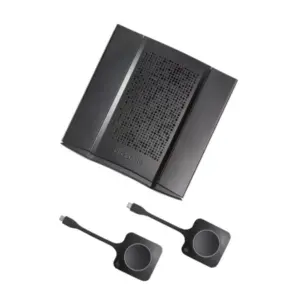
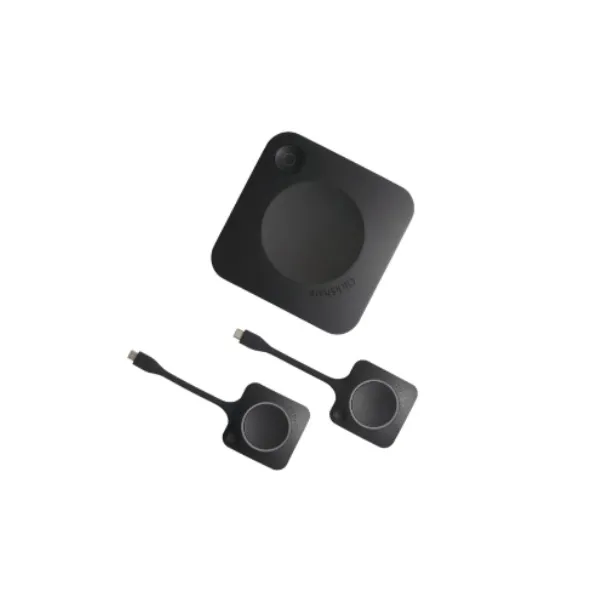
The system is built around a base unit connected to the meeting room display and the Barco sharing experience through a ClickShare Button or the ClickShare App. Users can share content with minimal training, which makes it useful for boardrooms, sales rooms, consulting environments, executive meeting spaces, training centers, hospitality meeting areas, education rooms, and corporate collaboration zones. It is especially helpful where guest users need to present without joining the company network in a complicated way.
For UAE buyers, the value is not only in the device. The correct decision also depends on room size, display type, number of presenters, network policy, wireless environment, button count, and whether the business needs presentation only or full wireless conferencing. FourTeck helps customers review these points before quoting so the selected option fits the actual meeting room requirement. This prevents under-specifying the solution, ordering the wrong regional variant, missing required accessories, or choosing a presentation product when the room actually needs a wireless conferencing model.
Key Business Benefits
Faster Meeting Starts
Teams can begin presentations without hunting for cables, adapters, or display settings. This reduces wasted time at the start of internal reviews, customer presentations, and training sessions.
Better Guest Experience
External presenters can share content more smoothly, helping reception areas, client rooms, and executive suites feel more professional and less dependent on room support staff.
Two-Source Collaboration
When compatible with the selected room setup, two sources on screen help teams compare designs, dashboards, financial views, project files, or training material during collaborative decisions.
Cleaner Meeting Tables
Wireless sharing reduces exposed cable clutter, adapter confusion, and damaged connectors, giving boardrooms and management spaces a more polished appearance.
Useful Interactivity
Touchback, annotation, and blackboarding support can make discussions more practical in rooms where participants need to explain ideas, mark points, or review visual material.
Cloud Management Readiness
Centralized management capability helps IT teams manage meeting room devices more consistently, especially when multiple rooms or offices need similar presentation behavior.
Product Highlights
The Barco ClickShare C-10 Wireless Presentation System focuses on interactive content sharing rather than complicated room control. It supports business users who need to present clearly from different devices and reduce the friction created by wired screen connections. The base unit connects to the room display, while users can share through the ClickShare Button or application depending on device and policy. For many organizations, this makes meeting rooms easier for employees, executives, contractors, and visitors.
Designed to support sharp display output for presentation material when paired with a suitable display and selected connection method.
Allows a flexible meeting experience for employees and guests based on device type and IT policy.
Touchback, annotation, and blackboarding help teams explain ideas instead of only displaying slides.
Helps organizations manage deployed rooms more effectively when central oversight is required.
Technical Specifications
Buyers should confirm the exact regional article number, number of included buttons, display connection, operating system requirements, room display resolution, network rules, and whether the project needs presentation-only functionality or a conferencing system. Some requirements vary between C-10 and C-10 Gen2 packages, so FourTeck can help verify the correct option before quotation.
Configuration and Buyer Guidance
Choosing a wireless presentation system should start with the room workflow rather than the model name alone. A boardroom used by executives may need a very simple one-click experience for both employees and guests. A training room may need multiple users to present during the same session. A consulting or design room may need annotation and blackboarding. A corporate IT department may need cloud management so devices can be maintained consistently across several meeting rooms.
Confirm whether one or two users must share at the same time.
Review Windows, macOS, mobile, and guest device expectations.
Check HDMI, USB-C, resolution, and room screen compatibility.
Plan Wi-Fi, LAN, guest access, and security restrictions early.
Ideal Business Use Cases
Executive Boardrooms
Leadership teams need meetings to start quickly. Wireless sharing supports a polished room experience for reports, dashboards, board packs, and client briefings.
Client Presentation Rooms
Sales teams, consultants, and project managers can make visiting customers feel comfortable by reducing adapter issues and allowing cleaner screen sharing.
Training and Workshop Spaces
Trainers and participants can move between content sources more easily, making discussions more dynamic and less dependent on a single connected laptop.
Project Collaboration Areas
Design, finance, operations, and IT teams often compare materials. Two-source sharing and interactive tools can support better decision-making.
Barco ClickShare C-10 Wireless Sharing Experience
The main strength of this system is the everyday user experience. Meeting participants should not need to understand the technical layout of the room before presenting. With a supported laptop or mobile device, the user can share content through the ClickShare environment instead of relying on a physical cable. This is helpful in companies where meeting rooms are used by many departments, visitors, and remote project teams. The simpler the room experience, the fewer support calls the IT team receives before important meetings.
Wireless presentation also helps preserve meeting room hardware. HDMI cables, table boxes, and adapters are often damaged by repeated use, accidental pulls, or incompatible devices. Reducing that dependency can make meeting rooms easier to maintain. For businesses with multiple rooms, the same user experience across locations can make employees more confident when presenting in unfamiliar rooms.
Barco ClickShare C-10 Interactive Collaboration
Many meetings are no longer simple slide shows. Teams review designs, compare drawings, discuss spreadsheets, annotate documents, and refine ideas in real time. The interactive capabilities of ClickShare C-10 can help bring more participation into the room. Touchback allows users to interact with shared content in compatible room setups. Annotation and blackboarding can support explanation, brainstorming, and visual decision-making without requiring extra software in every meeting.
This is valuable for consultants, trainers, designers, engineers, and management teams who need to turn meetings into working sessions. Instead of sending notes after the meeting or asking users to imagine changes, teams can mark information on screen and align faster. FourTeck can help buyers evaluate whether the selected display, touch panel, network policy, and usage style support the expected interactive workflow.
Barco ClickShare C-10 Management and IT Control
For IT teams, meeting room technology must be reliable, manageable, and suitable for company security rules. A wireless presentation product should not become a separate island that is difficult to monitor or maintain. Cloud management and reporting capability can help IT administrators keep track of deployed devices, review settings, and support more consistent meeting room operation across an office environment. This matters when a company has several rooms, multiple floors, or regional offices that follow similar meeting standards.
Before deployment, buyers should review whether the system will operate on a standalone wireless setup, integrate with the business network, or follow a guest-sharing policy. Security rules, firmware update planning, network segmentation, and user access expectations should be discussed early. FourTeck can assist with pre-sales guidance so the device is selected with the IT environment in mind, not only the display on the wall.
What Buyers Should Check Before Purchase
Before requesting a quote, buyers should confirm the exact room requirement, user behavior, display type, button count, and IT policy. A meeting room that only needs basic presentation may have a different requirement from a boardroom that needs interactive annotation. A room used by external visitors may need a guest-friendly setup, while an internal project room may need stronger management and repeatable configuration. The right purchase decision should consider the total room experience, not only the product model.
Correct Model Selection
Confirm whether the room needs wireless presentation only or a full wireless conferencing model from the broader ClickShare range.
Compatibility Check
Review laptop operating systems, mobile device support, display inputs, touch display requirements, and room network rules.
Button Package
Check whether the selected article number includes one button, two buttons, or requires additional accessories for the intended workflow.
Quote Preparation
Share room count, display model, connection method, required delivery location, expected user type, and project timeline with FourTeck.
UAE Availability and Service Support
FourTeck supports product inquiries across Dubai and the UAE with assistance for model review, quote requests, delivery coordination, and warranty guidance. Availability may vary based on the selected variant, button bundle, supplier status, order quantity, and project timing. Buyers should avoid assuming that every regional article number has the same package contents. For example, one package may include a single ClickShare Button while another may include two, and the Gen2 variant may have different connection details from earlier versions.
FourTeck can help procurement teams, AV integrators, facility managers, and IT departments review the requirement before ordering. This is useful for single-room purchases, multiple room upgrades, branch rollouts, and replacement of older wired presentation setups. Contact FourTeck for current options and quotation support.
Dubai, Abu Dhabi, Sharjah, and Ajman Coverage
Businesses in Dubai, Abu Dhabi, Sharjah, Ajman, and other UAE locations can contact FourTeck for availability checks, quote assistance, and product guidance. The team can help buyers review suitable packages, related ClickShare options, display compatibility, and accessories based on the meeting room environment. Delivery coordination and warranty direction depend on supplier status, selected model, and project requirements.
GCC and Africa Availability
FourTeck also supports business technology inquiries across selected GCC and Africa markets through its regional platforms and inquiry channels. Organizations in Saudi Arabia, Qatar, Oman, Kuwait, Bahrain, Kenya, Uganda, and the wider Africa region can request guidance for meeting room presentation systems, availability direction, and project supply support. Country-specific delivery, warranty handling, regulatory requirements, and supplier options may vary.
Regional buyers can also explore FourTeck platforms including FourTeck UAE, FourTeck Kenya, FourTeck Uganda, FourTeck Africa, and FourTeck Kuwait for related inquiries.
Related Models and Suitable Alternatives
Some buyers may need a smaller presentation solution, while others may require full wireless conferencing. FourTeck can help compare related products based on room size, user count, camera and audio needs, and whether the meeting room uses Teams, Zoom, Webex, or standard presentation workflows.
Barco ClickShare C-5
Suitable for smaller meeting rooms needing simple wireless presentation.
Barco ClickShare CX-20
Useful when the room needs wireless conferencing features beyond presentation.
Barco ClickShare CX-30
A stronger collaboration option for interactive and conferencing-focused rooms.
Meeting Room Displays
Review compatible displays, touch screens, cables, and mounting requirements.
Why Buyers Choose FourTeck
FourTeck works with business buyers who need more than a model name and a quick quotation. Meeting room technology affects executives, sales teams, trainers, visitors, IT support staff, and facilities teams. A wrong selection can lead to device mismatch, missing accessories, poor user adoption, and repeated support issues. FourTeck helps customers review product purpose, configuration dependency, delivery requirements, and related alternatives before confirming a purchase.
Frequently Asked Questions
It is used for wireless presentation and interactive content sharing in professional meeting rooms. Users can share from compatible laptops and mobile devices without relying on standard HDMI cables.
Yes, the product is positioned for medium and large meeting rooms. Final suitability depends on display size, room layout, number of presenters, and the required user workflow.
Yes. FourTeck can review the number of rooms, button requirement, display connection, network policy, and whether the buyer needs presentation only or a conferencing model.
Yes. Availability can vary by regional article number, Gen2 package, included buttons, supplier status, and order quantity. Contact FourTeck for current options.
The C-10 range supports enhanced collaboration with two sources on screen, subject to the selected setup and usage environment. FourTeck can help verify this before ordering.
The ClickShare App supports desktop and mobile use, subject to operating system compatibility and IT policy. Buyers should confirm device requirements before deployment.
Share room count, display model, required buttons, delivery location, expected usage, network preference, and any installation or AV integration requirements.
FourTeck can guide buyers on warranty expectations based on supplier terms, regional model, and manufacturer policy. Exact coverage should be confirmed during quotation.
Need Help Choosing the Right Meeting Room Presentation System?
FourTeck can help you review availability, button options, display compatibility, warranty guidance, and delivery requirements for your business location. Share your meeting room requirement and the team will help you identify a suitable option.