

A practical snapshot for procurement teams
For most buyers, the important question is not whether the R30 can make a video call; it is whether its room size, host-computer model, camera coverage, audio reach, mounting and accessory package match the intended workspace. The following facts provide a reliable starting point before quotation.
What the Studio R30 does in a business meeting room
The R30 is best understood as a room peripheral, not a standalone meeting appliance. A compatible computer runs the conferencing application, while the video bar supplies the camera, microphones and speaker through USB. That approach works well for organizations that already rely on laptop-led meetings or a PC-based room workflow and want users to join familiar services without learning a separate room operating system.
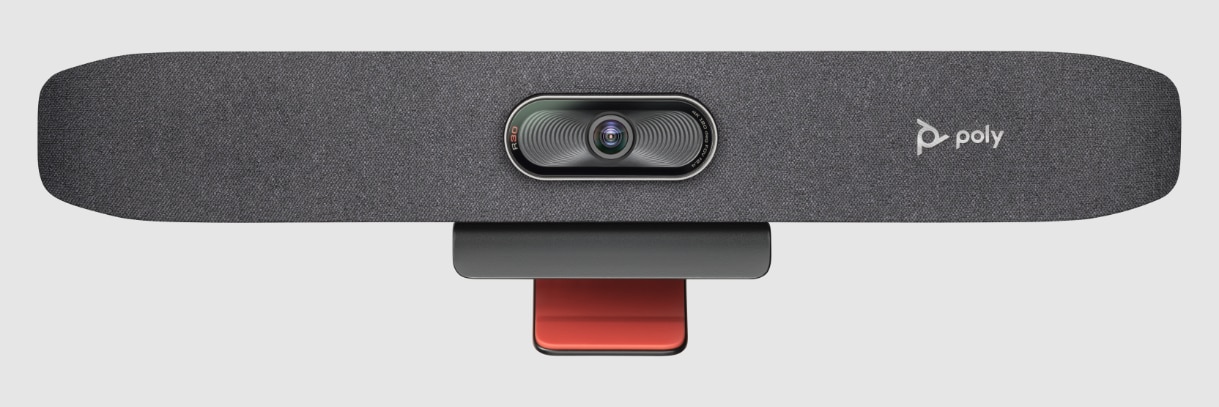
The unit combines an 8 MP camera with 4K capture, a 120-degree diagonal field of view, intelligent DirectorAI framing, a three-element beamforming microphone array and an integrated speaker. Poly NoiseBlockAI, Acoustic Fence and Acoustic Clarity technologies support cleaner conversations by reducing distracting background sounds and focusing the audio experience around the meeting area. For a small room, that integration can simplify the table and display area because teams do not need to assemble a separate webcam, USB microphone and desktop speaker for every call.
The wide camera view is particularly useful where participants sit close to the display or around a short meeting table. DirectorAI can apply group, people, speaker and presenter framing modes, helping the camera present a more useful view than a static wide shot. This matters in hybrid meetings where remote participants need to see facial expressions and follow who is speaking without someone in the room repeatedly adjusting the camera.
For IT teams, Poly Lens adds a management path for supported settings, updates and device oversight. Wi-Fi is available on the listed radio model, which can assist management even when a user is not actively connected to the bar for a call. Buyers should still review corporate wireless and device-management policies before deployment, especially in controlled networks where 802.1X, certificate handling or separate AV network rules apply.
In the UAE, a common buying question is whether the base R30 package is enough for the room. The standard HP listing includes the video bar, monitor clamp, power components, a five-metre USB-C-to-USB-A cable, setup sheet and removable privacy cap. A Bluetooth remote and HP USB-C Dock G5 are associated with the Studio R30 Plus bundle rather than the base R30. FourTeck can help buyers distinguish between the base unit, bundle choices, mounting accessories and a larger or more integrated Poly room system before a purchase request is finalized.
Why the R30 can simplify small-room collaboration
The strongest value comes from combining room coverage, clear voice pickup and USB simplicity in a device sized for compact spaces. The benefits below connect the confirmed capabilities to practical deployment outcomes.
More natural framing in tight spaces
A wide camera view helps include participants who may sit close to the screen or near the edges of a compact table. DirectorAI adds automated group, people, speaker and presenter framing so the video feed can adapt to the meeting instead of staying locked in a single wide view. The business benefit is not simply “more camera features”; it is a room that can present participants more clearly to remote colleagues without asking users to become camera operators.
Less dependence on laptop microphones
The three-element beamforming array and integrated speaker provide a dedicated room audio path. That reduces the common problem of placing one participant’s notebook at the center of the table and expecting its built-in microphone and speakers to serve the whole room. Poly audio processing also helps limit background distractions that can make hybrid discussions tiring.
A familiar USB meeting workflow
Because the R30 uses standard USB audio and video drivers, organizations can pair it with a compatible PC or Mac and continue using supported meeting applications on that host. This can be attractive when teams prefer bring-your-own-device meetings or when IT already manages room PCs and does not need a separate native collaboration appliance.
A clearer path for device oversight
Poly Lens gives administrators a supported management environment for compatible Poly devices. That matters when a business plans several meeting rooms and wants firmware, settings and operational visibility handled consistently rather than relying on each room user to maintain the device independently.
Mounting choices for cleaner room design
An included monitor clamp provides a practical starting point, while the design is tripod ready and optional wall or VESA mounting accessories are available. This gives facilities and IT teams more control over camera height, cable routing and display alignment, particularly where the room should look consistent rather than improvised.
Buy the room capability you actually need
Not every small meeting area requires a full native room system with dedicated compute and touch control. If users are comfortable launching calls from a host PC, the R30 can concentrate the investment on professional room audio and video. At the same time, buyers should avoid under-specifying larger spaces. FourTeck can compare room dimensions, seating, host model and platform expectations before recommending whether the R30, a newer small-room USB bar, or an all-in-one Poly Studio X model is the more sensible purchasing path.
Confirmed strengths buyers should notice
The R30 is a focused collaboration product. Its specification is strongest when the room is compact, the meeting application runs on an external computer, and the buyer values automated framing and dedicated room audio without moving into a larger all-in-one system.
The camera combines an 8 MP sensor with 4K capture at up to 30 frames per second. HP lists a 120-degree diagonal field of view and 110-degree horizontal field of view, giving the bar the breadth required for people sitting near the display. Digital zoom reaches 5x without tracking and 4x with automatic tracking. DirectorAI provides group framing, people framing, speaker framing and presenter tracking, allowing different meeting styles to use different visual behavior.
One detail that can easily cause a purchasing mistake is bundle confusion. The standard R30 listing includes the monitor clamp, power adapter and cable, five-metre USB-C-to-USB-A cable, setup sheet and removable privacy cap. HP separately describes the R30 Plus solution with an HP USB-C Dock G5 and Poly Studio Bluetooth remote. A buyer who expects those items should therefore confirm the exact bundle and part number instead of assuming every R30 quotation contains the same accessory set.
HP Poly Studio R30 specification table
These details are based on HP’s current Studio R30 product and support listings for the 842D2AA family. Regional suffixes, radio variants, bundle contents and commercial availability can differ, so the exact quoted part number should be checked before ordering.
| Specification | Confirmed product detail |
|---|---|
| Brand / model | HP Poly Studio R30; HP product listing 842D2AA, with regional suffixes possible |
| Product type | USB video bar for small conference spaces and huddle rooms |
| Camera | Single-lens, 8 MP, 4K capture, up to 30 fps |
| Field of view | 120° diagonal field of view; 110° horizontal field of view |
| Digital zoom | 5x without tracking; 4x with automatic tracking |
| Smart camera technology | Poly DirectorAI with group framing, people framing, speaker framing and presenter tracking |
| Microphones | Three-element beamforming microphone array; pickup up to 4.57 m / 15 ft |
| Speaker / audio | Integrated mono speaker; listed bandwidth 100 Hz to 20 kHz; NoiseBlockAI, Acoustic Fence and Acoustic Clarity |
| USB and power ports | 1 × USB Type-C 5Gbps signaling rate; 2 × USB 2.0 Type-A; 1 × 4.5 mm power adapter connection |
| Wireless | Bluetooth 4.2; Wi-Fi 802.11a/b/g/n/ac (SISO) on the listed radio model |
| Interoperability | Microsoft Teams and Zoom certified; compatible with applications that support standard USB audio and video drivers |
| Management | Poly Lens |
| Security | 802.1X support and certificate management listed by HP |
| Power | 12V / 3A external power supply |
| Dimensions | 445 × 86 × 81 mm with monitor clamp; 445 × 68 × 81 mm without monitor clamp |
| Weight | 822 g with monitor clamp; 737 g without monitor clamp |
| Standard box contents | Studio R30, monitor clamp, AC power adapter, power cable, 5 m USB-C-to-USB-A cable, setup sheet and removable privacy cap |
| Manufacturer warranty | Poly standard one-year limited warranty |
How to interpret the specification before buying
A 120-degree diagonal field of view does not automatically make the device suitable for every room. Seating distance, table width, participant count and camera position still determine whether people appear at a useful size. Similarly, a microphone pickup figure is not a guarantee that every room will sound the same; glass walls, hard surfaces, air-conditioning noise and people sitting beyond the intended zone can change the real experience.
The USB model also means the host computer remains part of the solution. Before ordering multiple units, confirm that the selected laptops or room PCs have the required USB connectivity, meeting application support, display path and corporate permissions. If the organization wants a dedicated room system that can join calls without depending on a user-provided computer, an all-in-one Poly Studio X model may be a more appropriate architecture. FourTeck can help separate these two deployment approaches during the quotation stage.
Five decisions to make before requesting a quote
The most important decision is whether the room should be USB-hosted or operate as a dedicated room endpoint. If users will bring a laptop or use an assigned room PC to run Teams, Zoom or another standards-compatible application, the R30’s architecture is a natural fit. If the expectation is walk-in, appliance-style operation without a connected PC, buyers should review a different Poly system class.
Who starts the meeting?
Decide whether each meeting starts from a user’s notebook, a permanently installed room PC, or a separate room appliance. This determines not only the R30’s suitability but also cable length, user workflow, device permissions, display connectivity and support responsibility.
Match coverage to seating
Share approximate room dimensions, table shape, maximum participant count and distance from the display. A compact boardroom with six people seated close to the screen has different camera and microphone needs from a long training room, even if both are described internally as “small.”
Check USB, display and power paths
The standard box includes a five-metre USB-C-to-USB-A cable. Confirm where the computer will sit, how it reaches the display, where mains power is available and whether cable routing must pass through furniture, floor boxes or wall conduits. Avoid ordering extensions before checking supported cable requirements.
Choose a stable camera position
The included monitor clamp may be sufficient for many rooms. Wall, VESA or tripod placement can be more suitable when the display profile, room furniture or camera height makes the standard clamp awkward. The goal is a centered, repeatable position that does not need adjustment before every meeting.
Base R30 or R30 Plus?
Do not assume a remote control or USB-C dock is included with every R30 quote. Those items are associated with the R30 Plus solution. Tell FourTeck whether users need single-cable notebook docking, remote call control, additional mounting or room integration so the commercial request reflects the correct package.
For a useful quotation, send the required quantity, room dimensions, estimated participant count, preferred meeting applications, host computer type, display count, mounting preference, delivery location and target project date. If the deployment will be repeated across several branches, include the number of room types rather than giving only a total device quantity. That helps FourTeck separate standard huddle rooms from spaces that may require a different video bar or additional accessories.
Where this USB video bar fits best
It is most suitable where a small group needs professional room audio and video but the organization wants to keep the meeting application on a PC or laptop. The following environments show where that design can be practical.
Huddle rooms for four to six-person discussions
Compact huddle rooms often suffer when teams depend on one participant’s laptop camera and microphone. A dedicated bar above or below the display creates a consistent viewing angle, gives the room its own microphone array and speaker, and lets DirectorAI frame the group or active speaker. Exact participant capacity still depends on room dimensions and seating, so the quote should be based on layout rather than a fixed head-count promise.
Executive offices and private meeting rooms
An executive office may host one-to-one calls most of the day but occasionally bring several people into the room. The wide camera view and integrated audio allow the space to work as a small collaboration room without permanently installing a larger boardroom system.
Project rooms with changing meeting platforms
Consultants, project teams and client-facing departments may move between several conferencing services. A USB peripheral model lets the host computer determine the application while the room continues to use the same camera and audio device, reducing the need to duplicate room hardware for each platform.
Branch offices standardizing small rooms
Organizations rolling out many small spaces can benefit from a repeatable camera, mount, cabling and management model. Poly Lens can support centralized oversight, while a consistent room bill of materials helps IT document installation and support. Larger rooms should be separated into a different standard rather than forcing one model across every space.
BYOD collaboration areas
Bring-your-own-device rooms are useful when employees or guests need to lead meetings from their own laptops. The R30 can provide the shared room camera and audio path, but the cable type, laptop ports, display connection and corporate USB permissions should be standardized so users are not troubleshooting adapters during meetings.
Rooms that may need a different model
A long boardroom, medium conference room, dual-display space requiring native room apps, or environment where users must join without a host PC can exceed the design assumptions of a small-room USB bar. In those cases, FourTeck can review Poly Studio V12, Studio USB or Studio X family options instead of stretching the R30 beyond its intended role.
HP Poly Studio R30 + DirectorAI intelligent framing
DirectorAI matters because a small room can still produce a poor remote experience when everyone appears tiny in a fixed wide shot. The R30 supports group framing, people framing, speaker framing and presenter tracking, giving organizations several ways to adapt the camera view to the conversation.
Group framing is useful when the meeting is collaborative and remote attendees need to see the whole table. Speaker framing can place greater attention on the active participant, which may help discussions feel less distant. People framing can create more individual visibility, while presenter tracking is relevant when someone is standing or moving within the supported room area. These functions reduce the need for manual camera control, but buyers should still think about camera height, room lighting, seating orientation and how often participants move outside the main table area.
HP Poly Studio R30 + room audio and noise control
Clear audio often determines whether a hybrid meeting succeeds, even when the camera is excellent. The R30 combines a three-element beamforming microphone array with an integrated speaker and Poly audio technologies designed to reduce distracting sound. HP specifies microphone pickup up to 4.57 metres / 15 feet, which gives buyers a useful planning figure for compact rooms while still requiring sensible acoustic placement.
NoiseBlockAI is intended to reduce unwanted sounds that would otherwise be transmitted to the far end, while Acoustic Fence helps focus the effective meeting area. Acoustic Clarity is also part of the listed audio feature set. In practice, these technologies are most useful when paired with sensible room acoustics: avoid placing the bar directly beside loud HVAC outlets, position participants within the expected pickup zone, and consider soft furnishings where hard glass and stone surfaces create excessive reflections. If the room is long, unusually reverberant, or regularly seats people beyond the intended pickup area, the right answer may be a different conferencing product rather than trying to compensate with software alone.
HP Poly Studio R30 + USB deployment and Poly Lens management
The USB architecture keeps the meeting application on the host computer, which can make the room easier to integrate with existing user workflows. HP lists the R30 as compatible with applications that support standard USB audio and video drivers, with Microsoft Teams and Zoom certification. This gives buyers flexibility, but it also means the host computer is part of the room design and should be treated as a required component rather than an afterthought.
Check the computer
Confirm supported operating system, available USB port, conferencing application, corporate device-control policy and how the laptop or room PC connects to the display. A USB video bar cannot solve a missing display adapter or restricted endpoint policy.
Plan device management
Poly Lens can support management and updates for compatible devices. The listed R30 model also includes Wi-Fi, which can help management workflows. IT teams should confirm network onboarding, 802.1X requirements and certificate practices before a multi-room rollout.
Standardize the room kit
For repeat deployments, define a standard list covering bar, mounting method, power, USB cable, display connection, optional dock or remote, room labels and support documentation. This reduces one-off room variations that make later troubleshooting harder.
The management choice becomes more important when an organization has many rooms. A single device can be updated manually, but a fleet benefits from predictable settings and visibility. Buyers planning ten, twenty or more rooms should therefore discuss management ownership, network access, firmware policy and room support responsibility during procurement rather than after installation.
What Buyers Should Check Before Purchase
Do not choose the R30 only because the room is described as “small.” The correct purchase depends on host-computer workflow, camera distance, microphone coverage, mounting, cable routing, bundle contents and whether users expect a native room interface. Confirm those items before price becomes the main decision.
Configuration Fit
Confirm room dimensions, table length, participant positions and host-computer workflow. If participants sit far beyond the recommended small-room zone, or if the camera must frame a long room, consider a larger-room system. If the room must work without a connected PC, compare an all-in-one Poly Studio X model.
Compatibility Check
Check the laptops or room PCs that will connect to the bar, including USB access, operating system, meeting software, display output and security policies. Also confirm whether the included five-metre cable suits the furniture layout. For managed networks, review Wi-Fi onboarding, 802.1X and certificate requirements.
Availability and Warranty
HP lists a standard one-year limited warranty for the product. Commercial availability can change by regional part number, quantity and supplier status. Ask FourTeck to confirm the quoted SKU, expected bundle contents, warranty handling route and delivery planning for the destination instead of relying on a generic product-family description.
Quote Preparation
Send the quantity, delivery location, room size, participant count, preferred conferencing services, host-device type, mount preference and whether a dock or remote control is needed. For project supply, include the rollout schedule and number of distinct room designs so the quotation can separate standard and exception rooms.
Common question: Is the R30 Plus the same product?
The R30 video bar is the core device, while HP describes the R30 Plus as a solution bundle that adds an HP USB-C Dock G5 and a Poly Studio Bluetooth remote. Buyers who want single-cable laptop docking or remote room control should state that requirement. This avoids receiving a base-unit quotation when the expected workflow actually depends on the Plus accessories.
Buying support for Dubai and UAE meeting-room projects
FourTeck supports business inquiries for HP Poly collaboration equipment across Dubai and the UAE. Current availability should be confirmed at quotation because part numbers, regional suffixes, order quantity, supplier status and bundle selection can change. The goal is to match the actual room requirement to the quoted product rather than treating every Studio R30 listing as commercially identical.
Selection support
Share the room dimensions, participant count, meeting platform and host-device plan. FourTeck can help determine whether the base R30, R30 Plus bundle, a mounting accessory or another Poly room product is the more appropriate option.
Delivery coordination
For office and project orders, provide the destination, quantity, target date and whether devices are needed in one shipment or staged by site. Delivery timing should be confirmed against the selected part number and current supply conditions.
Warranty guidance
HP lists a Poly standard one-year limited warranty for the R30. FourTeck can help buyers review the warranty information associated with the quoted unit and clarify what documentation should be retained for business procurement and future support requests.
Support for meeting-room requirements across major UAE cities
Businesses in Dubai, Abu Dhabi, Sharjah and Ajman can contact FourTeck for product-selection assistance, quotation support and delivery coordination. A project with several offices may use the same video bar in standardized huddle rooms while assigning a different model to larger conference spaces. Sharing the room schedule and site list helps create a more consistent bill of materials.
For multi-site deployments, buyers should also identify whether each location uses the same laptop standard, display size, mounting arrangement and corporate network policy. These details can affect installation even when the chosen video bar is identical. FourTeck can help organize those requirements before a purchase order so the commercial discussion covers more than device quantity alone.
GCC and Africa project inquiries
FourTeck also supports business technology inquiries through regional channels serving selected GCC and Africa markets. Organizations planning collaboration equipment for Saudi Arabia, Qatar, Oman, Kuwait, Bahrain, Kenya, Uganda or other supported locations should provide the destination country, quantity, required date and expected room configuration. Availability, delivery options, warranty handling and regional part numbers may differ by market.
For cross-border projects, it is especially important to check radio variants, plug and power requirements, procurement documentation and whether one central room standard is realistic for every office. Buyers can use FourTeck UAE, FourTeck Kuwait, FourTeck Kenya, FourTeck Uganda or the FourTeck Africa platform to route regional requirements appropriately.
Other products buyers may consider
The correct alternative depends on whether the buyer needs a newer small-room USB bar, a larger room design, a native all-in-one system or simply a mounting accessory. These links help procurement teams continue the comparison without assuming every Poly Studio product serves the same room.
Poly Studio V12
HP positions the V12 as a newer small-room USB video bar with a 20 MP 4K camera, 120° field of view, DirectorAI and multiple power options. Buyers comparing current small-room USB designs should review V12 when camera hardware generation or deployment flexibility is a priority.
Poly Studio USB
A medium-room USB bar option for buyers who need a larger collaboration space while retaining a PC-hosted meeting model.
Poly Studio X52
Consider this all-in-one video bar when a medium room needs built-in meeting applications, a different room architecture and broader integrated-room capability.
Poly Studio X72
A large-room all-in-one alternative for spaces that need significantly more room coverage and a native room-system workflow.
R30 display mounting clamp
Useful when the standard mounting position does not suit the display or room furniture and a more deliberate installation is required.
Procurement support built around the room requirement
Meeting-room purchases sit between IT, audiovisual design, facilities and user experience. A model can be technically capable yet still be the wrong choice if the room is too large, the host workflow is different from what users expect, or the mounting and cabling were never planned. FourTeck focuses the buying discussion on those practical details before the quote is finalized.
This approach is useful for a single executive room and even more valuable for project procurement. Standardizing the correct device, mount, cable and host workflow can reduce variation between sites, while identifying exception rooms early prevents a business from forcing one product into spaces it was not designed to serve. Buyers can contact FourTeck for product assistance with a room list or a single-room requirement.
Questions business buyers ask about the Studio R30
What is the HP Poly Studio R30 used for?
It is a USB video bar for small conference spaces, huddle rooms and similar compact collaboration areas. A connected PC or Mac runs the meeting application, while the R30 provides the room camera, microphones and speaker. It is useful when a business wants better shared-room audio and video without installing a separate native meeting-room appliance.
Does the R30 support Microsoft Teams and Zoom?
HP lists the Studio R30 as certified for Microsoft Teams and Zoom and compatible with applications that use standard USB audio and video drivers. Because the meeting software runs on the host computer, buyers should confirm the chosen application, operating system, endpoint permissions and display connection as part of the room setup.
Is the R30 suitable for a medium conference room?
HP positions the R30 for small rooms. A medium room may need greater microphone reach, a different camera composition or a more integrated room system. Share the actual dimensions, seating distance and participant count with FourTeck before choosing. A Poly Studio USB, V-series bar or Studio X system may be more appropriate when the room exceeds the R30’s intended deployment.
What is included with the standard Studio R30?
HP’s listed box contents include the R30 video bar, monitor clamp, AC power adapter, power cable, five-metre USB-C-to-USB-A cable, setup sheet and removable privacy cap. A Bluetooth remote and HP USB-C Dock G5 are associated with the separate R30 Plus solution, so buyers should confirm the quoted bundle rather than assuming those accessories are included.
Can FourTeck help choose the correct mounting option?
Yes. The R30 includes a monitor clamp and is also tripod ready, while optional wall and VESA mounting solutions are available. FourTeck can review the display type, camera height, cable path and room furniture so the buyer can choose a stable installation rather than relying on an improvised position that changes the camera view from meeting to meeting.
Is the Studio R30 available in Dubai and the UAE?
FourTeck can support availability and quotation inquiries in Dubai and across the UAE, but current supply should be confirmed for the required quantity and exact regional part number. Availability may change with supplier status and bundle choice. Send the model, quantity, delivery location and target date so the sales team can prepare a current commercial response.
How is the R30 managed by IT?
HP lists Poly Lens as the management software for the R30. The listed radio model includes Wi-Fi, and HP also lists 802.1X support and certificate management. Organizations planning a wider rollout should confirm network onboarding, firmware policy, administrative ownership and any endpoint-security requirements before installation so device management is consistent across rooms.
What warranty information is available?
HP lists a Poly standard one-year limited warranty for the Studio R30 product listing. The exact support route can depend on the quoted part number and purchasing channel. FourTeck can help buyers review the warranty information associated with the supplied unit and clarify which invoice, serial-number and procurement records should be retained for future support requests.
Can businesses request multiple units for a room rollout?
Yes, businesses can request project quantities. For a multi-room order, provide the number of rooms, room types, delivery sites, rollout schedule and any standard mounting or docking requirements. This makes it easier to identify whether every room can use the same R30 configuration or whether larger spaces should be assigned another Poly model before the order is finalized.
Need help planning the right small-room setup?
FourTeck can review the room dimensions, host computer, meeting platform, quantity, mounting, accessory expectations, delivery location and target date before preparing a quote. This is especially useful when deciding between the base R30, the R30 Plus bundle and another Poly Studio model.
Share: room size, participant count, preferred platform, host device, quantity, mounting preference, delivery location and required date.



