

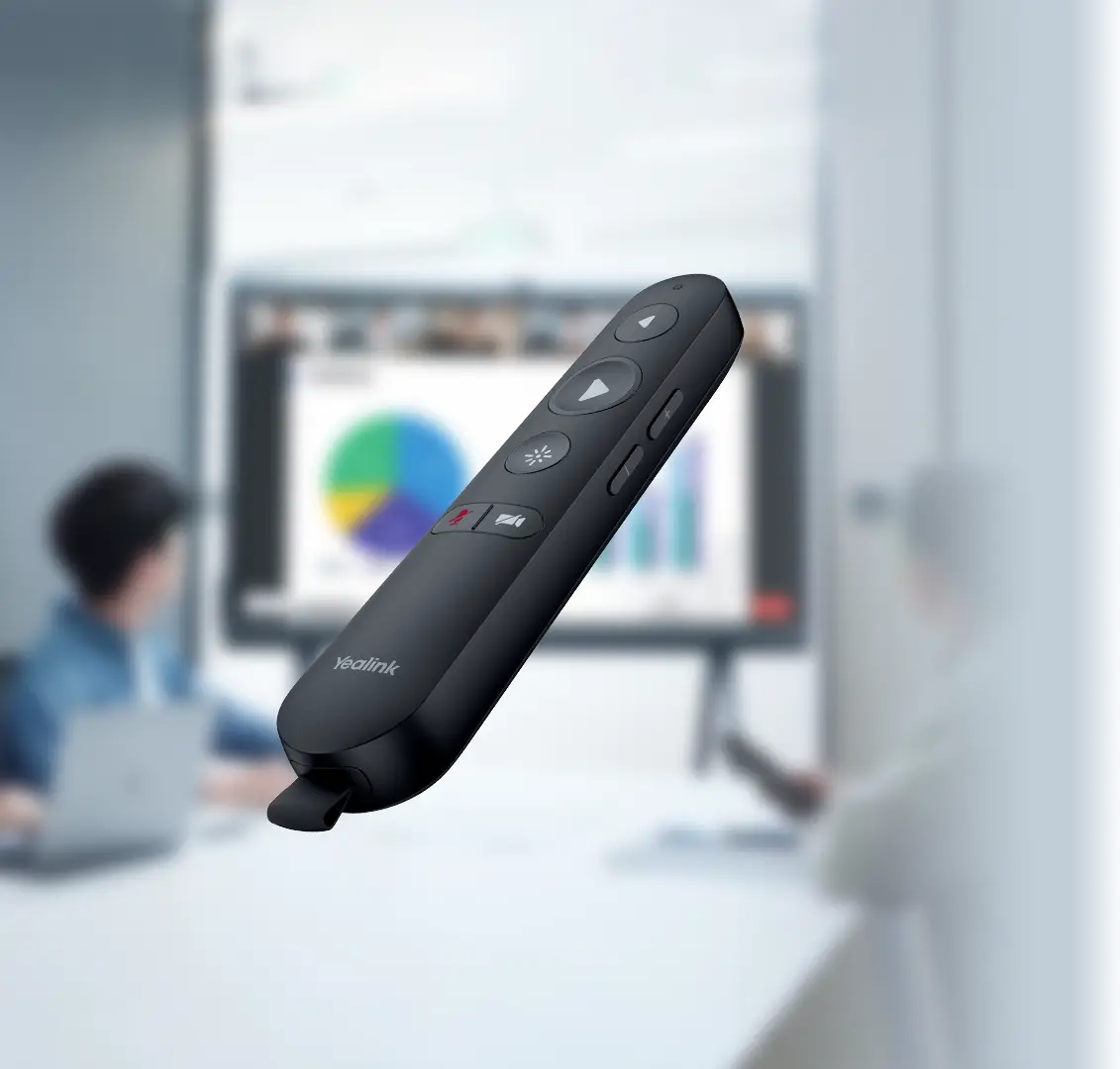
A Practical Control Layer for Interactive MeetingBoard Rooms
The MB-Remote is a purpose-built accessory rather than a complete conferencing endpoint. Its job is to give a presenter or meeting host direct handheld control over compatible Yealink MeetingBoard environments. That distinction matters during purchasing: businesses should choose it when they already have, or are planning, a supported MeetingBoard platform and want a more flexible way to manage presentations and selected meeting functions away from the display.
Yealink confirms multimedia page-turning, air-mouse operation, and additional meeting-control functions. It also states that the remote and receiver are paired at the factory, allowing the USB receiver to be connected to the host without a separate user pairing process in the normal supported setup. For a boardroom presenter, trainer, teacher, consultant, or executive speaker, this can remove the need to repeatedly walk back to the screen for every content movement or control action. The value is less about adding a new conferencing platform and more about improving how an existing MeetingBoard room is used.
In a UAE meeting space, the accessory can be especially relevant where rooms are designed for customer briefings, internal town halls, product demonstrations, classroom instruction, hybrid workshops, or executive reviews. Presenters often need to stand where participants can see them rather than remain beside the display. A handheld remote supports that room behavior while preserving a familiar interaction model for users who prefer physical controls.
Before purchase, the most important check is compatibility. A buyer should not select the controller simply because the room uses another Yealink device. FourTeck can review the exact MeetingBoard or MeetingBoard Pro model, existing accessories, intended meeting workflow, quantity, delivery location, and any broader room upgrade requirement. That review helps the buyer decide whether the remote is the correct addition, whether another controller is more suitable, or whether the requirement is actually for content sharing, touch control, room scheduling, or a different collaboration accessory.
Why a Handheld Controller Can Improve Meeting Flow
For the right MeetingBoard deployment, the main benefit is smoother human interaction with the room. The controller supports mobility, familiar physical controls, and less dependence on staying beside the display.
Move Around the Room Without Losing Control
A presenter may need to face participants, point to a discussion area, walk between tables, or stand beside a physical product demonstration. Handheld control makes that movement easier because common presentation actions remain available away from the main screen. This is particularly useful in training rooms and customer-facing sessions where the speaker’s position changes throughout the meeting.
Direct Multimedia Page Turning
Yealink lists multimedia page turning as a core capability. For a buyer, that means the remote is designed around the everyday task of moving through shared content without needing to reach the collaboration display for each transition. It suits presentations where pace and speaker continuity matter.
Air-Mouse Interaction
Air-mouse control gives the presenter another way to navigate on-screen elements from the handheld device. This can be useful when moving a cursor, indicating an interface area, or interacting with presented material. The exact behavior should be tested with the intended MeetingBoard workflow and software configuration.
Factory-Paired Receiver
Yealink states that the receiver and controller are paired before shipment. In a supported installation, the receiver can be connected to the host without requiring the presenter to perform a new pairing routine. That is valuable in shared meeting rooms where accessories should be straightforward for different users.
Physical Controls for Shared Spaces
Not every presenter wants to learn a touch interface immediately. A dedicated controller can provide a familiar physical interaction method for boardrooms, classrooms, and training spaces used by many people. This can reduce hesitation at the start of a presentation and make room operation feel more predictable.
A Focused Accessory Rather Than a New Room Platform
Because the controller is designed as an accessory to supported MeetingBoard systems, businesses can assess it as part of a room-standardization plan instead of treating it as a standalone conferencing purchase. The buying decision becomes clear: confirm the host model, decide which rooms benefit from handheld control, calculate quantity, and align the accessory with the organization’s support and replacement policy.
The Important Capabilities, Without Overcomplicating the Purchase
The product’s strength is its narrow, practical purpose. It is not intended to replace a MeetingBoard touch interface, a room scheduling panel, or a wireless presentation pod. It adds handheld presentation control to a compatible Yealink collaboration display and is most useful where presenters need to navigate while standing away from the screen.
Official Yealink information identifies MeetingBoard and MeetingBoard Pro as supported product families and lists page turning, air mouse, and meeting-control functions. The factory-paired USB receiver is another key characteristic because it reduces setup friction in a shared room. Two AAA batteries are included, together with the remote, receiver, protective velvet bag, and quick start guide.
For procurement teams, the model number and host compatibility are more important than chasing generic remote-control specifications. When a room has an older MeetingBoard, a newer MeetingBoard Pro, a MeetingBoard C-series environment, or a mixed accessory layout, FourTeck can help verify whether this controller is appropriate before the order is finalized. That is also the right point to confirm warranty terms and current regional availability.
MB-Remote Technical and Package Details
The table keeps confirmed manufacturer facts separate from configuration-dependent buying details. Where an exact value is not published on the primary Yealink product page, FourTeck recommends confirmation before purchase rather than assuming it applies to every hardware generation.
| Specification | Details | Buyer note |
|---|---|---|
| Brand | Yealink | Room collaboration accessory |
| Model / SKU | MB-Remote | Use this exact model name in quote requests |
| Part number | 1303133 | Useful for procurement matching |
| Product type | Presentation remote controller | Accessory, not a standalone conferencing endpoint |
| Official compatibility | Yealink MeetingBoard and MeetingBoard Pro | Confirm exact host model and generation |
| Presentation functions | Multimedia page turning and air mouse | Function behavior can depend on host workflow |
| Meeting controls | Various meeting-control functions | Confirm required actions for your software mode |
| Receiver | USB dongle included | Receiver is paired with the remote at the factory |
| Power | 2 × AAA batteries | Batteries are listed in official package contents |
| Package contents | Remote, USB dongle, velvet protective bag, quick start guide, 2 × AAA batteries | Confirm regional pack contents on quotation |
| Warranty | Configuration / supply-channel dependent | Ask FourTeck for current terms |
| UAE availability | Contact FourTeck for current options | Availability can vary with supplier status and quantity |
For most buyers, the key specification is not a raw technical number but the compatibility relationship with the MeetingBoard host. Start by identifying the exact display or room system model already installed. Then confirm how the room is used: presentations, whiteboarding, video meetings, teaching, training, or executive briefings. If the requirement is mainly wireless content sharing from laptops, a presentation pod may be more relevant. If the requirement is room booking at the doorway, a scheduling panel serves a different purpose. If the requirement is touch-based room control at the table, another controller category may be appropriate. FourTeck can help separate these accessory roles before a quotation is prepared.
Confirm the Room Before You Confirm the Remote
The fastest route to the correct purchase is to verify the existing meeting-room platform first. A remote controller is inexpensive compared with a full room system, but ordering the wrong accessory still creates delay, returns, and user frustration.
Which MeetingBoard is installed?
Record the exact MeetingBoard or MeetingBoard Pro model, screen size, and generation if known. This is the highest-risk question because accessory support can vary between product generations and system modes.
What do presenters actually need to control?
List the desired actions: slide movement, cursor navigation, meeting controls, camera-related actions, or another workflow. This prevents a buyer from choosing a remote when the real requirement is wireless sharing or a tabletop touch controller.
How many rooms need the accessory?
For multi-room offices, identify whether every MeetingBoard room needs a remote or only training, boardroom, and presentation-heavy spaces. Standardizing selectively can make accessories easier to manage without buying more units than required.
Is the USB receiver practical in the room?
Confirm the host arrangement and access to the relevant USB connection. In tightly integrated rooms, accessories may be hidden behind wall panels or display enclosures, so installation access should be considered before deployment.
What support expectations apply?
Ask about warranty handling, replacement process, delivery timing, and whether the remote is part of a larger Yealink room project. These commercial details matter more for organizations standardizing many rooms than for a single accessory purchase.
For a useful FourTeck quote, share the host MeetingBoard model, number of remotes required, delivery location, target date, and the presentation or meeting functions you expect to use. If the room is still at design stage, include the proposed MeetingBoard model and any related Yealink accessories so compatibility can be reviewed as a complete room rather than one item at a time.
Where This Accessory Makes the Most Sense
The controller is most useful in spaces where a compatible MeetingBoard is already central to the room and the presenter benefits from moving around while staying in control of content or meeting actions.
Boardrooms and Executive Presentation Spaces
Executives, visiting speakers, and customer-facing teams often prefer to stand away from the display rather than operate the room from the screen. A handheld controller can make presentation flow more natural during quarterly reviews, strategy sessions, bid presentations, and customer briefings. The key is to make sure the room’s MeetingBoard model is supported and that the expected control functions align with the remote.
Training and Learning Rooms
Trainers frequently move between the display, participants, whiteboards, and demonstration areas. Page turning and air-mouse navigation can help them control presented material without interrupting the lesson to walk back to the screen. It can also give guest instructors a familiar physical control option.
Hybrid Workshops
In a hybrid workshop, the facilitator may need to alternate between remote participants, shared content, physical attendees, and whiteboarding. A handheld remote can support smoother navigation when the room is already built around MeetingBoard collaboration and the presenter needs freedom of movement.
Sales Demonstrations
Sales teams can use the remote during product walkthroughs, proposal reviews, and visual demonstrations. The benefit is not technical complexity; it is presentation continuity. A speaker can remain engaged with the customer while moving through multimedia content on the supported collaboration display.
Education and Classroom Collaboration
Where a supported MeetingBoard is used in a classroom, teachers may benefit from presenting while moving among students. The remote can complement touch interaction at the display, especially for content navigation. Buyers should confirm that the institution’s exact MeetingBoard configuration supports the desired functions.
Multi-Room MeetingBoard Standardization
For organizations deploying multiple MeetingBoard rooms, the accessory can be evaluated as part of a repeatable room standard. Procurement teams can decide which room profiles need a remote, document where the receivers are installed, maintain spare batteries, and include the controller in room user guides. This is more reliable than purchasing ad hoc accessories after users begin requesting them.
Yealink MB-Remote Presentation Navigation
Presentation navigation is the central reason to choose this controller. Yealink specifically identifies multimedia page turning and air-mouse functionality, giving users two different ways to interact with on-screen content. Page turning is direct and familiar for slide-based sessions. Air-mouse control is more flexible when the presenter needs to move a pointer or interact with elements that are not arranged as simple next-and-previous slides.
For businesses, this means the remote can support different presentation styles without forcing the speaker to remain near the display. The most important practical question is how the team presents today. If most meetings involve static video calls with little content movement, the accessory may be optional. If the room hosts training, sales presentations, workshops, or executive briefings, handheld navigation can become much more valuable.
Yealink MB-Remote Plug-and-Play Receiver
Yealink states that the controller and its receiver are paired in advance at the factory. That design choice is important in shared rooms because it removes a common accessory problem: users should not have to perform a pairing process every time they want to present. In the intended setup, the receiver is connected to the compatible host and the remote is ready for use without a separate pairing workflow.
IT teams should still document the accessory. In a large office, it is useful to label the remote by room, keep the paired receiver with its intended device, and include battery replacement in room-support routines. Those small operational steps matter because portable accessories can move between rooms. A technically simple controller becomes much easier to support when the organization treats it as part of the room inventory rather than a loose peripheral.
Yealink MB-Remote MeetingBoard Compatibility
Compatibility is the feature that should drive the purchase decision. Yealink positions this controller specifically for MeetingBoard and MeetingBoard Pro. Buyers should therefore treat the exact host model as the first item on the quote, not an afterthought. A Yealink-branded room does not automatically mean every Yealink accessory is interchangeable across all devices.
This approach is particularly helpful for older rooms, mixed MeetingBoard estates, or organizations that have gradually added accessories over time. FourTeck can review the current setup and suggest whether the remote fits the requirement or whether another Yealink meeting-room accessory is more appropriate.
What Buyers Should Check Before Purchase
The main purchase risk is ordering by accessory name without confirming the MeetingBoard host and the actual room workflow. A five-minute compatibility review can prevent a remote from arriving for a room that really needed a different controller or sharing accessory.
Configuration Fit
Confirm the exact MeetingBoard or MeetingBoard Pro model, how users present, and which controls they need. If the project is for several rooms, decide whether every room needs a controller or only presentation-heavy spaces. This keeps the purchase aligned with real use rather than assuming one accessory profile suits every room.
Compatibility Check
Check the host hardware, software mode, installed room accessories, and access to the USB connection used by the receiver. If the room is a newer or specialized MeetingBoard deployment, share its exact model details with FourTeck. Compatibility should be confirmed before quantity or price becomes the main decision factor.
Availability and Warranty
Do not assume a published market listing means the same stock position or warranty applies to a UAE business order. Ask FourTeck to confirm current availability, supplier status, delivery planning, regional warranty terms, and any replacement expectations. For project quantities, availability can differ from a single-unit request.
Quote Preparation
Provide the model name, part number if known, host MeetingBoard model, required quantity, delivery location, target date, and intended use. If this is part of a new meeting-room project, also describe whether you need video, audio, wireless sharing, room scheduling, mounts, or installation guidance so the complete requirement can be reviewed.
Is this model suitable for every Yealink meeting room?
No. The manufacturer positions it for MeetingBoard and MeetingBoard Pro, so buyers using a MeetingBar, MVC kit, RoomPanel, standalone camera, or another Yealink endpoint should not assume compatibility. FourTeck can help identify the correct controller or accessory once the room hardware is known.
Buying Support for Dubai and UAE MeetingBoard Projects
FourTeck supports business inquiries for this accessory across Dubai and the wider UAE. Assistance can include model identification, MeetingBoard compatibility review, quotation, delivery coordination, and guidance on warranty expectations. Availability may vary with supplier status, quantity, product lifecycle, and the exact regional package, so current supply should be confirmed at the time of inquiry rather than assumed from older online listings.
If you are refreshing several meeting rooms, it can be useful to send FourTeck a room inventory instead of requesting the accessory one room at a time. A simple list containing MeetingBoard models, room names, quantity, and intended controller needs can make quotation and compatibility review more efficient.
Support Across Dubai, Abu Dhabi, Sharjah and Ajman
Businesses in Dubai, Abu Dhabi, Sharjah, Ajman, and other UAE locations can contact FourTeck for product availability, compatibility guidance, and quote assistance. The controller is a small accessory, but the buying questions can still be project-specific when it is being ordered for several collaboration rooms. A corporate office may want one unit per training room, a school may need controllers for selected classrooms, and a hospitality or government environment may require a consistent accessory standard across multiple meeting spaces. FourTeck can help review the requested quantity, host models, delivery destinations, and room requirements in one purchasing conversation. For organizations with sites in more than one emirate, consolidating the requirement can also help ensure the same model and support expectations are used across the deployment.
GCC and Africa Availability Guidance
FourTeck also supports business technology inquiries through regional channels serving selected GCC and Africa markets. Organizations operating in Saudi Arabia, Qatar, Oman, Kuwait, Bahrain, Kenya, Uganda, and other African markets may have different delivery routes, supplier availability, warranty handling, and import requirements. Those differences matter even for a compact room accessory, particularly when a regional company is standardizing MeetingBoard rooms across several countries.
For a multi-country project, provide a location-by-location quantity and the exact host models. FourTeck can use that information to discuss available sourcing paths and whether the same controller specification can be maintained across the project. Do not rely on one country’s listing or delivery terms as proof of availability elsewhere.
Other Meeting-Room Solutions Buyers May Consider
The correct alternative depends on what the room is missing. A remote is for handheld presentation and meeting control. Other accessories solve different problems, such as room booking, content sharing, or complete video-conferencing deployment. Consider the role first, then the model.
Yealink Microsoft Teams Room Panels
Choose a room scheduling panel when the business requirement is to show room availability, booking status, and calendar information outside the meeting space. It is complementary to MeetingBoard collaboration rather than a replacement for handheld presentation control.
Video Conference System Planning
Use the wider FourTeck conferencing solution page when the requirement goes beyond one accessory and includes cameras, microphones, displays, room control, wireless sharing, installation, or platform integration.
Wireless Content Sharing
If users mainly want to bring laptop content to the room without repeatedly handling cables, ask FourTeck about compatible Yealink wireless presentation options. This is a different buying need from a remote controller.
MeetingBoard Pro Room Expansion
For rooms built around MeetingBoard Pro, accessory planning may include camera expansion, microphones, touch controllers, floor stands, wall mounts, or compute modules. Request a complete room review when several components are involved.
Room Scheduling and Collaboration Together
A modern meeting room may need both an in-room collaboration system and an outside-the-room scheduling panel. FourTeck can help buyers separate these functions and plan the correct combination.
Practical Support for Small Accessories and Complete Meeting Rooms
A meeting-room accessory is easy to order when every detail is known. It becomes harder when the buyer only has a room photo, an old quotation, or a partial model name. FourTeck’s value in that situation is helping turn a vague requirement into a clearer procurement request before supply is confirmed.
This approach is useful to SMB buyers ordering a single boardroom accessory as well as enterprise teams planning a standardized set of meeting spaces. The goal is not to add unnecessary complexity to a remote-control purchase. It is to confirm the few details that matter so the accessory arrives for the right host, the right room, and the right user workflow.
Questions Business Buyers Ask About MB-Remote
What is the MB-Remote used for?
It is a handheld presentation and meeting controller designed for compatible Yealink MeetingBoard systems. Yealink identifies multimedia page turning, air-mouse operation, and additional meeting-control functions. It is useful when presenters need to move around the room while continuing to navigate content or access supported meeting actions.
Which Yealink systems are officially listed as compatible?
Yealink’s product information states that the controller is designed for MeetingBoard and MeetingBoard Pro. Because individual hardware generations and room modes can differ, provide your exact MeetingBoard model when requesting a quote. FourTeck can help review whether the accessory matches the installed host.
Does the controller need to be paired manually?
Yealink states that the receiver and controller are paired in advance at the factory. In the supported setup, the USB receiver is connected to the host for plug-and-play use. IT teams should still keep the paired receiver with its intended controller and document the accessory in shared-room environments.
What is included in the package?
The official package contents list the remote controller, USB dongle, velvet protective bag, quick start guide, and two AAA batteries. Regional packaging can change over time, so project buyers should confirm the quoted package contents if a particular accessory or document is important to deployment.
Is it available in Dubai and the UAE?
FourTeck can support Dubai and UAE inquiries, but current availability should be confirmed at quotation stage. Supply can vary with quantity, distributor status, product lifecycle, and timing. Send the host MeetingBoard model, required quantity, and delivery location so the request can be checked against current options.
Is this the same as a wireless presentation pod?
No. A remote controller is primarily for handheld navigation and supported meeting controls, while a wireless presentation device is generally used to bring content from a laptop or other source into the room. If your main problem is cable-free content sharing rather than control, ask FourTeck about the appropriate Yealink sharing accessory.
How do I choose the right quantity for multiple rooms?
Start with the room profile rather than buying one remote per display automatically. Training rooms, boardrooms, and presentation-heavy spaces may benefit more than simple huddle rooms. Build a list of MeetingBoard rooms, identify where presenters need mobility, and request a quantity based on those real use cases.
Can FourTeck help confirm warranty and support?
Yes. Warranty handling can depend on the supply route, region, and quoted terms. FourTeck can provide guidance as part of the quotation process. For enterprise projects, it is helpful to state any required support period, replacement expectation, or internal procurement condition before the order is approved.
What information should I send to request a quote?
Send the MB-Remote model name or part number 1303133, the exact MeetingBoard host model, required quantity, delivery location, target date, and the functions users expect from the controller. For a new room project, also mention any requirements for cameras, microphones, sharing, scheduling, mounting, or installation support.
Need Help Confirming the Right MeetingBoard Accessory?
FourTeck can review the host MeetingBoard model, intended presentation workflow, quantity, delivery location, and warranty expectations before preparing a quote. This is especially useful when the room has several Yealink accessories or when the exact installed model is uncertain.
Share the MeetingBoard model, required quantity, delivery location, target date, and the controls your users need.



