
Fourteck UAE Meeting Room Solutions
Yealink MVC500 Dubai
Yealink MVC500 Dubai is a complete Microsoft Teams Rooms system designed for small and medium meeting rooms where users need one-touch joining, professional video, clean audio pickup and easier content sharing. Fourteck helps UAE companies plan the correct meeting room package, confirm room suitability and arrange business-ready supply support across Dubai and nearby Emirates.
Yealink MVC500 Dubai Information
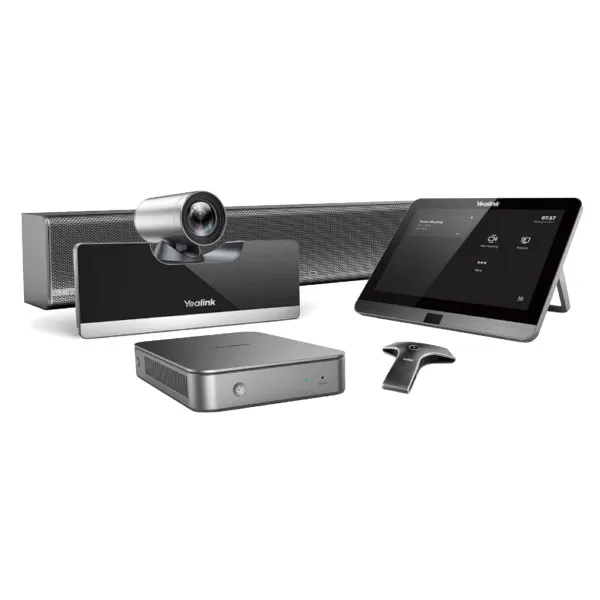
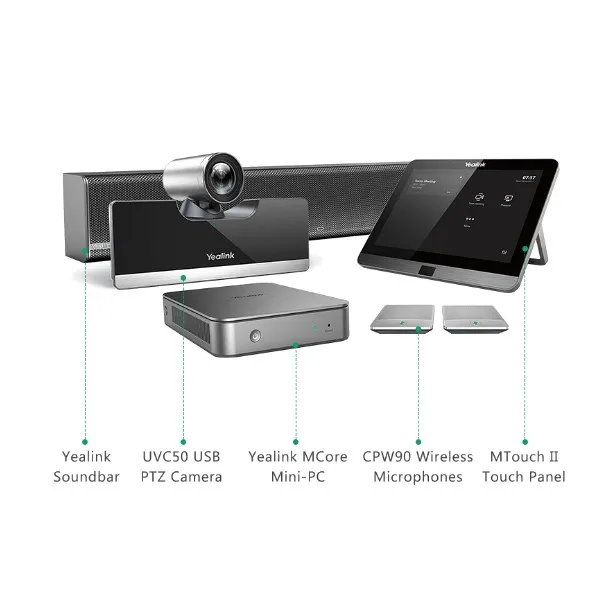
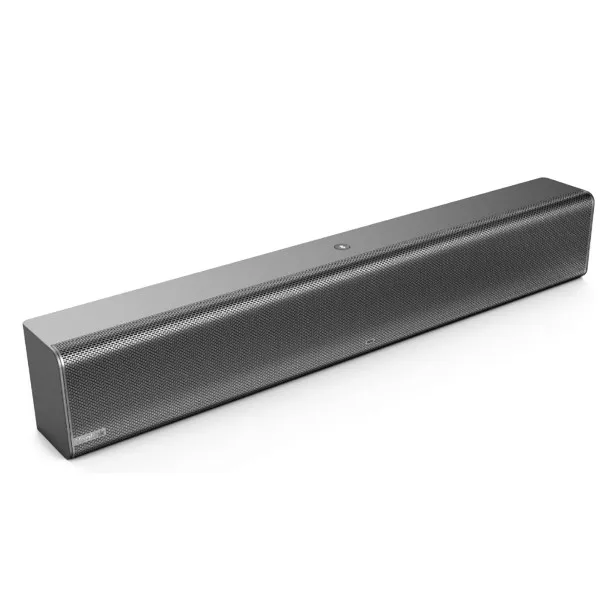
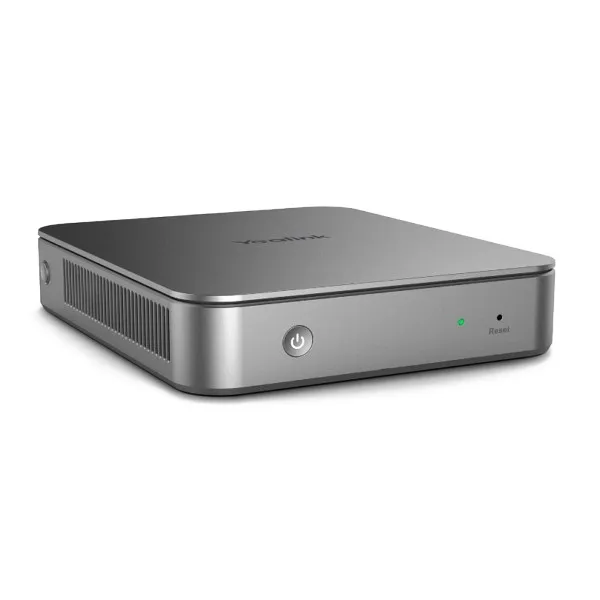
The Yealink MVC500 is built for companies that want a native Microsoft Teams Rooms experience without assembling separate camera, speaker, microphone, controller and room computer components from different brands. The official Yealink MVC500 package includes a mini-PC with cable management box, Yealink MTouch touch console, Yealink MShare content sharing unit, UVC50 USB PTZ camera, microphone options and Yealink MSpeaker soundbar. The room system is preloaded for Teams Rooms use, with Windows 10 IoT Enterprise and Microsoft Teams Rooms application support listed in the official datasheet.
For Dubai businesses, this matters because meeting rooms must be simple for management teams, visiting customers and staff who may not have time for technical setup before every meeting. With MVC500, users can walk into a room, join a scheduled Teams meeting from the touch panel, share laptop content through the room system and communicate clearly with remote participants. It is suitable for executive offices, consultation rooms, branch meeting spaces, sales presentation rooms, school administration rooms and project coordination areas.
Fourteck focuses on the missing decision points that many product pages do not explain clearly: screen quantity, network point readiness, HDMI routing, camera viewing position, microphone coverage, table size, power availability, Teams account preparation and future service support. This page is prepared for buyers who want product clarity, room planning confidence and fast quotation assistance before purchase.
Yealink MVC500 Dubai Highlights
Native Room Control
The MTouch console gives meeting users a familiar touch interface for joining, calling and controlling the room without depending on a remote control.
Clear PTZ Video
The UVC50 camera supports Full HD video and pan-tilt-zoom movement, helping participants appear clearly during hybrid discussions.
Flexible Audio Choice
Buyers can plan wireless CPW90 microphone coverage or a VCM34 wired microphone approach based on table style and room layout.
Content Sharing
MShare supports wired and wireless content sharing workflows so teams can present reports, dashboards and proposals more comfortably.
Yealink MVC500 Dubai Features
Across buyer research and reseller references, the strongest reason customers choose this system is the complete-room approach. Rather than buying a standalone camera and hoping it works with a separate microphone, speaker and meeting PC, MVC500 is arranged as a coordinated Teams Rooms bundle. The included mini-PC provides the room computing base, the MTouch panel gives users touch control, MShare handles content input, the UVC50 camera manages room video and the audio options help cover typical meeting tables.
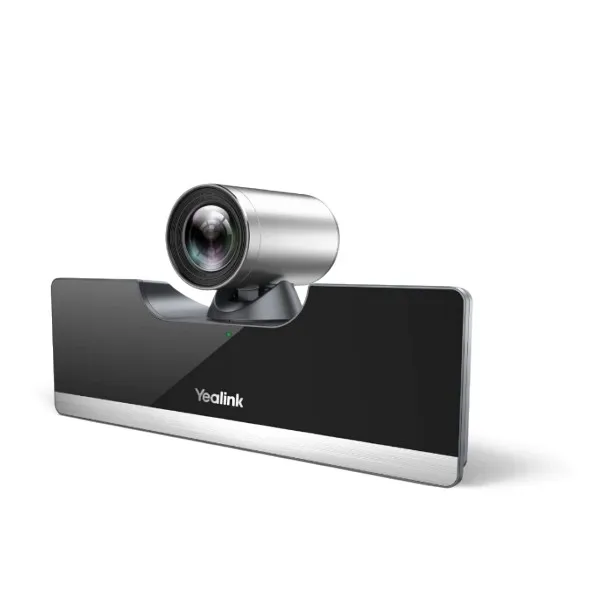
The UVC50 is especially useful for rooms where users need more control than a fixed webcam can offer. PTZ movement helps align the view toward presenters, meeting tables or whiteboard zones. The official specification lists 1920 x 1080 video resolution and a 60 frame rate for the UVC50 camera, which gives procurement teams a clear technical base when comparing meeting room devices.
The practical value is not only in hardware. It is in reduced meeting friction. Dubai offices often host external consultants, regional managers, suppliers and customers in the same room. A room system should make the meeting start quickly, keep the table tidy and reduce repeated support calls. MVC500 is suitable when the room is used regularly and needs a more permanent conferencing standard than a portable USB speakerphone and laptop camera setup.
Yealink MVC500 Dubai Specifications
The following specification summary is written for IT buyers, procurement teams and office managers who need a practical view before requesting a quotation. Exact package options can depend on availability, microphone version and project requirements.
Yealink MVC500 Details
Customers may describe this device in several practical ways, including Yealink MVC500, MVC500 Teams Room, Yealink Microsoft Teams Room system, MVC500 video conference kit, Yealink UVC50 meeting room bundle, Teams room camera system, Yealink room system for small meeting rooms and Yealink video conference solution for office boardrooms. These wording differences usually come from different departments. A procurement user may focus on the bundle. An IT engineer may ask about camera, microphone and mini-PC connectivity. A management user may simply ask for a Teams room solution that works reliably.
Fourteck writes product guidance around all these buyer paths so the customer receives a clearer answer. The MVC500 can be considered when a business wants a dedicated meeting space instead of a temporary laptop-based setup. It is also useful when the same room is used by multiple teams and the company wants a repeatable process for joining meetings, sharing content and speaking clearly to remote participants.
Yealink MVC500 Dubai Descriptions
Dubai companies work across fast-moving business districts, free zones and industrial locations, so meeting room technology must be dependable and easy to operate. Yealink MVC500 Dubai is suitable for offices in Business Bay, Downtown Dubai, Deira, Bur Dubai, Dubai Marina, Jumeirah Lake Towers, Dubai Internet City, Dubai Media City, Al Barsha, Karama, Jebel Ali, Al Quoz, Dubai Silicon Oasis, Dubai Investment Park, Dubai Healthcare City, Nad Al Hamar, Mirdif, Jumeirah, Garhoud and Sheikh Zayed Road office towers.
The same product can serve many room types: executive cabins that need professional remote meetings, HR rooms used for interviews, sales presentation areas, training rooms, clinic consultation rooms, school administration meeting spaces and branch collaboration rooms. Fourteck helps customers discuss room size, table style, display location, cable pathway, network access, Teams account requirements and installation readiness before supply confirmation.
Yealink MVC500 GCC Uses
Across the GCC, buyers commonly look for dependable Microsoft Teams Rooms systems for regional management meetings, project coordination, education, healthcare, finance, logistics and customer presentation spaces. Yealink MVC500 can be considered by teams in UAE, Saudi Arabia, Kuwait, Qatar, Oman and Bahrain that want a room-based video conferencing experience with familiar Teams operation. In Dubai and Abu Dhabi, it supports head office and branch collaboration. In Riyadh, Jeddah and Dammam, it can support management rooms and client meeting spaces. In Kuwait City, Doha, Muscat and Manama, it can help businesses standardize meeting quality across regional branches. Fourteck can guide UAE buyers and connect regional technology requirements through its wider support network where suitable.
Yealink MVC500 Africa Availability
African businesses increasingly need meeting room systems for hybrid work, remote consulting, education, government offices, logistics, banking and multinational team communication. Yealink MVC500 can support professional room collaboration for buyers researching availability in Kenya, Uganda, Tanzania, Rwanda, Ethiopia, South Africa, Nigeria and Ghana. Fourteck’s regional web presence helps customers understand business technology supply, support direction and meeting room planning beyond the UAE. For offices that coordinate between Dubai and African branches, a standardized Yealink Teams room approach can reduce user learning time and simplify support discussions across locations.
Yealink MVC500 Dubai Understanding With Other Models
Fourteck also lists Yealink communication products that help customers complete wider office communication requirements. Buyers comparing meeting room solutions may review Yealink T43U Dubai for SIP desk communication, Yealink WPP30 Dubai for 4K wireless presentation workflows, Yealink SIP-T31G Dubai for everyday office voice users and Yealink T21P IP Phone Dubai for essential calling needs. These references help teams plan a complete workplace setup, from meeting room collaboration to front desk and staff extension calling.
When a company is building a new office or upgrading a boardroom, the video room system is only one part of the plan. Phones, wireless sharing devices, network switches, firewall readiness, structured cabling and display installation may also affect the final experience. Fourteck supports customers by connecting product selection with real deployment needs.
Yealink MVC500 GCC Usage
For GCC offices, Yealink MVC500 is relevant when teams need reliable collaboration between regional branches, suppliers and clients. UAE offices may use it for boardroom discussions with Saudi partners. Qatar and Oman project teams may use similar room systems for engineering coordination. Kuwait and Bahrain businesses may consider it for finance, training and customer-facing meetings. The strongest usage case is a regular meeting room where users expect the device to stay installed, connected and ready. Fourteck helps Dubai customers plan these rooms with display output, microphone coverage, network readiness, Teams licensing discussion and after-sales service direction.
Yealink MVC500 Dubai Service Availability
Fourteck supports Yealink MVC500 Dubai buyers with pre-sales guidance, product selection, quotation support, room readiness review, installation coordination and service assistance. Meeting room devices are not only about buying a box. A successful room needs correct screen positioning, camera height, cable access, stable network, audio placement and user training. Fourteck can help customers review whether the room is better suited for wireless microphones or a wired array microphone, whether one or two displays are expected, and how the touch console should be placed for daily use. This support-focused approach helps reduce installation delays and avoids mismatched accessories.
Fourteck Yealink MVC500 Dubai Reference
Customers considering a Teams room system may also review Yealink WPP30 Dubai, a compact wireless presentation pod used for easier content sharing in meeting rooms and collaboration spaces. While MVC500 is a complete Microsoft Teams Rooms system, WPP30 is useful for rooms where users want fast wireless presentation from compatible devices. Reviewing both products can help a buyer decide whether the requirement is a complete video conferencing room or an accessory for screen sharing inside an existing meeting setup.
Yealink MVC500 Dubai UVC50 Camera Feature Used
The UVC50 camera is one of the strongest reasons to choose the MVC500 for a proper room instead of a basic desktop webcam. Its Full HD output and PTZ design help the room host frame participants more professionally. In management meetings, this allows better eye contact and clearer participant visibility. In training rooms, it helps show the presenter or the table area depending on the session. For Dubai offices where clients may join remotely from other Emirates or GCC countries, the camera gives the meeting a more polished appearance and supports a stronger business impression.
Yealink MVC500 Dubai MTouch Console Feature Used
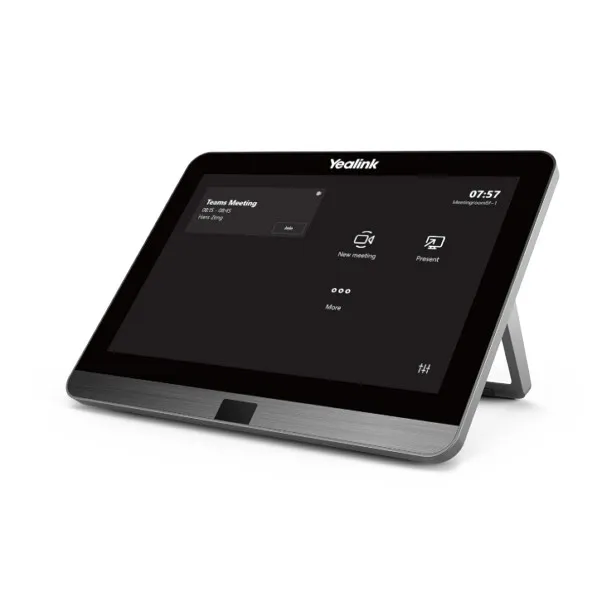
The MTouch touch console keeps the meeting table simple. Users can join meetings, manage calls and control the room from a dedicated panel rather than searching for software controls on a laptop. This is valuable in shared meeting rooms because different users can operate the same system with less training. The official specification lists an 8-inch IPS screen, 1280 x 800 resolution and 10-point capacitive touch capability, giving the room a professional control point for daily Teams meetings.
Yealink MVC500 Dubai Microphone Feature Used
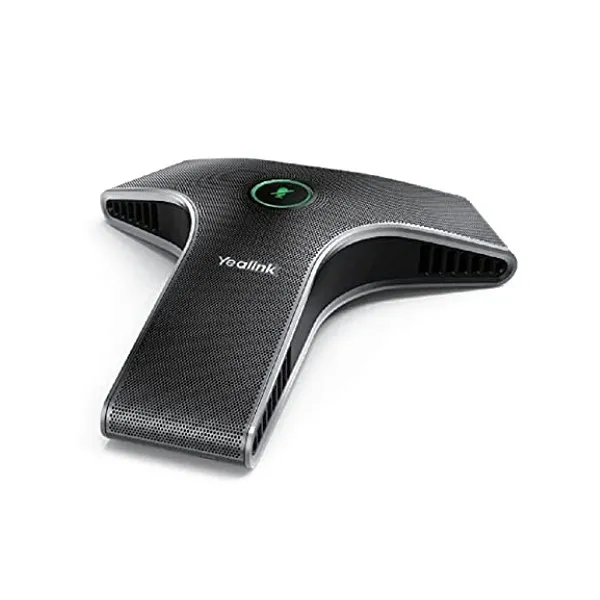
Audio quality often decides whether a meeting feels professional. MVC500 gives buyers microphone planning choices. CPW90 wireless microphones are useful when tables need a cleaner cable-free setup, while VCM34 wired array microphones may suit rooms that prefer fixed cabling. The official datasheet lists CPW90 DECT technology, a 3-meter voice pickup range for each microphone unit and support for up to four wireless units. For rooms with longer tables, this flexibility helps Fourteck recommend a more suitable coverage approach.
Yealink MVC500 Dubai MShare Feature Used
MShare helps the meeting room handle presentation content more neatly. Users can share laptops and business material into the room workflow instead of relying on loose adapters and uncertain cables. The official datasheet lists HDMI input, Mini-DP input and content sharing support. For Dubai companies that present quotations, drawings, finance dashboards, training slides and project updates, MShare can make the room feel more organized and easier for visitors to use.
Yealink MVC500 Dubai Product Family Guide
Yealink has multiple collaboration and communication devices for different room sizes and user needs. The MVC500 is a practical choice for small and medium Teams rooms. Buyers with larger or newer room projects may also evaluate other Yealink MVC series options based on camera coverage, audio expansion and room intelligence requirements. For desk communication, Yealink IP phones remain useful alongside video room systems.
| Model | Best Fit | Buyer Note |
|---|---|---|
| Yealink MVC500 | Small-to-medium Teams rooms | Balanced room system with PTZ camera and audio options |
| Yealink MVC500 II | Updated Teams room projects | Suitable when customer asks for newer bundle availability |
| Yealink MVC800 | Medium-to-large rooms | Planned for broader room coverage |
| Yealink MVC S50 | Modern medium rooms | Useful when AI room features are requested |
| Yealink MVC S90 | Boardrooms and larger spaces | Consider when multiple camera coverage is needed |
| Yealink T43U | Office SIP calling | Complements meeting room systems with desk phones |
Market Availability Yealink MVC500 Dubai Business Bay
Companies looking for Yealink MVC500 Best price, Yealink MVC500 Buy now, Yealink MVC500 Authorized partner, Ready stock Business Bay, Get Dubai Price, Request Quote and Check UAE Availability can contact Fourteck for quotation support and room planning. Availability may change by package, microphone option and project quantity, so buyers are advised to confirm stock, lead time, warranty and installation support before final approval. Fourteck can guide offices in Business Bay, Downtown Dubai, Deira, JLT, Dubai Marina, Al Quoz and Dubai Silicon Oasis with practical buying assistance.
Yealink MVC500 AbuDhabi
Abu Dhabi companies often look for meeting room systems for corporate offices, government-related departments, oil and gas contractors, healthcare groups, education institutions and regional management teams. Yealink MVC500 is suitable for small and medium rooms where users need a dependable Microsoft Teams Rooms setup instead of a portable laptop meeting arrangement. Fourteck can assist Abu Dhabi buyers with model guidance, quotation discussion, deployment planning and UAE availability direction.
Yealink MVC500 Dubai Deployment
Deployment should begin with room assessment. Fourteck recommends confirming display location, table size, seating count, camera mounting position, speaker placement, microphone choice, power points, network cabling and Teams account readiness. The Yealink deployment guide notes that display devices should be connected first and recommends using a wireless keyboard and mouse through the mini-PC during setup. For daily users, the goal is a clean meeting room where the MTouch console is accessible, camera view is natural, audio pickup is balanced and cables are managed safely.
Yealink MVC500 Dubai Installation Details
Installation normally includes placing the mini-PC and cable management box, connecting display outputs, positioning the UVC50 camera, connecting MTouch, arranging MShare input, installing MSpeaker and setting up microphone coverage. Rooms with glass walls, hard floors or long tables may need extra attention to audio pickup and echo conditions. Fourteck can guide customers on practical installation readiness so the meeting room looks neat and works consistently after handover. User orientation is also important, because staff should know how to join meetings, share content and report support needs.
Yealink MVC500 Sharjah
Sharjah offices, schools, trading companies, warehouses and professional service firms may choose Yealink MVC500 when they need a fixed meeting room system for supplier calls, management reviews, online training and customer coordination. The system is suitable for organizations that want a more polished room experience than a laptop camera. Fourteck can support Sharjah buyers with UAE quotation assistance and meeting room planning from Dubai.
Product Availability Yealink MVC500 Dubai
Get Yealink MVC500 support from Fourteck when your team needs a complete room system with professional guidance before order confirmation. Buying Support for Yealink MVC500 includes product package discussion, room size review, microphone selection, display requirement guidance, quotation assistance and installation coordination. Genuine Yealink MVC500 Guide from Fourteck helps buyers avoid unclear package decisions and select the correct solution for UAE business use.
Yealink MVC500 Ajman
Ajman businesses can use Yealink MVC500 for conference rooms, owner offices, training spaces, education administration and branch meetings. It is helpful for companies that communicate frequently with Dubai, Sharjah, Abu Dhabi or international partners through Microsoft Teams. Fourteck can help Ajman buyers check suitability, discuss UAE supply options and plan installation requirements based on the room layout.
Fourteck Dealing Product Dubai
For customers building a wider Yealink setup, Yealink T43U Dubai is another useful Fourteck product reference. It serves office users who need a professional SIP desk phone for reception, sales, admin and support teams. A company can use MVC500 for room collaboration and Yealink IP phones for daily desk calling, creating a stronger office communication environment across departments.
Fourteck Regional Support Points
Yealink MVC500 FAQ
Is Yealink MVC500 suitable for small meeting rooms?
Yes, it is commonly planned for small and medium meeting rooms where users need a dedicated Microsoft Teams Rooms experience.
Does MVC500 include a camera?
Yes, the package includes the Yealink UVC50 USB PTZ camera for Full HD room video.
Can Fourteck help with installation in Dubai?
Fourteck can guide Dubai customers with installation planning, room readiness and deployment support discussion.
Does it support content sharing?
Yes, the MShare unit supports meeting room content sharing through supported wired and wireless workflows.
What microphone options are available?
MVC500 can be planned with CPW90 wireless microphones or VCM34 wired array microphone options depending on the package and room requirement.
Is it a Microsoft Teams Rooms system?
Yes, Yealink MVC500 is designed for Microsoft Teams Rooms use and supports a familiar meeting room interface.
Can it be used with two displays?
The mini-PC specification includes two HDMI video outputs, allowing dual display planning where the room design supports it.
Is it better than a normal webcam setup?
For regular meeting rooms, MVC500 offers a more structured room system with touch control, room audio, camera control and content sharing.
How can I request a quote?
Contact Fourteck with your room size, location, display requirement and preferred microphone option for quotation assistance.
Can Fourteck support UAE locations outside Dubai?
Fourteck can guide customers in Dubai, Abu Dhabi, Sharjah, Ajman and other UAE locations with product and deployment discussion.




Reviews
There are no reviews yet.