

ZKTeco SenseFace 7A Multi-Biometric Access Terminal in Dubai, UAE
A 7-inch access terminal for face, fingerprint, card, and password authentication, with door-control connectivity and video intercom support for managed business entrances.
It is suited to organizations that want several authentication choices at one doorway while keeping central management, event records, and integration planning in view. Final suitability depends on the selected card technology, software platform, optional wireless features, door hardware, network design, and installation environment.
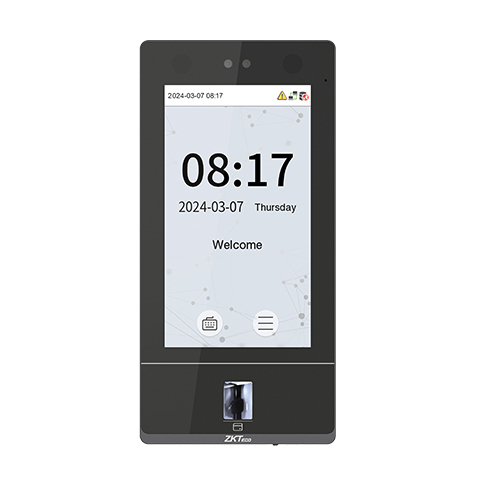
A flexible identity checkpoint for controlled business entry
The SenseFace 7A is designed for access-control projects where a business wants more than one way to verify a person at the door. It brings facial authentication, fingerprint verification, card reading, and password entry into a single wall-mounted terminal. That matters in real deployments because one organization may have permanent employees using biometrics, contractors using cards, administrators using alternative credentials, and visitors who require a controlled temporary process. Instead of treating every entrance as a one-method doorway, the terminal gives the system designer several credential paths that can be matched to policy.
The unit uses a 7-inch touch display and a WDR binocular 1MP camera. ZKTeco specifies face recognition at a distance of approximately 30 cm to 200 cm, with facial authentication quoted at under 0.35 seconds and fingerprint verification under 0.5 seconds for the standard SenseFace 7A. For busy employee entrances, these figures make the terminal relevant where queues and repeated credential failures would otherwise affect staff movement. The in-glass fingerprint sensor provides another biometric option when face-only access is not the preferred policy.
The terminal also belongs in a wider access-control system rather than being viewed as an isolated screen. It provides TCP/IP connectivity, Wiegand input or output, ZKTeco RS485, USB for drive-based data handling, auxiliary input, electric-lock connection, door sensor, exit button, and 12V output. Optional Wi-Fi, optional IC card support, and an optional wireless doorbell can change the final bill of materials. SIP version 2.0 and ONVIF support add video-intercom possibilities when the chosen monitors, software, and network design are compatible.
For UAE buyers, the key procurement question is not simply whether the model supports biometrics. The important question is whether the exact credential type, software environment, door hardware, network method, user population, and installation location have been confirmed. FourTeck can help organize those details before quotation, reducing the risk of ordering a terminal without the correct card technology, power arrangement, communication option, or integration plan.
Key Business Benefits
The strongest value comes from combining several access and communication capabilities in one doorway endpoint, while keeping configuration choices clear for the buyer.
Multiple credentials support different user policies
Face, fingerprint, card, and password verification allow a security team to create practical enrollment choices for different user groups. This can be useful when some staff should use contactless entry, some need a card fallback, and certain controlled workflows require more than one authentication method. The benefit is not simply more features; it is the ability to design access around the organization’s real people and policies.
Fast verification supports busy entrances
Vendor-stated facial authentication below 0.35 seconds and fingerprint verification below 0.5 seconds can help reduce friction at staff doors when enrollment and installation conditions are appropriate. A smoother entry process is especially valuable at shift changes, office opening times, training centers, and other periods when many authorized users arrive together.
Anti-spoofing strengthens facial verification
ZKTeco positions the SenseFace platform with anti-spoofing measures intended to resist common photo and video presentation attempts. For buyers, this means face authentication is designed as a security mechanism rather than a simple camera match. It should still be deployed as part of a complete access policy that includes correct enrollment, door hardware, permissions, logging, and administrative controls.
Door and reader interfaces reduce design gaps
Connections for electric lock, door sensor, exit button, auxiliary input, Wiegand, and RS485 make the device suitable for real access-control architecture. Buyers can plan the terminal together with lock type, emergency egress requirements, reader extensions, and controller logic instead of discovering those needs only after hardware arrives.
On-premise and cloud software paths
The current product family supports ZKBio CVSecurity and ZKBio Time for selected on-premise workflows, plus ZKBio Zlink for cloud-based web and mobile management. The correct software should be confirmed during procurement because access-control management, attendance workflows, intercom use, and licensing expectations can differ.
IP65 expands installation possibilities
An IP65 rating provides dust and water protection at the enclosure level. This can be useful for entrances exposed to dust or occasional moisture, although project teams must still consider shade, direct weather exposure, temperature limits, cabling, power protection, mounting surface, local building requirements, and the conditions around the lock hardware.
What stands out in the SenseFace 7A
The device is most useful when a project needs strong credential flexibility, an integrated door endpoint, and a pathway into centralized management. Its standard biometric profile includes 10,000 fingerprint templates and 10,000 face templates, while the listed standard card and user capacities reach 50,000 and transaction storage reaches 300,000. ZKTeco also offers big-capacity versions within the SenseFace 7 family, so buyers should confirm the exact version on the quote rather than assuming every unit has identical biometric capacity.
For connectivity, standard wired TCP/IP is the straightforward network path. Wi-Fi at 2.4 GHz is optional, which is important for procurement because wireless capability should not be assumed. The standard card technology is 125 kHz ID card, while 13.56 MHz IC card support is optional. These two choices can affect whether existing employee cards can be reused or whether a new credential rollout is required.
Video intercom capability is another differentiator. SIP version 2.0, ZKTeco private-protocol intercom options, and ONVIF support create integration opportunities with selected indoor monitors, software, and mobile platforms. This is valuable when an entrance needs both identity verification and a way for a visitor or staff member to communicate with a reception or security point. The system design still needs a compatibility review before purchase.
- 7-inch 600 × 1024 touch display
- 1MP WDR binocular camera
- Linux, dual-core 1GHz, 512MB RAM, 8GB ROM
- Face distance: 30–200 cm
- IP65 enclosure rating
- Wall-mount form factor
Technical Specifications
The following table reflects the current official SenseFace 7 Series information for the standard 7A model. Optional items and big-capacity variants should be confirmed on the final quotation.
| Specification | SenseFace 7A detail |
|---|---|
| Brand / model | ZKTeco SenseFace 7A |
| Display | 7-inch TFT color touch LED, 600 × 1024 |
| Camera | WDR binocular camera, 1MP |
| Operating system / hardware | Linux; dual-core 1GHz CPU; 512MB RAM; 8GB ROM |
| Authentication | Fingerprint, face, card, password via virtual keypad |
| Fingerprint capacity | 10,000 templates standard; big-capacity version differs |
| Face capacity | 10,000 templates standard; 50,000 on listed big-capacity version |
| Card / user capacity | 50,000 cards / 50,000 users |
| Transaction capacity | 300,000 |
| Verification speed | Face under 0.35 sec; fingerprint under 0.5 sec |
| Face recognition distance | 30 cm to 200 cm |
| Card technology | 125 kHz ID card standard; 13.56 MHz IC card optional |
| Communications | TCP/IP; optional 2.4GHz Wi-Fi; Wiegand; ZKTeco RS485; USB Type-A; auxiliary input; lock, door sensor, exit button and 12V output interfaces |
| Video intercom | SIP version 2.0 and ZKTeco private-protocol options; ONVIF support |
| Software | ZKBio CVSecurity, ZKBio Time, ZKBio Zlink according to deployment mode |
| Power | DC 12V 3A, listed as optional supply |
| Operating environment | -5°C to 45°C; 10% to 90% RH non-condensing |
| Protection / mounting | IP65; wall mount; compatible with Asian gang-box / single gang-box |
| Dimensions / weight | 238 × 115 × 22.3 mm; 0.622 kg |
| Certifications | ISO14001, ISO9001, CE, FCC, RoHS |
Configuration selection should begin with the user population and credential policy. A standard 10,000-face and 10,000-fingerprint capacity may be more than sufficient for many offices, but larger campuses or consolidated multi-site deployments may require a different version or management architecture. Card technology is another early decision: organizations with existing 125 kHz credentials have a different requirement from those standardized on 13.56 MHz cards. Network planning should confirm whether wired Ethernet will be used or optional Wi-Fi is required. The door itself also matters: lock type, exit device, door contact, emergency release behavior, power supply, and any external reader must be included in the design. Finally, verify the software platform and intercom requirement before ordering because central access management, time-attendance workflows, mobile operation, and SIP monitor compatibility can change the appropriate configuration.
Configuration and Buyer Guidance
The right purchase depends on the complete doorway and management requirement, not only the terminal model. Confirm the points below before requesting commercial terms.
How many people and credentials?
Count employees, contractors, recurring visitors, and future growth. Decide whether each group will use face, fingerprint, card, password, or a combination. This determines whether the standard capacity and credential mix are appropriate.
Which card technology is already used?
The standard reader is 125 kHz ID card; 13.56 MHz IC card support is optional. Existing employee badges should be identified before ordering so a buyer does not discover after installation that current cards are incompatible.
What door hardware will be controlled?
Document the electric lock or strike, door sensor, exit button, emergency egress arrangement, power supply, and any additional reader. Door safety and local installation practice should be reviewed by a competent access-control installer.
How will the terminal reach management software?
Wired TCP/IP is standard. Optional Wi-Fi may be useful where cabling constraints exist, but security, reliability, and signal conditions should be considered. Confirm firewall rules, VLAN placement, IP addressing, and server or cloud access needs.
Is video intercom part of the project?
If reception or security must speak with people at the entrance, confirm the required SIP monitor, software, mobile app, network path, and call workflow. Do not assume every indoor monitor or third-party system will behave identically.
What support scope is expected?
Clarify whether the requirement is supply only, configuration assistance, software setup, door integration, installation, testing, user enrollment support, or ongoing maintenance. A quote becomes more useful when these expectations are stated in advance.
When contacting FourTeck, share the model, required quantity, number of users, preferred authentication methods, existing card type, door count, software preference, network method, intercom requirement, delivery location, target date, and expected installation scope. These details allow the quotation to be structured around the real project instead of a generic terminal-only price.
Ideal Business Use Cases
The terminal is best considered where controlled entry, multiple credential types, and centralized administration meet at the same doorway.
Corporate offices and headquarters
Office environments often need fast employee entry, controlled access to restricted floors or rooms, clear event records, and a practical method for handling staff who forget or lose a card. Facial and fingerprint authentication can reduce reliance on one physical credential, while card and password options give administrators alternative workflows. The terminal can also support reception-oriented intercom scenarios when a visitor reaches a controlled entrance. Buyers should still map doors by security level because not every office door needs the same biometric policy.
Warehouses and logistics sites
Warehouses can use multi-biometric access at staff entrances, secure stores, control rooms, or administrative zones. IP65 protection is useful where dust and occasional moisture are concerns, but temperature, sun exposure, lock hardware, and cable routes still need site-specific planning.
Education and training facilities
Campuses may require different access rules for employees, instructors, students, contractors, and restricted laboratories or administration areas. The terminal’s credential flexibility allows each user group to be handled according to policy, subject to privacy, consent, and organizational rules governing biometric data.
Healthcare and clinic environments
Clinics, laboratories, pharmacies, and administrative areas may need controlled staff access to sensitive rooms. A multi-method terminal can support fast employee verification while allowing separate credentials for service teams or approved contractors. System design should consider hygiene procedures, privacy, emergency access, and audit requirements.
Multi-site business operations
Organizations with several branches may prefer a common access platform so user administration and reporting are easier to standardize. The SenseFace family can participate in centralized software environments, but buyers should confirm software licensing, connectivity, bandwidth, data governance, and the exact enrollment or synchronization workflow across sites.
Reception and controlled visitor entry
SIP video intercom capability can be relevant at entrances where a person needs to communicate with reception before the door is released. This is not a substitute for a full visitor-management process, but it can become one part of an entry workflow that combines visual communication with controlled door operation.
SenseFace 7A Multi-Method Biometric Authentication
The defining capability of the 7A model is the ability to combine facial authentication with an in-glass fingerprint sensor while also supporting card and password credentials. For a buyer, this broadens policy choices. A company can choose face for fast daily employee access, retain fingerprint as an alternative biometric, keep cards for contractors or specific departments, and use password workflows where appropriate. The platform also supports multiple authentication methods, which means system administrators can design stricter rules for sensitive entrances when supported by the configured access policy.
This flexibility is valuable only when enrollment governance is clear. Organizations should define who may enroll users, how biometric data is handled, when credentials expire, how terminated employees are removed, and what fallback method is permitted when a biometric cannot be used. Those operational decisions are just as important as the sensor specification.
SenseFace 7A Door Control, Network and Intercom Integration
An access terminal must do more than recognize a face. It has to connect the identity decision to a real door, event log, management platform, and sometimes a reception workflow. The 7A provides interfaces for electric lock, door sensor, exit button, auxiliary input, 12V output, Wiegand, RS485, and wired TCP/IP. Optional Wi-Fi can provide another network path. These connections let an installer build the terminal into a complete controlled-door arrangement rather than treat it as a standalone attendance screen.
SIP version 2.0 and ONVIF support extend the project toward video intercom. A visitor may be able to call a compatible indoor monitor or supported software environment, while security staff can use a broader system to manage entry. The practical benefit is the possibility of combining identity, door release, and communication at one point. The main buying risk is compatibility: SIP does not mean every monitor, PBX, network, or application is automatically supported, so the intended intercom path should be checked before hardware is ordered.
SenseFace 7A Capacity, Management and Growth Planning
The standard model is listed with 10,000 face templates, 10,000 fingerprint templates, 50,000 cards, 50,000 users, and 300,000 transactions. Those numbers are large enough for many office and institutional deployments, but capacity should still be evaluated against the project architecture. A multi-branch organization might have fewer users at each site but want one centralized management system. A large campus may have one database with many credential types. A small office may care more about simple administration and door compatibility than maximum record counts.
ZKTeco also lists big-capacity versions in the SenseFace 7 family. Because face and fingerprint capacities can differ by variant, procurement teams should insist that the quote states the exact version and expected capacity. Software selection matters too. ZKBio CVSecurity, ZKBio Time, and ZKBio Zlink serve different deployment approaches, so buyers should define whether the main goal is access management, time-attendance workflow, cloud management, mobile access, or a combination supported by the selected platform.
Decision checklist
- Confirm standard versus big-capacity version.
- Estimate users for today and the next planned growth period.
- Decide whether events remain local, synchronize centrally, or are managed through a cloud workflow.
- Check who will administer enrollment, access levels, holidays, anti-passback, and reporting.
- Verify software and licensing requirements before finalizing the commercial scope.
What Buyers Should Check Before Purchase
The biggest purchase risk is treating a biometric terminal as a complete access-control solution by itself. The correct order must also match credentials, door hardware, network, software, mounting, power, privacy policy, and the operating environment.
Configuration Fit
Confirm the exact 7A version, required face and fingerprint capacity, card technology, optional Wi-Fi, wireless doorbell need, and whether the DC 12V 3A power supply must be included. Decide if face-only convenience is enough or whether policy requires fingerprint, card, password, or multi-factor combinations. For larger projects, review expected growth rather than choosing capacity solely from today’s headcount.
Compatibility Check
List the existing cards, locks, exit buttons, door sensors, external readers, network switches, VLANs, server platform, and any SIP monitor or software already in use. If the site uses 13.56 MHz cards, the optional IC reader requirement must be confirmed. If intercom is required, validate the exact monitor, software, and network call path rather than relying only on the presence of SIP support.
Availability and Warranty
Availability can vary with selected options, quantity, supplier status, and project timing. Warranty conditions can also depend on the supply channel and commercial agreement. Ask for current confirmation rather than assuming stock or coverage from another market. For project orders, clarify what is included in hardware supply, configuration, installation, software, cabling, accessories, training, and post-installation support.
Quote Preparation
Provide the number of doors, quantity of terminals, approximate user count, preferred credentials, current card type, lock type, network method, software preference, intercom requirement, delivery location, installation scope, target date, and any requirement for enrollment or migration. This makes it easier to identify missing accessories and prepare a useful bill of materials rather than a device-only quote.
Also consider long-term operating effort. Someone must maintain user records, remove expired access, review logs, manage software updates, keep administrator credentials secure, and handle replacement cards or enrollment changes. When the access-control policy is documented before installation, the terminal becomes easier to manage and less dependent on informal knowledge held by one employee or installer.
UAE Availability and Service Support
FourTeck supports inquiries for access-control hardware in Dubai and across the UAE with a procurement process that starts by checking the actual project requirement. For SenseFace 7A requests, this can include confirming the model version, user capacity, credential type, optional features, required accessories, software platform, door hardware, installation scope, and delivery destination. This is particularly important for a product where card technology, Wi-Fi, power supply, intercom accessories, and software choices can affect the final configuration.
Availability should be checked at the time of quotation. Supplier status, selected configuration, order quantity, import timing, and project schedule can change from one request to another. FourTeck does not need a buyer to guess these variables in advance; the useful approach is to provide the intended usage and let the commercial discussion separate required components from optional ones. For installation projects, the team can also review whether site preparation, cabling, lock hardware, network access, mounting, and software setup need to be included.
Dubai, Abu Dhabi, Sharjah and Ajman Coverage
Businesses in Dubai, Abu Dhabi, Sharjah, Ajman, and other UAE locations can contact FourTeck for product availability, configuration guidance, and quote assistance. The same buying questions apply across the Emirates: how many doors are involved, which credentials are required, what card technology is already in use, whether the site needs time-attendance integration, whether video intercom is part of the entrance workflow, and what level of installation support is expected.
For branch projects, it is useful to identify each site separately because a headquarters may need a more complex intercom and management setup while a smaller branch may only require controlled staff entry. A consolidated request can still be prepared, but door counts, network readiness, delivery locations, and installation conditions should be grouped by site. FourTeck can then help buyers compare the common hardware baseline with any site-specific accessories or support requirements.
GCC and Africa Availability
FourTeck also supports business technology inquiries across selected GCC and Africa markets through regional inquiry channels. Organizations in Saudi Arabia, Qatar, Oman, Kuwait, Bahrain, Kenya, Uganda, and other supported markets may have similar access-control requirements, but the commercial and deployment details can differ by country. Availability, delivery options, warranty handling, installation scope, local compliance needs, and software support should therefore be confirmed for the destination rather than assumed from a UAE quotation.
For regional projects, a structured bill of materials is especially valuable. List the number of sites, doors per site, user count, credential technology, required accessories, management architecture, and expected project timing. If a centralized platform will manage terminals in several countries, network security, data residency, administrator access, time-zone handling, and support responsibilities should be reviewed in advance. A single product model can be part of a regional standard, but the deployment plan still needs to account for local infrastructure and operating conditions.
Regional resources include FourTeck Kenya, FourTeck Uganda, FourTeck Africa, and FourTeck Kuwait for region-specific inquiry routing.
Other Options Buyers May Consider
A similar-looking biometric terminal is not automatically interchangeable. The right alternative depends on whether the project prioritizes fingerprint capability, face capacity, a smaller form factor, simpler credential requirements, or broader integration. FourTeck can help compare product families without forcing a larger model where a smaller terminal is sufficient.
ZKTeco SenseFace 7B
Consider the 7B when the project needs the SenseFace 7 platform but does not require an integrated fingerprint sensor. It supports face, card, and password authentication and shares the 7-inch interface style. The exact capacity and software path should still be checked.
ZKTeco SenseFace 4A
A buyer with a smaller doorway footprint or different capacity target may want to compare another SenseFace family size. Confirm the exact authentication methods, user limits, communication ports, and management compatibility for the selected 4A version before treating it as a direct replacement.
ZKTeco SenseFace 3A
Useful to review when the project calls for a more compact SenseFace-class device and does not need the larger 7-inch presentation.
Access control door hardware
Locks, exit buttons, door sensors, power supplies, and cabling are often just as important as the terminal. The correct hardware depends on the actual door.
PoE and network switching
The SenseFace terminal itself uses 12V DC, but the wider security network may still need managed or PoE switching for cameras, access points, phones, or other endpoints.
Complete CCTV and access control planning
For projects that combine door access with cameras, recording, cabling, and monitoring, a complete security-system review can prevent isolated purchasing decisions.
Why Buyers Choose FourTeck
Access-control purchasing is easier when the commercial conversation includes the door, network, credentials, and management platform rather than focusing only on a model number. FourTeck helps business buyers organize those dependencies before supply decisions are made.
Confirm the requested model, options, quantity, and current supplier status before finalizing an order.
Review user capacity, credential methods, card technology, optional Wi-Fi, software, intercom, and accessories.
Connect the terminal decision to locks, sensors, exit devices, cabling, network design, and security workflows.
Build the request around a defined scope so pricing discussions reflect the actual bill of materials and services.
Coordinate delivery after the configuration, quantity, destination, and supplier timing are confirmed.
Clarify applicable warranty expectations and support responsibilities before purchase rather than relying on assumptions.
Buyers can also review FourTeck’s broader IT products and service support or visit the FourTeck UAE homepage for related infrastructure requirements.
Frequently Asked Questions
These answers focus on the practical questions buyers should resolve before a quote or installation is finalized.
What is the SenseFace 7A used for?
It is a multi-biometric access-control terminal used to verify people before allowing entry through a managed door or controlled area. It supports facial authentication, fingerprint, card, and password methods. The terminal also connects to common door-control components and can work with selected ZKTeco management software and video-intercom workflows. The exact deployment depends on the door hardware, network, software, and credential policy.
Is the terminal suitable for a medium or large company?
The standard version lists 10,000 face templates, 10,000 fingerprint templates, 50,000 cards, 50,000 users, and 300,000 transactions, so it can suit many medium and larger business environments. Capacity should still be checked against the enrollment model, number of locations, expected growth, and central management design. Big-capacity versions exist within the product family, and the exact version should be written into the quotation.
Can it use our existing employee cards?
Possibly, but the card technology must be checked. ZKTeco lists 125 kHz ID cards as standard and 13.56 MHz IC card support as optional. If your organization already uses access badges, provide the card type or a sample credential during the planning stage. Card compatibility should be confirmed before ordering because physical appearance alone does not identify the underlying radio technology.
Does the SenseFace 7A include Wi-Fi?
Wi-Fi is listed as an optional function, while TCP/IP is the standard network connection. If wireless deployment is required, make sure the quoted unit includes the correct option. Wired Ethernet is often preferred for fixed access-control endpoints because it can provide a predictable network path, but the best choice depends on cabling availability, security policy, and the physical site.
Can it work as a video intercom?
Yes, the product family supports video-intercom functions including SIP version 2.0 and ZKTeco private-protocol scenarios, and it also supports ONVIF. Compatibility still needs to be verified with the intended indoor monitor, software, mobile platform, and network design. If intercom is important, include the exact receiving device or desired reception workflow in the quote request so the complete path can be checked.
What is required for installation?
A typical installation may require the terminal, suitable 12V power, an electric lock or strike, exit button, door sensor, network connection, mounting preparation, and appropriate cabling. Some doors also require emergency release hardware, external readers, or controller integration. The exact design depends on the door and local safety requirements. A site review or clear door information should be used to define the accessory list.
Which software can manage the device?
Current official information lists ZKBio CVSecurity for access-control workflows, ZKBio Time for time-attendance workflows, and ZKBio Zlink as a cloud-based platform with web and mobile access. The appropriate platform depends on how the organization wants to manage doors, users, attendance records, intercom, and remote administration. Licensing and deployment requirements should be confirmed as part of the project scope.
Is it suitable for outdoor installation?
The terminal carries an IP65 rating for dust and water protection and is specified for operation from -5°C to 45°C with 10% to 90% non-condensing humidity. That does not mean every outdoor position is automatically suitable. Direct sun, extreme heat, rain exposure, mounting protection, power, cabling, and the conditions of connected lock hardware should be reviewed for the actual entrance.
How do I request a useful quote from FourTeck?
Send the model name, quantity, number of doors, user count, preferred authentication methods, existing card type, required network method, software preference, intercom requirement, door hardware details, delivery location, target date, and whether installation or configuration support is needed. FourTeck can then review the request, identify configuration-dependent items, check current availability, and prepare commercial guidance around the real project rather than a generic device-only request.
Need Help Choosing the Right Access-Control Configuration?
FourTeck can review the required quantity, user population, credential types, card technology, door hardware, network method, software platform, intercom needs, installation scope, delivery location, and warranty expectations before preparing a quote.
Share the model, number of doors, users, preferred credentials, quantity, site location, and target date. If you already have cards or door hardware, include those details as well.




Reviews
There are no reviews yet.