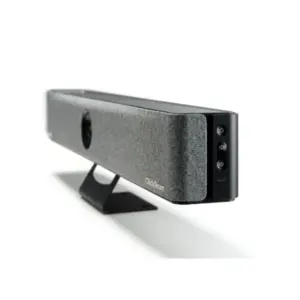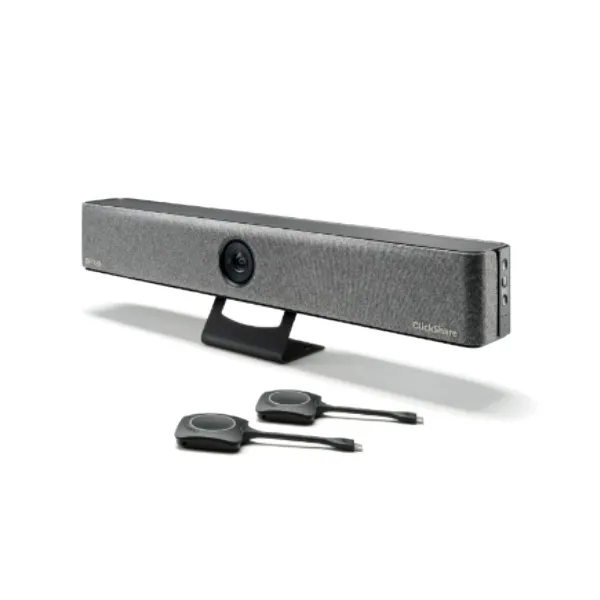
Barco ClickShare Bar Pro in Dubai, UAE
Equip your meeting room with a clean, reliable and professional conferencing experience built around wireless collaboration. This premium Barco video bar combines room audio, camera intelligence, content sharing and simple laptop control in one meeting-room device, making it suitable for businesses that want better hybrid meetings without creating a complicated AV setup for every call.
Request QuoteCheck UAE Availability
Quick Product Information
Product Overview
The Barco ClickShare Bar Pro is designed for organisations that want meeting rooms to be easier to use and easier to manage. In many offices, the meeting experience suffers because people must connect several cables, select the right camera, change audio settings, wait for drivers or ask IT to make the display work. A modern conferencing bar solves this by bringing the camera, microphones, speakers and collaboration workflow into one room device. Barco adds its ClickShare wireless meeting experience, making the device particularly useful for teams that frequently bring their own laptops into meeting rooms.
For Dubai companies running hybrid work, client presentations, project reviews, supplier calls, remote training or executive meetings, the device helps create a more consistent experience. Users can start a meeting from their laptop, connect to the room technology and share content with less friction. The integrated 4K camera with wide room coverage helps remote participants see the room more clearly, while the audio system is built to capture voices from the room and play meeting audio through dedicated speakers. This reduces dependence on laptop microphones and small built-in speakers, which often sound weak in shared spaces.
The Pro version is positioned for buyers who want advanced room capability rather than a basic webcam setup. It supports high-quality content sharing, dual display scenarios, touchback, annotation and blackboarding, depending on the room layout and connected display equipment. This makes it useful where meetings include presentations, drawings, interactive discussions and quick switching between participants. IT teams also benefit from management features because meeting-room devices need monitoring, firmware awareness and consistent settings across multiple rooms.
FourTeck helps business buyers review the room size, display setup, laptop environment, user workflow, warranty expectations and accessory requirements before selecting a final model. Instead of choosing only by model name, buyers can confirm whether the room needs a specific regional kit, extra buttons, mounting accessories, network integration, touch display compatibility or multiple screen support. This makes the purchase clearer and reduces the risk of deploying a conferencing solution that does not match the actual meeting environment.
Key Business Benefits
A conferencing bar is not only an audio-video device; it directly affects meeting quality, user confidence and IT support workload. For businesses with frequent hybrid calls, small improvements in room setup can save time across many meetings every week.
Cleaner Meeting Start
Wireless conferencing helps users begin calls without searching for the correct USB or HDMI cable. This is valuable in shared rooms used by different teams.
Professional Room Audio
Integrated speakers and beamforming microphones help make voices clearer than relying on individual laptop audio in a room with several participants.
Better Remote Visibility
A wide 4K camera supports more natural meeting visibility, helping remote attendees see the people in the room and follow discussions more comfortably.
Room Consistency
Using the same collaboration platform across multiple rooms helps employees understand the workflow quickly and reduces repeated training requests.
IT Management Support
Management and reporting support can help IT teams monitor devices, keep meeting rooms healthier and reduce reactive troubleshooting.
Interactive Collaboration
Touchback, annotation and blackboarding support can improve workshops, design reviews, teaching sessions and project meetings where people need to interact with shared content.
Product Highlights
The Barco ClickShare Bar Pro Video Conferencing Bar brings together several meeting-room needs in a single device. Its 4K camera supports a wide field of view and intelligent framing modes, making it suitable for small rooms where participants may sit at different positions around the table. The audio design includes stereo speaker output and a microphone array with echo and background noise reduction, helping meetings sound more natural for both in-room and remote participants.
The device includes support for ClickShare Button and ClickShare App workflows, allowing users to connect from laptops and mobile devices depending on the selected use case. Native wireless sharing protocols such as AirPlay, Google Cast and Miracast are also part of the product environment. For rooms with interactive displays, buyers can consider the Pro model because touchback, annotation and blackboarding features may support more active collaboration.
The product is especially relevant for meeting spaces where a business wants to avoid a mixture of separate webcam, speakerphone, HDMI switch and USB extender components. Consolidating the main meeting functions into one bar helps simplify the room design and makes the end-user experience more predictable. Buyers should still review display compatibility, network mode, power arrangement, mounting position and selected regional article number before purchase. FourTeck can assist in checking these details as part of the quotation process.
Technical Specifications
Buyers should treat specifications as the starting point for room planning, not the full deployment checklist. The selected kit, display connection, local plug type, mounting method, touch display compatibility and network integration mode can affect the final configuration. Before ordering, confirm the intended display resolution, number of screens, table-to-display distance, participant seating layout, laptop operating systems and any security restrictions placed on wireless devices. FourTeck can help review these points so the product is selected for the room rather than purchased only by article number.
Configuration and Buyer Guidance
A good conferencing deployment starts with the room requirement. Count how many people usually join from the room and how far they sit from the screen. A huddle room with three people has different needs from a formal project room where eight people gather around a table. The camera field of view, microphone pickup range and speaker coverage should be matched to the room layout. The Pro model is generally chosen where the buyer wants stronger collaboration capability, multi-screen flexibility or advanced interaction, but the final decision should still be validated against the actual room.
Check the display first. Confirm whether the room uses one display or two, whether 4K content sharing is required, whether a touch display is available, and how the device will connect physically. Then check the user workflow. Some organisations prefer ClickShare Button use because it gives a familiar meeting start process. Others prefer application-based joining. IT teams should also review wireless policy, guest access, network integration, firmware management and device monitoring expectations.
FourTeck recommends sharing a few details before asking for a quote: number of rooms, room size, display model, required article region, meeting platforms used, laptop operating systems, mounting preference, expected order quantity and warranty expectations. These details help the sales team guide the correct option and avoid missing accessories. For multi-room projects, it is also sensible to standardise the configuration so users experience a similar meeting process across the office.
Ideal Business Use Cases
Hybrid Team Meetings
Useful for departments that run regular calls with remote employees, regional teams and external consultants.
Client Presentation Rooms
Helps meeting hosts share content clearly while keeping audio and video quality more professional than a laptop-only setup.
Executive Discussion Spaces
Suitable for rooms where simplicity and a clean table layout matter because senior users expect the room to work without technical delays.
Training and Workshops
Interactive collaboration features can support annotation, whiteboarding and room-based discussion around shared material.
Multi-Room Rollouts
Businesses standardising meeting rooms can use a consistent workflow to reduce user confusion across offices and floors.
The product is best considered for spaces where people actively collaborate rather than only listen to calls. It fits meeting rooms that require reliable camera coverage, clear voices, content sharing and convenient user handover between presenters. It can also reduce meeting-room clutter because many separate AV functions are consolidated into one device. For larger boardrooms or rooms with complex ceiling microphones, external DSP audio or advanced AV switching, buyers should review whether a dedicated room system is more suitable. FourTeck can help compare suitable approaches based on the room design.
Barco ClickShare Bar Pro Camera and Framing
The camera is one of the strongest reasons to consider this model for a professional meeting room. A wide 120° field of view helps capture more of the room, which is useful when people sit around a small table or move slightly during discussion. Instead of forcing everyone to squeeze into a narrow frame, the camera helps remote participants understand who is present and who is speaking. Intelligent framing modes can help the meeting feel more natural by adjusting the view to the people in the room. This is particularly valuable for hybrid work because remote attendees often feel disconnected when the room camera is too far away, poorly angled or focused only on one side of the table.
Camera planning still matters. The bar should be placed at an appropriate height near the display so eye line and room framing are comfortable. Very bright windows behind participants, reflective glass walls and poor lighting can affect the meeting experience, so buyers should also review the room environment. FourTeck can help businesses consider placement, display positioning and expected participant distance before purchase.
ClickShare Wireless Conferencing Workflow
The ClickShare workflow is built around making the room easier for the meeting host. In a traditional meeting space, users often need to choose the correct camera, microphone and speaker in the conferencing application. They may also need to change display settings or connect several cables. With the Barco workflow, the user can connect to the room system and share content with fewer steps. This is helpful in offices where meeting rooms are used by different departments, visiting managers and guests who may not know the AV setup.
The included ClickShare Buttons in the Pro bundle can be useful where businesses want a consistent plug-and-present style experience. App-based use and native sharing options provide more flexibility, depending on user device policy. IT managers should decide how the device will be used by employees and guests, whether network integration is preferred, and how updates and management will be handled. When planned correctly, the room becomes less dependent on individual laptop hardware and more predictable for everyday collaboration.
Barco ClickShare Bar Pro Audio and Room Experience
Clear audio is often more important than video in business meetings. If remote participants cannot hear the people in the room, the meeting slows down and decisions are delayed. The integrated microphone array and stereo speaker design help create a stronger room experience than using a laptop placed at one end of the table. Echo and background noise cancellation can help reduce distractions, while beamforming pickup supports group conversations within the intended room range.
Buyers should still consider room acoustics. Hard glass walls, open ceilings, loud air conditioning and echo-heavy meeting rooms can reduce perceived audio quality. The maximum pickup range should be reviewed against the actual seating arrangement. For standard small rooms and huddle spaces, the integrated audio design can simplify deployment. For larger boardrooms, training rooms or divisible spaces, a more customised AV design may be required. FourTeck can guide buyers on whether this conferencing bar is suitable for the room or whether another collaboration solution should be considered.
What Buyers Should Check Before Purchase
Before requesting a quote, buyers should confirm the room requirement, display arrangement, meeting workflow and support expectations. Many conferencing products look similar online, but differences in camera framing, included buttons, regional article number, display support, warranty terms and management features can affect the final purchase. For a business buyer, the right choice is not always the cheapest visible model; it is the option that works consistently with the meeting room, the people using it and the IT policies already in place.
Room Fit
Check seating distance, room lighting, table shape and whether the 4 meter microphone pickup range suits normal meetings.
Display Plan
Confirm one or two displays, 4K sharing need, touch display use and cable path before selecting the final kit.
Compatibility Check
Review laptop operating systems, conferencing platforms, wireless policy, guest access and network integration expectations.
Quote Preparation
Share room count, location, article preference, mounting needs, warranty expectations and accessory requirements with FourTeck.
Also review whether your business needs spare ClickShare Buttons, mounting accessories, touch display integration, a managed deployment approach or support for several rooms. For project purchases, it is useful to create a room-by-room list showing the display model, network point, power point, cable route and normal meeting type. This helps avoid ordering the correct main device but missing the smaller items required for installation. FourTeck can help structure the inquiry so quotation, delivery and deployment planning are clearer.
UAE Availability and Service Support
FourTeck supports business inquiries for Barco ClickShare Bar Pro Dubai requirements with assistance for model selection, article number review, quotation, delivery coordination and warranty guidance. Availability may vary based on regional kit, supplier status, selected bundle, order quantity and current channel conditions. Buyers can contact FourTeck to confirm whether the needed version, plug type, button package and accessory set can be arranged for their project.
For meeting-room projects, FourTeck can also help compare this product with suitable alternatives in the same collaboration category. This is helpful when the room size, seating layout or display plan is not yet final. A business may need a simple huddle-room system, a premium video bar, a wireless presentation unit, an interactive display or a more customised AV solution. The sales team can review the requirement and guide the buyer toward a practical option instead of treating every room as the same.
Dubai, Abu Dhabi, Sharjah, and Ajman Coverage
Businesses in Dubai, Abu Dhabi, Sharjah, Ajman and other UAE locations can contact FourTeck for product availability, configuration guidance and quote assistance. The team can help buyers review suitable models, related options and purchase requirements based on business needs. For office projects, customers may share room photos, display information, meeting platform details and desired deployment timing so FourTeck can better understand the requirement before quotation. Delivery coordination and warranty guidance depend on product status, selected supplier route and final order details.
GCC and Africa Availability
FourTeck also supports business technology inquiries across selected GCC and Africa markets through its regional platforms and inquiry channels. Customers in Saudi Arabia, Qatar, Oman, Kuwait, Bahrain, Kenya, Uganda and the wider Africa region may contact the relevant FourTeck channel for availability guidance, delivery options and business technology supply support. Product availability, warranty handling and regional article options may vary by country, supplier status and order quantity.
For regional projects, buyers should confirm country destination, preferred currency, article number, plug requirements, warranty expectations, shipment terms and whether the order is for one meeting room or a multi-site rollout. Regional links include FourTeck UAE, FourTeck Kenya, FourTeck Uganda, FourTeck Africa and FourTeck Kuwait.
Other Options Buyers May Consider
Choosing a conferencing bar can be part of a wider collaboration upgrade. Some customers need a simpler model for small rooms, while others need interactive displays, network support, wireless presentation systems or accessories for a complete meeting space. FourTeck can help compare related options based on user workflow, room size and budget planning.
Barco ClickShare Bar Core
Suitable for smaller rooms that need simple wireless conferencing without the full Pro feature set.
Barco ClickShare Conference
Useful where the business wants wireless meeting control with existing room camera and audio equipment.
Video Conferencing Cameras
Consider when the room already has audio and only needs camera improvement.
Interactive Displays
Helpful for training, classrooms and brainstorming rooms that need touch collaboration.
Business Networking Products
Important when meeting-room devices need stable LAN, secure wireless and managed connectivity.
Why Buyers Choose FourTeck
FourTeck works with business buyers who need more than a product name. Meeting-room technology often depends on the room environment, user habits, display arrangement, network policy and accessory planning. A conferencing bar may be simple to use, but the purchase still benefits from practical guidance. FourTeck helps customers review requirements, request quotations, compare suitable alternatives and plan related items before finalising the order.
Buyers contact FourTeck for product sourcing support, configuration guidance, business IT understanding, delivery coordination and warranty information. The team can support small office purchases, corporate refresh projects and multi-room meeting space rollouts. For customers who are unsure whether to choose an all-in-one bar, a room kit, an interactive display or separate camera and audio components, FourTeck can help narrow the options based on the meeting use case.
Frequently Asked Questions
What is this product used for?
It is used to improve hybrid meetings by combining a room camera, microphones, speakers and wireless content sharing in one conferencing bar. It is suitable for meeting rooms where users want to start calls from laptops and connect to room technology with less setup effort.
Is it suitable for small meeting rooms?
Yes, it is designed for small rooms and huddle spaces. Buyers should still confirm seating distance, lighting, display location and microphone range. FourTeck can help check whether the room size and layout match the device before quotation.
Can FourTeck help with configuration?
FourTeck can help review the regional kit, included buttons, display requirement, mounting need, warranty expectation and related accessories. This is useful when a business is equipping several rooms or is unsure which version matches the local requirement.
Does availability depend on configuration?
Availability can depend on the selected regional article number, supplier status, order quantity and accessory bundle. Contact FourTeck with the required country, room count and expected deployment details so the team can provide current quotation guidance.
Which meeting platforms can it support?
The product is designed for use with common videoconferencing platforms through a laptop-based workflow. Buyers should confirm their Microsoft Teams, Zoom or other platform environment, operating systems and security policies before purchase.
How do I request a quote?
Use the FourTeck contact page and share the model name, quantity, delivery location, room size, display setup and any accessory requirements. This information helps FourTeck prepare a more accurate response and avoid missing deployment details.
Is warranty guidance available?
Yes. Warranty coverage may depend on vendor terms, registration and regional conditions. FourTeck can guide buyers on standard coverage information, SmartCare-related notes and what should be checked before placing the order.
Can businesses request bulk supply?
Businesses planning multiple meeting rooms can contact FourTeck for quantity-based quotation assistance. It is helpful to provide a room list, display details, preferred timeline and any standardisation requirements for consistent deployment.
Are related products available?
FourTeck can help buyers consider Barco ClickShare alternatives, conferencing cameras, interactive displays, networking products and accessories. Related options depend on whether the room needs basic conferencing, advanced collaboration or a broader AV solution.
Need Help Choosing the Right Conferencing Bar?
FourTeck can help you review product availability, room suitability, configuration options, warranty guidance and delivery requirements for your business location. Share your meeting-room requirement and request a quotation today.