
Yealink MShare Dubai
Yealink MShare Dubai is designed for professional meeting rooms where presenters need a clean, fast and reliable way to share laptop content on a conferencing display. It is suitable for boardrooms, executive offices, classrooms, clinics, consultation rooms, hotel meeting spaces and hybrid collaboration areas that already use, or plan to use, Yealink video conferencing systems.
HDMI And Mini-DP Input
Audio Sharing Support
WPP20 Wireless Support
Yealink MShare Dubai Information
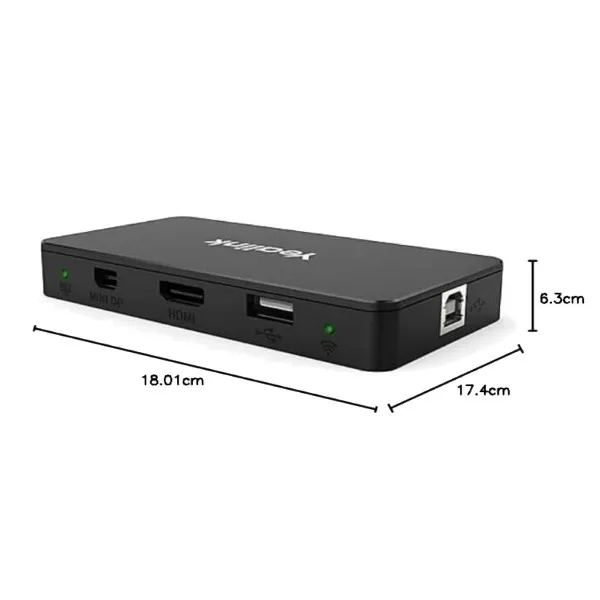
The Yealink MShare is a content sharing unit for Yealink meeting room systems. It allows users to present from a laptop using HDMI or Mini-DP, while also supporting audio sharing for richer presentations. In busy Dubai offices, this matters because meeting participants often bring different laptop models, different connector preferences and different presentation requirements. A dedicated sharing box keeps the room more organized and reduces the delays caused by swapping display cables during meetings.
For wireless workflows, MShare can work with the Yealink WPP20 wireless presentation pod, supported by the built-in 2.4GHz/5GHz wireless access point. This makes it useful for teams that want quick one-click sharing without depending on separate routers or complex network preparation. Fourteck positions this device for companies that want a dependable accessory for presentation sharing, meeting room upgrades, conferencing system refreshes and collaborative display environments across Dubai.
Yealink MShare Dubai Highlights
Supports up to 1080P/30FPS for smooth meeting room presentation content.
HDMI and Mini-DP inputs help users connect many laptop types with less confusion.
Works with Yealink WPP20 for simpler wireless content sharing in suitable rooms.
Package accessories support neat mounting, cable routing and organized installation.
Yealink MShare Dubai Features
The main value of Yealink MShare is not only the connector set. It improves the meeting room experience by giving presenters a predictable route for content sharing. Sales teams can open proposal slides, finance teams can review spreadsheets, trainers can display learning material and technical teams can walk through dashboards without turning a meeting into a cable search. The device is especially useful when a meeting room has a fixed Yealink collaboration setup and needs a stable accessory for user presentation input.
Companies searching for Yealink MShare Best price, Yealink MShare Buy now or Yealink MShare Authorized partner usually want more than the box. They want guidance on compatibility, installation, room layout and post-sale support. Fourteck supports this requirement with supply, meeting room consultation and configuration assistance for Dubai business customers.
Yealink MShare Dubai Specifications
The specification profile of Yealink MShare suits users who need simple Full HD sharing for professional collaboration rooms. The table below presents the important details in a business-friendly way for purchase review and project planning.
Yealink MShare Details
The product is commonly requested as Yealink MShare, Yealink MShare Screen Sharing Box, Yealink MShare Content Sharing Adapter, Yealink MShare HDMI Mini-DP sharing device and Yealink USB screen sharing adapter. Buyers often use these names when planning Teams room accessories, Zoom room accessories, Yealink meeting room presentation systems or Full HD screen sharing devices. The practical buying point is simple: it helps a meeting room accept presentation content in a controlled, easy-to-use way. Instead of relying only on direct display ports or loose adapters, MShare gives a dedicated connection point for the room system.
Yealink MShare Dubai Descriptions
Fourteck supports Yealink MShare enquiries across Dubai locations including Deira, Bur Dubai, Business Bay, Downtown Dubai, Dubai Marina, Jumeirah Lake Towers, Al Quoz, Dubai Investment Park, Jebel Ali, Dubai Silicon Oasis, Dubai Internet City, Dubai Media City, Garhoud, Al Barsha, Mirdif and Nad Al Sheba. For wider UAE projects, teams also ask for support in Abu Dhabi, Sharjah, Ajman, Ras Al Khaimah, Fujairah and Umm Al Quwain. This makes the product suitable for corporate offices, schools, clinics, government service spaces, hospitality meeting rooms and managed IT projects that need reliable presentation sharing with local assistance.
Yealink MShare GCC Uses
Across the GCC, Yealink MShare is relevant for companies comparing meeting room accessories in the UAE, Saudi Arabia, Qatar, Oman, Kuwait and Bahrain. Regional buyers usually need presentation sharing that is simple for visiting users, suitable for mixed laptop environments and easy for IT teams to manage. MShare fits boardrooms in Dubai, Riyadh, Doha, Muscat, Kuwait City and Manama where executives and guests may use different laptop ports but still expect quick content display. For multi-branch businesses, standardized meeting room accessories can also reduce training effort and simplify support.
Yealink MShare Africa Availability
Yealink meeting room accessories are also searched by businesses across Kenya, Uganda, Tanzania, Rwanda, Ethiopia, South Africa, Nigeria and Ghana. The demand is often linked to conference room modernization, hybrid work, education technology and better video collaboration. Fourteck’s regional presence helps customers explore Yealink-based solutions for Africa-focused projects where sourcing guidance, compatibility checks and communication system experience are important. For organizations managing branches in Dubai and Africa, a common meeting room accessory approach can make user experience more consistent.
Yealink MShare Dubai Understanding With Other Models
Yealink MShare is best understood as part of a wider Yealink collaboration ecosystem. Users may also evaluate Yealink WPP30 for compact 4K wireless presentation, Yealink T43U for desk calling, Yealink SIP-T31G for entry-level IP telephony and Yealink T21P for practical voice deployments. Fourteck has related Yealink references such as Yealink WPP30 Dubai, Yealink T43U Dubai, Yealink SIP-T31G Dubai and Yealink T21P IP Phone Dubai. These options help buyers build a complete communication setup instead of purchasing one accessory in isolation.
Yealink MShare Dubai Service Availability
Fourteck can assist with product selection, room requirement review, compatible Yealink accessory planning, installation coordination and post-installation support. A meeting room screen sharing accessory should be checked against the existing display, Yealink room system, table cable routing, user laptop requirements and wireless presentation expectations. This support-led approach helps reduce wrong purchases and keeps the meeting room easy to use for staff and guests.
Fourteck Yealink MShare Dubai Reference
For buyers comparing suitable Yealink presentation accessories, Yealink WPP30 Dubai is a useful related product reference. WPP30 is often considered when customers want a more wireless-first presentation experience, while MShare remains valuable for rooms that need HDMI, Mini-DP and Yealink WPP20-supported sharing. Fourteck can help compare both options based on room size, user habits and existing Yealink equipment.
Yealink MShare Dubai Full HD Screen Sharing
The 1080P/30FPS capability is ideal for daily business presentations, reports, dashboards, training slides, browser demonstrations and document reviews. It gives enough clarity for most office meeting room content while keeping the sharing process stable and responsive. For companies that conduct frequent client meetings, a reliable Full HD sharing path can help presentations feel more professional and reduce time wasted on display issues.
Yealink MShare Dubai Multiple Interface Use
HDMI and Mini-DP inputs make the device practical for mixed laptop environments. Many meeting rooms receive visitors using different notebook generations, and a single fixed cable may not satisfy every user. By offering more than one input type, MShare helps IT teams reduce adapter dependency and keep the table connection area more predictable.
Market Availability Yealink MShare Dubai Deira
Ready Stock Dubai enquiries for Yealink MShare are common from companies that need quick meeting room upgrades. Ready stock Abu Dhabi requests are also handled for project buyers and branch offices. Use Request Quote to confirm current availability, compatible accessories and delivery options. Check UAE Availability before planning bulk deployment, especially when your project includes several boardrooms or training rooms.
Yealink MShare AbuDhabi
Abu Dhabi businesses often search for Yealink MShare for corporate boardrooms, government offices, education spaces and healthcare meeting rooms. The device is useful when teams want reliable presentation sharing for formal meetings and hybrid discussions. Fourteck can support Abu Dhabi-based requirements by helping customers review compatibility, procurement quantity and installation planning for rooms that need professional presentation input.
Yealink MShare Dubai Deployment
A successful deployment starts with checking the room system, display, table location, cable route and user workflow. MShare can be placed neatly near the presenter area and connected to the conferencing setup with the supplied cabling accessories. For a clean installation, Fourteck can help plan cable management, test input switching, confirm audio sharing behavior and guide users on wired and wireless presentation methods.
Yealink MShare Dubai Installation Details
Installation normally includes positioning the MShare unit, connecting it to the room system through USB, preparing HDMI or Mini-DP access for presenters and testing wireless sharing with Yealink WPP20 where required. The package includes mounting and cable management items that help maintain a neat table or cabinet setup. After installation, users can share presentation content from compatible laptops with fewer steps and less meeting interruption.
Yealink MShare Sharjah
Sharjah companies, schools and training centers may choose Yealink MShare when they want structured screen sharing for meeting rooms and learning spaces. The device helps presenters connect quickly and share content without relying on personal adapters. Fourteck supports Sharjah buyers with product guidance, compatible Yealink ecosystem suggestions and quotation assistance for single-room or multi-room projects.
Product Availability Yealink MShare Dubai
Get Yealink MShare for meeting rooms that need smooth laptop presentation sharing with dependable local guidance. Buying Support for Yealink MShare is available through Fourteck for customers who want to confirm ports, accessories, room compatibility and project quantities. Genuine Yealink MShare Guide support helps buyers avoid mismatch between the sharing box, the Yealink room system and user presentation requirements.
Yealink MShare Ajman
Ajman offices and service companies can use Yealink MShare for compact conference spaces, consultation rooms and team discussion areas. It helps users present clearly from laptops and supports more organized collaboration when paired with a suitable Yealink meeting setup. Fourteck can assist Ajman customers with product selection, pricing requests and delivery coordination.
Fourteck Dealing Product Dubai
Customers building a complete Yealink meeting and communication environment can also review Yealink T43U Dubai for office voice communication and IPBX and Telecommunication Solutions in Dubai for broader communication infrastructure. Pairing the right phones, meeting accessories and room systems creates a smoother workplace experience across reception areas, offices, boardrooms and branch locations.
Yealink MShare Dubai Comparisons
Fourteck Service Reach
Yealink MShare FAQ
It is used to share laptop presentation content into compatible Yealink meeting room systems.
Yes, it supports up to 1080P/30FPS screen sharing.
It includes HDMI video input and Mini-DP video input.
Yes, audio sharing is supported for presentation content.
It supports wireless presentation with the compatible Yealink WPP20 presentation pod.
Yes, it is suitable for offices, boardrooms, training spaces and collaboration rooms in Dubai.
Fourteck can assist with product selection, compatibility guidance and deployment support.
The package normally includes the MShare unit, USB cables, Mini-DP cable, mounting accessories and quick start guide.
No. MShare E2 is a newer related sharing box with a different port design. Fourteck can help choose the right model.
Contact Fourteck to confirm availability, quotation and compatibility for your meeting room.
Contact Fourteck




Reviews
There are no reviews yet.