

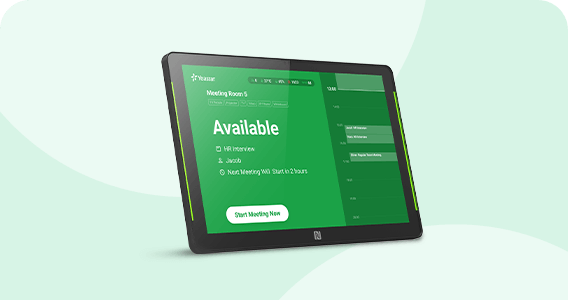
A Room-Side Interface for Faster, Clearer Meeting Decisions
The DS7510 is designed for a very specific workplace problem: people should not need to open a calendar, ask a receptionist, or walk into an occupied room simply to understand whether a meeting space is free. Positioned at the entrance to a bookable room, the display brings the current room state and schedule to the point where the decision happens. Employees can see availability, review meeting information according to the organization’s privacy settings, and carry out supported actions on the touch screen without returning to a desk.
For offices with several shared rooms, that doorway interaction can remove small but frequent sources of friction. A visible LED status strip helps people distinguish room state at a glance, while synchronization with the Yeastar Workplace environment keeps the display tied to the room-booking workflow rather than operating as stand-alone signage. The panel can support ad-hoc meeting starts, check-in, meeting extension and meeting end actions, giving the room itself a practical control point for everyday scheduling.
The hardware is also built for different installation conditions. A business can use a PoE switch to carry power and network connectivity over one Ethernet cable, use Wi-Fi with a separate supported power source, mount the unit on a solid wall or glass partition, or place it on a compatible VESA desktop stand. This matters in finished offices where cabling, glass walls and interior design can limit how a room scheduler is installed. The 245 × 160 × 18 mm enclosure and 0.65 kg weight keep the device compact enough for door-side placement without requiring a large signage footprint.
For buyers in the UAE, the more important purchasing question is usually not simply “Does the screen fit?” but whether the chosen DS7510 regional variant, network method, Yeastar Workplace plan, sensor integration and mounting approach match the project. FourTeck can review those details before ordering so the display is specified as part of the full meeting-room workflow rather than treated as an isolated tablet.
What the DS7510 Changes for Everyday Room Use
Its main value is not the screen by itself; it is the reduction of uncertainty at the room entrance. The following benefits are most relevant to facilities, workplace, IT and operations teams planning a structured meeting-room booking environment.
Room status becomes visible before someone reaches the door
Three-color side LED indicators let organizations use a simple visual language for room status, so employees can identify whether a space is available, approaching use or occupied without reading small calendar details. In a corridor with several meeting rooms, that visual cue can help people choose an alternative room more quickly and reduce unnecessary interruptions.
Common booking actions stay where the meeting happens
Users can carry out supported room actions from the touch interface, including starting an ad-hoc booking, checking in, extending a meeting or ending it. That can make shared-room behavior easier to follow because the control point is directly beside the room rather than hidden in a separate application.
Flexible mounting works with different office finishes
Wall mounting, glass mounting and VESA desktop-stand mounting give project teams more than one way to place the panel. This is useful in offices with glass meeting-room fronts, retrofit projects where drilling is restricted, and reception or training areas where a tabletop display is more practical.
PoE can simplify the room-side installation
With Power over Ethernet, a compatible PoE network path can deliver connectivity and power to the panel through Ethernet. That can reduce the need for a separate electrical outlet at each doorway. DC and Type-C power options provide alternatives where the network design or existing infrastructure calls for them.
Sensors can add useful room context
The integrated proximity and ambient-light sensors support automatic screen behavior, while the built-in LoRaWAN gateway can work with supported Yeastar workplace sensors. For suitable deployments, this helps extend the display beyond a calendar panel and makes it part of a broader smart-workplace device layer.
Central management reduces device-by-device effort
Yeastar Workplace provides the management context for registered room displays, including device monitoring and firmware-related administration. For a multi-room deployment, centralized control is more practical than treating every scheduler as an independent Android screen that must be maintained manually.
Designed as Workplace Infrastructure, Not Generic Signage
The strongest technical characteristic of the DS7510 is the way several office-facing functions are combined into one purpose-built device. A 10.1-inch 1280 × 800 touch display handles the user interaction. Side LEDs provide a longer-distance status cue. Gigabit Ethernet and dual-band 2.4 GHz/5 GHz Wi-Fi give network choices. Bluetooth 5.0, NFC hardware and a Semtech SX1262-based LoRaWAN gateway add additional connectivity possibilities for supported workflows.
The design also accounts for the room-display environment. The proximity sensor can detect presence up to the documented maximum range, and the ambient-light sensor supports five brightness levels across its stated light-detection range. This allows screen behavior to respond more appropriately to corridor activity and changing light. For organizations with many displays, small energy and usability improvements repeated across every room can matter operationally.
DS7510 Hardware and Deployment Specifications
The table below consolidates current manufacturer documentation for the room display. Regional model, firmware capabilities, platform licensing and accessory requirements should be confirmed for the intended deployment before purchase.
| Specification | Details |
|---|---|
| Brand / model | Yeastar DS7510; documented variants include DS7510-470M / 868M / 915M |
| Display | 10.1-inch TFT LCD touch screen; 1280 × 800 pixels; 16:10 aspect ratio |
| Active area / ratio | 216.58 × 135.36 mm active area; 74.88% screen-to-body ratio |
| Status indicators | Three-color side LED indicators; status colors can be configured in supported Yeastar Workplace plans |
| Wi-Fi | IEEE 802.11 b/g/n at 2.4 GHz; IEEE 802.11 a/n/ac at 5 GHz; WPA2-PSK and WPA2-EAP support |
| Wired networking | One 10/100/1000 Mbps Ethernet port |
| Bluetooth | Bluetooth 5.0 |
| System | Android 11.0; manufacturer help documentation also lists Linux 4.19.193 |
| LoRaWAN gateway | Semtech SX1262 LoRa chip; regional frequency variant must match the deployment requirement |
| Power | 802.3af Power over Ethernet; DC 12V/1A; Type-C 5V/2A |
| Proximity sensor | Up to 1.5 m detection distance in current Yeastar help documentation |
| Ambient light sensor | Five brightness levels; 0–2421 lux detection range |
| NFC | 13.56 MHz NFC hardware; supported workflow depends on current Yeastar software/firmware capability |
| Dimensions / weight | 245 × 160 × 18 mm; 0.65 kg |
| Mounting | Wall mount, glass mount, VESA 75 × 75 mm desktop stand mounting |
| Environment | Indoor use only; operating temperature -20°C to +50°C |
| Certificates | Yeastar datasheet lists CE and FCC |
For procurement, three specification lines deserve extra attention. First is the LoRaWAN regional model. The hardware family is documented in 470M, 868M and 915M variants, and the correct version should be selected for the planned country and sensor environment rather than chosen only by model name. Second is power: PoE can be the cleanest installation when a compatible switch or injector and the required Ethernet cabling are already available, but alternate power modes may suit retrofit sites. Third is mounting: glass-fronted meeting rooms need a different physical plan from solid-wall rooms, and a VESA stand may be preferable for reception desks or temporary collaboration spaces.
Buyers planning access-control integration, LoRaWAN sensor use or other advanced workplace workflows should also confirm hardware revision and current firmware requirements. Yeastar documents certain extended capabilities by hardware revision, so the display’s serial/hardware version can become a purchasing factor for projects that go beyond ordinary room scheduling. FourTeck can help capture these requirements before quotation so the requested unit is evaluated against the intended project rather than only against the base specification.
How to Specify the Right DS7510 Deployment
A room display project should be specified around the workplace workflow, not the screen alone. Start by identifying how many rooms need a display, how those rooms are networked, how the panels will be mounted, and which Yeastar Workplace functions the organization expects to use.
Which Yeastar Workplace room-booking functions are required?
List the actions users must perform at the door: view status, book ad-hoc, check in, extend, end, use customized status colors, show or hide meeting details, or integrate supported sensors. Feature availability can depend on the Yeastar Workplace plan and current software, so the expected workflow should be confirmed before devices are ordered.
PoE Ethernet or Wi-Fi?
Use PoE where structured cabling and switch capacity support it; this can simplify doorway installations. Where Ethernet is not practical, confirm wireless coverage, the required authentication method and a suitable local power source. WPA2-PSK and WPA2-EAP support are documented, which can help in business wireless environments.
What is the surface beside each room?
Record whether each location is a solid wall, glass partition or desk/stand position. Also check cable routing, viewing height, door swing, nearby switches and any restrictions on drilling or adhesives. The physical plan often determines accessories and installation time more than the display specification does.
Will the display act as a sensor gateway?
If the project includes People Counting, Room Comfort, desk-occupancy or other supported LoRaWAN devices, identify the sensor types, quantity and physical area. Confirm the regional frequency variant and hardware revision requirements rather than assuming every DS7510 unit is interchangeable.
Any access-control or advanced device integration?
Certain access-control and smart-device capabilities documented by Yeastar depend on later DS7510 hardware revisions. If these functions are part of the project, make them explicit in the request so the hardware requirement can be checked before supply.
For a useful quote, send FourTeck the display quantity, intended country, number of meeting rooms, required mounting style, PoE availability, wired or Wi-Fi preference, Yeastar Workplace plan if already selected, required sensor types, any access-control requirement, delivery location and target project date.
Where This Room Display Makes Practical Sense
The display is most useful where meeting rooms are shared, frequently booked and visible to many employees. It is less about adding another screen and more about making room availability and booking actions easy to access at the exact location where people need them.
Multi-room corporate offices
In a head office with several meeting spaces, employees often spend time checking calendars, opening doors, asking colleagues or walking between rooms. Door-side status and touch booking can turn each room into a self-explanatory resource. The LED state can be read before someone reaches the door, while the screen provides the schedule and supported booking actions. Centralized Yeastar Workplace management also gives IT or workplace teams a more consistent way to administer multiple displays.
Hybrid-work offices with fluctuating room demand
When attendance changes by day, room demand can become less predictable. A visible scheduler can help employees identify space quickly and start supported ad-hoc bookings when an unplanned discussion needs a room. That makes the physical workplace easier to navigate without depending solely on advance calendar planning.
Training rooms and project spaces
Rooms used for workshops, interviews, project sessions or training often have longer bookings and changing schedules. A dedicated panel at the entrance can show whether a session is currently in progress and when the space is expected to become available, reducing interruptions during important meetings.
Glass-fronted modern workplaces
Many contemporary UAE offices use glass partitions around meeting rooms. The DS7510’s documented glass-mount option gives project teams a practical route when conventional wall mounting is not desirable. Network and power still need to be planned carefully so the installation remains clean and accessible for maintenance.
Smart-workplace sensor projects
Organizations already planning Yeastar People Counting, Room Comfort or other supported LoRaWAN devices may use the display as part of a wider workplace-device design. In these cases the frequency variant, hardware revision, sensor quantity and supported feature set should be treated as core project requirements, not optional details added after purchase.
Reception-adjacent or temporary collaboration rooms
A compatible VESA desktop stand can be useful where the display cannot be permanently fixed to a wall or glass surface. This may suit flexible project rooms, managed-office environments or reception-adjacent spaces where room assignment changes and a relocatable display is more practical.
DS7510 Touch Scheduling and Visual Room Status
The display’s clearest advantage is the combination of near-field touch interaction and distance-readable status. A user standing at the room can work with the schedule, while another person walking down the corridor can use the side LED state as a quick signal. Those two interaction distances solve different problems, yet they are handled by the same room-side device.
For workplace administrators, status-color customization also makes the panel easier to align with the organization’s visual conventions where supported by the Yeastar Workplace plan. Meeting details can be shown or hidden according to the selected privacy approach. That matters in environments where room availability should be public but meeting titles or organizers should not always be visible to everyone walking past.
When evaluating this feature set, buyers should decide which on-screen actions employees are expected to use and whether those actions are enabled in the selected Yeastar Workplace setup. The screen can only improve room behavior when the software workflow, user permissions and booking policies are configured to match the organization’s real meeting habits.
DS7510 Connectivity, PoE and Mounting Flexibility
A room scheduler lives at the edge of the network, often on a glass wall or beside a door where normal desk cabling does not exist. That makes installation design as important as the user interface. The DS7510 gives project teams several deployment paths rather than forcing one power, network or mounting arrangement.
For procurement teams, the decision is best made room by room. A building may have some meeting rooms beside PoE cabling and others on glass partitions where Wi-Fi plus local power is simpler. Standardizing the display model does not mean every room must use the same installation method. Planning cable routes, switch PoE capacity, wireless signal, mounting surface and maintenance access before ordering can prevent unnecessary rework after the devices arrive.
DS7510 LoRaWAN, Sensors and Advanced Workplace Integration
The integrated Semtech SX1262-based LoRaWAN gateway is one of the most product-specific reasons to select the DS7510 instead of a generic wall tablet. In supported Yeastar Workplace deployments, the display can participate in a broader smart-workplace architecture with compatible sensors rather than serving only as a booking screen.
Yeastar documents use with devices such as People Counting and Room Comfort sensors, and later help documentation also shows certain smart-device gateway functions tied to DS7510 hardware revision. That creates useful possibilities, but it also introduces a purchasing responsibility: the buyer must confirm regional LoRaWAN frequency, hardware revision, software support and the planned sensor topology before assuming a specific integration will work.
This feature is especially valuable for organizations that already see room booking as part of a larger workplace-utilization project. If the requirement is only to show availability at one or two rooms, the sensor-gateway capability may not be the deciding factor. If the organization plans occupancy, environmental monitoring or related smart-workplace functions, it can materially influence model selection and hardware-revision requirements.
What Buyers Should Check Before Purchase
The biggest purchase risk is treating every DS7510 as identical. The correct regional variant, hardware revision, Yeastar Workplace entitlement, mounting method and network design can all affect whether the device fits the intended room-booking and smart-workplace workflow.
Configuration Fit
Confirm the LoRaWAN frequency variant, number of displays, required room actions, sensor plans and any access-control requirement. A basic room-scheduling project and a sensor-rich smart-office project may use the same model family but have different hardware-revision and platform needs.
Compatibility Check
Review Yeastar Workplace plan requirements, Ethernet or Wi-Fi authentication, PoE switch capability, cable path, mounting surface and sensor compatibility. If the display will connect with access-control hardware, make that requirement explicit because supported integration can depend on DS7510 hardware revision.
Availability and Warranty
Ask for the exact supplied variant, current availability, expected delivery path and warranty terms applicable to the quoted unit. Availability may change by quantity, supplier status and model revision. FourTeck can provide warranty guidance based on the sourced product rather than making a blanket warranty assumption.
Quote Preparation
Provide the number of rooms, display quantity, required date, installation surface, PoE availability, network method, Yeastar Workplace plan, sensor types, access-control needs and delivery location. This gives the sales team enough context to review the request as a deployment rather than a simple hardware line item.
Also check accessories early. A PoE injector may be optional rather than included, a VESA desktop stand may need to be ordered separately, and glass mounting requires suitable installation preparation. For projects with many rooms, confirm whether spare units, standardized cabling and a consistent mounting height should be included in the rollout plan. The lowest-friction installation usually comes from documenting these decisions before purchase, not after the devices are delivered.
Buying Support for Meeting-Room Display Projects
FourTeck supports product inquiries in Dubai and across the UAE with requirement review, configuration guidance, quotation assistance, delivery coordination and warranty guidance. Availability can vary by DS7510 regional model, current supplier status, hardware revision and project quantity, so the recommended approach is to request the exact deployment requirement rather than assume every listed unit is equivalent.
For larger office rollouts, include room count, floor plan considerations and installation style in the inquiry. A multi-room project may also require PoE switch capacity checks, cable planning, wireless coverage review or accessory coordination. FourTeck can use those details to make the quotation more relevant to the actual deployment.
Support for Business Requirements Across Key UAE Cities
Businesses in Dubai, Abu Dhabi, Sharjah and Ajman can contact FourTeck for room-display inquiries, model review, quotation support and delivery coordination. The same planning principle applies across the country: the buyer should confirm the number of rooms, the exact use case, regional hardware variant, network and power method, mounting requirement, Yeastar Workplace setup and any planned smart sensors before finalizing the order.
Project requirements can differ substantially between a single executive meeting room and a multi-floor corporate rollout. For a single room, the main concerns may be clean mounting and platform setup. For a larger deployment, switch capacity, consistent cabling, wireless coverage, device management, hardware revision, spares and rollout scheduling may become more important. FourTeck can help organize those requirements into a clearer purchase request.
GCC and Africa Business Inquiries
FourTeck also supports business technology inquiries through selected regional platforms for customers in the GCC and Africa. Organizations in Saudi Arabia, Qatar, Oman, Kuwait, Bahrain, Kenya, Uganda and other supported markets can submit requirements for product review and sourcing assistance. Availability, delivery route, warranty handling, LoRaWAN frequency selection and commercial terms may vary by destination and supplier status.
This regional detail is particularly important for a product family that is sold in different LoRaWAN variants. A configuration suitable for one country should not automatically be assumed suitable for another. Multi-country workplace projects should identify the destination of each unit and the sensor environment before procurement so regional hardware selection can be reviewed properly.
Other Yeastar Workplace Devices Buyers May Consider
The right alternative depends on screen size, camera requirement, sensor strategy and the wider workplace solution. These models and companion devices are relevant reference points when a buyer is building or expanding a Yeastar room-booking environment.
Yeastar DS7310 Room Display
A same-family 10.1-inch room display that uses a different hardware design and includes a camera in the manufacturer specification. It may be worth reviewing when camera-based room-display functions are a requirement and the project does not specifically need the DS7510’s newer hardware profile.
Yeastar DS7315 Room Display
A larger 15.6-inch room display for buyers who need a more prominent screen and a different visual footprint at the meeting-room entrance.
Yeastar People Counting Sensor
A companion workplace sensor for projects that need occupancy-related information as part of a broader room-utilization workflow.
Yeastar Room Comfort Sensor
Relevant when the workplace project includes room environmental monitoring such as temperature, humidity, CO2 and related comfort measurements.
Yeastar Smart Device Gateway
A dedicated gateway option to consider where the LoRaWAN sensor design should not rely on a room display to carry the full smart-device topology.
For a requirement spanning displays, sensors and workplace software, it is usually better to review the room-booking design as a complete system. Screen size, camera needs, sensor quantity, LoRaWAN coverage, licensing, mounting and network topology may point to a different combination of devices than a model-by-model purchase would suggest.
Why Business Buyers Contact FourTeck
Room displays sit at the intersection of hardware, networking, workplace software and physical installation. FourTeck’s role is to help business buyers turn those moving parts into a clearer procurement request. That can be especially useful when the model name is known but the regional variant, hardware revision, accessories or deployment method are still undecided.
This support is relevant to both small office purchases and larger rollouts. A single-room deployment may only require confirmation of mounting and PoE, while a multi-floor project can involve device counts, structured cabling, sensor architecture and consistent user policies. By describing the intended outcome first, buyers give FourTeck the information needed to discuss a more suitable bill of materials and quotation.
You can also begin from the FourTeck UAE website or send the complete requirement through the contact channel for a focused response.
Questions Business Buyers Ask About the DS7510
What is the Yeastar DS7510 Room Display used for?
It is an interactive display for meeting-room booking environments using Yeastar Workplace. Mounted at or near a room entrance, it can show room availability and schedule information and supports on-screen room actions such as ad-hoc booking, check-in, extension and ending a meeting. The side LEDs provide an additional visual indication of room status from a distance.
Can the DS7510 use Power over Ethernet?
Yes. Yeastar documents 802.3af PoE support, allowing a compatible Ethernet connection to provide power and network access. The device also supports DC 12V/1A and Type-C 5V/2A power. Buyers should check the existing switch’s PoE capability, cable route and available power budget before deciding on the final installation method.
Does the room display support Wi-Fi?
Yes. The published specification includes 2.4 GHz IEEE 802.11 b/g/n and 5 GHz IEEE 802.11 a/n/ac, with WPA2-PSK and WPA2-EAP support. Wi-Fi can be useful where Ethernet cabling is difficult, but the panel still needs a suitable power source and reliable wireless coverage at the exact mounting position.
Which DS7510 variant should I buy for my project?
Yeastar documentation lists DS7510-470M, 868M and 915M variants. The correct choice depends on the deployment region and the LoRaWAN environment used with supported sensors. Do not select the frequency version only from an online product title. Provide the destination country and sensor requirement so the regional model can be reviewed before quotation.
Can it be installed on a glass meeting-room wall?
Yes. Yeastar documents glass mounting in addition to conventional wall mounting and VESA desktop-stand mounting. The installation plan should still consider cable routing, adhesive or bracket preparation, device viewing height and maintenance access. For a glass-fronted office, confirm the exact mounting accessories and power/network route before installation starts.
Can the DS7510 work with Yeastar workplace sensors?
The device includes a LoRaWAN gateway and Yeastar documents integration with supported workplace sensors such as People Counting and Room Comfort devices. Some newer smart-device functions depend on specific DS7510 hardware revisions. If sensor integration is a project requirement, confirm the sensor model, frequency, hardware revision and Yeastar Workplace support before purchase.
Does it include NFC?
Yes. Current technical documentation lists 13.56 MHz NFC hardware and the physical device includes an NFC area. The exact identity, check-in or integration workflow available to the buyer should be checked against current Yeastar Workplace software and firmware rather than assumed from the hardware specification alone.
Is the DS7510 suitable for a small office?
It can be, particularly when a small office has shared rooms that are frequently booked and the organization already uses or plans to use Yeastar Workplace. For only one lightly used room, buyers should compare the value of a dedicated room display against their actual scheduling problem. FourTeck can help review whether the hardware adds practical benefit for the intended usage.
Is the product available in Dubai and the UAE?
FourTeck can support UAE inquiries and quotation requests for the product. Current availability can vary by regional variant, supplier status, hardware revision and quantity, so it should be checked for each request. Share the required quantity, project location, preferred delivery timing and any specific hardware requirement to receive a more useful availability response.
What should I send FourTeck before requesting a quote?
Provide the device quantity, destination, number of meeting rooms, expected Yeastar Workplace functions, PoE availability, wired or Wi-Fi preference, wall/glass/stand mounting, planned sensors, any access-control requirement and target date. If the project already has Yeastar Workplace licensing, include the plan information. These details help reduce ambiguity around variant, accessories and deployment compatibility.
Need Help Finalizing the Room-Display Requirement?
FourTeck can review the intended room-booking workflow, display quantity, regional variant, network and power method, mounting surface, sensor integration, delivery location and warranty expectations before preparing a quotation.
Share the room count, quantity, Yeastar Workplace requirement, PoE or Wi-Fi plan, mounting method, sensor needs, target date and delivery location.




Reviews
There are no reviews yet.