Barco ClickShare CX-50 Conference System in Dubai, UAE
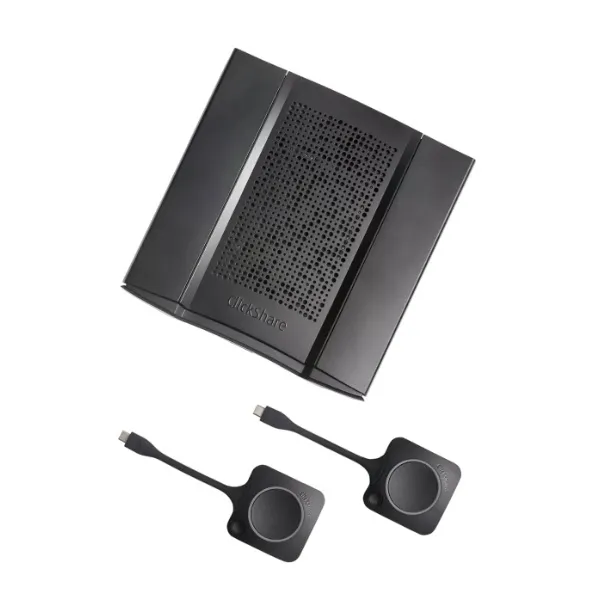
The ClickShare CX-50 Conference System is built for modern meeting rooms where users need quick wireless conferencing, professional presentation sharing, and a cleaner experience for hybrid collaboration. It helps teams bring their own laptop into a room, connect with room audio-video equipment, and start meetings with less cable handling and fewer setup delays. FourTeck assists UAE businesses with product selection, compatibility checks, quote requests, delivery coordination, and guidance for meeting-room deployment.
Configuration Guidance
UAE Quote Assistance
Meeting Room Accessory Review
Barco
ClickShare CX-50
Wireless conferencing and presentation system
Boardrooms, conference rooms, executive rooms, training rooms
BYOD/BYOM conferencing, wireless presentation, room device access
Contact FourTeck for current UAE options
Pre-sales guidance, compatibility review, quote support
Bundle, buttons, accessories, and room devices may vary
Product Overview
Hybrid meetings have changed the way companies design boardrooms and collaboration areas. A meeting room is no longer only a space for people sitting around one table. It must support local participants, remote attendees, shared content, high-quality audio, camera visibility, and quick switching between different laptops and conferencing platforms. The Barco ClickShare CX-50 helps solve this challenge by providing a wireless bridge between the user laptop and the meeting-room equipment.
For many UAE businesses, the biggest problem in meeting rooms is not the display or camera alone; it is the repeated setup delay before every call. Users search for HDMI cables, change audio devices manually, wait for drivers, or call IT teams to connect room peripherals. A wireless conferencing system reduces that friction. The CX-50 is designed for rooms where meetings need to start quickly and where users expect a professional experience without complex cabling on the table.
The system is relevant for leadership rooms, client presentation spaces, project review rooms, legal and finance meeting areas, consulting offices, education environments, healthcare administration areas, government meeting spaces, and companies that manage frequent remote collaboration. It can fit into environments where a display, camera, speakerphone, soundbar, or USB room peripheral is already planned, and it can also be reviewed as part of a full meeting-room refresh.
FourTeck helps buyers avoid choosing only by model name. The right selection depends on room size, display quantity, camera type, audio solution, USB connectivity, user devices, network policy, and management requirements. Before quotation, FourTeck can help review the required bundle, compatible accessories, deployment location, and current availability for Dubai and other UAE business locations.
Key Business Benefits
Faster Meeting Starts
Wireless joining helps reduce the time users spend connecting cables, selecting displays, and setting up audio-video devices. This is valuable for boardrooms and client-facing spaces where every delay affects meeting flow.
Cleaner Room Experience
A cable-light setup keeps meeting tables neater and makes the room easier for visitors and employees to use. It also reduces wear on ports and avoids confusion over which cable belongs to which device.
Supports Hybrid Work
Remote and in-room users can collaborate more naturally when room cameras, microphones, speakers, and displays are easier to access from the user laptop.
Professional Presentation Flow
Wireless content sharing helps presenters move smoothly between documents, dashboards, video calls, and screen sharing without depending on a fixed meeting-room computer.
Room Device Flexibility
When paired with suitable USB cameras, audio devices, and displays, the system can support a flexible meeting-room experience for many users and conferencing platforms.
IT-Friendly Management
Business buyers can review network, firmware, security, and management requirements before deployment, helping IT teams plan controlled and maintainable rooms.
Product Highlights
The CX-50 family is positioned for high-impact meeting spaces where wireless conferencing must feel reliable, simple, and professional. Current ClickShare CX-50 Gen 2 information from Barco describes support for modern operating systems, ClickShare app workflows, wireless presentation, dual-screen collaboration, USB-C connectivity, HDMI integration, and cloud management capabilities, with final options depending on the selected bundle and region. Buyers should confirm whether they require the original CX-50 replacement path or the CX-50 2nd generation model, because lifecycle status and available article numbers may differ.
For decision makers, the product highlight is not only a list of ports. The stronger value is meeting-room usability. Users can enter a room, use their own laptop, select their preferred conferencing application, and work with the room display and audio-video equipment. For IT teams, the benefit is a more standardized meeting-room experience that can reduce recurring support calls related to cables, input selection, and peripheral confusion.
Technical Specifications
Because meeting-room systems are often sold with different regional article numbers, button quantities, adapters, firmware status, and accessory bundles, buyers should confirm the exact configuration before approval. A product name alone does not always identify the complete requirement. FourTeck can help review whether the room needs only the base conferencing system, additional buttons, USB-C connectivity, HDMI source support, a camera, a speakerphone, a videobar, cabling, mounting accessories, or network configuration support.
Configuration and Buyer Guidance
A wireless conferencing product should be selected after reviewing the full meeting-room workflow. Start with the room size. A small huddle room may need a different camera and audio setup than an executive boardroom. Next, check how many displays are in the room and whether the business requires presentation only, conferencing only, or both. Buyers should also confirm whether users will mostly use Windows laptops, MacBooks, mobile devices, or a mixed environment.
Confirm whether the room is used for video calls, presentations, training, client demos, or mixed collaboration.
Check compatibility with cameras, speakerphones, microphones, touch displays, or videobars already planned for the room.
Review wireless, Ethernet, VLAN, guest access, and security policies with the IT team before deployment.
Confirm generation, article number, firmware support, warranty route, and replacement model options before placing an order.
Ideal Business Use Cases
The Barco ClickShare CX-50 Conference System is suited to spaces where multiple users join meetings from different laptops and where room devices must be shared without constant cable changes. It is especially useful for companies with a hybrid workforce, frequent guest presenters, management meetings, client demos, project reviews, remote interviews, and training sessions. In a boardroom, it allows senior teams to move from discussion to content sharing more smoothly. In a training room, presenters can switch between user devices without rebuilding the room connection each time. In consulting and professional service offices, it helps create a polished meeting experience for visitors and remote stakeholders.
Executive Boardrooms
Support leadership meetings, quarterly reviews, remote partner calls, and professional content sharing.
Hybrid Collaboration Rooms
Help in-room and remote users communicate through shared audio-video equipment and wireless content.
Client Presentation Areas
Create a clean visitor experience when external presenters need to share screens from their own laptops.
Training and Project Rooms
Allow facilitators and team members to move between materials, dashboards, and conferencing apps with less setup effort.
ClickShare CX-50 Wireless Meeting Experience
The most important feature for many buyers is the day-to-day meeting experience. A room may have an excellent camera and display, but users still face friction when the connection method is confusing. A wireless conference system simplifies the first minutes of the meeting by helping users connect from their own device and use the room environment more naturally. This is useful when different departments share the same room, when visitors present content, or when employees frequently alternate between conferencing tools.
For IT and facilities teams, the advantage is consistency. Instead of supporting many different ad-hoc cable setups, the room can be designed around a defined collaboration workflow. That makes training easier, improves room adoption, and supports a professional experience for meetings with customers, vendors, management, and regional teams.
ClickShare CX-50 Peripheral and Platform Flexibility
Modern meeting rooms usually include multiple components: a display, camera, microphone, speaker, soundbar, and sometimes a room control interface. A conferencing system must therefore be reviewed as part of a full room design, not as a standalone box. The CX-50 family is aimed at connecting users to compatible room equipment, helping businesses support bring-your-own-device and bring-your-own-meeting workflows. This is important when employees prefer different conferencing platforms or when external guests arrive with their own laptops.
FourTeck can help buyers review the expected device chain before purchase. This includes confirming whether the room uses USB peripherals, HDMI display inputs, USB-C laptops, network policies, or additional accessories. A careful review reduces the chance of buying the right conferencing model but missing the cable, adapter, button, or compatible room device required for the intended experience.
ClickShare CX-50 Security and Manageability Planning
Meeting-room technology touches user laptops, corporate networks, wireless channels, displays, and sometimes guest users. For that reason, IT teams should review security and management requirements before installation. The correct approach depends on company policy, office Wi-Fi design, device ownership, meeting-room access, and firmware management. Buyers should confirm how the device will be connected, who can access it, how updates are handled, and whether cloud management is required.
This planning stage is especially useful for multi-room deployments. A single executive room may be simple to manage manually, while a larger office rollout may require standardized naming, firmware policy, room documentation, network segmentation, and support procedures. FourTeck can support the pre-sales discussion so the system is purchased with the correct deployment assumptions.
What Buyers Should Check Before Purchase
Before requesting a quote, buyers should confirm the required configuration, usage environment, compatibility needs, warranty expectations, and delivery location. FourTeck can help review these details so the selected product matches the business requirement instead of choosing only by model name or price. For this type of meeting-room product, the most common mistakes are ignoring the room camera and audio device, assuming every laptop connects the same way, missing a required button or adapter, or not checking whether the organization prefers a managed network setup.
Correct Model Selection
Confirm whether the requirement is for the original CX-50 path, the 2nd generation model, a specific regional article number, or a bundle with buttons.
Compatibility Check
Review camera, audio device, display, laptop ports, conferencing platforms, network rules, and room layout before purchase.
Availability and Warranty
Availability and warranty terms may vary by source, model generation, region, and serial number, so they should be checked during quotation.
Quote Preparation
Share room size, display count, camera/audio model, expected user devices, quantity, delivery location, and any installation need.
UAE Availability and Service Support
FourTeck supports product inquiries across Dubai and the UAE with assistance for product selection, configuration review, quote requests, delivery coordination, and warranty guidance. Availability may vary based on product generation, selected bundle, supplier status, order quantity, and accessory requirement. Businesses can contact FourTeck to confirm current options before planning a room upgrade or project purchase.
For meeting-room technology, it is helpful to review the full setup before issuing a purchase order. A buyer may need only the conference system, or the project may also require a camera, speakerphone, display, HDMI cable, USB extension, network cabling, mounting accessory, or a full collaboration room package. FourTeck can assist with the pre-sales discussion so the quote reflects the actual room need.
Dubai, Abu Dhabi, Sharjah, and Ajman Coverage
Businesses in Dubai, Abu Dhabi, Sharjah, Ajman, and other UAE locations can contact FourTeck for product availability, meeting-room configuration guidance, and quotation assistance. The team can help buyers review suitable models, related options, and purchase requirements based on business use. Delivery coordination and support guidance depend on the selected item, supplier availability, project quantity, and destination.
GCC and Africa Availability
FourTeck also supports business technology inquiries across selected GCC and Africa markets through its regional platforms and inquiry channels. Availability, delivery options, warranty handling, and configuration support may vary based on country, product type, and supplier status. Customers in Saudi Arabia, Qatar, Oman, Kuwait, Bahrain, Kenya, Uganda, and the wider Africa region can share their requirement for review through the appropriate FourTeck inquiry channel.
Other Options Buyers May Consider
A meeting-room project may require related products or alternatives depending on room size, camera expectations, audio coverage, and collaboration style. FourTeck can help review the complete requirement and suggest suitable products from the same category or compatible room solution families.
Barco ClickShare CX-30
A suitable option for smaller meeting rooms that need wireless conferencing support.
Barco ClickShare Bar
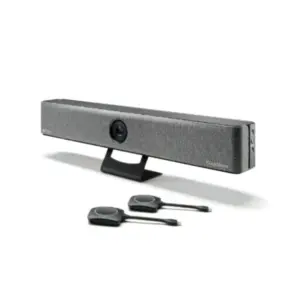
Consider an all-in-one videobar approach when the room needs integrated camera and audio.
Logitech Room Solutions
Useful when buyers need cameras, speakerphones, and room kits for Teams or Zoom spaces.
Conference Displays
Large displays or interactive screens may be needed for boardrooms and training spaces.
Why Buyers Choose FourTeck
FourTeck works with business buyers who need more than a product name. Meeting-room procurement often requires product matching, accessory checks, compatibility guidance, and quotation support. The FourTeck team can help customers review room requirements, compare suitable options, coordinate delivery guidance, and understand warranty considerations without making unsupported stock or price claims.
Support for companies, schools, hotels, healthcare offices, and professional service firms.
Help reviewing selected model, accessories, room equipment, and procurement details.
Buyers can request current pricing and options based on quantity and requirement.
Support for UAE inquiries and selected regional business technology requests.
Frequently Asked Questions
It is used for wireless conferencing and presentation in meeting rooms. It helps users connect their laptop to room displays and compatible audio-video equipment so meetings can start with less cable handling and better room device access.
Yes, it is commonly considered for premium meeting rooms, boardrooms, and hybrid collaboration spaces. Buyers should review the room size, display setup, camera, microphone, speaker, and user workflow before choosing the final bundle.
FourTeck can help review the required model, generation, button bundle, meeting-room accessories, network considerations, and delivery requirements before quotation. This reduces the risk of missing important room components.
Yes. The original CX-50 and CX-50 2nd generation may have different article numbers, lifecycle status, and supplier availability. Buyers should confirm the exact requirement with FourTeck during the quote stage.
Share the room size, number of displays, camera and audio device model, laptop types, preferred conferencing platforms, quantity, delivery location, and whether installation or accessory support is required.
FourTeck can assist with delivery coordination for UAE business buyers based on product availability, supplier status, order quantity, and delivery location. Confirm current options when requesting a quote.
The system is designed for bring-your-own-meeting workflows with common conferencing applications. Final experience depends on laptop settings, room peripherals, operating system, firmware, and the selected product generation.
Yes, companies planning multi-room deployment can contact FourTeck with quantity, site details, required accessories, and delivery schedule. FourTeck can help prepare a quotation based on the business requirement.
Need Help Choosing the Right Conference System?
FourTeck can help you review product availability, room compatibility, accessory requirements, warranty guidance, and delivery coordination for your business location. Share your room size, user workflow, and required quantity to receive suitable buying assistance.