ClickShare CX-30 Conference System in Dubai, UAE
The ClickShare CX-30 Conference System helps businesses create cleaner, faster, and more flexible hybrid meeting rooms. It connects a user’s laptop wirelessly to the room display and compatible meeting peripherals, so teams can present, collaborate, and host video meetings without depending on fixed room PCs or a complicated cable setup. FourTeck assists UAE buyers with model selection, quote support, compatibility guidance, and delivery coordination for professional meeting room projects.
Two Sources on Screen
Room Device Connectivity
UAE Quote Assistance
Quick Product Information
Barco ClickShare
CX-30 / CX-30 Gen2 options
Wireless conferencing and collaboration system
Small to medium meeting rooms
BYOD video meetings, content sharing, hybrid collaboration
Contact FourTeck for current UAE options
Room requirement review and quote assistance
Final bundle and article number depend on selected region/model
Product Overview
Modern meeting rooms need to serve in-room participants, remote attendees, visiting presenters, and employees using different laptops or operating systems. A room that depends on a single cable, a dedicated conference PC, or a fixed user account can slow down meetings and create support calls. The ClickShare CX-30 is built to reduce that friction by allowing users to bring their own device and connect wirelessly to the room environment. Users can start from their laptop, join their preferred meeting platform, and use compatible room cameras, microphones, speakers, soundbars, and displays.
For UAE businesses, this is useful in executive rooms, client presentation spaces, training rooms, legal and consulting offices, sales meeting rooms, healthcare admin areas, and education facilities. Teams that regularly host Microsoft Teams, Zoom, Google Meet, Webex, or similar video meetings can benefit from a system that keeps control on the user’s laptop while still using meeting-room AV equipment. It also supports a cleaner meeting-room table because users are not forced to search for display cables, adapters, or a specific conferencing PC login.
FourTeck helps buyers review the practical details before purchase: room size, screen input, camera and audio compatibility, network design, USB connectivity, cable route, mounting location, user profile, guest access, and preferred collaboration workflow. This guidance is important because wireless conferencing products are often selected by model name alone, while successful deployment depends on how the full room will be used.
Key Business Benefits
Cleaner Meeting Start
Teams can begin meetings from their own laptop, reducing dependency on loose HDMI cables, adapters, or shared room computers. This helps meetings start with fewer delays and less technical confusion.
Hybrid Collaboration
The system supports collaboration between people in the room and remote participants by connecting laptops with compatible room cameras and audio devices for a more natural meeting experience.
Two-Source Sharing
Two content sources can be shown on screen, which is helpful for design review, financial comparison, project discussion, and workshops where multiple people need to contribute.
Guest Friendly Use
Visitors can present without needing access to a company conference PC. This is especially useful for consultants, trainers, client meetings, vendor demos, and project partners.
Managed Environment
Cloud management and security options help IT teams maintain meeting-room devices with better control, updates, and visibility instead of treating each room as a disconnected island.
Flexible Room Planning
The CX-30 can support different room accessories and layouts, allowing businesses to build a meeting space around user experience rather than forcing one rigid conferencing workflow.
Product Highlights
The ClickShare CX-30 focuses on the practical needs of small and medium-sized hybrid rooms. It supports wireless conferencing from a laptop through ClickShare Button or ClickShare App workflows, allowing users to keep their familiar meeting platform while using room peripherals. It is designed for collaboration, not just simple screen mirroring. Touchback, annotation, and blackboarding functions help interactive rooms work more naturally when a compatible touch display is used. Two simultaneous sources on screen make the system valuable for collaborative review rather than one-way presenting.
Connect laptop meetings with compatible room devices.
Support for user-friendly connection options.
Touchback, annotation, and blackboarding where supported.
Designed with security and cloud management in mind.
Technical Specifications
Buyers should confirm the exact model code before procurement because regional article numbers, included buttons, warranty registration, and package contents can vary. The correct choice also depends on the display input, camera type, speakerphone or soundbar, laptop operating systems, network policy, and whether users need touch display interaction. FourTeck can help review these details before quotation.
Configuration and Buyer Guidance
Choosing a wireless conferencing system should start with the room, not only the model name. A buyer should first identify the meeting-room size, expected number of people, preferred conferencing applications, display type, camera position, microphone coverage, speaker output, and whether guest presenters need a simple connection method. A small meeting space may only need a compact camera and display connection, while a medium room may require better audio pickup, a wider camera, a display-mounted video bar, or ceiling/table microphones.
Room Fit
Confirm room size, display position, user count, and table layout.
AV Compatibility
Review cameras, soundbars, microphones, speakers, and touch displays.
Network Policy
Check Wi-Fi, LAN, guest access, security, and IT management needs.
Package Check
Confirm article number, buttons, power requirement, mounting, and warranty terms.
Ideal Business Use Cases
This system is suited for companies that host frequent hybrid meetings, client reviews, project discussions, internal training, and cross-office collaboration. It can help leadership teams present from their own laptops, sales teams run customer demos, HR teams conduct interviews and training sessions, and operations teams hold weekly reviews with remote branches. Educational institutions can use it in meeting rooms and seminar areas where multiple presenters need to share content. Professional services firms can use it in client rooms where visitor access must remain simple but controlled.
Cleaner laptop-based meetings with shared room AV.
Multiple presenters can share ideas and content more easily.
Visitors can connect without complex room PC access.
Designed for collaboration between in-room and remote participants.
ClickShare CX-30 Wireless BYOD Conferencing
The main value of the CX-30 is the ability to keep the meeting on the user’s laptop while using the room’s meeting equipment. This approach is practical for businesses where employees use different applications or where guests cannot log in to a fixed company PC. Instead of moving files, switching accounts, or changing meeting links, the host can use the laptop they already prepared. The room becomes an extension of the user’s device, supporting a smoother meeting rhythm and reducing support requests before important calls.
ClickShare CX-30 Collaboration and Interaction
Interactive tools such as touchback, annotation, blackboarding, and two-source sharing are valuable when meetings involve more than passive presentations. Project teams can compare two documents, trainers can explain a point visually, and decision makers can review data with live discussion. These features are especially useful when paired with compatible touch displays and well-planned room peripherals. FourTeck can help buyers check whether the intended display and accessory environment supports the desired interaction style.
ClickShare CX-30 Management and Security Planning
Meeting-room technology becomes part of the business network, so IT teams should consider manageability and access control before deployment. The CX-30 is designed with secure and cloud-managed operation in mind, helping businesses manage the environment more professionally. Buyers should discuss firmware update practices, network segmentation, guest access policy, and user training with their IT or AV team. This helps the system remain easy for users while still fitting business technology standards.
What Buyers Should Check Before Purchase
Before requesting a quote, buyers should confirm the complete meeting-room requirement rather than selecting only by product name. Important details include room size, expected participants, existing display input, camera and microphone model, speaker or soundbar choice, USB cable route, network access, operating systems used by employees, and whether guests need a no-login experience. It is also important to confirm the exact article number, included buttons, warranty registration process, regional version, and whether any accessories are needed for mounting, cable management, or touch display use.
Configuration Fit
Share the room layout, display type, camera model, audio device, and number of regular users so the right bundle can be suggested.
Compatibility Check
Confirm laptop platforms, conferencing applications, touch display needs, USB requirements, and network policy before purchase.
Availability and Warranty
Availability and warranty terms may vary by supplier, region code, article number, and registration conditions.
Quote Preparation
Provide quantity, delivery location, preferred accessories, installation needs, and project timeline for a clearer quotation.
UAE Availability and Service Support
FourTeck supports product inquiries across Dubai and the UAE with assistance for product selection, configuration review, quote requests, delivery coordination, and warranty guidance. Availability may vary based on the selected article number, regional version, supplier status, and order quantity. For meeting-room projects, FourTeck can also help buyers discuss related devices such as compatible cameras, video bars, microphones, displays, network accessories, and cable requirements. This helps businesses avoid missing components and improves the chance of a smooth room deployment.
Dubai, Abu Dhabi, Sharjah, and Ajman Coverage
Businesses in Dubai, Abu Dhabi, Sharjah, Ajman, and other UAE locations can contact FourTeck for product availability, configuration guidance, and quote assistance. The team can help buyers review suitable models, related options, and purchase requirements based on business needs. For multi-room projects, buyers can share room count, device preference, delivery location, and expected deployment schedule so FourTeck can support a more accurate procurement discussion.
GCC and Africa Availability
FourTeck also supports business technology inquiries across selected GCC and Africa markets through its regional platforms and inquiry channels. Availability, delivery options, warranty handling, and configuration support may vary based on country, product type, and supplier status. Buyers from Saudi Arabia, Qatar, Oman, Kuwait, Bahrain, Kenya, Uganda, and other supported locations can begin with an inquiry through FourTeck UAE, FourTeck Kenya, FourTeck Uganda, FourTeck Africa, or FourTeck Kuwait.
Other Options Buyers May Consider
Some meeting rooms need a smaller wireless conferencing system, while larger boardrooms may need a more advanced model or additional AV devices. FourTeck can help compare options based on room size, user workflow, screen layout, camera coverage, audio pickup, and IT management requirements.
ClickShare CX-20
For smaller meeting spaces with simple wireless conferencing needs.
ClickShare CX-50
For higher-impact rooms and more demanding boardroom environments.
Conference Cameras
Useful for improving video coverage in hybrid meeting rooms.
Business Displays
Pair wireless conferencing with the right meeting-room display.
Why Buyers Choose FourTeck
FourTeck supports business buyers by looking beyond a simple product code. The team can help review the meeting-room purpose, existing AV devices, required accessories, quantity, delivery location, and support expectations before quotation. This is important for wireless conferencing projects because the room experience depends on many parts working together. FourTeck can assist SMB, enterprise, education, healthcare, hospitality, and professional services buyers with practical guidance, related product matching, UAE delivery coordination, and warranty direction. Buyers can also contact FourTeck for product assistance, networking products, meeting-room accessories, and business software solutions.
Frequently Asked Questions
It is used for wireless conferencing and collaboration in small to medium meeting rooms. Users can present and run video meetings from their own laptop while using compatible room displays, cameras, microphones, speakers, or soundbars.
Yes. It is designed for meeting spaces where in-room users and remote participants need to collaborate. It helps connect the user’s laptop meeting with the room’s AV equipment, depending on the connected devices and configuration.
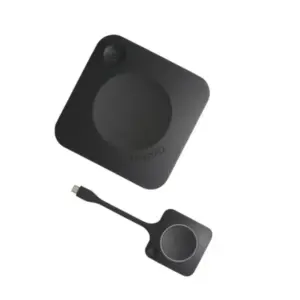
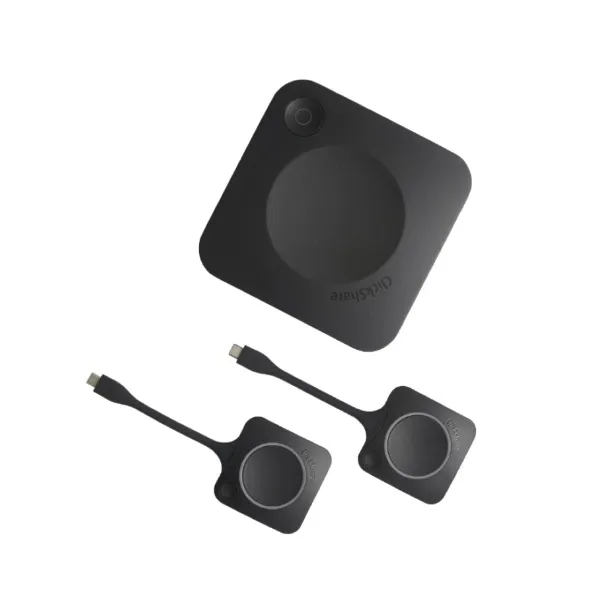
Common CX-30 Gen2 bundles include two ClickShare Buttons, but the final package depends on article number and regional version. FourTeck can help confirm the bundle before quotation.
FourTeck can review display input, camera type, soundbar or speakerphone requirements, USB connectivity, laptop platforms, and network policy so buyers can select a suitable meeting-room setup.
Availability can vary by supplier status, region code, selected model, and quantity. Contact FourTeck with the required quantity and delivery location to check current UAE options.
Yes. Businesses can request quotation support for single-room or multi-room requirements. Sharing room count, bundle preference, accessories, and project timeline helps FourTeck prepare better guidance.
Warranty handling and coverage can depend on region, supplier conditions, and registration terms. FourTeck can guide buyers on warranty expectations before purchase.
Contact FourTeck with the product name, quantity, delivery location, room size, accessory requirements, and any preferred camera or audio device. The team can then assist with availability and quotation.
Need Help Choosing the Right Meeting Room Solution?
FourTeck can help you review product availability, room compatibility, bundle options, warranty guidance, and UAE delivery requirements for your business location.